

Learning Games for Toddlers can be a lifesaver when you want calm, meaningful screen time that actually supports early development. In 2026, parents are more careful than ever about ads, pop-ups, sneaky purchase prompts, and overstimulating design that turns a short session into a meltdown. That is why this list focuses on ad-free toddler games that keep play simple, safe, and genuinely educational.
This guide gives you a ranked top 10, a quick “what ad-free really means” explanation, and an easy checklist to help you choose the right app for your child’s age and learning goals. You will also find quick picks, common mistakes to avoid, and a simple setup routine to make any device feel more toddler-friendly.
Key Takeaways
- True ad-free toddler apps should feel calm, closed, and predictable, not like a noisy marketplace.
- For toddlers, the best learning happens through short, repeatable activities with clear goals and quick feedback.
- Parent gates and purchase protection matter as much as the learning content.
- A great toddler learning app makes stopping easy and reduces screen time battles.
- You can improve outcomes fast by pairing apps with a short routine and a tiny teach-back moment.
What “Ad-Free” Should Mean In 2026
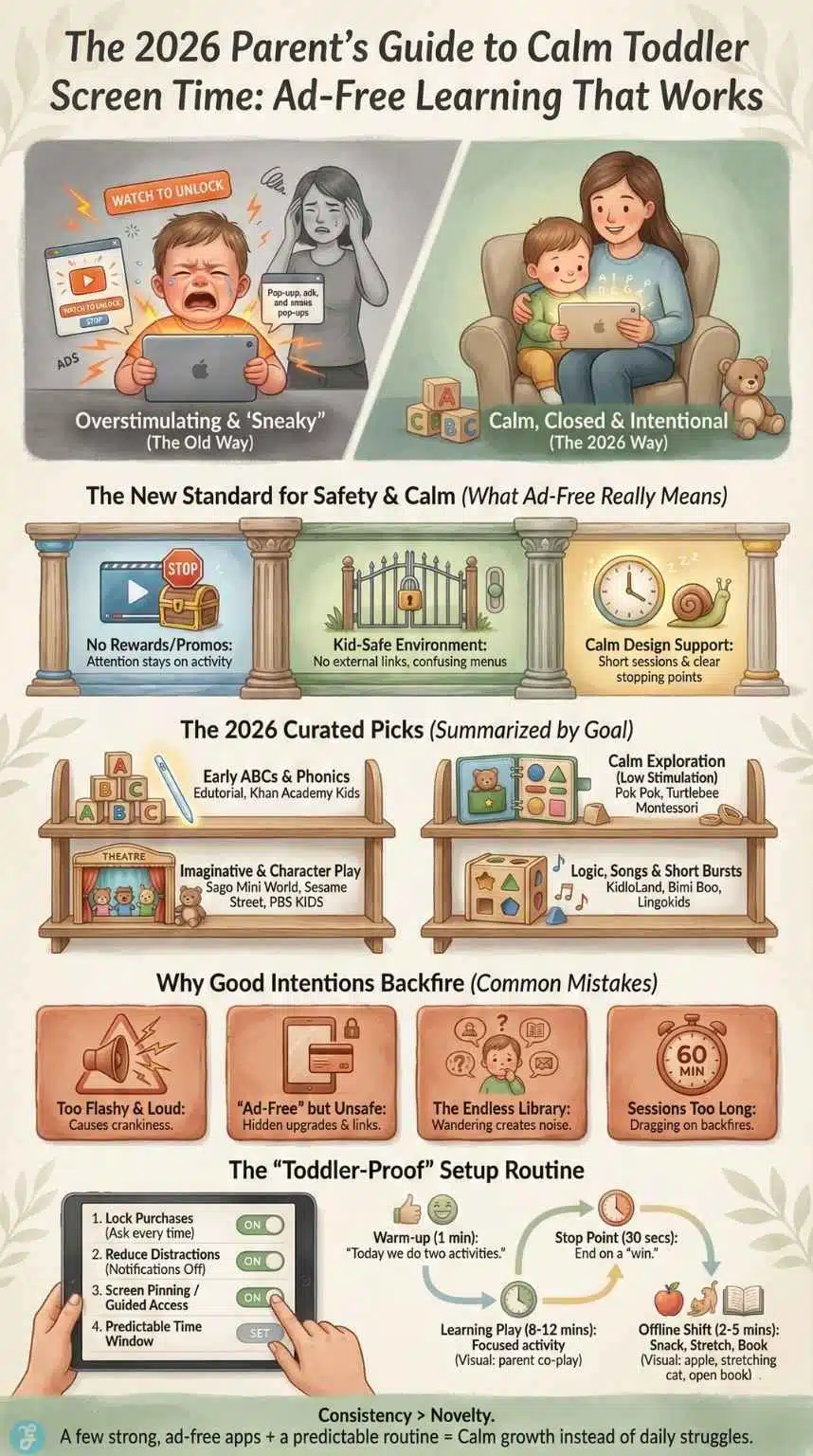
Many parents assume “ad-free” means “safe.” That is not always true. Some apps remove banner ads but still push constant upgrades, external links, or reward loops that encourage more time, not better learning. A truly ad-free toddler learning game usually includes three things.
No Ad Networks, No Video Rewards
A good toddler app does not say, “Watch to unlock.” It does not show banners, sponsored characters, or flashy promos that interrupt play. It keeps attention on the activity.
A Closed, Kid-Safe Environment
Toddlers tap everything. A safe app prevents accidental exits, surprise web pages, and confusing menus. Many high-quality toddler apps use a parent gate or a “grown-ups” area to protect settings.
A Calm Design That Supports Short Sessions
Toddlers learn best in short bursts. The best apps feel like a learning toy, not an arcade. You want gentle sound, clear visuals, and obvious stopping points.
How We Chose These Learning Games For Toddlers
To keep this list practical, I used criteria that match how toddlers actually learn and how parents actually use devices at home. These points also make it easier to compare apps fairly.
Our 7-Point Rubric
- Ad-free experience that does not interrupt play
- Parent gate or child-safe navigation
- Simple toddler-friendly controls and visuals
- Real learning value, not just tapping
- Calm pacing with clear stopping points
- Offline-friendly play when possible
- Purchase safety and minimal “upgrade pressure”
Quick Score Snapshot
| What We Checked | What “Good” Looks Like For Toddlers |
| Ad-Free | No banners, no “watch to unlock,” no promos during play |
| Safety | Parent gate, no external links, predictable navigation |
| Learning | ABCs, phonics, counting, shapes, matching, logic, fine motor skills |
| Design | Calm visuals, gentle audio, short activities |
| Stopping Points | Sessions end naturally after a mission or activity |
Top 10 Ad-Free Educational Games For Toddlers In 2026
Each entry below follows the same mini-review format, so you can scan fast. The “best for” line is the quickest way to decide.
1) Edutorial Alphabet Magic Trace And Phonics
Best for: Early literacy foundations with tracing and letter-sound practice
Edutorial earns the #1 spot because it combines toddler-friendly tracing with early phonics exposure in a clean learning flow. It focuses on core early skills that parents care about most, including alphabet recognition, matching, and guided tracing that support fine motor control. The experience feels structured without being rigid, which helps toddlers stay engaged without overstimulation.
What kids learn:
- Letter recognition and early phonics exposure
- Tracing practice that supports pencil readiness
- Matching and early pattern thinking
Why parents like it: Gamification in education, and it feels like purposeful play. Sessions are easy to keep short, and the learning goal stays clear.
Watch-outs: If your toddler is very young, co-play for the first few sessions so they learn the routine and stopping point.
2) Khan Academy Kids
Best for: A broad early learning library that stays gentle and structured
Khan Academy Kids is a strong all-around option for families who want variety without chaos. It covers reading, math, and early social-emotional learning with a calm tone. The activities are usually short and guided, which fits toddler attention spans well.
What kids learn:
- Early reading foundations and vocabulary
- Basic math concepts and patterns
- Listening and comprehension skills
Why parents like it: It offers breadth without feeling like a noisy game hub.
Watch-outs: Because it has a lot of content, use a simple routine so toddlers do not jump randomly between activities.
3) Pok Pok
Best for: Calm Montessori-style “digital toy” play
Pok Pok is great for parents who want low-stimulation screen time. It leans into open-ended exploration rather than fast rewards. The best part is the calm pacing and the sense of “playroom learning” rather than “screen excitement.”
What kids learn:
- Cause and effect
- Creativity and exploration
- Early problem-solving through play
Why parents like it: It feels soothing and predictable. That makes transitions off-screen easier.
Watch-outs: If you want direct phonics or counting practice, pair this with a more skill-focused app.
4) Sago Mini World
Best for: Imaginative play with gentle learning and safe design
Sago Mini World works well for toddlers who love pretend play. The activities are playful and easy to understand. It also tends to feel friendly rather than intense, which helps reduce overstimulation.
What kids learn:
- Storytelling and imagination
- Basic problem solving
- Social-emotional themes through play
Why parents like it: It keeps the tone light and kid-appropriate.
Watch-outs: Some families prefer more direct academic practice. If that is you, treat this as a “calm fun” option, not the main learning tool.
5) Lingokids
Best for: Families who want a large learning library with structured lessons
Lingokids is a good fit if you want many activities in one place. It often focuses on early academics through songs, mini-games, and lesson-style play. For toddlers who enjoy repeat routines, it can work well.
What kids learn:
- Early literacy and vocabulary
- Counting and basic logic
- Listening and memory skills
Why parents like it: It makes it easy to do short daily learning blocks.
Watch-outs: With large libraries, toddlers can wander. Choose a “daily set” of activities to keep sessions focused.
6) Sesame Street Games Club Plus
Best for: Character-led preschool learning with familiar faces
Sesame Street activities can help toddlers engage quickly because the characters feel safe and friendly. The games usually support early math and literacy, plus social-emotional themes. The familiar style can be helpful for kids who resist new apps.
What kids learn:
- Letters, numbers, and early patterns
- Listening and following directions
- Emotional vocabulary through stories and play
Why parents like it: It feels warm and child-centered.
Watch-outs: Some toddlers get excited by characters and rush. Use a short timer and end after a clear activity.
7) KidloLand Toddler Games
Best for: Songs, rhymes, and early learning in short bursts
KidloLand is often used by parents who want quick, easy toddler activities. It mixes songs, phonics exposure, stories, and simple games. It can work well for toddlers who learn through repetition and music.
What kids learn:
- Early language and sound awareness
- Basic matching, shapes, and patterns
- Memory and attention through short tasks
Why parents like it: It fits toddlers who respond well to music-based learning.
Watch-outs: If your child gets overstimulated by sound, reduce volume and choose calmer activities.
8) Bimi Boo Toddler Games
Best for: Offline-friendly skill packs and simple toddler challenges
Bimi Boo style packs often focus on classic early learning tasks like matching, shapes, sorting, and logic puzzles. The structure is straightforward, which makes it easy to keep sessions short and purposeful.
What kids learn:
- Shapes, colors, and early sorting
- Pattern recognition
- Beginner logic skills
Why parents like it: The activities are simple and repeatable, which is great for toddlers.
Watch-outs: Rotate content so your toddler does not get bored. Repetition helps, but variety keeps engagement healthy.
9) Turtlebee Montessori Preschool
Best for: Calm exploration and “no pressure” play
This type of Montessori-inspired app is often designed to avoid loud rewards and overstimulating effects. That can be a strong fit for toddlers who get overwhelmed easily or who melt down after fast-paced games.
What kids learn:
- Attention and calm engagement
- Exploration and discovery
- Early thinking skills through gentle tasks
Why parents like it: It supports regulation. That can make your whole routine easier.
Watch-outs: If your toddler needs more direct phonics or counting practice, add one structured learning app alongside it.
10) PBS KIDS Games
Best for: Variety and kid-friendly learning themes
PBS KIDS-style games usually focus on early learning through familiar characters and educational themes. It often offers a wide range of activities, which can be useful when you want variety but still want a kid-centered tone.
What kids learn:
- Early literacy and problem-solving
- Simple math and pattern thinking
- Listening and comprehension
Why parents like it: It provides lots of choices while staying child-focused.
Watch-outs: With variety, toddlers can bounce. Use a “pick two activities” rule to keep sessions contained.
Quick Picks For Busy Parents
If you just want fast answers, use these picks based on goals and temperament.
| What You Want | Best Type Of App | Good Picks From This List |
| Early ABCs and phonics | tracing and letter-sound practice | Edutorial, Khan Academy Kids |
| Calm screen time | low stimulation exploration | Pok Pok, Turtlebee Montessori |
| Imaginative play | pretend play and stories | Sago Mini World, Sesame Street |
| Music and repetition | songs and short learning loops | KidloLand |
| Logic and matching | simple puzzles and sorting | Bimi Boo |
Common Mistakes Parents Make When Choosing Toddler Learning Apps
The right app can help. The wrong app can create daily battles. These are the biggest mistakes parents make, plus easy fixes.
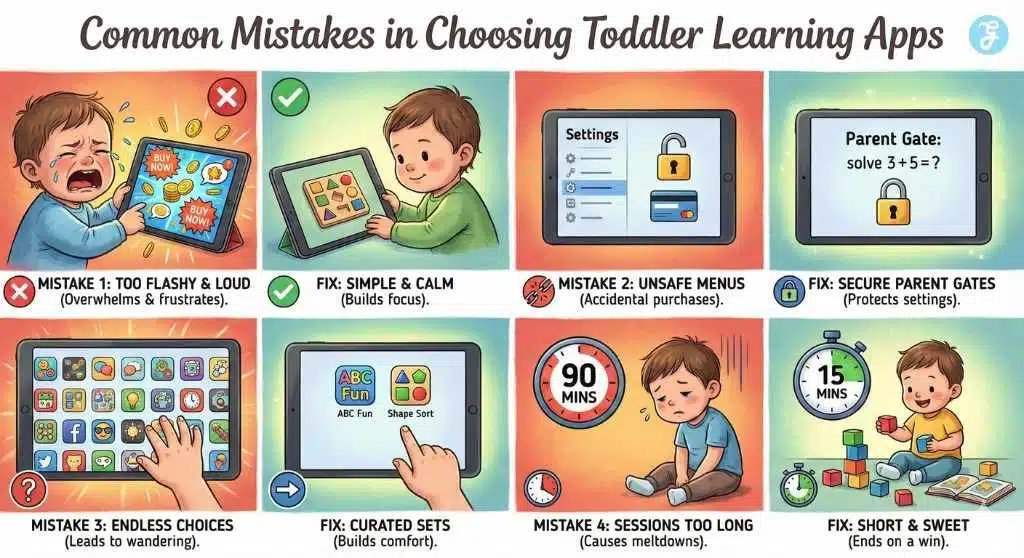
Mistake 1: Choosing Flashy Over Developmentally Right
Some apps look exciting but overwhelm toddlers fast. Loud sounds, fast animations, and constant rewards can lead to crankiness after the session.
Fix: Choose calm visuals, simple tasks, and short missions. If your toddler becomes more dysregulated after the app, switch tools.
Mistake 2: Assuming “Ad-Free” Automatically Means “Safe”
An app can be ad-free but still push constant upgrades, confusing menus, or external links that toddlers can tap.
Fix: Look for a parent gate, simple navigation, and purchase protection. Make sure the app stays in a closed environment.
Mistake 3: Letting Toddlers Wander Through A Huge Library
When toddlers roam freely, they often pick the loudest thing, not the best learning activity.
Fix: Pick two to three activities per session. Repeat them for a week so your toddler builds comfort and skill.
Mistake 4: Sessions That Are Too Long
Even excellent learning games for toddlers can backfire if sessions stretch too long. Toddlers do not need extended screen blocks to learn.
Fix: Stop after a win. End after one or two activities, then transition into a snack, movement, or a book.
Parent Setup Checklist Before You Hand Over The Device
A few settings can turn any phone or tablet into a much better learning space for toddlers. These steps also reduce accidental purchases and app-hopping.
Step 1: Lock Down Purchases
Turn on purchase protection or “ask every time” settings. Toddlers tap fast, and accidents happen.
Step 2: Reduce Distractions
Turn off notifications on the child device or child profile. Notifications pull attention away from learning and make stopping harder.
Step 3: Use Screen Pinning Or Guided Access
If your device supports it, pin the app so your toddler cannot exit and open random screens. This one change can prevent many stressful moments.
Step 4: Keep Sessions Predictable
Use the same time window each day if possible. Toddlers respond well to rhythm.
Here is a simple routine you can copy:
| Routine Step | Time | What To Do |
| Warm-up | 1 minute | “Today we do two activities.” |
| Learning Play | 8 to 12 minutes | One or two short learning activities |
| Stop Point | 30 seconds | End after a win, not mid-task |
| Transition | 2 to 5 minutes | Snack, stretch, or a short book |
Frequently Asked Questions
1) What Are The Best Learning Games For Toddlers In 2026
Look for ad-free apps with simple controls, clear learning goals, and short activities. Start with literacy and early math basics, then add calm exploration apps if your child enjoys open-ended play. A small set of strong apps usually works better than a huge library.
2) Are Ad-Free Toddler Games Safer
They are often safer because ads can lead to accidental taps, confusing prompts, and unwanted content. Still, “ad-free” alone is not enough. You also want a parent gate, purchase protection, and a closed environment that keeps toddlers from jumping to external pages.
3) How Much Screen Time Is Okay If It Is Educational
Short, structured sessions work best for toddlers. Many families succeed with 10 to 20 minutes in a predictable window, paired with plenty of offline play. If your toddler transitions smoothly and still enjoys toys, books, and movement, your balance is likely working.
4) Do Toddlers Actually Learn From Educational Apps
Yes, toddlers can learn, especially when apps reinforce repetition, matching, and early language skills. Learning improves when an adult co-plays sometimes and adds quick talk around the activity. One simple question like “What did you match?” helps turn tapping into understanding.
5) What Should I Avoid In Toddler Learning Apps
Avoid ads, aggressive upgrade prompts, open web links, and apps that never end. Also avoid overly fast, noisy design that leaves your child irritable after the session. If stopping causes repeated meltdowns, that app is not a good fit for your toddler.
Final Thoughts: Calm Screen Time That Builds Real Skills
The goal is not to find a magical app that teaches everything. The goal is to choose a few learning games that fit your child’s age, capture their attention, and support the skills you want to grow. When you keep it ad-free, short, and predictable, screen time becomes a helpful tool instead of a daily struggle.
If you want the simplest plan, start with one strong literacy app, one calm exploration app, and a short routine you can repeat. Your toddler will learn more from consistency and comfort than from endless options.























