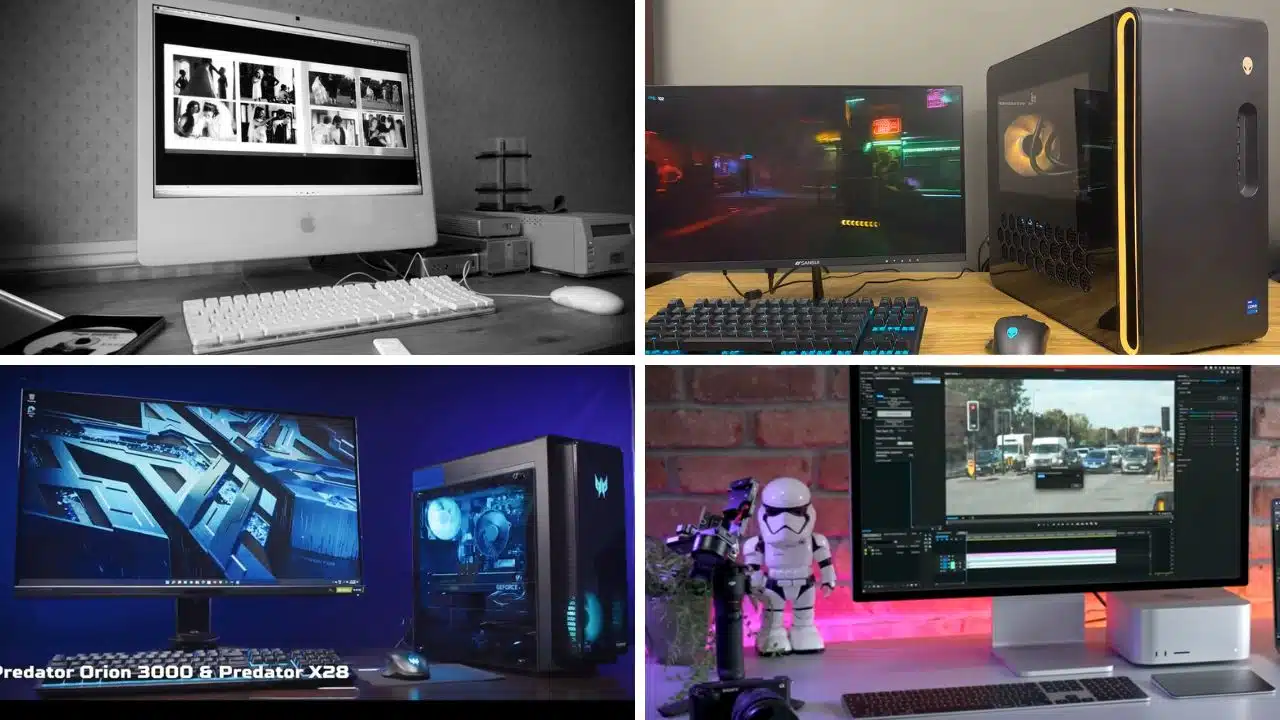
The best computers offer enough power to handle both work and play, catering to various needs from remote work and school to photo and video editing, gaming, and even virtual reality.
Whether you prefer an all-in-one computer, a mini PC, or a gaming desktop, we’ve reviewed the best options available. This list includes both Windows and Mac systems, providing recommendations for various budgets and needs.
The Quick List
Here’s a brief overview of the top computers on this list, along with links to detailed reviews for each one:
- Apple iMac 24-inch – Best for Most People
- Alienware Aurora R16 – Best Gaming PC
- Apple Mac mini M2 – Best Mini PC
- Apple Mac Studio M2 – Best Mac for Power Users
- Acer Predator Orion 3000 – Best Starter Gaming PC
Apple iMac 24-inch: Best for Most People
The Apple iMac 24-inch is our top pick for a basic PC. The new Apple M3 chip provides plenty of power for both work and play, while the 24-inch Retina display looks stunning in any setting. The webcam is high-quality, and the speakers sound impressive.
Specifications
- Processor: Apple M3 chip
- RAM: 8-24GB
- Graphics Card: Apple M3 chip
- Storage: 256GB – 2TB SSD
- Accessories: Apple Magic Keyboard and Mouse
Reasons to Buy
- Bright, beautiful 4.5K display
- Speedy performance
- Great audio
- Solid 1080p webcam
Reasons to Avoid
- $1,299 model feels underpowered
- Lack of height or angle adjustment
Alienware Aurora R16: Best Gaming PC
The Alienware Aurora R16 is our top gaming PC recommendation. It features a sleek design, quiet operation, and is configurable with powerful gaming hardware, making it perfect for playing VR games.
Specifications
- VR Ready: Yes
- Processor: Intel Core i7-13700F
- RAM: 32GB
- Graphics Card: Nvidia GeForce RTX 4070
- Storage: 1 TB SSD, 1 TB HDD
- Accessories: Dell Multi-Media Keyboard, Dell Optical Mouse MS116AW
Reasons to Buy
- Elegant, discreet design
- Small desk footprint
- Excellent performance
- Runs cool and quiet
Reasons to Avoid
- Proprietary design limits upgradability
Apple Mac mini M2: Best Mini PC
The Apple Mac mini M2 is perfect if space is a concern. The M2 chip offers plenty of power for most tasks, and this compact device runs quietly, fitting easily into most desk setups.
Specifications
- Size: 7.7 x 7.7 x 1.4 inches
- Weight: 2.6-2.8 pounds
- CPU: Apple M2/M2 Pro
- Storage: 256GB – 8TB SSD
- Geekbench 5 Score: 15,038
Reasons to Buy
- Powerful, especially with M2 Pro
- Small and quiet
- $100 cheaper than predecessor
Reasons to Avoid
- Not user-repairable or upgradable
Apple Mac Studio M2: Best Mac for Power Users
For those who need more power, the Apple Mac Studio M2 is a top choice. Though the M2 is older than the M3 in the iMac, it still offers immense power in a compact design.
Specifications
- Size: 7.7 x 7.7 x 3.7 inches
- Weight: 5.9/7.9 pounds (M2 Max/M2 Ultra)
- CPU: Apple M2 Max/M2 Ultra
- RAM: 32GB – 192GB
- Storage: 256GB – 8TB SSD
Reasons to Buy
- Remarkable performance
- Promising gaming potential
- Plenty of ports
- Elegant, quiet design
Reasons to Avoid
- M2 Ultra configurations get pricey fast
Acer Predator Orion 3000: Best Starter Gaming PC
The Acer Predator Orion 3000 is an excellent starter gaming PC. It’s affordable, easy to set up, and performs well for 1080p gaming.
Specifications
- VR Ready: Yes
- Processor: Up to Intel Core i7
- RAM: 16GB
- Graphics Card: Up to Nvidia GeForce RTX 3070 Ti
- Storage: Up to 1TB HDD, 1TB SSD
- Accessories: Predator wired keyboard and gaming mouse
Reasons to Buy
- Stylish design
- Easy to upgrade
- Quiet operation
- Great 1080p performance
Reasons to Avoid
- Underwhelming performance compared to competition
- Low-quality keyboard and mouse
How to Choose the Best Computer for You?
When choosing a computer, consider both form and function. Here are some types of computers and their typical uses:
Standard PC Towers
These are usually the most affordable and basic option, offering flexibility for various uses from web browsing to gaming and animation.
All-in-One Desktops
These combine the PC and monitor into one device, saving space and reducing cable clutter. They range from budget-friendly to high-powered workstations.
Gaming Desktops
These use powerful components optimized for gaming, featuring high-performance graphics cards, processors, and ample storage.
Mini PCs
These compact devices use laptop components to provide a desktop experience in a small form factor, suitable for limited spaces or home theater setups.
Key Considerations
- Usage: Determine what you will primarily use the computer for (e.g., gaming, content creation, basic tasks).
- Budget: Set a budget and find a computer that offers the best value within your price range.
- Performance Needs: Choose specifications that meet your performance needs, such as the processor, RAM, and storage capacity.
With these tips and our top picks, you’re well-equipped to find the best computer for your needs in 2024.