AI research tools for product claims are useful when you need to answer a specific question: where did this statement come from, and does the original source actually support it? A citation beside a sentence is a starting point. You still need the relevant passage, the product version or plan, and any restriction that changes the meaning. The 7 tools below help with different parts of that job, from finding current documentation to checking a supplied PDF.
For a quick web investigation, start with Perplexity. For a defined collection of manuals and specifications, consider Gemini Notebook, formerly NotebookLM, or ChatPDF. ChatGPT, Claude and Gemini offer broader research workflows; You.com’s Research API suits teams building a repeatable checking process into their own software. These are workflow choices, not an accuracy ranking, and none guarantees a source for every claim.
What We Checked
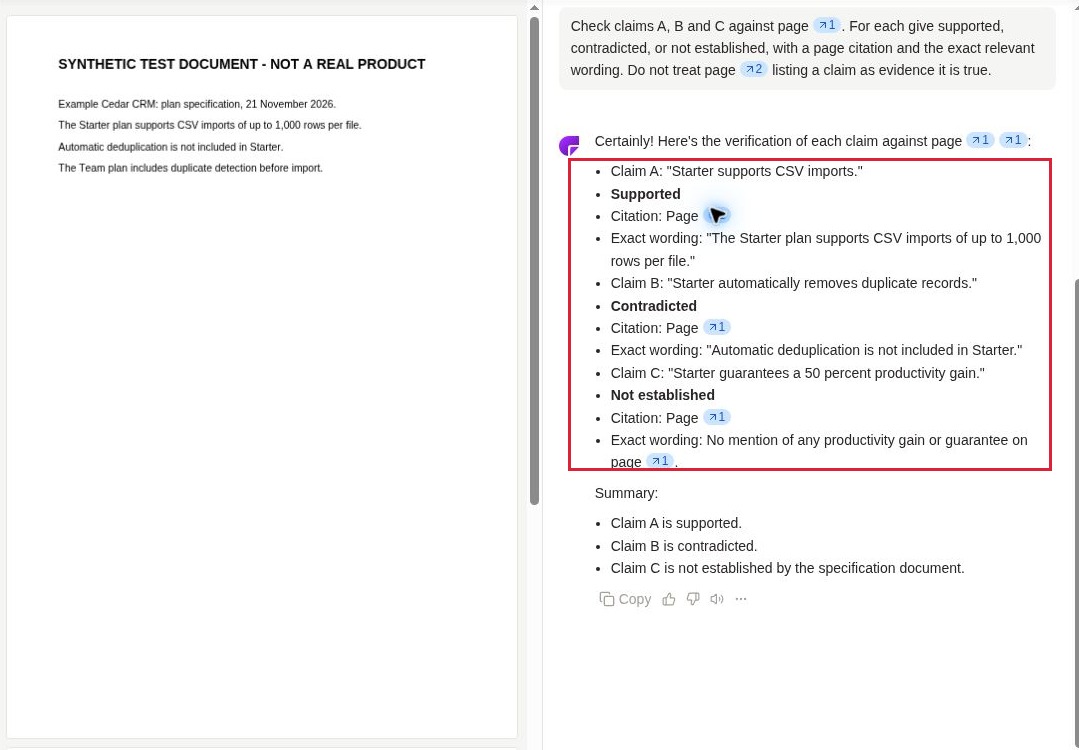
On November 21, 2026, we reviewed official documentation for all 7 tools and made three direct browser checks. In ChatPDF, a two-page synthetic product specification produced three different findings: a supported import feature, a contradicted deduplication claim, and an unsupported productivity promise. A page citation was also clicked with the source document visible beside the answer. This was one small document test, not an accuracy benchmark.
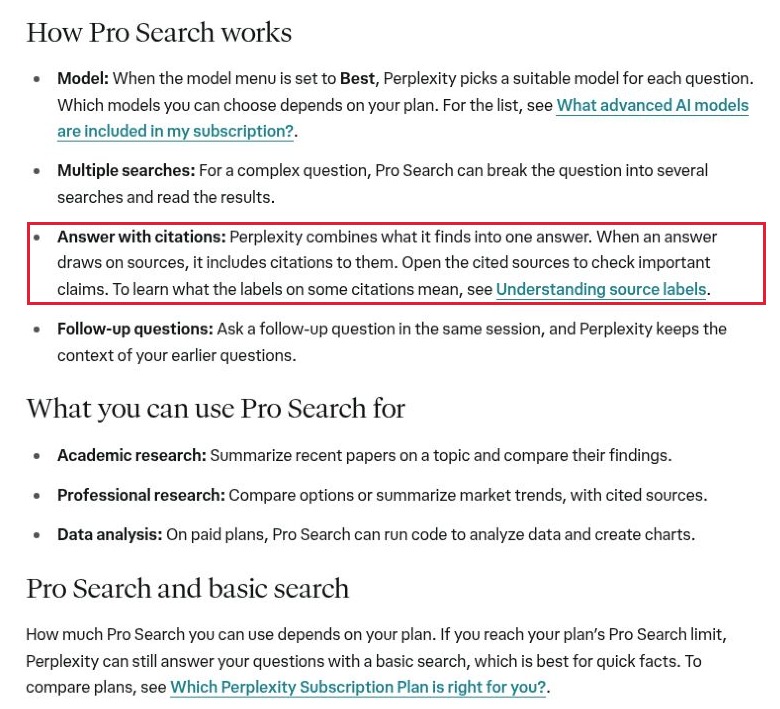
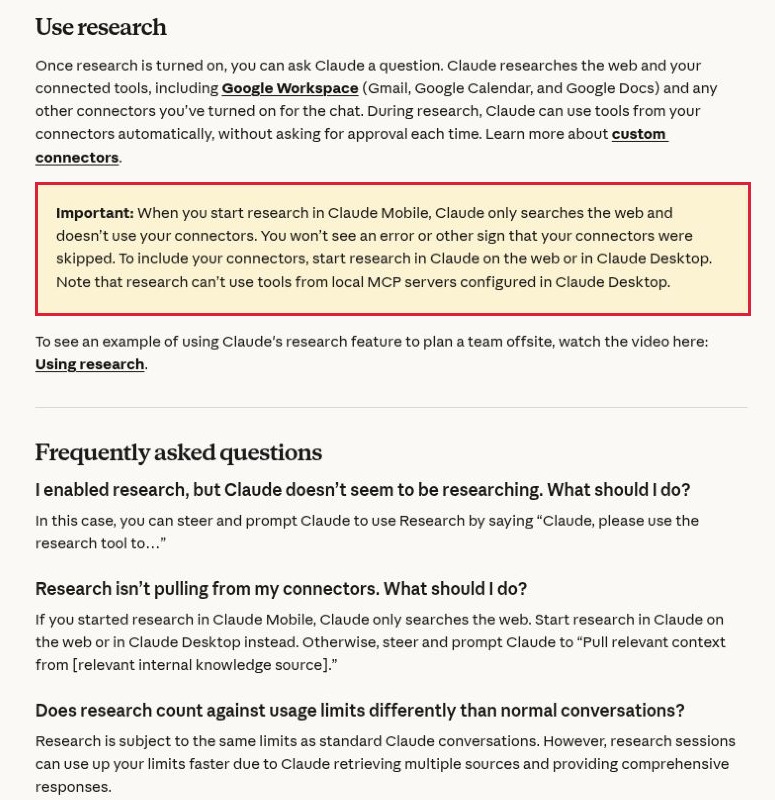
The other two checks examined public documentation. Perplexity’s citation section explicitly tells readers to open sources and check important claims. Claude’s research instructions identify a mobile limitation: research started on mobile does not use connected tools. Screenshots below show those exact findings. Paid research sessions, private connectors and the other products’ answer quality were not tested.
Compare AI Research Tools for Product Claims
| Tool | Useful starting point | Traceability mechanism | Decision-changing limit |
|---|---|---|---|
| Perplexity | Find current public product documentation | Web answers with linked citations | Pro Search availability and usage depend on your plan |
| Gemini Notebook / NotebookLM | Interrogate a chosen source collection | Citations navigate to quoted source context | An answer can only establish what the selected material supports |
| ChatGPT deep research | Investigate a multi-part product comparison | Cited reports and controls for specified websites | Access and research allowances vary by plan and account |
| Claude Research | Compare web information with connected working documents | Research synthesis with source citations | Mobile-started research excludes connectors |
| Gemini Deep Research | Research across chosen Google and uploaded sources | Editable research plan and source-based report | Connected Workspace sources require the relevant connection |
| ChatPDF | Check an existing specification or manual | PDF page references beside the conversation | A document can repeat a claim without proving it |
| You.com Research API | Build a repeatable internal claim-checking workflow | Inline citations, returned sources and optional structured output | Requires development work, an API key and usage budgeting |
1. Perplexity: Find the Documentation Behind a Public Claim
Perplexity is a practical first stop when you have a product name and a claim but no reliable source. Its documented search workflow can split a complex question into several searches and combine the results with citations. For a software buyer, the useful output is the route back to a feature page, help article or release note.
Keep the request narrow. Instead of asking whether a CRM has good automation, ask which official document confirms that its entry-level plan can trigger a workflow after a CSV import. Request the product name, plan, supporting passage and any exception. Then open the cited page: a broad marketing statement about automation may not cover the trigger you need.
In the public help-page check, the citation instructions made source inspection an explicit part of the workflow. That supports using Perplexity for discovery, not treating its synthesis as final verification. Pro Search is used automatically where included in the plan; reaching its allowance can leave you with basic search. Record which mode and account conditions produced a result if you intend to repeat the check later.
2. Gemini Notebook: Work From a Deliberately Chosen Source Set
Google’s notebook research tool, familiar to many readers as NotebookLM and described in its current help as Gemini Notebook, is useful once you already have the evidence collection. You can select the notebook sources used for a question. Its documented citations expose quoted material and let you navigate to the surrounding context.
That makes it a sensible option for comparing a product manual, a pricing document and a release note without starting from a general web answer. Ask a separate question for each claim. If one document says a feature is available and another limits it to a higher tier, preserve both passages rather than asking for a reassuring summary.
The source boundary is also the limitation. A carefully cited response to an outdated manual can still lead to a bad purchasing decision. Label your files with their dates and editions, and decide which document should control when they disagree. Use this approach when maintaining a reviewable source collection matters more than discovering an unfamiliar vendor. We reviewed the documented citation behavior; we did not run this product against the synthetic test file.
3. ChatGPT Deep Research: Set the Search Boundary Before the Report
ChatGPT’s deep research is suited to a question that needs several kinds of evidence: feature availability, plan conditions, supporting documentation and conflicting descriptions. OpenAI documents a research plan that can be reviewed, reports with citations or source links, and controls for selecting websites.
The important distinction is between restricting research to specified sites and prioritizing those sites while permitting a wider search. For a product claim, an official-domain-only pass can establish what the supplier currently documents. A separate broader pass can look for independent evidence. Combining the two without labeling their roles makes vendor promises look more independently established than they are.
Request a claim-by-claim table rather than a persuasive recommendation. Include a column for “not established” so the report has somewhere to put missing evidence. Preserve the report and the relevant source passages together; a polished export should not become the only surviving record.
Research allowances, connected-source access and availability depend on the account and plan. The usage counter is more useful than an assumed universal monthly quota. This entry assesses the documented controls, not a completed paid research session.
4. Claude Research: Watch Which Sources the Session Can Actually Reach
Claude Research can investigate a question through successive searches and use connected tools alongside the web. It is a useful fit when a product comparison must be reconciled with working documents, such as a team’s requirements or an approved vendor response. Research requires web search to be enabled and is offered on paid plans.
The browser check found a consequential platform difference. Claude’s help says research started on mobile searches the web without using connectors; it also warns that the omission may not produce an obvious error. For a comparison that depends on a connected requirements document, start from the supported web or desktop workflow and confirm the document appears in the evidence.
A proposed check is to ask for each requirement, the supplier’s supporting source and any unresolved mismatch. Keep internal requirements separate from public product facts: a sentence in your own planning document does not establish what the vendor delivers. Research can also consume usage allowance faster than an ordinary conversation. The screenshot verifies the published restriction, not the behavior of a connected paid account.
5. Gemini Deep Research: Review the Plan and Source Mix
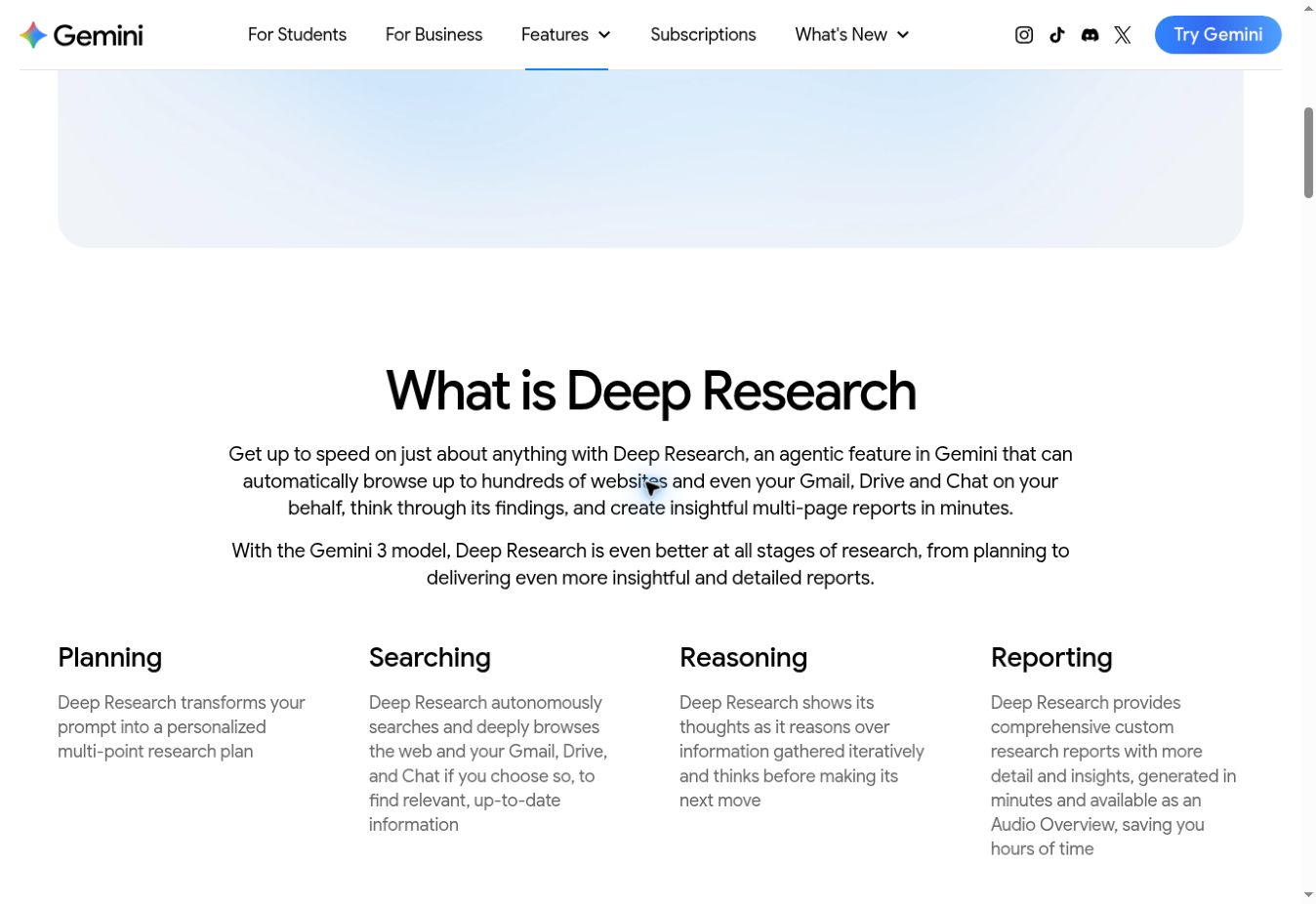
Gemini Deep Research is worth considering when your work already combines Google sources with uploaded material. Google documents a research plan you can edit before starting. Google Search is included by default, while selected alternatives can include uploaded files and connected Workspace sources.
That source selection matters when checking a product statement against an internal brief. A web search may establish the supplier’s current claim; a requirements document establishes what your team needs. Ask the report to distinguish these jobs. If you deliberately want only the selected non-web material, the documented controls allow Google Search to be deselected.
Gemini can export a report to Google Docs, which is useful for handing the findings to an editor. Review the cited evidence before turning a research report into a purchase recommendation or public comparison. An editable plan improves visibility into the intended investigation; it does not prove that every source was found.
Use requires a signed-in eligible account, and research requests have daily and concurrent limits. Paid Google AI plans offer higher allowances. Workspace information is available only through the applicable connection. These are documented capabilities; no connected-source research session was performed for this article.
6. ChatPDF: Put the Claim Beside the Relevant Page
ChatPDF is a focused choice when the question is already contained in a manual, specification or proposal. Its interface places the document beside the conversation, and its citations refer back to the PDF. The service offers a free starting allowance; its website currently describes two documents per day, with a paid Plus option for heavier use.
Our synthetic test used a fictional CRM specification. Page one allowed CSV imports of up to 1,000 rows, explicitly excluded automatic deduplication from Starter, and made no productivity guarantee. Page two listed three claims to check. ChatPDF correctly classified the import claim as supported, the deduplication claim as contradicted and the productivity claim as not established. The answer reproduced the relevant wording for the first two and supplied page references.
That result is useful because the file deliberately contained both evidence and unsupported promotional statements. The prompt told the tool not to treat the claim list as proof. The small test does not establish reliability on scanned documents, complicated tables or longer contracts. In particular, a page reference attached to “not established” identifies the checked page; it cannot prove that no supporting evidence exists elsewhere.
7. You.com Research API: Keep Source Data in Your Own Workflow
You.com’s Research API is the option here for a technical team that wants claim checks to feed an internal system. Its documented response combines a researched answer with citations and supporting source information. Optional source controls can constrain the search, while structured output can return fields in a predictable format.
For a product-content operation, that could mean one record per claim: exact wording, product edition, source URL, supporting passage, checked date and reviewer decision. Keeping those fields separate makes it easier to identify a claim that has a citation but no adequate support. It also lets a reviewer revisit only the facts affected when a plan changes.
This is an implementation choice, not a ready-made approval desk. You need an API key, development work, error handling and a budget for the selected research effort. Source controls and structured output are documented as beta, and structured output is not available at the lite effort level. Build explicit failure states for missing citations, unavailable pages and inconclusive evidence. No API request was run for this comparison; the fit assessment is based on the documented response and controls.
Turn a Cited Answer Into a Reviewable Claim Record
The most useful output is often a short row, not a long report. Take the fictional claim “Starter automatically removes duplicate records.” The checking record should preserve the exact claim, the relevant plan, the specification passage, its page and the decision to reject or rewrite the sentence. “It has a citation” is not a decision.
| Record field | What to preserve | Why it matters |
|---|---|---|
| Claim | The exact sentence being checked | Prevents a weaker statement from being substituted during review |
| Scope | Product, plan, version, market and date where relevant | A feature on one tier does not establish availability on another |
| Evidence | Source location and a short supporting passage | Lets the reviewer inspect support without rerunning the entire search |
| Decision | Supported, contradicted, qualified or not established | Keeps uncertainty visible instead of forcing a yes |
| Review | Who checked it and when it should be revisited | Creates responsibility for changes after the first research pass |
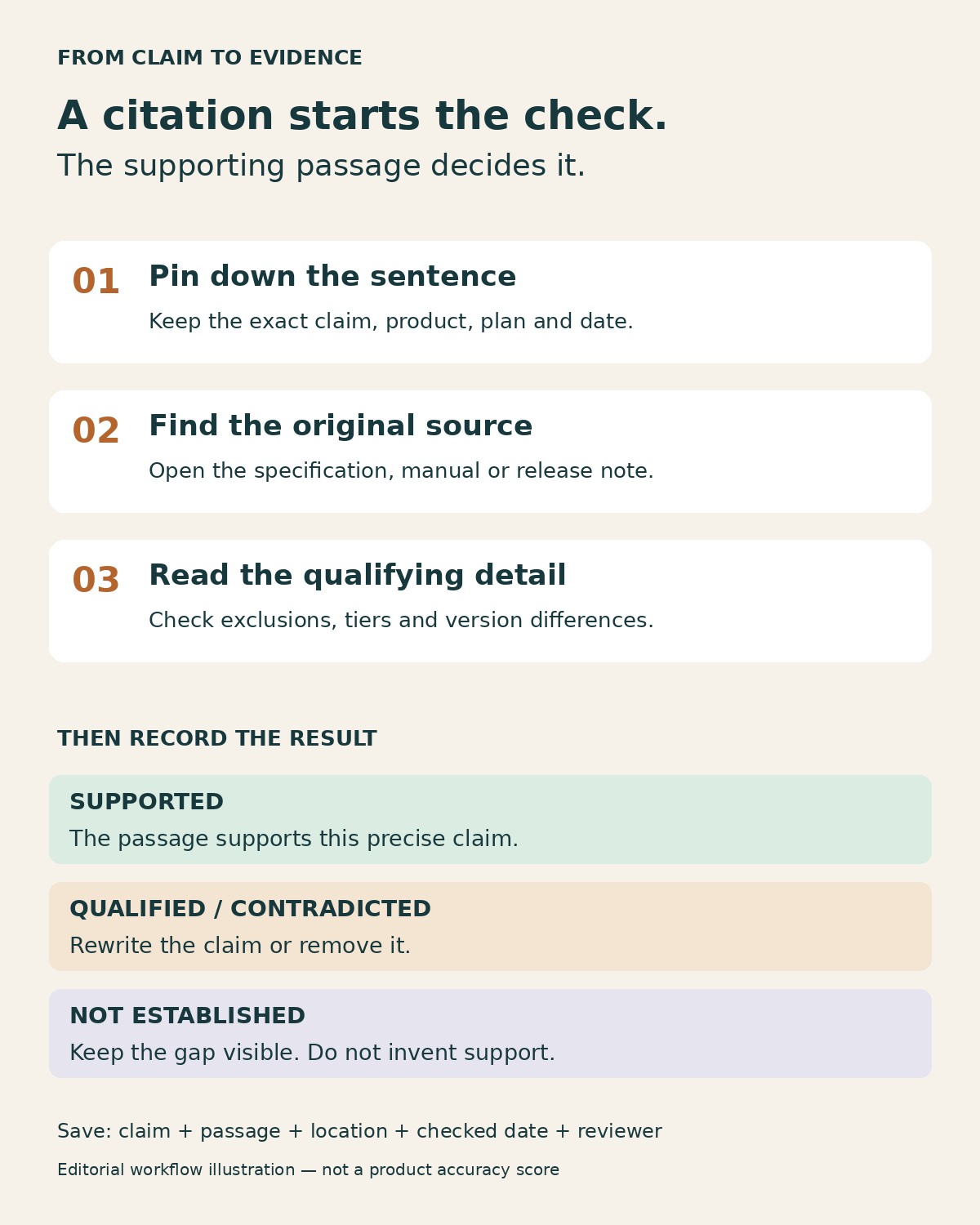
Separate a supplier’s documented feature from a measured outcome. A help article may establish that a product includes duplicate detection; it cannot establish that your team will save a particular percentage of time. In the United States, the FTC’s advertising substantiation policy emphasizes having a reasonable basis for objective advertising claims before dissemination. A generated answer is not a substitute for the underlying evidence.
For a broader overview of the category, see our guide to AI tools for serious research. This narrower workflow is about deciding whether a particular product sentence survives inspection, rather than choosing a general literature-discovery tool.
A Small Trial That Reveals More Than a Polished Demo
Before adopting a tool, prepare three harmless claims about a fictional product: one clearly supported, one contradicted by a condition, and one not addressed by the evidence. Put the source facts and the claims in different sections. Ask the tool to cite the facts, preserve restrictions and acknowledge missing support.
Review four things: whether it found the right passage, whether it retained the condition, whether the citation opens a useful location, and whether it resisted endorsing the unsupported claim. Then repeat with a representative document from your own approved material. A clean two-page result is encouraging, but your actual sources may contain footnotes, images and competing editions.
Keep the original document, the question and the answer. If the tool gives a different response later, those records let you investigate the difference. Avoid scoring products on an invented universal accuracy percentage; measure the tasks and errors that matter in your own workflow.
Choose the Tool That Makes Review Easier
AI research tools for product claims should shorten the path from a statement to inspectable evidence. Choose Perplexity for initial web discovery, Gemini Notebook or ChatPDF for a controlled document set, and a broader research assistant when the question requires several source types. Choose You.com’s API when your team is prepared to build and maintain the surrounding checking process.
Start with one claim you cannot currently substantiate. The useful result is a passage you can inspect, a qualification you can preserve, or a clear reason to leave the claim out. A confident paragraph without that trail is unfinished research.