

An AI tool can turn a short prompt into a formal-looking contract in seconds. The problem comes later, when a clause is unclear, a key term is missing, or the agreement does not fit the law that applies to the deal. AI-generated contract risks are easy to miss because fluent writing can make a draft seem more reliable than it is.
These 7 risks move from errors in the document itself to the decisions and information behind it. They are not ranked by severity; the right level of review depends on the agreement, the parties, and the potential consequences. This article provides general information, not legal advice. For high-value, sensitive or complex agreements, ask a qualified lawyer in the relevant jurisdiction to review the draft.
AI-Generated Contract Risks to Check Before Signing
AI-generated contract risks fall into three broad areas: whether the wording is accurate, whether the agreement fits the deal and local law, and what information or rights you may expose by using it. The seven points below cover those concerns. Use them as a review checklist, then seek legal advice when an error could have serious consequences.
1. Legal Errors can Sound Convincing
Generative AI can produce clear language while getting a legal detail wrong. It may invent a reference, describe a rule inaccurately or combine valid information in a way that does not apply to your situation. If you are not familiar with contract law, the mistake may be hard to spot.
One of the most visible AI-generated contract risks is a false sense of authority. In Mata v. Avianca, a U.S. lawyer submitted court filings with fabricated case citations produced by ChatGPT. That case involved court documents, not a contract, but it shows why AI-generated legal material needs independent checking. The American Bar Association likewise warns that AI can produce inaccurate or incomplete results and says lawyers should verify its output.
A clause might cite the wrong law or promise a remedy that is unavailable. Check every legal reference, and ask a lawyer to explain any provision whose effect you cannot put into plain language.
2. The Law May Be From the Wrong Place
A contract’s effect depends partly on which law applies. A general prompt may not specify where the parties are based, where the work will happen, or which courts should resolve a dispute. Naming a country in the prompt helps, but it does not guarantee that the tool will apply its law correctly.
A core AI-generated contract risk is jurisdiction mismatch. Contract rules may differ within a country as well as between countries. For example, some contract rules vary by U.S. state. UNCITRAL’s electronic-commerce materials provide frameworks for electronic transactions, but they do not replace the laws that apply to a particular agreement.
For a cross-border service agreement, check the governing-law clause, dispute forum, language, and enforcement process. A freelancer in Bangladesh working with a client in the UK should not assume that a generic contract settles those issues. A lawyer familiar with the relevant jurisdictions can check whether the proposed terms fit the transaction.
3. Important Deal Terms May Be Missing
AI can only draft from the information it receives. If your prompt does not explain what counts as completed work, how payment is triggered or who supplies materials, the agreement may leave those points open.
“Payment upon completion” is a weak term if the contract never defines completion. A draft may also omit how the client approves changes, how many revisions are included, or what happens when a deadline moves. UNCITRAL’s contract-drafting guidance identifies basics such as naming the parties, defining the subject, and setting out their rights and obligations. The actual agreement still needs to capture the details of your deal.
This is one of the practical AI-generated contract risks that a proofreading pass will not fix. Compare the draft with what both sides discussed. Check scope, deliverables, fees, deadlines, acceptance, revisions, and termination. If an unanswered question could change the cost or responsibility, settle it before signing.
4. A Clause may be Unfair or Legally Limited
A clause can sound forceful without achieving what the drafter expects. Some terms are limited by local law or treated differently depending on the parties and the kind of transaction.
Consumer contracts offer one example. Under the UK Consumer Rights Act 2015, a consumer-contract term may be unfair if it creates a significant imbalance to the consumer’s detriment. Written terms must also be transparent. Those rules apply in their legal context; they are not a universal test for every contract.
Among AI-generated contract risks, this one can be costly when the draft includes a liability cap, indemnity, waiver, or non-compete clause. A business may assume the wording protects it when the clause is restricted or unsuitable. Have a lawyer review provisions that could shift substantial costs, limit future work or affect legal rights.
5. Confidential Information May Be Exposed
To get a tailored draft, users may paste in names, rates, customer details, negotiation notes or technical plans. Before doing that, check how the AI provider handles submitted information.
Privacy-related AI-generated contract risks depend on the specific service, its settings, and its data practices. The U.S. Federal Trade Commission has warned that people may share sensitive or confidential material with AI providers, including internal documents and customer data.
There is a second question: are you allowed to share that information in the first place? A confidentiality commitment or data-protection duty may restrict what your business can upload.
Use placeholders instead of real names and sensitive details where possible. Do not enter confidential or regulated information until you have checked the provider’s terms and your organization’s rules. For sensitive material, get legal or privacy advice first.
6. Ownership Terms May Not Reflect the Deal
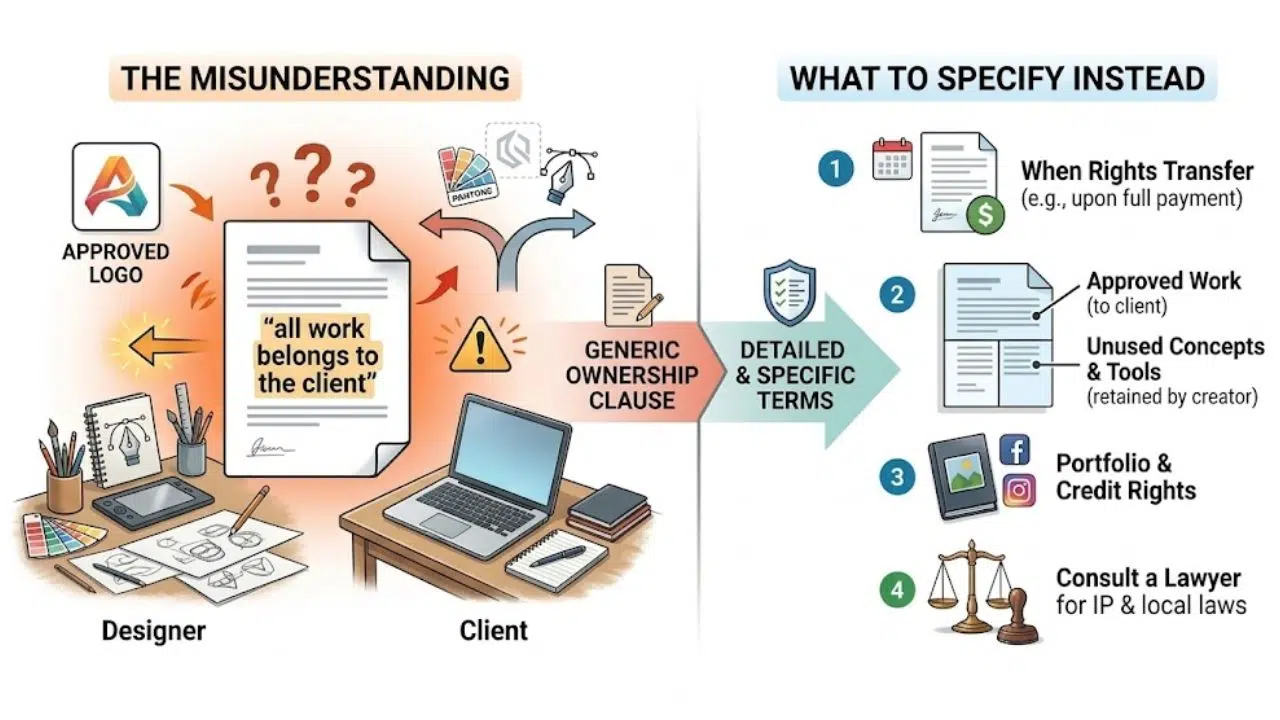
A contract should say who owns the work, who can use it, and whether either party may modify or reuse it. A generic ownership clause can leave those practical details unresolved.
Consider a designer hired to create a logo. The client may expect to own the approved design after payment, while the designer keeps unused concepts and pre-existing tools. A sentence such as “all work belongs to the client” may not describe that arrangement or say when rights transfer.
Ownership disputes are among the AI-generated contract risks that can surface long after the work is delivered. Specify what each side brings to the project, what rights are granted or transferred, when they transfer, and whether credit or portfolio use is permitted. If intellectual property is central to the deal, have a lawyer check that the wording matches the parties’ intentions and local law.
7. A Polished Draft can Hide a Bad Trade-off
AI does not know your negotiating priorities, the other party’s position or what your business can afford to accept. It can produce a neat document without flagging that one clause shifts too much risk onto you.
A broad indemnity might leave your business responsible for costs beyond what you expected. A termination clause could let the other party end the agreement before you recover expenses. A restriction on working with other clients may be buried in formal language.
This is one of the less obvious AI-generated contract risks: a document can be grammatically polished and still reflect a poor deal. Review means more than proofreading. Ask what each important clause requires and what happens if something goes wrong. The ABA’s guidance says AI may assist legal work, but it cannot replace the judgment lawyers need to advise clients or prepare legal documents. Its opinion concerns lawyers’ responsibilities under ABA Model Rules, not a universal rule for every jurisdiction.
Final Thoughts
Use AI to organize ideas or prepare a first draft, then check whether the agreement reflects the real deal. Review the tool’s data practices before sharing sensitive information, verify legal references and resolve gaps before signing. For an agreement involving significant money, ownership rights, employees or more than one jurisdiction, legal review is a sensible part of the process.
The AI-generated contract risks are not limited to obvious errors. Missing terms, local-law conflicts, privacy exposure and unwanted trade-offs can all sit inside professional-looking language. If you cannot explain what a clause means or what happens if it is breached, pause and get qualified advice before agreeing to it.
Frequently Asked Questions (FAQs) About AI-Generated Contract Risks
Can I use AI to draft a contract?
Yes. It can help organize the terms or prepare a starting draft. Treat that draft as something to review, not as a final legal document.
Is an AI-generated contract legally binding?
That depends on the applicable law and the facts, including how the parties agreed to the terms. AI involvement alone does not establish that an agreement is valid or enforceable.
What should I avoid entering into an AI contract tool?
Avoid sharing confidential business information, trade secrets, customer records, personal data or privileged material until you have checked the provider’s data practices and confirmed you are allowed to share it.
What are the most important AI-generated contract risks to check first?
Start with the governing law, payment and performance terms, liability, termination, confidentiality and ownership. Get a lawyer’s help when a mistake in any of those areas could have serious consequences.























