DVDFab Blu Ray Ripper is a great tool for anyone looking to easily and quickly convert their Blu-rays to digital files. In this DVDFab Blu Ray Ripper review, we’ll take a look at how easy it is to use and what some of its best features are. Whether you’re new to Blu-ray ripping or a seasoned pro, DVDFab Blu Ray Ripper is definitely worth checking out.
Introduction:
There’s no denying that Blu-rays offer the best picture and sound quality for your movies. But if you’re like most people, you don’t want to spend the money on a Blu-ray player. Luckily, there’re many ways to rip your Blu-rays so you can watch them on any device. The fastest and easiest way is to use a DVDFab Blu-ray Ripper. Yes! this great tool can help you finish the Blu-ray ripping process within minutes with just a few clicks. Today, we’re going to show you how DVDFab Blu-ray Ripper can help you rip your Blu-rays quickly and easily. So, read on to learn more!
What Does It Mean to “Rip” a Blu-ray?
First, let’s take a look at what it means to “rip” a Blu-ray. When you “rip” a Blu-ray, you’re copying the contents of the Blu-ray disc to your computer’s hard drive. This process allows you to watch your movies without needing the physical disc. You know, for Blu-ray movies, the file size is usually very large, around 25GB to 50GB. So it’s not surprising that many people choose to rip their Blu-rays instead of dealing with the hassle of storing them. Furthermore, once you’ve ripped your Blu-rays, you can watch them on any device in any format. So, in this way, you’re not limited to watching your movies on a Blu-ray player. And DVDFab Blu-ray Ripper is the best tool to help you rip your Blu-rays. Let’s take a look at how it works.
DVDFab Blu-Ray Ripper Features :
DVDFab Blu-ray ripper is the best tool to help you rip your Blu-rays quickly and easily. It can convert any Blu-ray disc to 1000+ audio and video formats. So, in this way you can get gapless playback on any media player, home theater, or any device. It can compress a full-length Blu-ray movie to a much smaller file without quality loss. And with multi-task mode and 50x speed conversion with GPU acceleration, you can finish multiple tasks in no time.
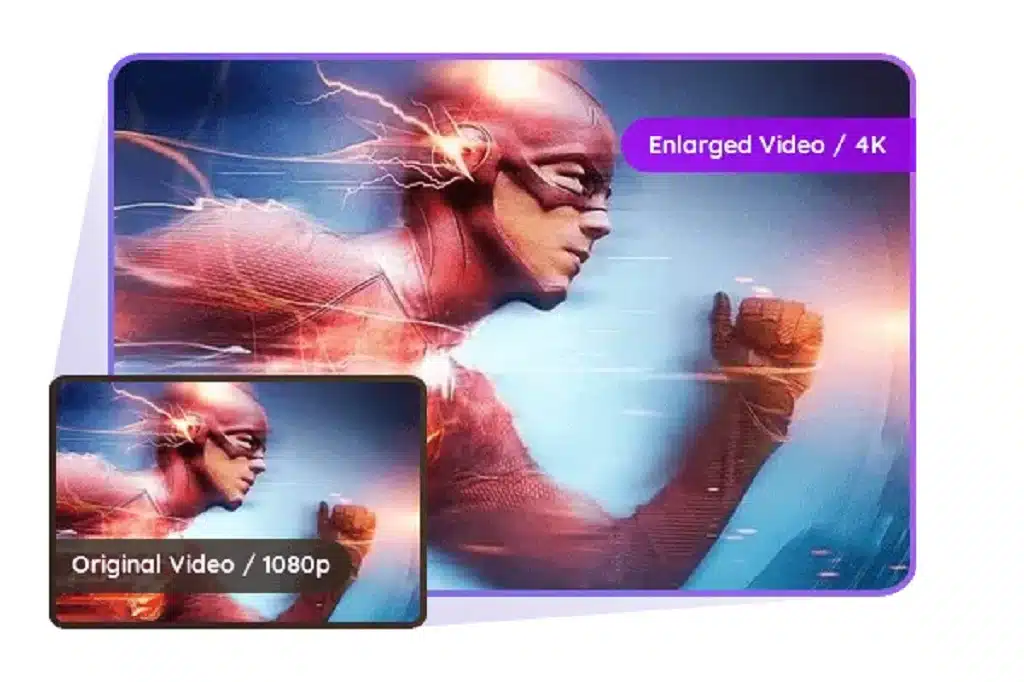
The best part is it can remove any Blu-ray protection, including region code, AACS, BD+, UOPs, and BD-J. So you can make a backup of your precious Blu-ray discs without any worry. It can also remove cinavia watermarks from your Blu-rays. Furthermore, it comes with built-in video editor that allows you to trim, crop, rotate, add watermarks, and more. You can also upscale your Blu-rays from 1080p to 4k or even higher resolution with this great tool.
DVDFab Blu-ray Ripper can also convert your Blu-ray subtitles to SRT files. This is a great feature if you want to watch your movies with subtitles on any device. And it’s easy to do. Just select the subtitle track you want DVDFab to convert and DVDFab will take care of the rest. DVDFab will even create a .nfo file for you so you can easily add your movie to your media server. To sum up, DVDFab Blu-ray Ripper is the best tool to help you rip your Blu-rays quickly and easily. So, why not try DVDFab Blu-ray Ripper today? You won’t be disappointed!
How to Use DVDFab Blu-ray Ripper to Rip Your Blu-rays?
Now that we’ve taken a look at DVDFab Blu-ray Ripper and its features, let’s take a look at how to use it to rip your Blu-rays. Just follow these simple steps and you’ll be able to rip your Blu-rays in no time.
1. First, you’ll need to download DVDFab Blu-ray Ripper and install it on your computer.
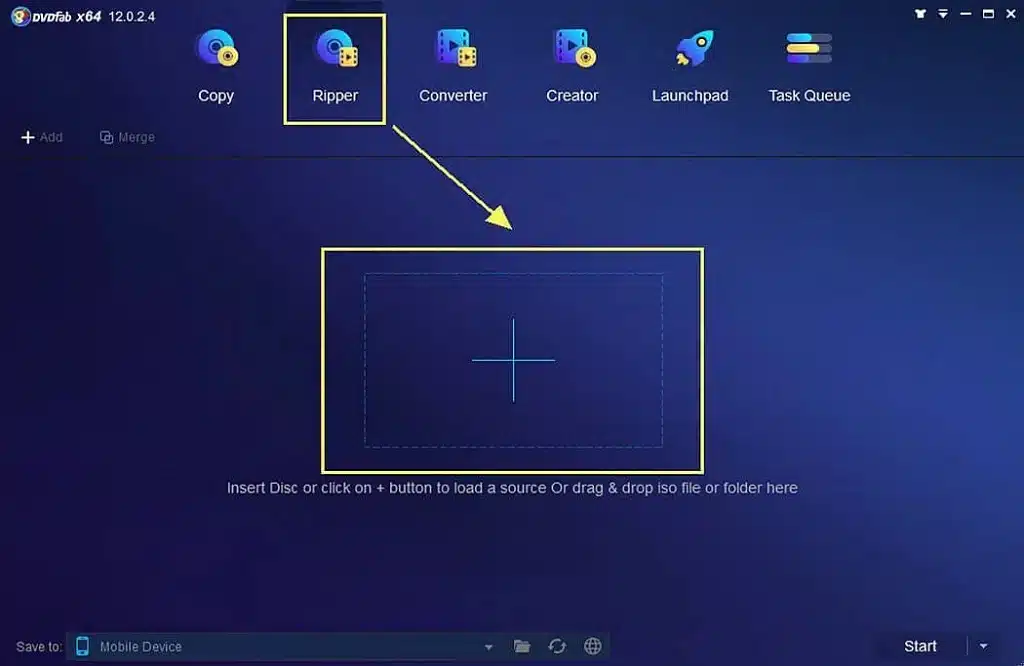
2. Then, from the main interface, select the “Ripper” module.
3. Now, you’ll need to insert your Blu-ray disc into your computer’s optical drive. Add the Blu-ray disc to DVDFab by clicking the “+” button.
4. Once DVDFab has loaded your Blu-ray, you’ll need to customize the settings. You can click “choose other profile” to select the output format, video resolution, and more. Select audio tracks and subtitles that you want to keep in the output file. You can also upscale your video to higher resolution with this great tool.
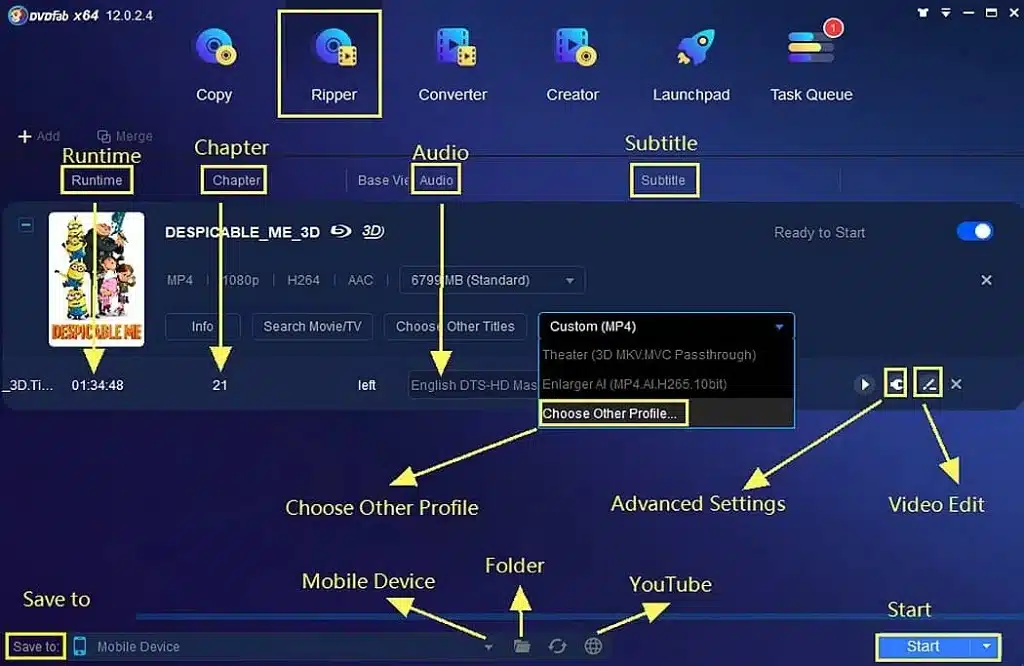
5. Then, select the destination folder where you want to save the output file.
6. When you’re satisfied with the settings, click “Start” to begin the conversion process. DVDFab will now rip your Blu-ray to the output format you’ve selected.
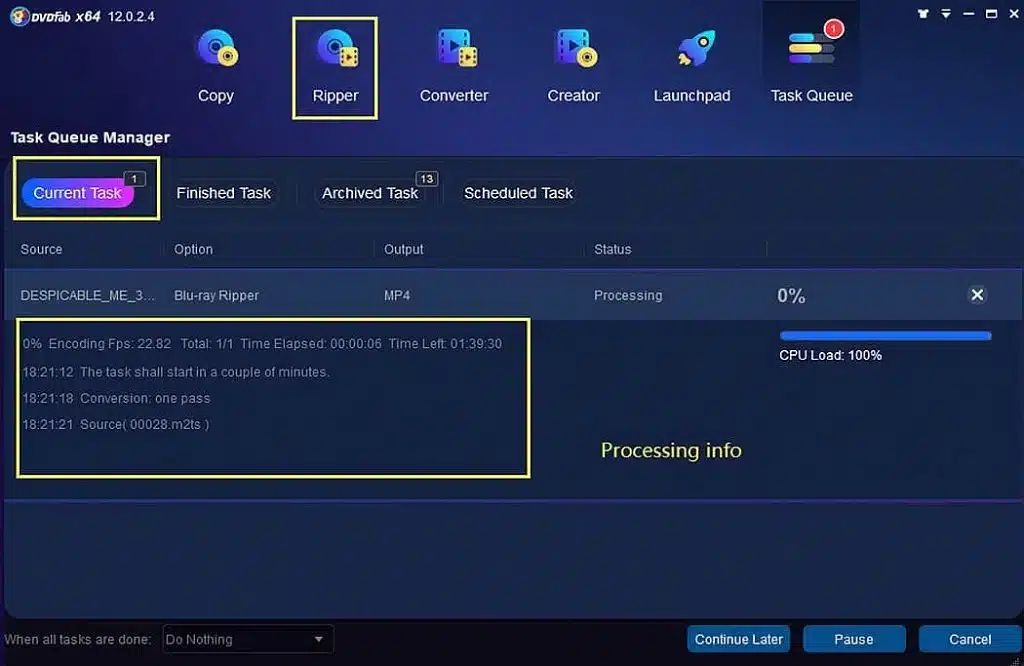
Once DVDFab has finished ripping your Blu-ray, you can find the output file in the location you’ve specified. Now you can watch your movies on any device in any format. Remember! never shut down your PC during the conversion process. DVDFab may not be able to finish the job if you do.
Frequently Asked Questions:
Q: What are the System Requirements for DVDFab Blu-ray Ripper?
DVDFab Blu-ray Ripper is compatible with Windows 7 to 11. It also requires at least 2GB of RAM and 100GB of free hard disk space. Also, you must have an optical drive that can read Blu-ray discs and a live internet connection.
Q: Why is DVDFab Blu-ray Ripper Best Than Others?
There are several reasons DVDFab Blu-ray Ripper is the better choice over other Blu-ray rippers. First, it can remove any Blu-ray protection, including region code, AACS, BD+, UOPs, and BD-J. Furthermore, it comes with a built-in video editor that allows you to trim, crop, rotate, add watermarks, and more. And with 50x conversion speed, DVDFab Blu-ray Ripper is one of the fastest Blu-ray rippers on the market.
Q: Can DVDFab Blu-ray Ripper convert my Blu-ray to WAV format?
Yes, DVDFab Blu-ray Ripper can convert your Blu-ray to WAV format. It supports MP4, AVI, MKV, MOV, FLV, M4V, MPE, and more. It also supports many audio formats, including WAV, MP33, AAC, and FLAC. So, you don’t need to worry about whether DVDFab Blu-ray Ripper can convert your Blu-ray to a WAV format or not.
The Bottom Line:
So, here’s everything you need to know about DVDFab Blu-ray Ripper. As you can see, it’s a great tool that can help you rip your Blu-rays quickly and easily. It also has many features that other Blu-ray rippers don’t have. Also, it comes with a free version that is fully functional. But, if you need more features, you can always upgrade to the paid version. And with a 30-day money-back guarantee, you have nothing to lose. So try this great tool today and see for yourself how easy it is to use.