The ImagineLab video tour makes a straightforward pitch: bring the creative jobs scattered across several subscriptions into one workspace. Images, short videos, narration, music, writing, and graphics sit behind a shared EDT credit wallet. For a freelancer or small team, the useful question is which parts of an actual client job can move there without sacrificing the output or creating more cleanup work.
The overview gives you a quick map of the platform. It also gives you a sensible starting point for a small trial: choose one deliverable, check the cost, create a candidate, and inspect the export before moving more work across.
Disclosure: ImagineLab Art is a sister concern of Editorialge Media LLC. This is an explanation of its official video and current published product information, not an independent performance comparison.
What the ImagineLab Video Tour Covers
The video was published on the ImagineLab Art YouTube channel on October 14, 2026, and runs 2 minutes 40 seconds. Its description and transcript were checked against the current website on November 22, 2026. The description says the images, clips and visuals were made with ImagineLab’s Image Lab and Video Lab; that is the producer’s account of how the video was made.
Its central idea is easy to follow. A Lab is the workspace for a particular job, while the model is the engine selected to perform it. Having several models in one account gives you choices, but those choices can have different settings, costs and results. “All in one” describes the workspace; it does not mean every model has identical capabilities.
The tour is a useful orientation rather than a complete production tutorial. It introduces the places to work, then leaves the details of a finished client deliverable—revision, approval, rights and export—to the creator.
The Labs, translated into everyday creative jobs
| Workspace | A practical use | What still needs your attention |
|---|---|---|
| Imagine Chat | Develop an idea, outline a campaign or improve a brief | Check factual statements before using them in client copy |
| Writing Lab | Prepare a script, email, ad or blog draft | Supply real product details and edit the final message |
| Image Lab | Create a visual or revise an authorized reference image | Inspect product shape, composition and unintended changes |
| Infographic Lab | Turn approved notes or data into a visual explanation | Check every label, number and relationship |
| Video Lab | Generate a scene or animate an image | Review motion, continuity, framing and the selected model’s limits |
| Voice Lab | Create narration from an approved script | Listen for pronunciation and confirm permission for any voice clone |
| Music Lab | Prepare a song, instrumental or short musical element | Check fit, duration and the terms for the intended use |
| Video Editing Lab | Assemble and refine video material | Check beta availability, plan limits and the exported result |
These are suggested applications of the capabilities described in the tour. The table is not a claim that each workflow was independently completed for this article.
Where One Workspace Could Make a Difference
Consider a small product announcement: a hero image, a short clip, narration and a launch email. The shared subject gives the work continuity. The product name, audience, colors and approved claims should remain the same as you move from the script to the image and then to the video.
A unified platform can make that collection of jobs easier to organize. It does not automatically make the outputs agree. A video model might alter an object that looked correct in the still image. A voice model might pronounce the brand name differently from the way the client expects. A generated infographic might turn a cautious statement into a confident claim.
Write the approval rules before generating the assets. Our guide to an AI image acceptance checklist explains how to turn a brand brief into visible pass-or-fail requirements. That makes the discussion more useful than choosing whichever result looks most polished.
Keep a simple handoff record as well: approved copy, selected files, model and settings, remaining corrections and destination dimensions. One workspace can reduce account switching; it should not replace the record of what the client actually approved.
Watch the Official ImagineLab Overview
The video below introduces the Labs and the shared-wallet approach. It is ImagineLab’s own product overview. Treat its claims about replacing other subscriptions as an invitation to evaluate your workflow, rather than a measured savings result.
For a quick route through the tour, start at 0:36 for the prompt-and-cost sequence, 1:18 for images and infographics, 1:35 for video generation, and 2:10 for video editing. The final section introduces planned additions and the signup offer.
Read the Video Alongside Today’s Product Terms
A recorded tour is a snapshot. Three details deserve attention before you plan a project around it.
- The narration describes Imagine Chat as free and unlimited. Imagine Chat currently allows up to 50 free chats per week in Fast/Balance mode. Use this weekly limit when planning your work.
- Video Editing Lab is currently labeled beta. The homepage distinguishes limited free tools from unlimited manual editing with an active paid package; AI editing and generation still use EDT, and export and storage limits depend on the plan.
- Music Video Lab and Ad Creative Studio remain marked coming soon. They should not be counted as available tools in a client deadline or purchasing decision.
The current site advertises 50 one-time EDT credits after verified signup. That gives a new user an allowance to explore; it does not establish how many finished images, videos or songs the balance will buy. A longer clip or a different model can change the cost of the same idea.
The video also promotes broad model access across packages. Access and included usage are separate questions. Check the model, available controls and displayed charge for your particular job before committing to it.
Does It Really Replace Ten Paid Tools?
The title’s “10 AI tools” line is a marketing proposition, not a documented comparison of ten named subscriptions. Whether consolidation saves money depends on what you already pay for and what you actually use.
A designer who relies on one specialist editor may have little to cancel. A freelancer producing several media formats could have more overlap. An agency may still need separate review, asset management, or delivery software even after moving generation into one platform.
Make the comparison using a completed job. On one side, record the subscriptions and extra usage needed for that job today. On the other, record the ImagineLab package, additional EDT, unsuccessful attempts, editing time and any tools you still need. Avoid counting a subscription as a saving until its required work has genuinely moved.
The EDT Wallet Guide says the amount shown before confirmation is the current in-app charge; its examples are planning estimates. That makes the cost confirmation an important checkpoint. Save the amount for each attempt, including outputs you reject, so that your calculation reflects accepted work rather than only the best-looking generation.
A Small Trial That Answers a Useful Question
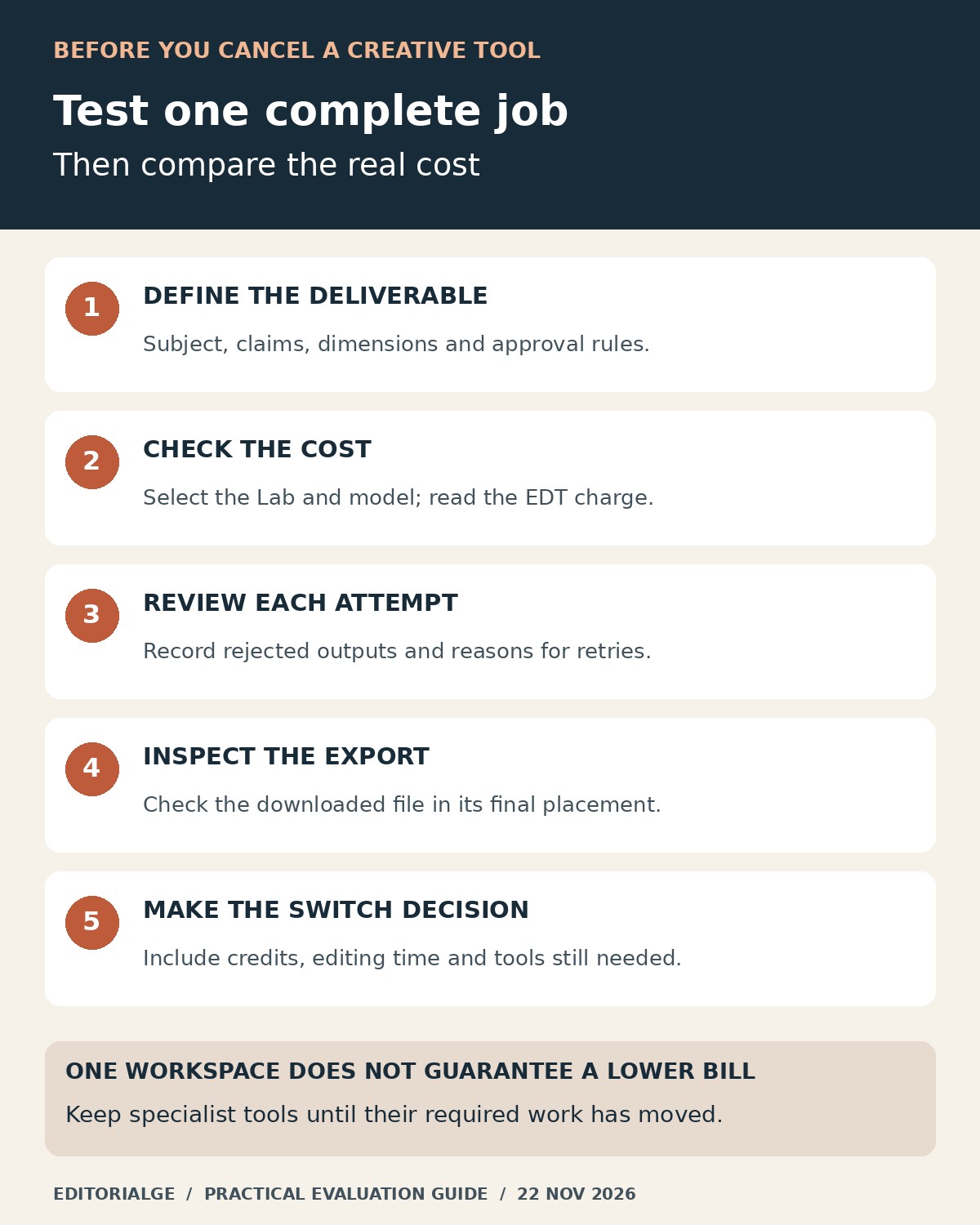
Start with a nonconfidential brief and assets you have permission to use. Choose one recurring deliverable, such as a social image with a short caption. Keep the scope small enough to inspect properly.
- Write the acceptance conditions: required subject, accurate claims, dimensions and anything that must not change.
- Choose the appropriate Lab and model, then read the available settings and EDT charge.
- Create a candidate and compare it with the original brief. Record the reason for any retry.
- Download the file and inspect it in the intended placement, not only in the platform preview.
- Record total credits, revision effort and the remaining tools needed. Decide whether that particular job is worth moving.
If you compare several image candidates, keep stable filenames and inspect full-resolution originals. A thumbnail grid can conceal a changed object or an awkward crop. The contact-sheet review checks show how to separate a display problem from a problem in the source image.
Only expand the trial after the first deliverable works. That approach makes the ImagineLab video tour useful beyond its promotional message: it becomes a map for testing a specific creative job, with a clear result and a cost you can explain.