A company may buy training for 50 employees before it knows their names. The difficult part is not just taking payment: the provider must deliver access, prevent over-allocation, and give the buyer a workable way to manage learners.
These six platforms document ways to sell multiple course seats or subscription seats to business buyers. The comparison is based on vendor documentation reviewed November 10, 2026. It is not a hands-on test or a ranking; configurations, supported payment providers, features and availability vary by contract and region.
What matters when selling seats to companies
Separate purchasing from enrollment. Ask whether the buyer can purchase unknown future seats, invite learners independently, replace a departing employee, see completions, and receive an invoice. Confirm whether the platform records a seat at purchase or at redemption, and whether access expires. Our guide to choosing a learning management system covers the broader LMS decision.
These options were selected because official documentation describes a multi-seat buying or subscription workflow. A generic group course or an ordinary single-learner checkout was not sufficient. Verify exact plan, country, taxes, processor fees, contract and customer-admin permissions before purchase.
Comparison: Six approaches to business seat sales
| Platform | Documented approach | Best fit to investigate | Important check |
|---|---|---|---|
| Thinkific | Group orders and seat manager | Course businesses using its integrated checkout | Payment method and seat-release rules |
| LearnWorlds | Multiple-seat offerings and licenses | Schools selling training to multiple client teams | Required toolkit and manager permissions |
| LearnUpon | Bulk purchases and seat management | Buyers who need to allocate seats later | Plan access and ecommerce configuration |
| Absorb LMS | Multi-seat purchases and enrollment keys | Teams distributing course access by key | Key redemption and seat capacity |
| Docebo | Seat-based subscription plans | Organizations selling access to course bundles | Permissions, subscription configuration and seat reuse |
| Thought Industries | B2B group subscriptions and seat packages | Providers needing client-admin invitations | Features available in the chosen ecommerce setup |
1. Thinkific: Group orders and seat managers
Thinkific documents a group-order checkout and a seat-manager role for purchasers of multiple seats. The group-order documentation describes how buyers can distribute access after purchase. This is a useful starting point for a course business already considering Thinkific’s payment setup.
Check which payment methods and plans support the intended workflow. Thinkific notes that different unenrollment actions can affect whether a seat returns to the pool. Test a replacement learner and refund scenario before promising transferable seats to a customer.
2. LearnWorlds: Separate seat management for a client
LearnWorlds documents multiple-seat offerings and a seat-manager role that can import learners, enroll them and monitor progress within its assigned scope. It also describes licenses for bulk sales. This is worth considering when the customer wants a designated person to manage training.
Ask which B2B toolkit and subscription are required, and whether the specific offering supports checkout, invoicing and course combinations you need. A buyer’s administrative access should be tested against another client’s data before launch.
3. LearnUpon: Sell seats before naming learners
LearnUpon’s bulk-purchase guide describes one buyer purchasing multiple course seats and inviting or assigning learners later. This is useful for a company buying onboarding places ahead of hiring.
Availability depends on the LearnUpon plan. Confirm whether your store configuration supports the products, pricing and seat management your buyer expects; also check whether a buyer can reassign an unused or incorrectly allocated seat under your terms.
4. Absorb LMS: Distribute enrollment keys
Absorb documents multi-seat purchases that generate enrollment keys for distribution. Its configuration can issue individual keys, making it suitable to investigate when a customer needs to pass course access to several employees.
Confirm how the chosen course type and settings handle keys. Absorb notes that instructor-led session capacity is updated when keys are redeemed, which can complicate capacity control. Ask for a demonstration using a nearly full live session, not only a self-paced example.
5. Docebo: Subscription seats for course bundles
Docebo documents subscription plans for course bundles, with permitted Power Users purchasing seats and enrolling learners. Its extended-enterprise features also support separate client learning environments.
Check the required permissions and applications in your agreement. Docebo describes a configurable seat-refunding setting affecting reuse after certain access changes; negotiate and test your policy for departures, expiration and renewals rather than assuming every seat is interchangeable.
6. Thought Industries: Client-managed subscription packages
Thought Industries documents B2B group subscriptions in which customers purchase seat packages and can invite learners through supported methods. This can fit providers selling ongoing access to an organization instead of one-off individual courses.
Its documentation distinguishes ecommerce configurations, so verify availability in the specific engine and contract. Ask a customer administrator to demonstrate buying additional seats, inviting a learner and handling an unused seat before finalizing terms.
A practical seat-sale test before signing
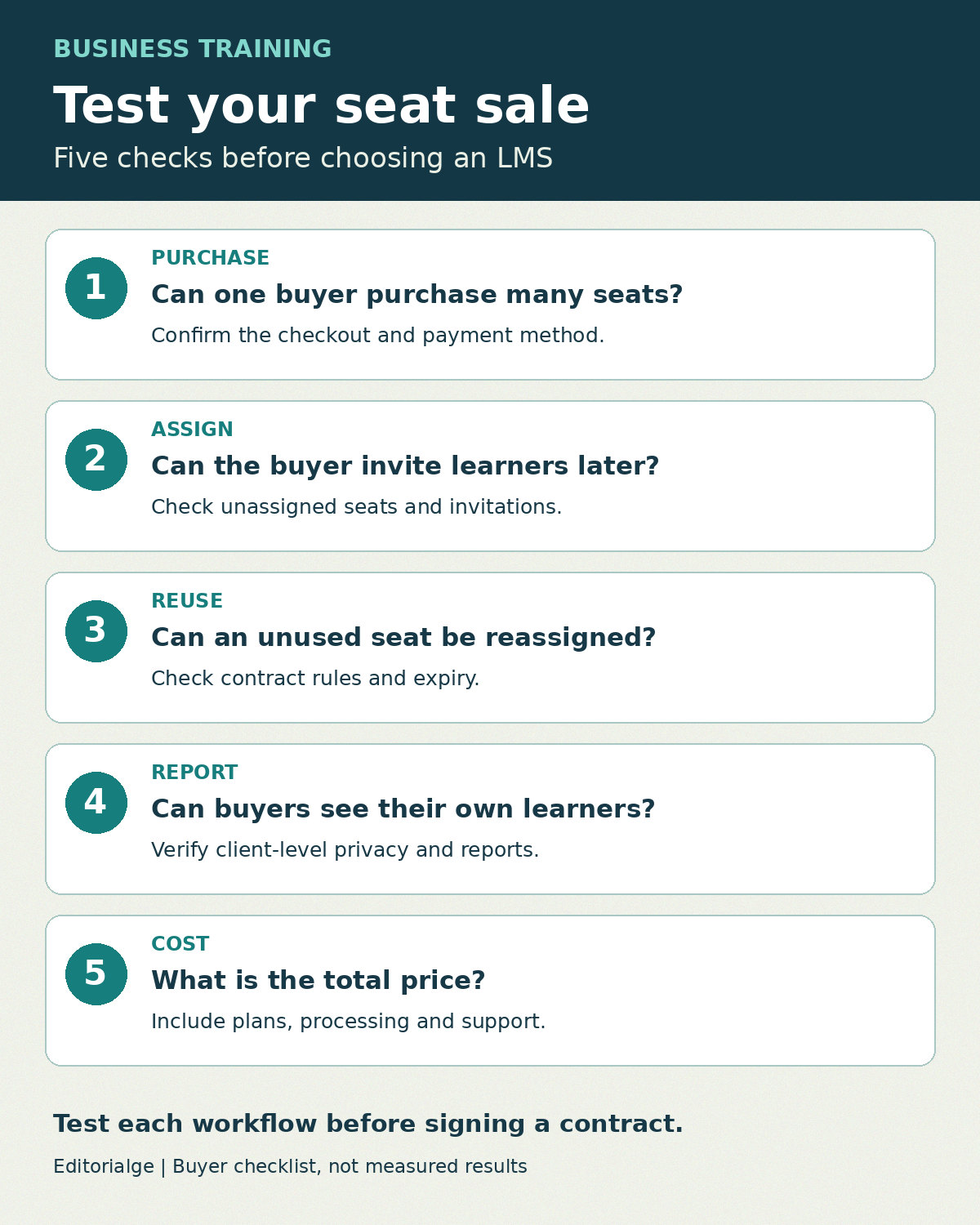
Use this hypothetical transaction with each vendor; the numbers are an example, not a claim about any product’s pricing.
- A business purchases 20 seats for a course and names only five learners.
- The buyer invites five more people, checks the remaining balance and views completion data without accessing another company’s learners.
- One invitee leaves before starting. Ask whether and how that seat can be reassigned.
- A learner completes the course and another requests a refund. Confirm whether each seat can be reused and who pays any processing charge.
- Renew the agreement with a different seat count; verify expiry, learner history, invoice and tax handling.
Record the observed checkout, administrative steps, limitations and contract answers for each platform. If an action requires vendor support or a manual workaround, include that time in your operating cost. Do not import real customer data into a demonstration without appropriate authorization.
Questions to ask before choosing
Can the buyer manage seats without becoming a full administrator?
Request a live demonstration of the exact buyer role. Check that it can invite and monitor its own learners without changing courses or seeing other customers.
Does a group purchase always mean reusable licenses?
No. Distinguish purchased, assigned, redeemed, completed and expired seats in the contract. Reuse may depend on the product, action used to unenroll the learner or configuration.
Which price should a training provider compare?
Compare the LMS subscription or quote, business-seat features, payment processing, taxes, implementation, support and any per-learner or usage charges. Ask each vendor for a written quote based on the same buyer and learner volumes.