


Most students do not need another perfect-looking timetable. They need a plan that accounts for real deadlines, difficult subjects, available hours, and the work they failed to finish last week. That is where AI chatbots for study planning can be useful. A chatbot can organize scattered information, divide large tasks, and help revise a schedule when circumstances change. It can also turn a vague intention such as “study biology” into a specific session with a clear outcome.
But an AI-generated plan is still a draft. The chatbot does not automatically know your course requirements, actual ability, or institutional rules. It may misunderstand a syllabus, invent a deadline, or create a schedule that looks organized but is impossible to follow.
The best approach is to use AI as a planning partner. Give it verified information. Question its suggestions. Record what you actually complete. Then use that evidence to adjust the next version of the plan.
What Can an AI Study Planner Really Do?
Effective studying is a repeating process. A student must understand the task, set a goal, select a method, complete the work, check the result and adjust the next step.
Research on educational chatbots suggests that they can support parts of this process. They can help students locate resources, choose strategies and monitor progress. However, the evidence remains mixed, particularly when chatbots provide unrestricted answers instead of encouraging students to think.
A useful distinction is therefore necessary:
| AI can help you | You remain responsible for |
| Organize dates and tasks | Verifying official dates and requirements |
| Suggest a study sequence | Deciding whether the sequence fits your course |
| Divide work into sessions | Completing the work independently |
| Generate practice questions | Checking the accuracy of questions and answers |
| Review progress records | Reporting your progress honestly |
| Suggest schedule changes | Making the final decision |
I would never treat the first schedule produced by a chatbot as final. It should be reviewed in the same way as any other unverified draft.
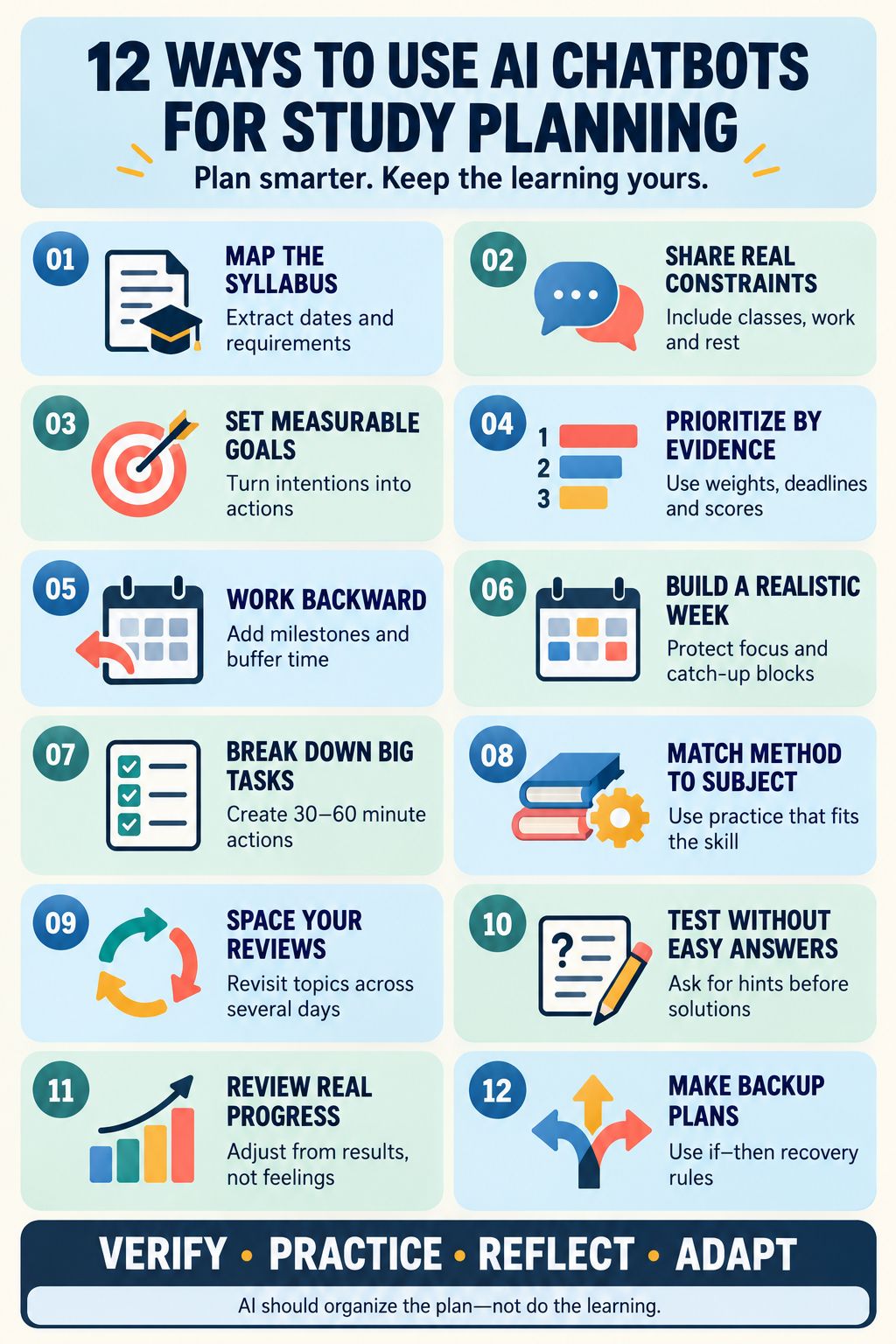
1. Turn Your Syllabus Into a Clear Task Map
A syllabus may contain exam dates, assignment instructions, weekly topics, marking criteria and required reading. Those details are often spread across several pages.
An AI chatbot can organize this information into a table or chronological task map. Ask it to separate confirmed requirements from missing information. This prevents the chatbot from quietly filling gaps with assumptions.
Check every extracted date, percentage and requirement against the original document before adding it to your calendar. If uploading course documents is not permitted, enter only the necessary information manually.
Prompt: “Using only the syllabus information below, extract all confirmed deadlines, assessment weights, topics and required materials. Mark anything that is not clearly stated as unknown. Do not make assumptions.”
2. Ask the Chatbot to Interview You First
A chatbot cannot create a personal study plan if it knows almost nothing about the student.
Before requesting a schedule, ask it to question you about your classes, job, commute, family responsibilities, available study hours and difficult subjects. It should also ask when you usually have enough energy for demanding work.
This conversation is more useful than typing, “Create a study plan for me.” It gives the chatbot the constraints needed to produce something realistic.
Do not include private identifiers, medical records or confidential institutional information. The chatbot needs practical scheduling details, not your entire personal history.
Prompt: “Before creating a study plan, ask me one question at a time about my deadlines, available hours, fixed commitments, difficult topics and preferred session length.”
3. Convert Vague Intentions Into Measurable Goals
“Revise chemistry” is not a useful study target. It does not define what to study, how to study it or how to know when the work is complete.
A chatbot can convert broad intentions into observable actions. “Complete 15 equilibrium problems, explain three mistakes and identify two topics for review” gives the session a clear finish line.
The goal should describe work under the student’s control. A target such as “get an A” depends on more than one study session. A process goal tells the student what to do next.
Prompt: “Turn my goal of studying Chapter 6 into three measurable tasks. Each task should include an action, an expected result and a simple completion check.”
4. Prioritize Topics Using Evidence
Students often spend too much time on subjects they already enjoy. Difficult topics remain untouched because they feel uncomfortable.
Ask the chatbot to rank topics using four factors: official importance, deadline, prerequisite value and evidence of current mastery. Evidence might include quiz scores, practice-paper errors or questions the student could not explain without notes.
Confidence can be included, but it should not be the only measure. Students sometimes feel confident after rereading material even when they cannot retrieve or apply it.
The chatbot must use official assessment weights supplied by the student. It should never guess how much a topic will count.
Prompt: “Rank these topics using the official exam weight, deadline, prerequisite importance and my recent quiz results. Explain the reason for each priority and do not invent missing information.”
5. Work Backward From the Deadline
A final deadline tells a student when the work must end. It does not show when the work should begin.
An AI chatbot can work backward from an examination or assignment date and create intermediate milestones. An exam plan might include initial learning, problem practice, spaced review, a mock test and final correction. An essay plan might include research, source evaluation, outlining, drafting and revision.
Every backward plan needs buffer time. Students and chatbots can both underestimate unfamiliar work. A schedule with no spare time assumes that nothing will take longer than expected.
Prompt: “Work backward from this deadline. Include preparation, practice, feedback, revision and buffer time. Show which stages depend on earlier tasks.”
6. Build a Weekly Schedule That Leaves Room for Life
A study timetable should not occupy every free hour. That may look ambitious, but it leaves no space for delays, tiredness or ordinary life.
Give the chatbot your fixed commitments first. These may include classes, work, commuting, meals, exercise, family time and regular appointments. Then ask it to place demanding subjects in periods when your attention is usually strongest.
Keep at least one catch-up block open. It is also sensible to protect genuine rest rather than treating every unscheduled hour as unused study time.
Prompt: “Create a weekly schedule around these fixed commitments. Limit study to my available hours, protect rest periods and leave one block open for unfinished work.”
7. Break Large Assignments Into Manageable Actions
“Write the research paper” is too large to function as a daily task. It encourages delay because the starting point is unclear.
A chatbot can divide a large assignment into smaller actions such as reviewing the brief, defining the question, finding sources, evaluating evidence, outlining sections, drafting and proofreading.
The actions should be specific enough to begin immediately. “Research the topic” is still vague. “Find three peer-reviewed studies addressing the first research question” is clearer.
The chatbot may organize the workflow, but it should not complete assessed work unless the institution explicitly permits that use.
Prompt: “Break this assignment into actions that can each be completed in 30 to 60 minutes. Identify dependencies, milestones and points where I need feedback.”
8. Match the Study Method to the Subject
A schedule is not useful if every block simply says “review.” Different learning tasks require different forms of practice.
| Learning task | More appropriate activity |
| Facts and definitions | Closed-book retrieval and flashcards |
| Mathematics | Solving unfamiliar problems and explaining each step |
| Essay-based subjects | Reconstructing arguments, comparing evidence and outlining responses |
| Languages | Vocabulary retrieval, speaking, listening and corrective practice |
| Programming | Predicting output, writing code and debugging errors |
| Practical subjects | Applying procedures, analysing cases and reviewing mistakes |
Ask the chatbot to explain why a method suits the task. Do not ask it to assign a fixed “learning style.” Preferences can matter for comfort and accessibility, but the learning activity must still match the skill being developed.
Prompt: “Choose an appropriate study method for each topic. Base the choice on what I must be able to do in the exam, not on a learning-style label.”
9. Schedule Spaced Review Instead of Cramming
Material is easier to remember when students return to it across separate sessions. Repeated exposure on the same night can create familiarity without durable recall.
An AI study planner can distribute review throughout the remaining weeks. Each return should involve retrieving, explaining or applying the material rather than simply reading it again.
There is no single spacing formula that works for every subject and student. The interval should respond to performance. Topics recalled accurately can be reviewed later. Topics producing repeated errors should return sooner.
Prompt: “Spread reviews of these topics across the available weeks. Use retrieval or application in every review and shorten the interval when my test results show weak recall.”
10. Create Low-Stakes Tests Without Revealing Answers
One of the strongest uses of a chatbot is turning verified material into practice questions. The chatbot can ask one question at a time, wait for an answer and then offer feedback.
Ask it to provide a hint before revealing the solution. This matters because immediate answers can improve task completion without producing independent learning.
A randomized mathematics study illustrated this risk. Students using unrestricted GPT-style assistance performed well during supported practice but later performed worse without the tool. A more controlled tutor that emphasized hints avoided the same learning penalty.
Use course notes or approved materials as the basis for questions, and verify the answer key.
Prompt: “Quiz me one question at a time using only these notes. Do not reveal the answer immediately. Ask me to explain my reasoning, provide a hint if needed and record the type of error I make.”
11. Review What Actually Happened Each Week
A plan should change when new evidence appears.
At the end of the week, record the sessions completed, actual time spent, practice scores, unfinished tasks and recurring mistakes. Give that information to the chatbot and ask it to revise the next week.
This is more useful than repeatedly generating a new plan from scratch. It shows where the original estimates were unrealistic and whether the study methods produced measurable progress.
Keep observations separate from guesses. “I scored 55% on the practice test” is evidence. “I am bad at physics” is a broad judgment that does not identify the problem.
Prompt: “Compare my planned work with these actual results. Identify what caused the largest gaps and revise next week without increasing my total available hours.”
12. Create Recovery Rules for Disrupted Plans
Missing one study session should not destroy the entire timetable.
Ask the chatbot to create simple if–then rules. For example: “If I miss Tuesday’s mathematics session, I will use Thursday’s catch-up block for the problem set and move the optional reading to next week.”
These rules reduce the need to make a fresh decision while already under pressure. They also prevent the common habit of pushing every unfinished task into the final days before an exam.
Recovery plans should protect high-priority work first. Lower-value or optional activities may need to be reduced rather than endlessly rescheduled.
Prompt: “Create if–then recovery rules for missed sessions, unexpected assignments and low-energy days. Protect deadlines and essential reviews without overloading the following day.”
How to Use AI Without Outsourcing the Learning
The difference between assistance and dependence often comes down to how the chatbot is instructed.
A good study-planning conversation should make the student more aware of the work. It should not remove every difficult decision or supply every answer.
Follow a few basic rules:
- Check the AI policy for each course and assessment.
- Treat the official syllabus as the source of truth.
- Never assume that a confident AI answer is accurate.
- Ask for questions, hints and feedback before complete solutions.
- Do not upload sensitive, private or unpublished material to an unapproved tool.
- Check generated references and answer keys independently.
- Contact a teacher or tutor when the problem requires subject expertise.
- Younger students should use institutionally approved tools with suitable adult guidance.
The chatbot should help organize the path. The student must still walk it.
A Useful Plan Should Reduce Dependence on the Chatbot
AI chatbots for study planning are most valuable when they help students see their work more clearly. They can organize deadlines, expose unrealistic assumptions, schedule repeated practice and adjust a plan when the week does not go as expected.
They can also produce convincing nonsense. A polished timetable may contain the wrong dates, unsuitable methods or more work than a student can reasonably complete.
That is why the final decision must remain with the learner. Verify the inputs. Test the plan through real work. Record the results. Then adjust it.
A good AI-assisted study plan should not make a student dependent on constant answers. It should gradually make that student better at planning, practising and judging progress independently.
Frequently Asked Questions on AI Chatbots for Study Planning
Can an AI chatbot create a reliable study plan?
It can create a useful starting plan when given accurate deadlines, available hours, topic priorities and evidence of current performance. The schedule still needs human review. AI cannot independently confirm that course information is correct or that every time estimate is realistic.
What information should I provide to an AI study planner?
Provide the study period, confirmed deadlines, syllabus topics, assessment weights, fixed commitments, available hours, recent practice results and any topics requiring additional attention. Avoid sharing personal identifiers or confidential materials.
Is using AI for study planning considered cheating?
Using AI to organize personal study time is usually different from using it to produce assessed content. However, there is no universal rule. Policies vary by institution, department, course and assignment. Students should check the instructions for each assessment instead of assuming that previous permission still applies.
How often should an AI-generated study plan be updated?
A weekly review is practical for most long-term plans. Update it sooner when an examination date changes, a new assignment appears or actual progress differs significantly from the schedule. Constant daily rebuilding can become another form of procrastination.
Can AI plan for several subjects at the same time?
Yes, provided the chatbot receives accurate information about deadlines, importance, prerequisites and available time. The student should check that one difficult or urgent subject has not consumed so much time that other required work disappears from the schedule.
Which AI chatbot is best for study planning?
The most suitable option is one permitted by the school or university, with appropriate privacy protections and the ability to work from verified material. The quality of the planning process matters more than a long list of product features.





















