


Learning how to write a project brief quickly is essential when client requests are scattered across emails and meeting notes. A project brief is a 1- to 2-page document that summarizes project goals, scope, target audience, key deliverables, and deadlines to align team members and stakeholders before work begins.
By using a 30-minute time-boxed framework, you can translate raw notes into a concise, actionable draft ready for review. This quick guide outlines a structured, 6-step method to clarify project requirements, control scope creep, and streamline approvals fast.
Keep the Brief Small Enough to Use
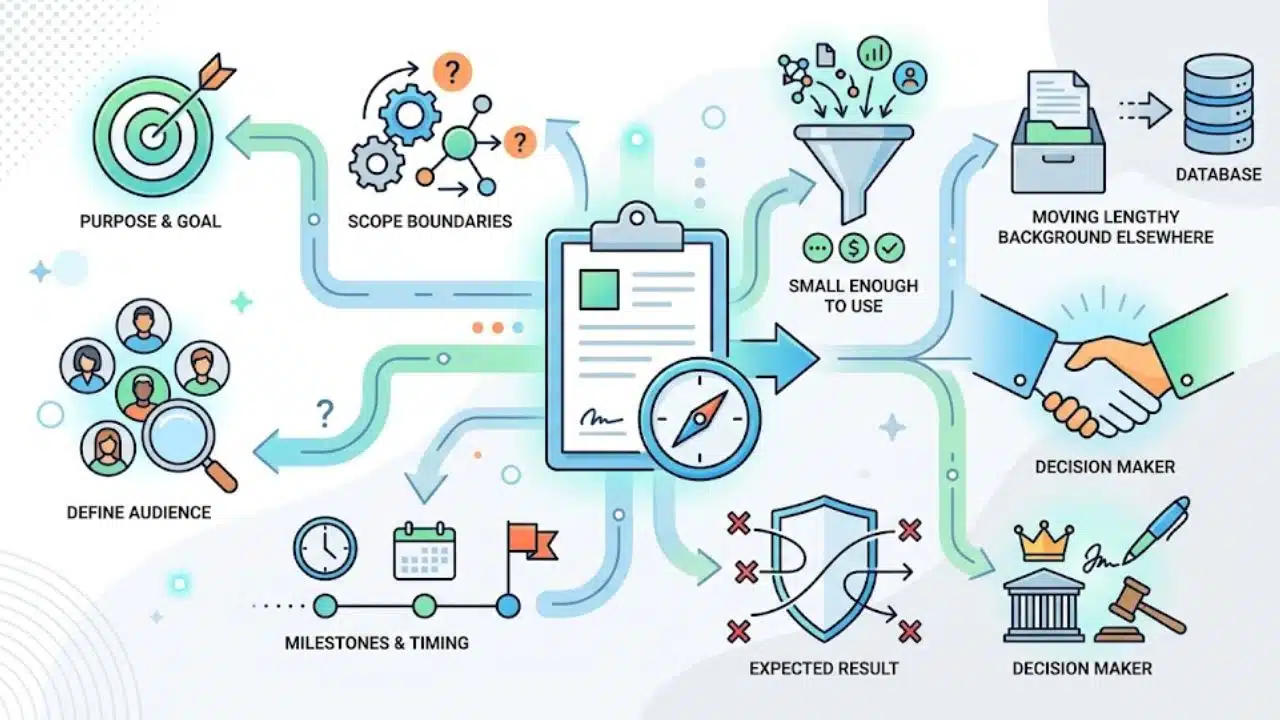
A project brief summarizes the purpose, audience, scope, and timing of an initiative. The project plan develops the execution detail. Follow any required internal format, since organizations use these documents differently.
Aim for one or two pages for this exercise, with links to supporting material. Treat that as a working limit. Keep detail that affects a decision; move lengthy background elsewhere.
A useful brief makes decisions visible. A colleague who missed the earlier discussions should be able to identify the expected result, boundaries, and decision-maker.
How to Write a Project Brief: The 30-minute Workflow
Open a shared document, keep the original request nearby, and set a timer. When information is missing, record who will supply it and when. Continue drafting around that gap.
Minutes 0–5: State the Problem and Intended Audience
Explain what needs to change and who will benefit. “Redesign the onboarding page” names an assignment without explaining its purpose.
For a hypothetical client-onboarding project, the background could read:
New clients receive setup instructions across several emails. This project will bring the required steps into one onboarding page for client administrators preparing their first account.
That establishes the situation without claiming the new page will solve every onboarding problem. If scattered instructions are suspected of causing delays, add “Confirm the main causes of setup delays with the account team” to the open questions.
Minutes 5–10: Define Success Before Listing Tasks
Choose a primary outcome and describe how it will be assessed. For the same example:
Reduce the median time from invitation to completed setup for new client administrators, comparing the first month after launch with the previous month.
This remains a draft objective until someone confirms the baseline and target. Assign that decision to the person responsible for onboarding data, with a deadline before approval. Do not invent a percentage to fill the field.
Define “completed setup” consistently across both periods. Record unfinished accounts too, so quicker completions do not hide clients who remain stuck. A before-and-after comparison tracks change; it cannot alone establish that the page caused it.
Separately, write acceptance criteria for the deliverables. Proposed criteria might include approved instructions and five setup links that open their intended destinations. The reviewer can check those before publication; the effect on setup time becomes measurable later.
Minutes 10–16: Set Deliverables and Explicit Exclusions
Describe what the team will hand over, using enough detail to estimate the work:
- Included: One English-language onboarding page in the existing help center, covering five setup steps.
- Supporting deliverable: One revised welcome email linking to that page.
- Excluded: Account-system changes, translations, video tutorials, and a wider help-center redesign.
Explicit scope exclusions clarify the boundaries. Choose ones that address likely misunderstandings.
Pay attention to broad words such as “launch” and “support.” Does launch include publishing and staff training? Does support mean one review round or ongoing maintenance? Answer those questions while the work is still being defined.
Minutes 16–21: Add Timing, Resources and Dependencies
Record the requested completion date and what drives it. Label it confirmed, proposed, or dependent on another decision.
For the onboarding example, an illustrative schedule could place the draft in week one, client-services review in week two, and publication in week three. These are milestones, not effort estimates. Replace them with dates after contributors confirm availability, including time for revisions.
Review time belongs in the schedule. A Friday release needs reconsideration if the only approver is unavailable until Monday.
Add the confirmed budget ceiling or staff allocation. If neither is settled, name the person who will resolve capacity. Internal work still consumes time, even when no supplier invoice is involved.
Minutes 21–25: Name Owners and Surface Uncertainty
Identify the delivery lead, the approver, and any necessary specialist reviewers. Use names in the actual brief: “Marketing will approve” leaves the team guessing whose response counts.
Keep three distinctions clear. An assumption is something the draft treats as true. A dependency is something delivery needs. A risk is an uncertain event or condition that could affect the project; prioritize those that could disrupt delivery here.
Give each unresolved item an action. For example:
Publishing access is unconfirmed. The help-center administrator will confirm access by Thursday. If access is unavailable, the delivery lead will revise the release date.
This identifies the uncertainty, owner, deadline, and response without requiring a lengthy risk register.
Minutes 25–30: Review for Conflicting Interpretations
Read the draft as someone who missed every earlier conversation. Look for:
- A deadline that precedes a required approval.
- Deliverables that exceed available capacity.
- Success measures without a data owner.
- Open decisions presented as settled facts.
Spend these minutes resolving ambiguity, then mark the document “Draft for review.” Formatting can wait if nobody has agreed what “finished” means.
If the purpose or scope is disputed, use the draft to guide a decision meeting. Finishing the document does not make the project ready to start.
A Reusable Outline for Your Next Brief
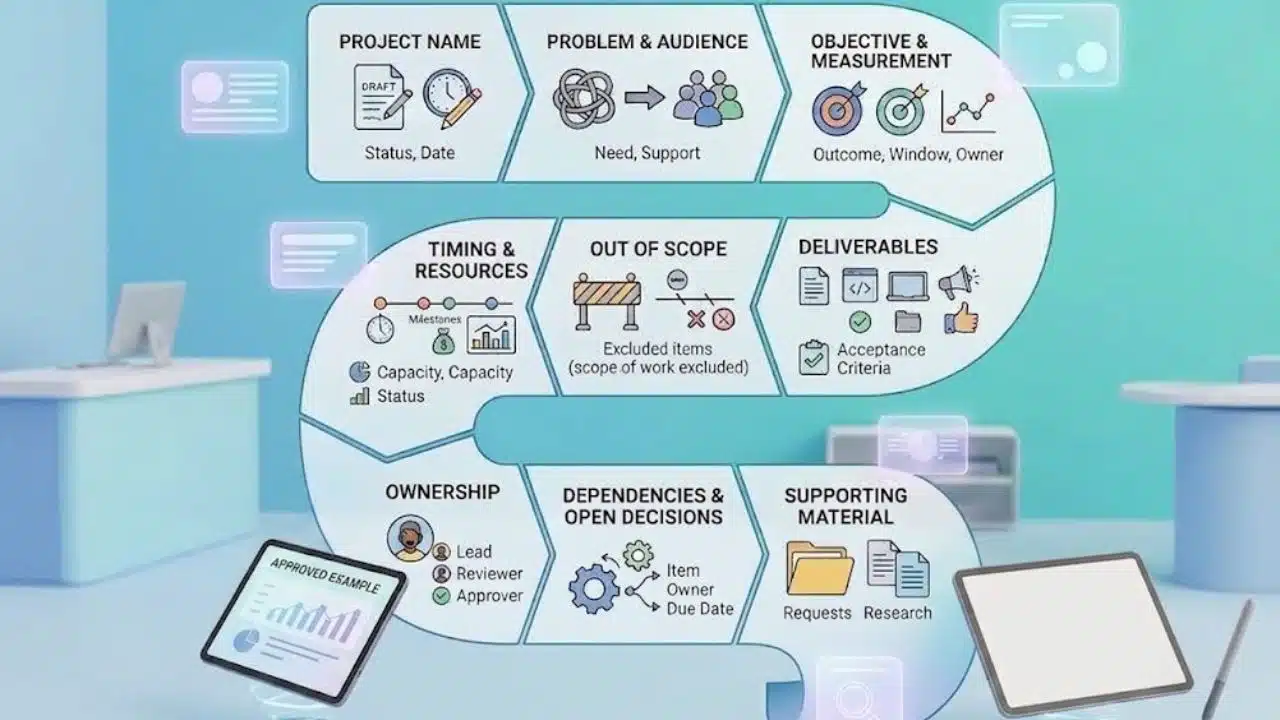
Copy these prompts into your document and keep the answers concise:
- Project name and status: Working title, draft or approved, version date.
- Problem and audience: Who needs what to change, and what supports the request?
- Objective and measurement: Outcome, target, measurement window, and data owner.
- Deliverables and acceptance: Outputs and the criteria for accepting them.
- Out of scope: Likely requests excluded from this version.
- Timing and resources: Milestones, deadline status, capacity, and budget status.
- Ownership: Delivery lead, reviewers, and approver.
- Dependencies and open decisions: Unresolved items, each with an owner and due date.
- Supporting material: Relevant requests, research, or detailed requirements.
When showing a colleague how to write a project brief, pair this outline with an approved example from a similar project. Check copied names, dates, and commitments before reusing it.
Get Agreement Before Treating the Brief as Settled
Share one version for review. Ask stakeholders to confirm scope, timing, responsibilities, and outstanding decisions by a specific date. Silence should not count as approval.
Follow your organization’s authorization process. An approved brief does not automatically grant spending authority or replace a required project charter.
Record approval and link the agreed version from the project workspace. When a new request changes the deliverables, assess its effect on time and resources before accepting it. Update the brief and record who approved the change.
Final Thoughts
Knowing how to write a project brief means making the work clear enough for others to commit to it. Before sending your next draft, identify the unresolved decision most likely to change the scope or deadline. Give it an owner and a response date. Resolve decisions that block delivery before committing the team to a start date.
FAQs
Does every small task need a project brief?
A routine task with a clear owner and output may need only a task description. Use a brief when several people must agree on purpose, boundaries, or commitments.
Can you write a brief after a project has started?
Yes. Document the current position, confirm it with stakeholders, and record the approval date accurately. Keep earlier assumptions distinguishable from newly agreed decisions.
Should separate workstreams have their own briefs?
Keep a shared brief when they contribute to one outcome. Consider linked briefs when workstreams have different approvers or substantial independent scope, while keeping their dependencies visible.























