


Moving day rarely goes wrong on moving day. It goes wrong six weeks earlier, when nobody books the truck, nobody tracks what’s in box 14, and nobody checks whether the “mover” from that Google ad even holds a license. The right moving apps for planning stress-free relocation fix those three problems. Most of them cost nothing.
But some cost more than they admit. And a few popular picks won’t even let you in without an invitation. Here are ten that pull their weight, what each really costs, and the one free government tool almost every list forgets.
Quick answer: Start with MoveAdvisor (free timeline and checklist) and Encircle (free photo inventory). Add U-Haul or TaskRabbit depending on whether you’re moving yourself or hiring help. Before you pay any mover a deposit, run their USDOT number through FMCSA’s Protect Your Move site.
Quick Comparison of the Best Moving Apps for Planning Stress-Free Relocation
Look at the last column first. That’s where the surprises live.
| App | Main job | Cost | The catch |
|---|---|---|---|
| MoveAdvisor | Timeline, checklist | Free | Rarely updated |
| Sortly | Box and item inventory | Free up to 100 items | QR labels need a paid plan |
| Encircle | Photo inventory for claims | Free | Built for insurance, not packing |
| Todoist | Shared to-do list | Free plan available | You build the checklist yourself |
| magicplan | Floor plans, room scans | Free for 2 projects | Subscription after that |
| Facebook Marketplace | Selling stuff before you go | Free for local pickup | No shows and lowballers |
| U-Haul | Truck rental, 24/7 pickup | Pay per rental | App glitches at pickup |
| TaskRabbit | Hourly labor | Tasker rate plus fees | Not a licensed moving company |
| Updater | Utilities, address updates | Free | Invite only |
| USPS Change of Address | Mail forwarding | $1.25 online | Lookalike sites overcharge |
The 10 Best Moving Apps for Planning a Stress-Free Relocation
No single app can manage every part of a move. These 10 tools help with schedules, packing, inventories, floor plans, truck rentals, temporary labor, utilities, and mail forwarding, along with the costs and limitations you should know before downloading them.
1. MoveAdvisor
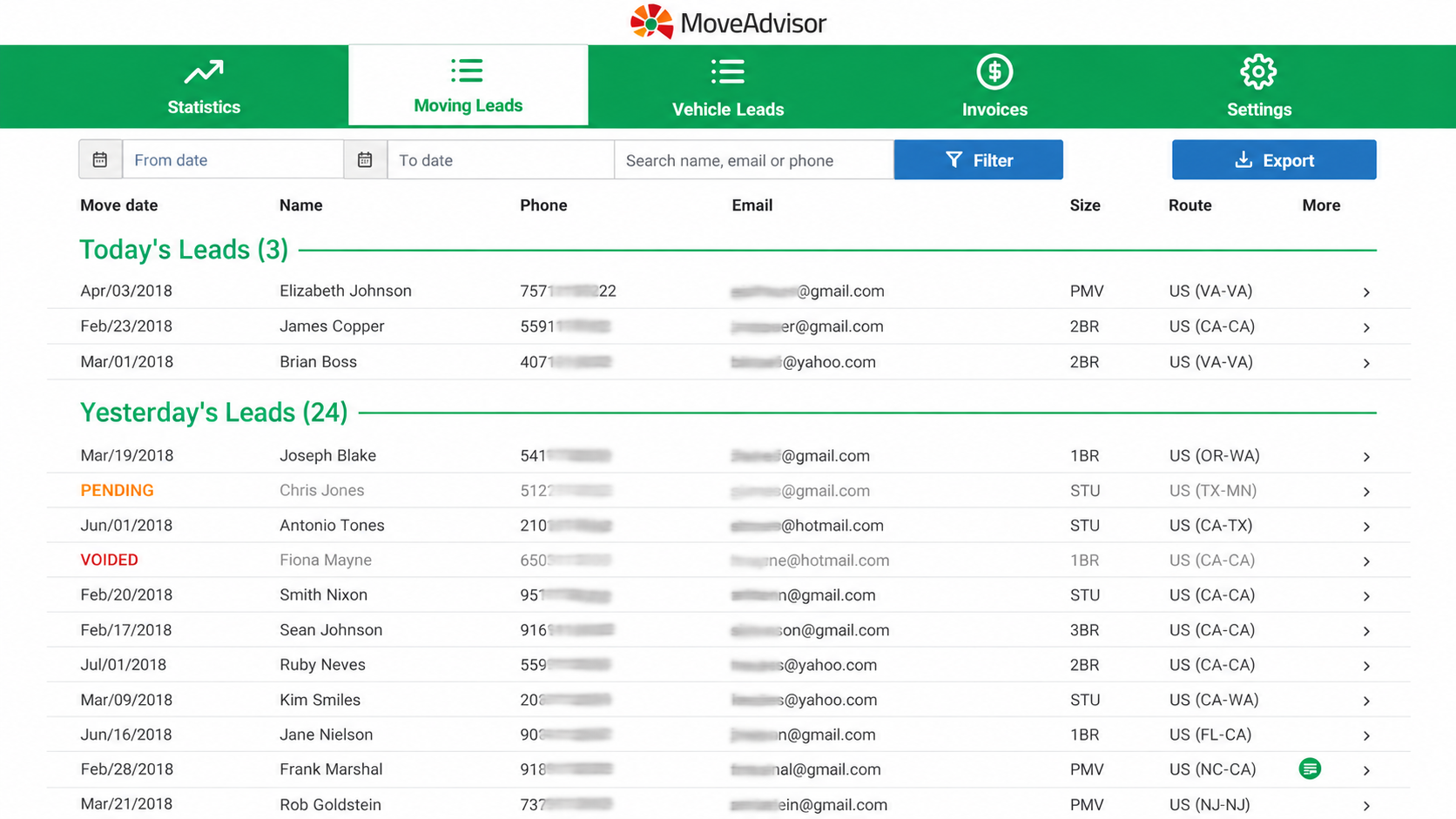
If you only download one of the moving apps for planning a stress-free relocation, make it this one. MoveAdvisor builds a week-by-week timeline from your move date, lets you inventory your home room by room, and estimates how many boxes and furniture blankets you’ll need. It’s free on iOS and Android, with no ad banners.
That box estimate alone saves a second trip to the store.
Here’s the catch: the app isn’t actively maintained. It holds a 3.3 rating from 66 App Store reviews, and the Android version hasn’t been updated since March 2025. The timeline still works fine, but treat its “movers around you” list as a starting point, not a vetting service. Verify any company it shows you yourself (more on that below).
2. Sortly
Sortly is the inventory app people mention most for packing. You snap a photo of each box’s contents, file it by room, and search later when you need the coffee maker at 7 a.m.
The free plan covers 100 unique items and one user. That’s fine for a one-bedroom apartment if you track boxes, not individual forks.
Most beginners make the mistake of assuming the QR box labels are free. They’re not. Label creation starts on the Advanced plan at $49 a month, or $24 a month for the first year on annual billing. The trial needs a credit card and renews automatically, so if you just need labels for one move, pay for a single month and cancel the day the last box is unpacked.
DIY workaround: number your boxes with a marker and keep the photo list in the free tier. Works fine.
3. Encircle
Encircle is a free home inventory app that insurance pros also use for claims, and that’s exactly why it belongs on your phone. Walk from room to room, snap photos, and add serial numbers and receipts. The developer says most people finish a full photo inventory in about an hour.
Why bother? Federal rules give interstate movers a default liability of just 60 cents per pound per item. A 25-pound TV gets you $15. If you buy Full Value Protection instead and something breaks, you have nine months after delivery to file a written claim. Photos taken before loading are your proof.
Short version: Sortly for packing, Encircle for protection.
4. Todoist
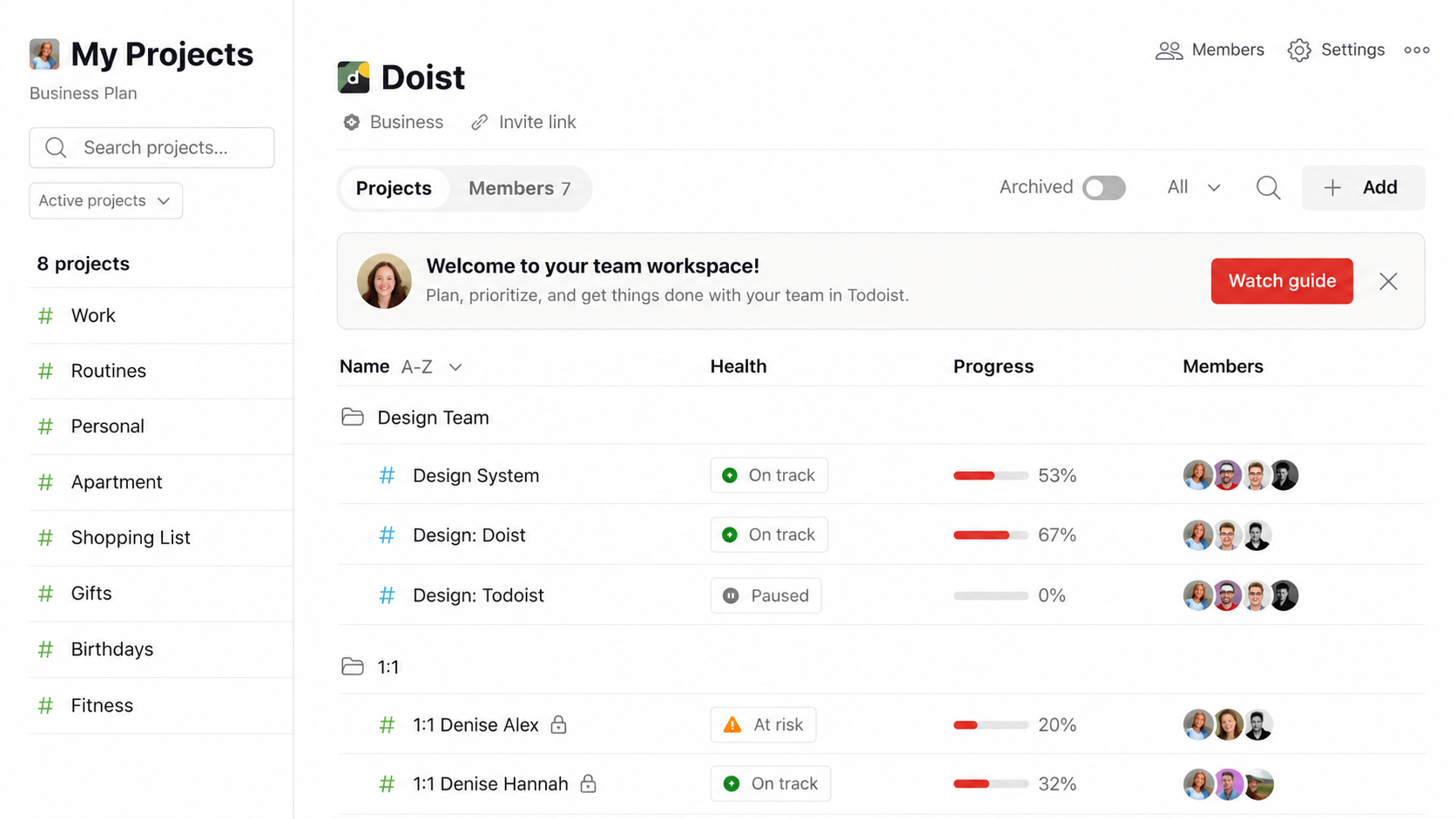
Not a moving app. Still one of the best moving apps for planning a stress-free relocation if two adults are splitting tasks. Make one project called “Move,” add due dates, and split the utility calls and the school records between you.
The free beginner plan gives you 5 projects and task reminders, and you can share a project with up to 5 people. You’ll build the list yourself, but copying MoveAdvisor’s timeline into it takes about 15 minutes.
5. magicplan
Magicplan scans a room with your phone’s camera and draws a floor plan with measurements. Phones with LiDAR scan faster and more accurately. Use it at the new place before moving day so you know whether the sectional fits the living room wall. Or whether it doesn’t.
That answer is worth more than any packing tip. A couch that won’t fit through the door costs you a sale, a dump fee, or a very bad afternoon.
It’s free for two projects, which covers most moves. After that, it runs on a subscription built for contractors, so don’t sign up for a paid plan unless you renovate for a living.
6. Facebook Marketplace
Every box you don’t pack is a box you don’t pay to move. Marketplace is still the fastest way to sell furniture locally, and local pickup sales cost nothing. Shipped sales are different: Meta takes a 10% selling fee, with a minimum of $0.80.
If you ask anyone who’s sold furniture there before a move, they’ll tell you the same three things. Price 20% below what you hope to get. Expect no-shows. Never accept “I’ll send a courier with a check.”
Start listing six weeks out, not six days.
7. U-Haul
U-Haul’s app runs Truck Share 24/7, which lets you pick up and return a truck after hours using only your phone. You take photos, answer a few questions, and grab the keys. It’s handy when you can’t leave work until 6 p.m.
The truth is, the app is also the top complaint. Customer reviews on U-Haul’s own location pages mention identity scans that fail, photo steps that loop, and pickups delayed an hour or more. Don’t use mobile pickup for the first time at 10 p.m., alone, in a dark lot.
Set up your account and verify your license two days early. And drop the keys in the drop box on return, since U-Haul’s own after-hours guide warns of a $50 charge if you don’t.
8. TaskRabbit
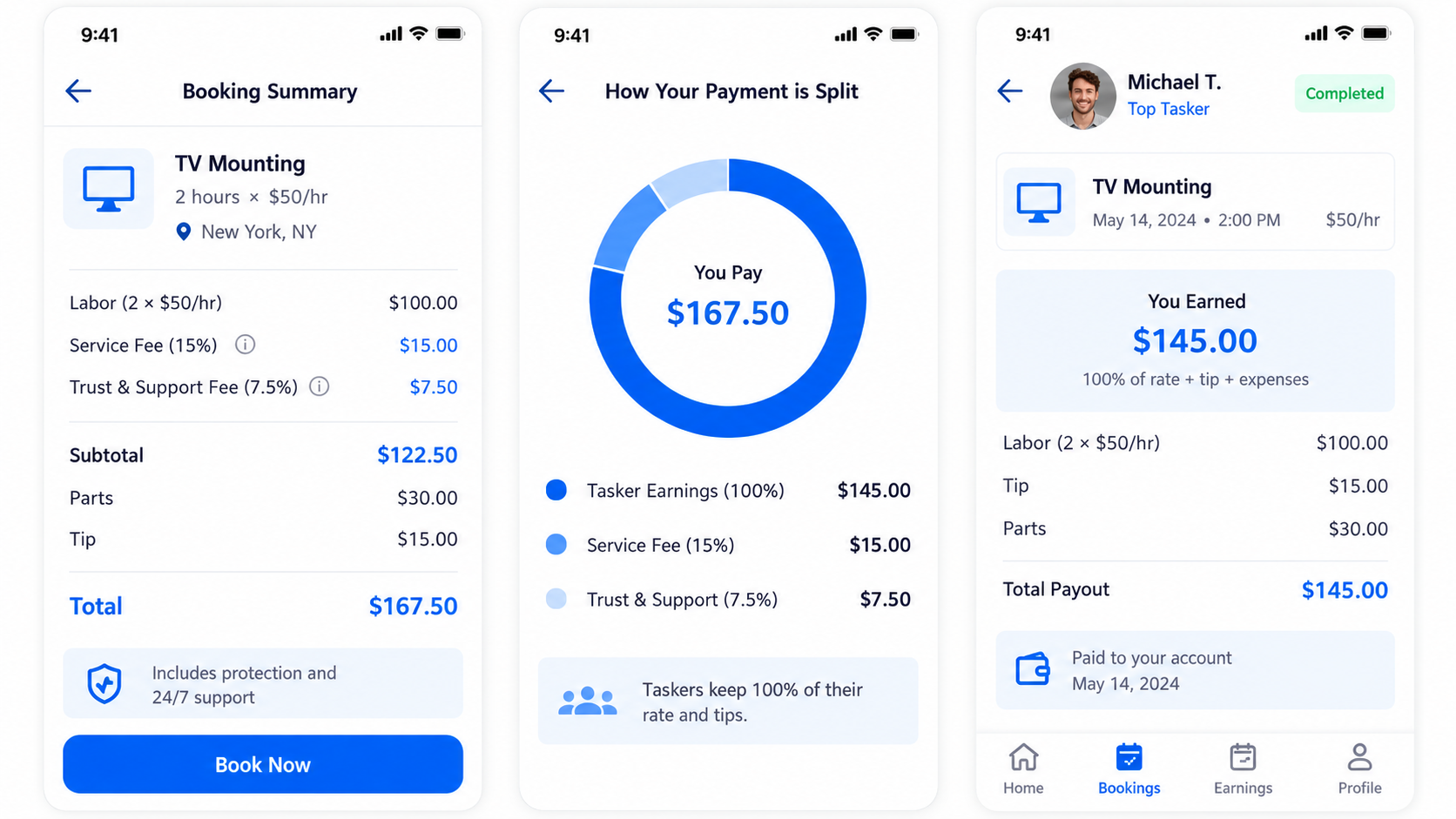
TaskRabbit gets you two strong people for loading, or someone to assemble the bed frame you forgot how to build. Taskers set their own hourly rates. You also pay a service fee and a Trust & Support fee on top, both calculated as a percentage of the hourly rate, so the price you see in search isn’t the final bill.
Here’s what most people miss. Taskers are independent contractors, not a moving company. That means you don’t get the liability coverage federal law requires interstate movers to offer. For a local load into a U-Haul, that’s usually fine. For a cross-country move with a piano, hire a licensed mover.
9. Updater
Updater handles the boring stuff: utilities, internet, insurance, mail forwarding, and driver’s license updates, all in one checklist. It’s free to use, and the company says it handles over 25% of US household moves each year.
There’s a catch, though.
You can’t just download it and sign up. Someone helping with your move (your real estate agent, apartment community, or moving company) has to invite you. Ask your agent or leasing office for an invite the week you sign. If nobody offers one, MoveAdvisor plus Todoist covers most of the same ground.
10. USPS Change of Address
Mail forwarding is the one task on your list of moving apps for planning a stress-free relocation that only the post office should handle. Online, USPS charges a $1.25 identity verification fee, and you’ll verify with a code sent to your phone. In person at a post office with a photo ID, there’s no fee at all.
Big warning: lookalike websites charge $20 to $30 for the same form. Type USPS.com yourself. Don’t click an ad. If your card shows more than the official fee, you hit a scam site.
The Free Tool Most Lists Skip: FMCSA’s Protect Your Move
None of these moving apps for planning a stress-free relocation will tell you whether a mover is legit. The Federal Motor Carrier Safety Administration will. At ProtectYourMove.gov you can look up a mover’s USDOT number, confirm its registration, and see its complaint history.
FMCSA logged 3,907 moving complaints in 2023. Florida alone accounted for 1,871 of them.
Three rules from FMCSA’s own fraud guide:
- Skip any interstate mover that doesn’t show a USDOT number or any broker without an MC number.
- Get estimates in writing. Never sign blank or incomplete papers.
- Read the coverage section before signing. FMCSA calls picking the wrong liability option a common pitfall.
Moving for a new job? Ask HR what the company covers first. Many executive relocation packages pay for professional packing, which changes which apps you even need.
Marketing Gimmicks You Can Skip
Some moving app features sound great and do little:
- “Instant quote” buttons on broker apps: Many collect your phone number and sell it as a lead. Expect 15 calls by dinner.
- Paid “premium” moving checklists: Free timelines from MoveAdvisor or FMCSA cover the same tasks.
- AR “virtual staging” upgrades: Fun to play with. A free magicplan scan answers the only question that matters: does the furniture fit?
Put your money into Full Value Protection on an interstate move, decent boxes (not free liquor store boxes for heavy books), and two hours of extra labor on moving day. That last one saves more backs and friendships than any app.
What People Complain About After the Move
Six months later, the gripes sound the same:
- “I stopped updating the inventory halfway”: Fix: track boxes, not items. Thirty entries beat 300 abandoned ones.
- “Mail still went to the old place”: Forwarding takes time, and some senders ignore it. Update banks and subscriptions directly too.
- “I paid for an app I used once”: Cancel trials the week you unpack. Set a reminder in Todoist.
- “The cheap quote doubled on delivery”: Usually a mover that never got verified. That one isn’t an app problem.
For a short-distance move, the shortcut list is simpler. This stress free local moving guide for homeowners walks through it step by step.
Frequently Asked Questions (FAQs) on Moving Apps for Planning Stress-Free Relocation
What is the best free moving app?
MoveAdvisor for planning and Encircle for inventory. Both cost nothing and cover most moves together.
How early should I start using moving apps?
About eight weeks out for a long-distance move. For a local move, four weeks usually works.
Is Updater free?
Yes, but you need an invitation from your agent, apartment community, or moving company.
How much does USPS change of address cost?
$1.25 online for identity verification. It’s free if you file in person at a Post Office with ID.
How do I check if a moving company is legitimate?
Search its USDOT number on ProtectYourMove.gov and review its complaint history before paying anything.
Can I use TaskRabbit for a long-distance move?
Only for loading and unloading. Taskers aren’t a licensed interstate moving company.
Final Thoughts
You don’t need ten apps. You need three that match your move. Pick one planner, one inventory app, and one way to get things on a truck, then add USPS and a mover check on top. That’s the whole trick to using moving apps for planning stress-free relocation without adding a new headache.
Start eight weeks out. Verify every mover. Cancel every trial the day you finish unpacking.





















