

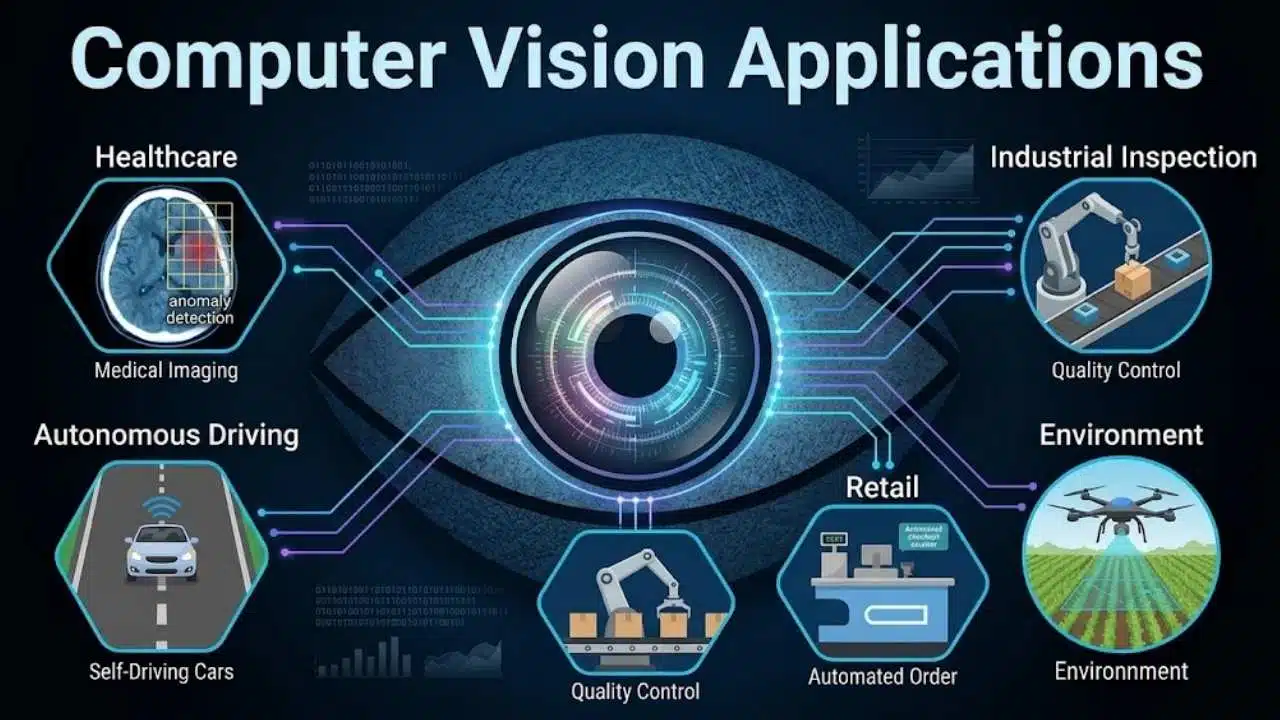
Computer vision has a branding problem. Mention it in a product meeting, and surveillance dominates the conversation. That bias overlooks the true scope of modern computer vision applications, which analyze everything from agricultural crops and industrial machinery to high-resolution medical scans—without ever processing a human face.
For product leaders and tech founders, confusing vision AI with biometric tracking distorts strategy. Real-value computer vision applications transform raw visual data into automated operational actions: flagging manufacturing defects, routing logistics parcels, or extracting structured data from complex documents.
By deploying specialized deep learning algorithms and image segmentation, these non-biometric tools allow enterprises to scale quality control, streamline workflows, and unlock massive operational efficiency.
Our Selection Criteria
Each application had to meet most of these conditions:
- The visual task can be defined precisely.
- A prediction leads to a measurable decision or action.
- Real implementations or authoritative technical documentation exist.
- Human review or another safe fallback can be built into the workflow.
- The practical limitations can be explained without relying on marketing claims.
Applications operating in controlled environments generally appear more mature than those expected to interpret roads, farms, public spaces, or other constantly changing scenes.
The Detail Most Computer Vision Demos Miss
A convincing demonstration proves that a model can recognize selected examples. It does not prove that the full system will survive daily operations.
Lighting changes. Cameras shift. Suppliers redesign packaging. Rain covers a surface. A document arrives folded, stamped, or photographed from an angle. These ordinary variations create more trouble than the clean images shown in most presentations.
Teams also need to measure false positives and false negatives separately. Rejecting a good component creates waste; accepting a defective one may create a safety risk. The tolerable balance changes with the application.
Privacy deserves attention even when biometric identification is absent. Cameras in stores, workplaces, vehicles, and public spaces may still capture personal data. Local rules can affect the lawful basis for recording, signage, retention, access, and privacy-impact assessments.
9 Computer Vision Applications Worth Considering
1. Automated Quality Inspection in Manufacturing
A factory line gives computer vision something most real-world environments cannot: control. Lighting, background, camera position, and product movement can often be standardized, making manufacturing one of the more practical places to begin.
Visible-light cameras can find scratches, contamination, missing parts, or assembly errors. X-ray and computed-tomography systems can expose internal faults, although they require specialist equipment. Object detection locates a suspected defect, while segmentation can mark its exact shape.
The difficult part is not finding an obvious crack. It is catching subtle defects without rejecting too many acceptable products. Teams should start with one product family, one line, and a short list of defects that inspectors define consistently. Uncertain cases should remain with human reviewers until the system has been tested against normal production variation.
2. Medical Image Analysis and Clinical Support
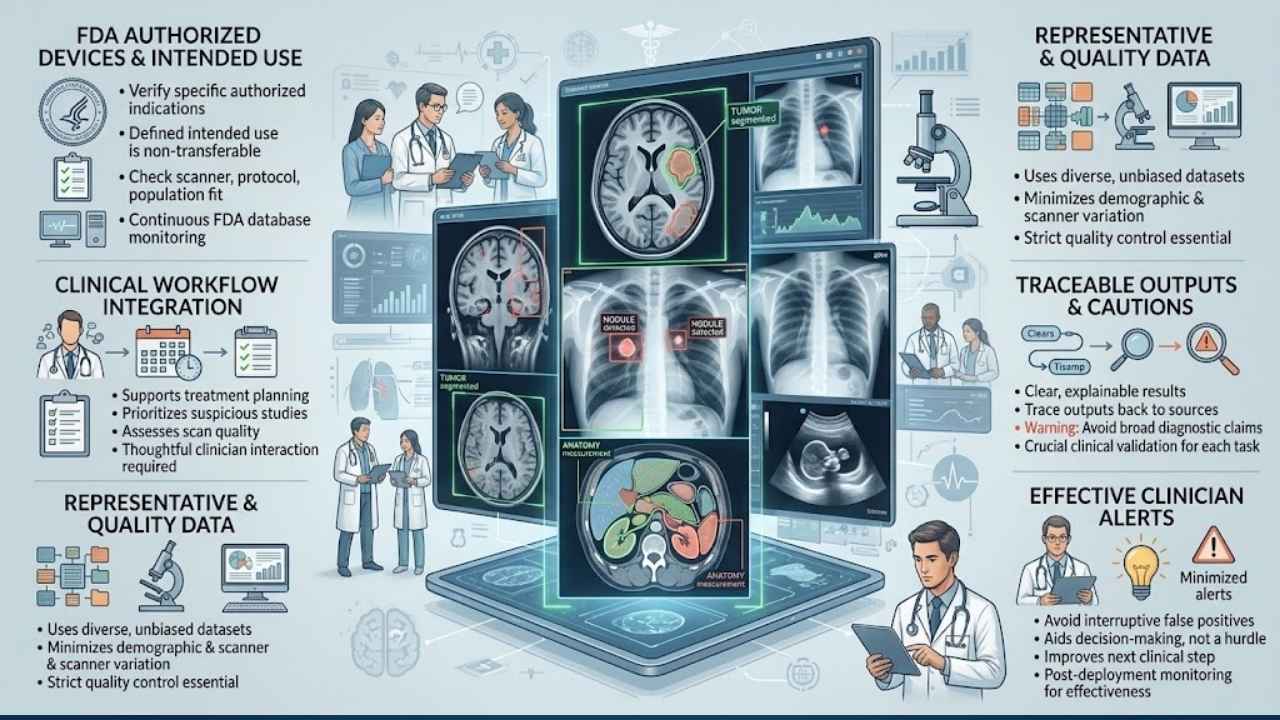
Medical imaging deserves stricter scrutiny than most applications on this list. Computer vision can segment organs, measure anatomical structures, assess scan quality, highlight suspicious regions, prioritize studies, or support treatment planning. A technically impressive result is not enough when errors could influence patient care.
The FDA maintains a periodically updated, non-comprehensive list of authorized AI-enabled medical devices, including many radiology products. Each device has a defined intended use. Authorization for one type of scan or clinical task does not establish suitability for every scanner, protocol, population, or hospital.
Broad claims about diagnosing any condition from any scan should be treated cautiously. A credible product tackles a narrower workflow, such as measuring a particular structure or flagging a defined finding for review.
Representative data, traceable outputs, clear user information, monitoring after deployment, and thoughtful clinician interaction are essential. An alert that interrupts a clinician without improving the next decision is not a useful clinical product.
3. Robotic Picking and Parcel Sortation
A warehouse robot must locate a package, judge its orientation, find a workable grasp point, lift it without damage, and confirm where it was placed. Recognition is only one part of the job.
Amazon’s Cardinal system uses computer vision to select a parcel from a pile, lift it through suction, read its label, and place it into the appropriate cart. Amazon currently states that Cardinal can handle packages weighing up to 50 pounds.
Crushed cartons, loose wrapping, reflective surfaces, and overlapping parcels remain harder than ordinary boxes. Teams evaluating warehouse automation should track successful picks per hour, interventions, product damage, and recovery time. A high recognition score is not very helpful if employees regularly have to rescue the robot.
4. Precision Agriculture and Targeted Treatment
Agricultural vision systems can distinguish crops from weeds, count plants or fruit, assess visible crop condition, and guide equipment through fields.
John Deere’s See & Spray connects visual detection directly to machinery. Cameras and machine-learning models identify weeds among crops, allowing the system to activate selected nozzles rather than treating the whole field in the same way. Supported crops and capabilities vary across models and markets, so regional product details need checking before purchase.
The field is less predictable than a factory. Crop type, growth stage, weed species, weather, dust, and lighting can all affect recognition. Models should be validated under local growing conditions rather than assumed to transfer cleanly from another crop or region.
5. Driver Assistance and Road Perception
Vehicle cameras can interpret lane markings, pedestrians, traffic signs, nearby vehicles, and obstacles. That information supports lane-departure warnings, lane centering, automatic high beams, and some collision-warning or braking functions.
The warning is straightforward: assistance should not be marketed as autonomy. Under the commonly used automation levels, Level 0–2 features still require the driver to monitor the road and remain responsible for operating the vehicle.
Road perception is unusually difficult to validate. Faded markings, construction zones, darkness, glare, heavy rain, unusual vehicles, and partial obstruction can expose weaknesses hidden by an overall accuracy score. Testing must be broken down by road, weather, lighting, distance, and object type. Product language should be just as carefully controlled as model behavior.
6. Document Capture and Workflow Automation
Document processing is probably the least glamorous entry here and one of the easiest to underestimate. Computer vision can perform optical character recognition, detect page structure, interpret tables, find key-value pairs, classify files, and split a PDF containing several document types. That supports invoice processing, customs paperwork, insurance claims, medical forms, loan applications, and archive digitization.
Extraction alone saves little. The value appears when verified fields reach an accounting platform, claims system, database, or approval queue.
Real documents arrive blurred, rotated, stamped, folded, or photographed at an angle. Tables break across pages, handwriting varies, and suppliers change templates. Review thresholds should reflect the consequence of an error: an uncertain description may be acceptable, while an uncertain bank-account number or invoice total should stop the workflow.
7. Checkout-Free Retail and Product Tracking
Checkout-free technology makes the most sense where short demand surges create long queues, such as stadiums, airports, campuses, and busy convenience locations. In a quiet store, the installation may solve a problem that barely exists.
The computer-vision version of Amazon’s Just Walk Out system uses cameras, object recognition, machine learning, and supporting sensors to detect products taken from or returned to shelves. Amazon states that this tracking system distinguishes shoppers without collecting or using their biometric information.
There is an important distinction. Amazon One, the optional palm-based service available at some locations, is a separate biometric system. Current Just Walk Out installations can also use RFID, so retailers should not assume every deployment requires the same camera and sensor configuration.
Similar packaging, misplaced items, shopping groups, obstructed views, and layout changes still require careful testing. Retailers should measure billing corrections, throughput, customer-support cases, and operating cost rather than relying on the novelty of removing a checkout lane.
8. Infrastructure Inspection and Maintenance Planning
Inspecting bridges, towers, roads, and industrial structures can require scaffolding, traffic restrictions, or work near water and at height. Drones and inspection vehicles can collect images from locations that are slower or riskier to reach manually.
Computer vision can flag cracks, corrosion, spalling, vegetation growth, and visible changes between inspections. The most useful systems organize evidence and direct qualified inspectors toward possible problem areas. They should not issue unsupervised declarations that a structure is safe.
FHWA-reviewed projects have identified crack-like artifacts, inconsistent lighting, surface-color changes, overlapping defects, and variation in defect size and direction as practical problems. Image resolution and collection angle can determine whether the resulting analysis is useful. In this field, better data collection may matter more than switching to a newer model.
9. Satellite Imagery and Environmental Monitoring
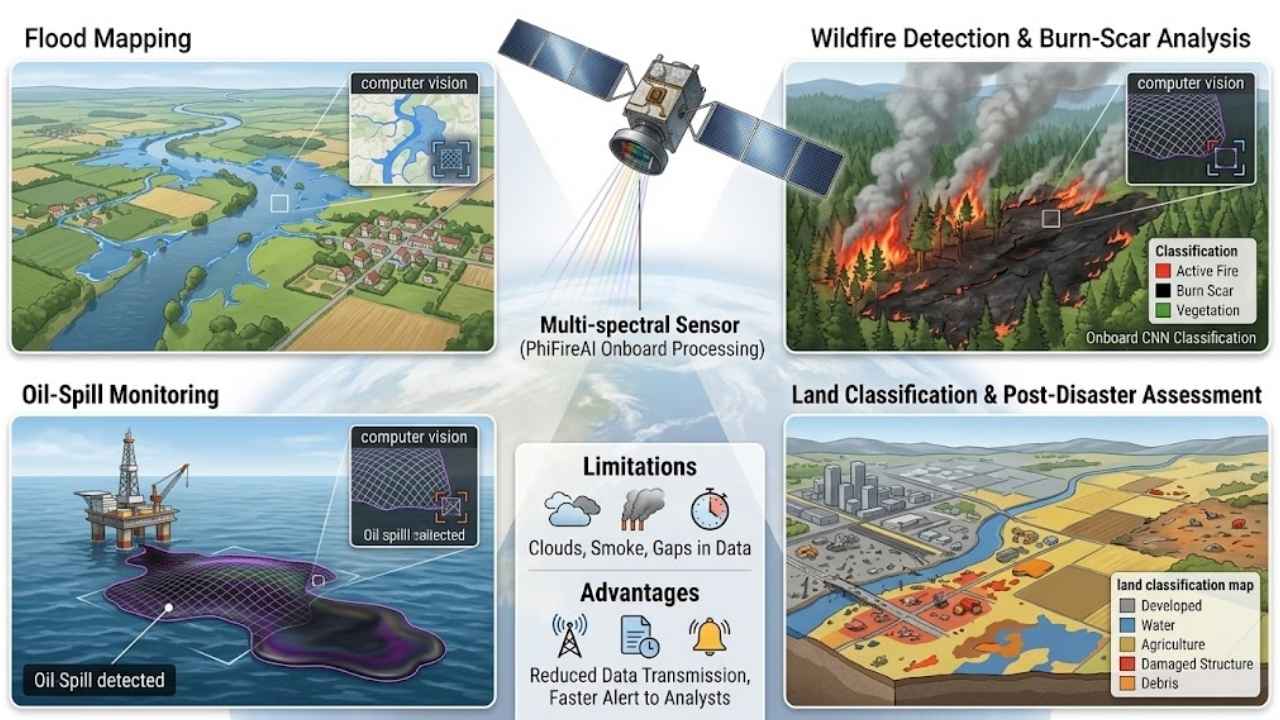
Earth observation is more specialized, but it can cover areas too large, remote, or dangerous for continuous ground inspection. Computer vision can support flood mapping, wildfire detection, burn-scar analysis, oil-spill monitoring, land classification, and post-disaster assessment.
The European Space Agency’s PhiFireAI application demonstrates onboard analysis of multispectral images. It uses convolutional neural networks to classify areas containing wildfire, burnt land, water, or unaffected terrain.
The system should be understood as a technology demonstration, not proof that automated classifications can be used without confirmation. Clouds, smoke, regional vegetation, sensor differences, limited ground truth, and the interval between satellite passes can all affect usefulness.
Onboard screening remains valuable because it can reduce the amount of imagery that must be transmitted and reviewed, helping potentially important observations reach analysts sooner.
Computer Vision Applications at a Glance
The most practical starting point is rarely the most dramatic application. Controlled scenes and clear review paths usually matter more than technical novelty.
| Application | Primary Visual Task | Strongest Fit | Main Deployment Friction |
| Manufacturing inspection | Detect or segment defects | Controlled production lines | Rare defects and false rejects |
| Medical imaging | Segment, measure, or flag findings | Narrow clinical workflows | Regulation and population differences |
| Warehouse robotics | Locate, classify, and grasp objects | Repetitive parcel handling | Irregular or occluded packages |
| Precision agriculture | Distinguish plants and guide treatment | Defined field operations | Seasonal and regional variation |
| Driver assistance | Interpret lanes, people, and obstacles | Specific assistance functions | Uncontrolled road conditions |
| Document processing | Extract text, layout, and fields | High-volume administrative work | Poor scans and changing templates |
| Checkout-free retail | Track product interactions | High-throughput stores | Hardware and operational complexity |
| Infrastructure inspection | Find and compare visible damage | Inspector-led asset management | Image quality and false positives |
| Environmental monitoring | Classify changes in remote imagery | Large-area screening | Clouds, timing, and ground truth |
Manufacturing inspection and document processing are usually easier starting points because the input and downstream workflow can be constrained. Medical, vehicle, and infrastructure products carry higher consequences and require specialist safety, regulatory, or engineering knowledge.
How to Choose the Right Computer Vision Application
Before approving a pilot, settle five questions.
What happens after detection?
A prediction must change a decision, transaction, inspection, or physical action.
How stable is the scene?
Fixed lighting, camera distance, and background reduce the number of conditions the model must handle.
What does each error cost?
Missing a dangerous defect and flagging an acceptable one need different thresholds and escalation rules.
Who handles uncertainty?
Assign human review, manual inspection, or a safe system state before launch.
What will change later?
New suppliers, products, cameras, document templates, crops, scanners, and operating conditions can make the original test data less representative.
Teams new to the field should favor a narrow workflow with a stable scene, measurable outcome, and manageable fallback. A modest system that reliably handles one repetitive task is more valuable than a broad platform that performs well only during demonstrations. That discipline is what turns promising computer vision applications into dependable products.
Final Thoughts
The strongest computer vision applications solve a narrow, expensive, and measurable problem. Manufacturing inspection and document processing often provide sensible starting points because their inputs can be controlled and their outputs reviewed. Medical imaging, driver assistance, and infrastructure inspection can offer greater impact, but they also carry higher safety and regulatory demands.
Before investing, define the action that follows each prediction, the cost of mistakes, and who handles uncertain cases. Start with one workflow and test it under ordinary operating conditions, not just carefully prepared demonstrations. A focused system that performs reliably is more valuable than an ambitious platform that promises to understand every image but cannot be trusted when conditions change.





















