SaaS email marketing is easy to underestimate because email feels old compared with AI tools, product analytics, in-app messaging, and shiny growth dashboards. Then reality hits. A user signs up and never activates. A free trial starts, but nobody reaches the first value moment. A customer forgets the product exists after week two. A team admin stops inviting users. A payment fails. A renewal comes close, but the customer cannot remember what value they received.
Suddenly, email does not feel old. It feels like one of the few channels that can still bring the right user back at the right moment. That is why SaaS email marketing is not just about newsletters.
It is about helping users move through the full customer journey. Good emails guide people from signup to activation, from activation to adoption, from adoption to retention, and from retention to expansion. Bad emails do the opposite. They interrupt, repeat, oversell, confuse, or arrive when the user no longer cares. The best SaaS email programs do not send more emails. They send more useful emails.
They connect product behavior with customer intent. They know when someone needs onboarding help, when a trial user needs a nudge, when a customer is at risk, when a power user is ready for more, and when silence is better than another “just checking in” message.
What Is SaaS Email Marketing?
SaaS email marketing is the use of email to guide prospects, users, trial accounts, customers, and inactive subscribers through the SaaS customer journey.
It includes newsletters, onboarding emails, product education, lifecycle campaigns, upgrade prompts, renewal reminders, reactivation emails, product announcements, customer success messages, and automated behavioral sequences. For SaaS companies, email has a different job than it does for many other businesses.
A retail email may push a seasonal sale. A media email may drive a click to a new article. A SaaS email often has to move someone toward a product action.
That action might be:
- Confirming an email address
- Completing setup
- Inviting a teammate
- Connecting an integration
- Creating a first project
- Importing data
- Using a core feature
- Starting a trial
- Upgrading a plan
- Booking a demo
- Recovering a failed payment
- Renewing an annual contract
- Coming back after inactivity
This is why SaaS email marketing works best when it is connected to product behavior.
A generic campaign says, “Here is what we want to promote.”
A strong SaaS email says, “Here is what this user needs next.”
Why SaaS Email Marketing Still Matters
SaaS teams have more channels than ever, but email still matters because it reaches users outside the product. That is important because users do not live inside your dashboard.
They get busy. They forget. They sign up during a meeting and plan to return later. They test three tools at once. They need a reminder. They need a clearer next step. They need proof that the product is worth more attention. Email can help with that if it is handled properly.
Good SaaS email marketing can improve:
- Trial activation
- Product onboarding
- Feature adoption
- User education
- Demo bookings
- Free-to-paid conversion
- Customer retention
- Renewal preparation
- Expansion revenue
- Failed payment recovery
- Customer feedback
- Product engagement
- Churn prevention
But email can also hurt the customer experience if it is lazy. Too many SaaS emails sound like they were written for the company, not the user. They announce features without explaining why they matter. They send educational content to people who have not completed setup. They ask inactive users to upgrade before they understand the product. They send the same sequence to every segment.
That is not email marketing. That is inbox clutter.
The Biggest Mistake in SaaS Email Marketing
The biggest mistake is treating email like a broadcast channel when it should be a lifecycle channel. A SaaS user’s needs change quickly.
A new signup needs help reaching the first value. A trial user needs urgency and proof. An activated user needs habit-building. A team admin needs adoption support. A dormant user needs a reason to return. A paying customer needs value reinforcement. A renewal-stage account needs evidence. A power user may need expansion guidance.
If everyone receives the same emails, most of them will be poorly timed. That is why an email automation SaaS strategy should start with the customer journey, not the campaign calendar.
Before writing a single email, ask:
- Who is receiving this?
- What stage are they in?
- What have they already done?
- What have they not done yet?
- What action should they take next?
- Why would that action help them?
- What friction might stop them?
- What should happen if they ignore the email?
That is where SaaS email becomes useful.
SaaS Email Marketing Best Practices That Actually Work
Use these best practices to build email programs that support activation, retention, and revenue without annoying users.
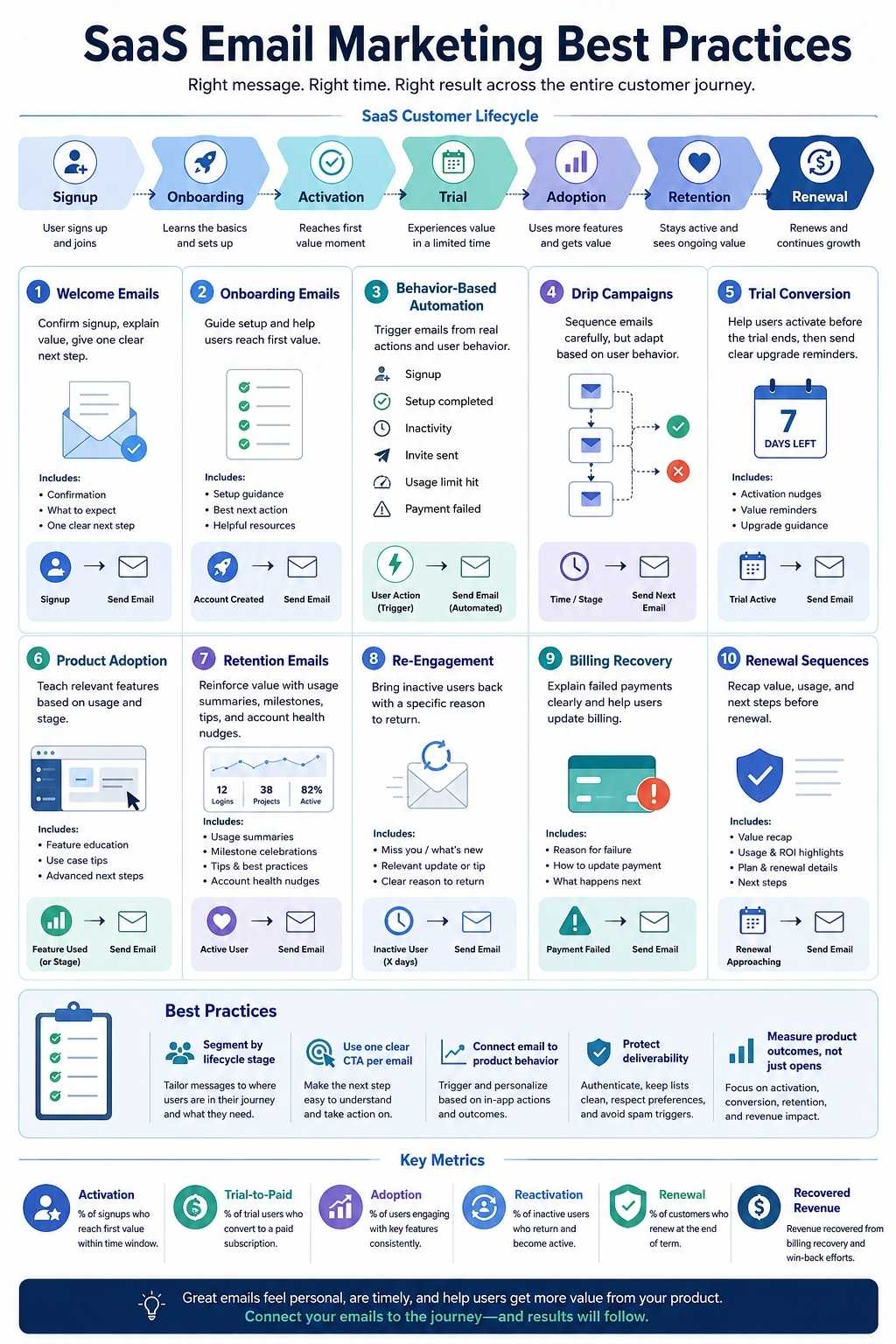
1. Map Emails to the SaaS Customer Journey
Do not start with subject lines. Start with the journey.
A SaaS customer journey usually includes:
| Stage | Email Goal |
| Lead capture | Build trust and explain the problem |
| Signup | Welcome user and guide the first step |
| Onboarding | Help the user reach the first value |
| Activation | Drive the key product action |
| Trial evaluation | Prove value before the trial ends |
| Adoption | Build repeat usage and habits |
| Retention | Reinforce outcomes and reduce churn risk |
| Expansion | Introduce higher-value use cases |
| Renewal | Help the customer see value before renewal |
| Reactivation | Bring inactive users back with a clear reason |
| Cancellation or churn | Learn why users leave and offer relevant next steps |
Each stage needs a different type of email. A welcome email should not sound like a sales pitch. A trial-ending email should not ignore what the user did during the trial. A product announcement should not go to users who have not completed onboarding unless it helps them take the next step.
When email matches the journey, it feels helpful.
When email ignores the journey, it feels random.
2. Build SaaS Email Sequences Around User Behavior
The best SaaS email sequences respond to what users do or fail to do. This matters because time-based emails alone can be misleading.
For example, sending “Try our advanced reporting feature” on day three sounds fine until you realize the user never connected their data. Sending “Your trial is ending soon” is useful, but it is more powerful if the message changes based on whether the user has activated.
Behavior-based triggers may include:
- User signed up but did not verify email
- User verified email, but did not complete setup
- User started onboarding but abandoned step two
- User created a workspace but did not invite a teammate
- User invited teammates, but nobody became active
- User connected data, but did not generate a report
- The user used a feature once but did not return
- User hit a usage limit
- User visited the pricing page
- User became inactive
- Payment failed
- Renewal date is approaching
- The customer reached a success milestone
This turns email into guidance.
Instead of asking, “What email should we send on day five?”
Ask, “What does this user’s behavior tell us they need next?”
3. Start With a Strong Welcome Email
The welcome email is not just a greeting. It sets the tone for the entire product experience.
A weak welcome email says:
“Thanks for signing up. Explore your dashboard.”
A stronger welcome email says:
“Here is the first step that will help you get value.”
Your welcome email should do three things:
- Confirm the user made the right decision
- Remind them what problem the product helps solve
- Give them one clear next action
Do not overload the welcome email with five links, three announcements, two videos, and a founder story. The user has just signed up. Their attention is fragile.
A good SaaS welcome email structure:
| Element | Purpose |
| Short opening | Reassure the user |
| Value reminder | Explain what they can achieve |
| One next step | Move them toward activation |
| Support option | Show help is available |
| Simple CTA | Bring them back into the product |
Example CTA ideas:
- Complete your setup
- Create your first project
- Connect your data
- Invite your team
- Build your first report
- Start your first campaign
- Open your dashboard
The welcome email should not try to explain the whole product. It should help the user begin.
4. Focus On the First Value Moment
SaaS email marketing should be built around the first value moment. The first value moment is when the user sees why the product matters.
Examples:
| SaaS Type | First Value Moment |
| CRM SaaS | User imports contacts and manages a deal |
| Email marketing SaaS | User creates and schedules a campaign |
| Project management SaaS | User creates a project and assigns work |
| Analytics SaaS | User connects data and sees a useful dashboard |
| AI writing SaaS | User generates a usable draft |
| Support SaaS | Team receives and resolves a ticket |
| Finance SaaS | User imports transactions or creates a report |
| HR SaaS | User posts a job or creates an employee workflow |
Every onboarding email should help the user move closer to that moment. This is where many drip campaigns SaaS teams create fail. They teach features in the order the company thinks about them, not the order the user needs them.
A better approach:
- Email 1: Start the first important task
- Email 2: Remove the biggest setup blocker
- Email 3: Show a quick example or template
- Email 4: Encourage the first meaningful action
- Email 5: Reinforce progress and next step
If the user reaches the first value, change the sequence. Do not keep sending beginner emails to activated users.
5. Segment Users Before You Automate
Email automation without segmentation creates noise at scale. Segmentation helps you send emails based on who the user is, what they want, and how they behave.
Useful SaaS segments include:
- New leads
- Free trial users
- Freemium users
- Paid customers
- Enterprise prospects
- Self-serve users
- Product-qualified leads
- Inactive users
- Power users
- Admin users
- End users
- Team accounts
- Monthly customers
- Annual customers
- At-risk customers
- Expansion-ready accounts
- Recently canceled users
You can also segment by:
- Use case
- Industry
- Company size
- Acquisition source
- Plan type
- Lifecycle stage
- Product behavior
- Feature usage
- Support history
- Customer health score
- Trial status
- Billing status
The goal is not to create hundreds of segments. The goal is to avoid sending the wrong message to the wrong person.
For example:
- A founder testing the product needs different content from an enterprise admin.
- A power user needs different content from someone stuck in setup.
- A monthly customer at risk needs different content from an annual customer preparing for renewal.
Segmentation turns email from broadcast into relevance.
6. Use Drip Campaigns Carefully
Drip campaigns SaaS teams use often follow a fixed schedule.
Day 0: Welcome
Day 1: Feature email
Day 3: Case study
Day 5: Demo invite
Day 7: Trial reminder
That can work as a starting point, but fixed drips become weak when they ignore behavior. A better SaaS drip campaign should have conditions.
For example:
- If the user completes setup, skip the setup reminder.
- If the user has not used the core feature, send quick-start guidance.
- If the user invites a teammate, send collaboration tips.
- If the user hits a usage limit, send an upgrade explanation.
- If the user books a demo, pause promotional emails.
- If the user becomes paid, stop trial-ending emails.
- If the user cancels, move them to the feedback or win-back flow.
The more your emails respond to behavior, the less they feel automated. That is the strange truth of SaaS email automation. Good automation feels more human because it is better timed.
7. Write Emails Around One Clear Action
Most SaaS emails try to do too much. They announce a feature, link to a blog post, invite the user to a webinar, promote a template, ask for feedback, and suggest booking a demo. That creates decision fatigue. Each email should usually have one main job.
Examples:
- Finish setup
- Try one feature
- Invite one teammate
- Watch one short tutorial
- Read one relevant guide
- Book one onboarding call
- Upgrade after hitting a limit
- Update billing details
- Review account health
- Share feedback
One email can include supporting information, but the main CTA should be obvious. If the user has to think, “What am I supposed to do here?” the email is probably too crowded.
8. Make Product Education Contextual
Product education is useful only when it matches the user’s stage. A new user does not need an advanced reporting guide before they complete setup. An inactive user does not need a feature roundup before they remember why they signed up. A power user does not need a beginner tutorial. Contextual education means sending the right lesson at the right moment.
Examples:
| User Behavior | Useful Email |
| User has not completed setup | Short setup guide |
| User created the first project | Tips to organize workflow |
| User invited team | Collaboration best practices |
| User used one feature repeatedly | Related advanced feature |
| User hit usage limit | Upgrade explanation |
| User has not logged in recently | Specific reason to return |
| Customer nearing renewal | Value recap and usage summary |
This is especially important for complex SaaS products. If users do not understand the product, they do not adopt it. If they do not adopt it, they do not retain. If they do not retain, acquisition becomes expensive. Email education should reduce friction, not create homework.
9. Connect Email With In-App Behavior
Email should not operate separately from the product. If the product says one thing and email says another, users get confused.
For example, if a user completes onboarding in the app, the next email should not say, “Complete your onboarding.” If a user has already upgraded, they should not receive “Your trial is ending.” If a user has never created a project, they should not receive a feature email about advanced reporting.
This requires product data. At minimum, connect email automation to events such as:
- Account created
- Email verified
- Setup started
- Setup completed
- First key action completed
- Team invite sent
- Integration connected
- Feature used
- Usage limit reached
- Trial started
- Trial ending
- Plan upgraded
- Payment failed
- Account inactive
- Renewal approaching
- Cancellation requested
The email should reflect what the user has actually done. This makes the customer feel understood. It also protects your brand from looking disorganized.
10. Build Trial Emails Around Activation, Not Pressure
Free trial SaaS emails often become too aggressive. “Your trial is ending.” “Upgrade now.” “Last chance.” “Do not miss out.” Those emails may create urgency, but urgency without value does not convert well. Trial emails should help users experience value before asking them to pay.
A strong SaaS trial sequence may include:
| Timing | Email Goal |
| Immediately after signing up | Welcome and first action |
| Day 1 | Help the user complete the setup |
| Day 2 or 3 | Show use case or template |
| Mid-trial | Highlight progress or missing steps |
| Before the trial ends | Explain the value achieved and the next steps |
| Final day | Clear upgrade reminder |
| After the trial ends | Offer help, demo, or extension if appropriate |
The message should change based on activation.
Activated trial user:
“You created your first workflow and invited two teammates. Here is what you can keep using on the paid plan.”
Unactivated trial user:
“You have not completed the setup yet. Here is the fastest way to test whether this is a fit.”
Those are very different emails. Treating them the same wastes the trial window.

11. Use Lifecycle Emails for Retention
SaaS email marketing should not stop after conversion. Many companies over-invest in trial emails and under-invest in customer retention emails. That is a mistake. Once a user becomes a customer, email can help reinforce value and prevent churn.
Useful retention emails include:
- Usage summaries
- Milestone emails
- New feature education
- Role-based tips
- Customer success check-ins
- Account health alerts
- Renewal preparation emails
- Team adoption nudges
- Training invitations
- Product updates tied to use cases
- Feedback requests
- Billing reminders
- Re-engagement campaigns
A good retention email answers:
“Why should this customer keep caring?”
For example:
- “Your team completed 84 tasks this month.”
- “You saved three hours using automation.”
- “Your latest report is ready.”
- “Three invited users have not joined yet.”
- “Your annual renewal is coming. Here is what your team used this year.”
Value needs to be visible. If customers forget the value, they may cancel even when the product helped them.
12. Send Product Announcements With User Relevance
Most SaaS product announcement emails are written from the company’s point of view.
“We launched a new feature.”
That is not enough. Users care about what the feature helps them do.
A better product announcement explains:
- What changed
- Who it helps
- Why it matters
- How to use it
- What action to take next
Do not send every announcement to everyone. Segment by relevance.
For example:
- Send admin controls update to admins.
- Send reporting update to accounts using reports.
- Send integration update to users who requested or use that tool.
- Send advanced automation update to activated users, not brand-new signups.
Product emails should increase adoption, not just show that the roadmap is active.
13. Use Re-Engagement Emails Before Users Fully Disappear
Inactive users rarely come back because of a generic “We miss you” email. They come back when the email gives them a practical reason. A re-engagement email should be specific.
Instead of:
“We noticed you have not logged in.”
Try:
“You started setting up your dashboard, but did not connect your data. Connect one source to see your first report.”
Or:
“Your team has three unfinished projects. Here is the fastest way to organize them.”
Re-engagement triggers may include:
- No login in 7, 14, or 30 days
- Setup abandoned
- Trial user inactive
- Team members inactive
- Core feature unused
- Admin inactive
- Report not viewed
- Campaign not sent
- Workflow not completed
- Payment issue unresolved
The goal is not guilt. The goal is relevance. Give users a reason to return that connects to the value they originally wanted.
14. Create Expansion Emails Based on Product Signals
Expansion emails should be earned by behavior. Do not ask everyone to upgrade just because your revenue target needs it.
Look for signals such as:
- User hits a usage limit
- Team invites increase
- More projects are created
- Advanced reports are viewed
- Multiple users become active
- Storage or automation limits are reached
- Admin visits the billing page
- The customer uses the product regularly
- Customer requests a feature on a higher plan
- Customer asks about security, permissions, or integrations
A good expansion email connects the upgrade to the user’s actual need.
Example:
“Your team has reached the project limit on your current plan. Upgrading gives you more active projects and team permissions.”
That is stronger than:
“Upgrade now to unlock premium features.”
Expansion should feel like the next logical step, not a random upsell.
15. Do Not Ignore Transactional and Billing Emails
Transactional emails are part of the SaaS customer experience.
They include:
- Email verification
- Password reset
- Invite emails
- Payment receipts
- Failed payment emails
- Trial reminders
- Usage alerts
- Security notifications
- Account updates
- Cancellation confirmations
- Renewal notices
These emails need to be clear, reliable, and easy to understand. A failed payment email, for example, should not sound like a threat. It should explain what happened, what the user needs to do, and how to keep access.
A team invite email should make it obvious who invited the user and what to do next. A password reset email should be simple and fast.
Transactional emails are often boring, but they affect trust. If they are confusing, late, or poorly written, users notice.
16. Protect Deliverability From the Start
Email only works if people receive it. Deliverability should not be an afterthought.
SaaS teams should pay attention to:
- Domain authentication
- Sender reputation
- Spam complaint rate
- Bounce rate
- Unsubscribe rate
- List quality
- Email frequency
- Engagement signals
- Clear sender identity
- Clean subject lines
- Relevant content
- Easy unsubscribe
- Avoiding purchased lists
- Removing inactive or invalid addresses
- Separating transactional and marketing emails where appropriate
Do not wait until emails land in spam to care. Deliverability problems are easier to prevent than repair.
A few basic rules help:
- Send only to people who have a clear relationship with your product.
- Make unsubscribe easy.
- Avoid misleading subject lines.
- Keep lists clean.
- Monitor spam complaints.
- Use plain, honest copy.
- Do not send every email to every contact.
- Warm up new sending domains carefully.
- Avoid sudden volume spikes.
- Test important automated emails.
For SaaS, deliverability affects activation, billing, support, and retention. It is not just a marketing metric.
17. Keep Compliance Built Into the System
SaaS email marketing needs compliance discipline.
At a minimum, commercial emails should have:
- Honest sender information
- Clear subject lines
- Accurate message content
- A working unsubscribe option
- A valid business address where required
- Prompt opt-out handling
- Respect for user preferences
- Proper consent or lawful basis, where applicable
- Clear separation between marketing and essential transactional messages
Different countries and regions have different rules, so SaaS teams should get legal guidance for their markets.
But the practical principle is simple:
Do not trick users into receiving emails they do not want. Respecting inbox consent is not just about avoiding penalties. It also improves trust.
If users cannot easily unsubscribe, they are more likely to mark emails as spam. That hurts everyone.
18. Write Like a Helpful Product Guide, Not a Sales Brochure
SaaS email copy should be clear, specific, and useful.
Avoid vague lines like:
- “Unlock your potential”
- “Transform your workflow”
- “Take your productivity to the next level”
- “We are excited to announce”
- “Revolutionize your process”
These phrases do not help users act.
Better SaaS email copy is concrete:
- “Create your first report in 3 minutes.”
- “Invite one teammate to test approvals.”
- “Connect your calendar before scheduling.”
- “Your trial ends Friday. Here is what you have set up so far.”
- “You used 80% of your monthly automation limit.”
- “Your team has not completed onboarding yet.”
Good email copy tells the user what matters and what to do next. It respects their time.
19. Make Subject Lines Clear Before Clever
Subject lines do not need to be boring, but they should not mislead. For SaaS, clarity often beats cleverness because users are busy.
Good subject line examples:
- “Finish setting up your workspace”
- “Your first report is ready”
- “3 steps before your trial ends”
- “Invite your team to complete setup”
- “Your payment did not go through”
- “Your monthly usage summary”
- “New: Faster workflow approvals”
- “Your renewal is coming up”
Weak subject lines:
- “You won’t believe this”
- “Last chance!!!”
- “Big news inside”
- “Quick question”
- “We miss you”
- “Do not ignore this”
The subject line should match the email content. If users feel tricked, they may stop trusting your emails.
20. Balance Frequency With Customer Value
There is no perfect SaaS email frequency. A new trial user may need several emails in the first week. A long-term customer may only need occasional product updates, usage summaries, or renewal messages.
Frequency should depend on:
- Lifecycle stage
- Product complexity
- User activity
- Trial length
- Customer segment
- Email type
- User preferences
- Engagement level
- Support needs
- Renewal timing
A simple rule:
Send more when the user needs guidance. Send less when the user is already succeeding.
Watch engagement signals:
- Open rates
- Click rates
- Unsubscribes
- Spam complaints
- Replies
- Activation lift
- Feature adoption
- Conversion
- Churn impact
Do not judge email volume only by open rate. An email can get opened and still fail if it does not move the user toward value.
21. Measure Outcomes, Not Just Email Metrics
Email metrics are useful, but SaaS teams need to connect email to product outcomes.
Track:
| Email Metric | SaaS Outcome to Connect |
| Open rate | Subject line relevance |
| Click rate | CTA clarity |
| Set up email clicks | Onboarding completion |
| Trial emails | Trial activation and conversion |
| Feature emails | Feature adoption |
| Re-engagement emails | Return usage |
| Upgrade emails | Paid conversion or expansion |
| Renewal emails | Renewal rate |
| Failed payment emails | Recovered revenue |
| Education emails | Product adoption and support reduction |
The real question is not:
“Did users open the email?”
The better question is:
“Did this email help users take a valuable action?”
That is how email becomes part of SaaS growth.
22. Test Emails With a Clear Hypothesis
A/B testing is useful when you know what you are testing. Do not test random subject lines just to feel data-driven.
Test specific ideas:
- Does a shorter welcome email improve setup completion?
- Does a behavior-based nudge beat a time-based nudge?
- Does a product screenshot improve feature adoption?
- Does a value recap improve upgrade conversion?
- Does a plain-text email get more replies from enterprise leads?
- Does sending trial reminders earlier improve activation?
- Does a shorter onboarding sequence reduce unsubscribes?
Test one meaningful change at a time when possible. And remember: the winner is not always the email with the highest open rate. It is the email that helps the user move forward.
23. Build a Basic SaaS Email Automation System
If your SaaS email system is still messy, start simple. You do not need 40 workflows on day one.
Start with these core flows:
Welcome and Onboarding Sequence
Purpose: Help new users reach the first value.
Includes:
- Welcome email
- Setup reminder
- Quick-win guide
- Feature education
- Activation nudge
Trial Conversion Sequence
Purpose: Help trial users evaluate and convert.
Includes:
- Trial start email
- Use-case guide
- Progress reminder
- Trial-ending reminder
- Upgrade or demo CTA
Product Adoption Sequence
Purpose: Help activated users deepen usage.
Includes:
- Feature tips
- Templates
- Team invite prompts
- Integration education
- Advanced workflow guidance
Retention Sequence
Purpose: Keep customers engaged.
Includes:
- Usage summaries
- Success milestones
- Product education
- Account health alerts
- Customer feedback requests
Re-Engagement Sequence
Purpose: Bring inactive users back.
Includes:
- Inactivity reminder
- Unfinished setup nudge
- New value prompt
- Personal help offer
- Final preference check
Billing Recovery Sequence
Purpose: Reduce involuntary churn.
Includes:
- Failed payment alert
- Card update reminder
- Grace period notice
- Access impact reminder
- Recovery confirmation
Renewal Sequence
Purpose: Prepare customers before renewal.
Includes:
- Usage recap
- Value summary
- Stakeholder reminder
- Renewal notice
- Success review invitation
This is enough for many SaaS companies to move from random campaigns to a real lifecycle email system.
24. SaaS Email Sequence Examples
Here are practical sequence structures you can adapt.
New Trial User Sequence
| Timing | |
| Immediately | Welcome and first setup step |
| Day 1 | Quick-start guide |
| Day 3 | Use-case example or template |
| Day 5 | Activation nudge based on behavior |
| Day 7 | Progress recap |
| 2 days before trial ends | Trial-ending reminder with value summary |
| Final day | Upgrade or book demo CTA |
| After trial | Feedback, extension, or win-back email |
Freemium User Sequence
| Trigger | |
| Signup | Welcome and first action |
| First value reached | Next useful feature |
| Usage limit hit | Upgrade explanation |
| Team invite sent | Collaboration tips |
| Inactivity | Return-to-value email |
| Pricing page visit | Plan comparison or demo invite |
| Long-term active free user | Paid use-case education |
Paid Customer Sequence
| Trigger | |
| Payment confirmed | Welcome to paid plan |
| First week | Success checklist |
| First month | Usage summary |
| Feature unused | Relevant education |
| Team inactive | Admin adoption nudge |
| Renewal approaching | Value recap |
| Milestone reached | Success celebration and next step |
At-Risk Customer Sequence
| Signal | |
| No login | Specific return prompt |
| Setup incomplete | Help completing setup |
| Support issue unresolved | Human follow-up |
| Payment failed | Billing recovery email |
| Renewal near with low usage | Success review request |
| Cancellation intent | Feedback and alternative options |
These are not scripts. They are structures.
The copy should match your product, audience, and customer journey.

Common SaaS Email Marketing Mistakes
1. Sending the Same Sequence to Everyone
Different users have different needs. A one-size-fits-all sequence creates irrelevant messages.
2. Writing Emails Before Defining Activation
If you do not know the first value moment, your onboarding emails will feel scattered.
3. Overloading Emails With Too Many CTAs
One email should usually guide one main action.
4. Ignoring Product Data
If email does not know what users have done inside the product, automation becomes clumsy.
5. Treating Product Announcements as Company News
Users do not care that you shipped something. They care what it helps them do.
6. Relying Only on Newsletters
Newsletters can build trust, but SaaS companies also need lifecycle and behavior-based emails.
7. Sending Trial Pressure Without Trial Value
A trial-ending email works better when the user has experienced value.
8. Forgetting Deliverability
If emails do not reach inboxes, the strategy fails before users see the message.
9. Making Unsubscribe Difficult
Hard-to-find unsubscribe links increase frustration and spam complaints.
10. Measuring Only Opens
Open rates do not prove activation, adoption, retention, or revenue.
SaaS Email Marketing Checklist
Use this checklist before launching or improving your email program.
| Area | Question |
| Journey mapping | Do emails match lifecycle stages? |
| Activation | Do onboarding emails drive first value? |
| Segmentation | Are users grouped by behavior and stage? |
| Automation | Are triggers based on meaningful actions? |
| Copy | Does each email have one clear purpose? |
| Timing | Does the email arrive when the user needs it? |
| Product data | Does email reflect in-app behavior? |
| Trial flow | Do trial emails help users activate before selling? |
| Retention | Do paid customers receive ongoing value reinforcement? |
| Re-engagement | Are inactive users given a specific reason to return? |
| Expansion | Are upgrade emails tied to real usage signals? |
| Billing | Are payment recovery emails clear and helpful? |
| Deliverability | Are sender reputation and unsubscribe practices monitored? |
| Compliance | Are commercial email rules and user preferences respected? |
| Measurement | Are emails tied to product and revenue outcomes? |
If several answers are “no,” the problem is not just email copy.
It is the system behind the email.
The Bottom Line on SaaS Email Marketing
SaaS email marketing works when it helps users succeed. That sounds simple, but it changes the whole strategy. You stop asking, “What campaign should we send?” You start asking, “What does this user need next?”
That shift matters. A new signup needs guidance. A trial user needs value. An activated user needs adoption. A customer needs proof. An inactive user needs a reason to return. An at-risk account needs help before cancellation. A power user needs a path to more value.
The strongest SaaS email programs are not built on louder promotions. They are built on timing, behavior, segmentation, clear copy, useful automation, and honest customer understanding.
Email will not fix a weak product. It will not rescue bad onboarding by itself. It will not turn poor-fit users into loyal customers. But when the product has real value, email can help users find it, use it, remember it, and keep coming back. That is the real role of SaaS email marketing. Not noise. Guidance.
Frequently Asked Questions About SaaS Email Marketing
1. What is SaaS email marketing?
SaaS email marketing is the use of email to guide leads, trial users, freemium users, customers, and inactive accounts through the software customer journey. It includes onboarding, automation, drip campaigns, product education, retention emails, billing recovery, renewals, and expansion campaigns.
2. What emails should a SaaS company send?
A SaaS company should send welcome emails, onboarding emails, activation nudges, trial reminders, product education emails, feature announcements, usage summaries, re-engagement emails, billing recovery emails, renewal reminders, and customer feedback emails.
3. What is email automation SaaS strategy?
Email automation SaaS strategy uses product behavior, lifecycle stage, user segment, and timing triggers to send relevant emails automatically. Instead of sending the same message to everyone, automation sends emails based on what users do or do not do inside the product.
4. What are drip campaigns SaaS teams should use?
Useful SaaS drip campaigns include onboarding sequences, trial conversion sequences, freemium upgrade sequences, product adoption campaigns, re-engagement flows, customer retention emails, renewal sequences, and billing recovery campaigns.
5. How long should SaaS email sequences be?
SaaS email sequences should be as long as needed to help users reach the next meaningful step. A trial sequence may need 5–7 emails, while onboarding or retention flows may continue through behavior-based triggers. The key is relevance, not length.
6. How do you measure SaaS email marketing success?
Measure SaaS email marketing by connecting email performance to product and revenue outcomes. Track activation rate, onboarding completion, trial-to-paid conversion, product adoption, reactivation, upgrade conversion, payment recovery, renewal rate, churn reduction, and customer engagement.