
Does the daily content creation process feel like a never-ending treadmill? When blog posts launch, video scripts delay, and critical SEO tasks lag, momentum quickly stalls. Fortunately, integrating the right AI tools for content strategy transforms chaotic cycles into streamlined success.
Small businesses, dynamic startups, and busy marketing teams frequently face these specific operational bottlenecks. However, an optimized technology stack quickly accelerates planning, drafting, search optimization, and performance reporting without ever sacrificing a unique brand voice.
Implementing a practical, clear five-step approach makes it entirely possible to seamlessly scale production while strictly protecting overall quality. By adopting smarter automated workflows, teams can finally stop chasing constant deadlines and start leveraging actual data to make better, faster decisions for sustained digital growth.
Why Use AI Tools in Your Content Strategy?

AI helps you remove the slowest parts of content marketing, like first drafts, keyword clustering, transcript cleanup, and repetitive editing. That gives your team more time for interviews, original ideas, and sharper positioning.
In HubSpot’s 2026 State of Marketing report, 80% of marketers said they use AI for content creation and 75% use it for media production. That matters because AI is no longer a side experiment, it is part of how teams keep up with publishing demands.
Enhanced efficiency and productivity
Use automation for the repetitive work, then save human energy for judgment, storytelling, and brand choices.
Good ai content tools cut time in places that usually drag: outlines, rewrites, metadata, captioning, and versioning. Jasper can build an on-brand starting draft, Grammarly can clean up clarity and tone, and Descript can turn a transcript into clips, captions, and social-ready edits.
That workflow works because each tool handles a different bottleneck. You stop asking one platform to do everything, and you start building a real production system.
- Drafting: ChatGPT or Jasper for outlines, angles, and first-pass copy
- SEO: Semrush or Ahrefs for keyword research and competitor analysis
- Editing: Grammarly for clarity, consistency, and polish
- Repurposing: Descript for transcripts, captions, and short clips
- Reporting: Google Analytics, HubSpot, and Salesforce for performance metrics
Improved scalability without compromising quality
Scaling does not mean publishing more random assets. It means creating a repeatable system that turns one idea into many useful pieces of digital content.
Jasper’s current guidance is a helpful model here: set up at least one Brand Voice, two Audiences, and five Knowledge Base items before you rely on AI heavily. That is a smart reminder that content scaling starts with structure, not volume.
When you feed AI the right context, brand rules, audience cues, approved terms, and past examples, your output improves fast. You spend less time fixing off-brand copy and more time improving the message.
Data-driven decision-making
AI becomes much more useful when you connect it to market research, search behavior, and audience signals. Semrush’s Keyword Magic Tool now works from a database of more than 27 billion keywords, which makes it easier to spot patterns in search volume, trend shifts, and keyword intent.
That data changes your next move. Instead of guessing what to publish, you can prioritize content that supports awareness, comparison, or purchase intent.
| Data signal | What it tells you | Best action |
|---|---|---|
| Rising keyword trend | Interest is growing now | Publish quickly and update older posts |
| High-volume, high-difficulty term | Hard to rank with one page | Build a cluster, not a single article |
| Strong engagement, low conversions | Topic attracts attention but weak intent match | Adjust CTA, offer, or funnel stage |
| High bounce on key pages | User experience or search intent is off | Improve structure, speed, and relevance |
Key Ways to Use AI Tools for Scaling Content Strategy
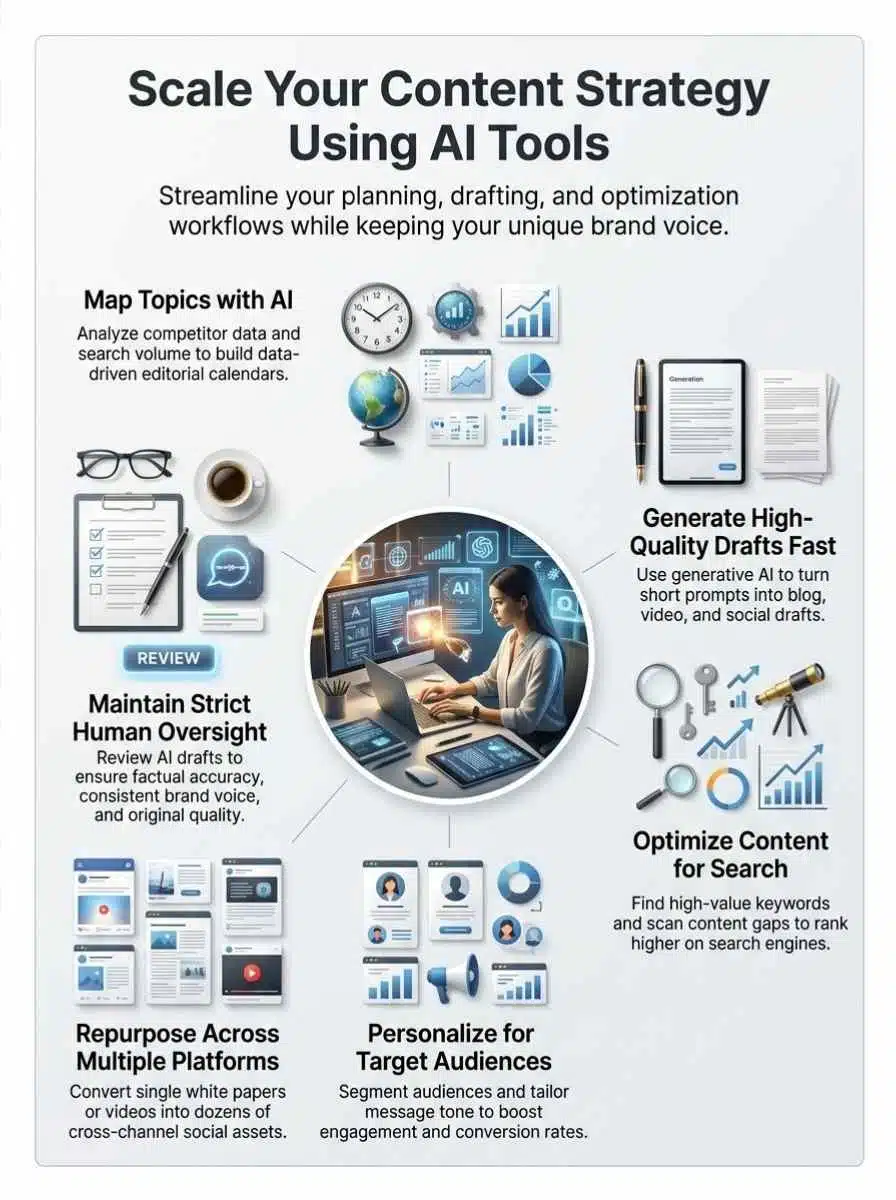
The best use of AI is not one giant shortcut. It is a set of smaller wins across planning, drafting, optimization, personalization, and repurposing.
If you want to scale without losing your human touch, build your process around these five jobs.
Automate topic discovery and content planning
Topic planning is where many teams lose momentum. They collect too many ideas, skip search intent, and end up with a calendar full of posts that do not support business goals.
Start with competitor analysis, then use AI to group topics by intent. Pull in search data, questions from customer calls, social comments, and support tickets, then let the tool organize the pile into themes you can actually publish.
- Feed competitor pages and keyword lists into your research stack.
- Group terms by intent: informational, comparison, and purchase-focused.
- Ask AI to suggest content clusters, not just one-off posts.
- Map each topic to a funnel stage and a measurable CTA.
- Turn the winners into briefs with headings, sources to review, and SEO targets.
A simple rule helps here: if a topic does not support a real audience question or a real business goal, cut it. AI makes brainstorming cheap, so your job is to stay selective.
Generate high-quality content drafts quickly
This is where tools like chatgpt and Jasper shine. They help you move from blank page to workable draft fast, which is often the biggest productivity gain in content creation.
Jasper’s current platform centers on Brand Voice, knowledge, audiences, and style guidance, so you can generate more consistent drafts without rewriting every prompt from scratch. That setup matters more than clever prompting because it lowers revision time across the whole team.
Use AI for the first 60% of the work: outline, headline options, angle testing, section summaries, and rough body copy. Then let a human editor handle facts, nuance, examples, and final positioning.
- Give the tool a clear brief with audience, goal, and target keyword.
- Ask for two or three structure options before you accept a draft.
- Paste in approved messaging, product facts, and voice rules.
- Review for accuracy, repetition, and weak claims before publishing.
That last step matters most. AI is fast, but speed without editing creates bland content that sounds familiar and performs poorly.
Optimize SEO strategies with AI-driven insights
AI can speed up search engine optimization, but it works best when paired with strong SEO data. Semrush and Ahrefs are useful here because they show search volume, keyword difficulty, SERP patterns, and competitor gaps in one place.
Ahrefs Keywords Explorer is especially handy for finding parent topics and judging whether a term is worth chasing. Semrush adds practical workflow help by surfacing keyword intent, trend direction, and on-page opportunities.
| SEO task | Best AI-assisted move | Why it helps |
|---|---|---|
| Keyword research | Cluster related terms by intent | Prevents thin, overlapping pages |
| On-page optimization | Rewrite title tags and headers | Improves clarity and relevance |
| Content gap analysis | Compare competitor coverage | Reveals missed subtopics |
| Refresh strategy | Find declining pages to update | Wins traffic faster than net-new content |
A pro tip is to use AI to build the brief, not to force keywords everywhere. If the copy reads awkwardly, readers leave, and your user experience drops with it.
Personalize content for different audiences
Personalization works best when you start with real audience segments, not vague personas. Use your CRM, email data, and on-site behavior to separate new visitors, returning readers, active leads, and customers.
Then ask AI to adapt one message into versions for each group. You can change the hook, proof points, CTA, and reading depth without rebuilding the whole asset from zero.
- Create segments based on behavior, source, lifecycle stage, or product interest.
- Write one core message that stays true to your brand alignment.
- Use AI to generate variations for email, landing pages, and social media.
- Review tone and compliance before launch.
- Track conversions by segment, then keep the versions that actually work.
This is where content personalization becomes practical. You do not need fully custom content for every person, you need smart variations for the audiences that matter most.
Repurpose content across multiple platforms
Repurposing is one of the easiest ways to scale output without doubling effort. A strong webinar, podcast, case study, or long-form article can become a month of assets if you plan for reuse from the start.
Descript is especially strong for this job because it supports text-based editing, clip creation, captions, and transcript export. Its official product pages say transcription is available across 25 languages, with subtitles in more than 30 languages, which makes it useful for both reach and accessibility.
- Turn a webinar into short clips, quote graphics, and an email recap.
- Turn a blog post into a script, carousel outline, and FAQ page.
- Turn customer interviews into testimonials, reels, and sales enablement snippets.
- Turn research notes into charts, pull quotes, and executive summaries.
One common mistake is republishing the same idea in the same format. Real repurposing means changing the angle, length, and packaging so the asset fits the platform and the audience.
Tools to Consider for AI-driven Content Strategy
You do not need a huge stack. Most teams get better results from a few well-chosen tools that cover planning, writing, optimization, editing, and repurposing.
The names below are useful because each one solves a different production problem.
Jasper AI for content creation
Jasper works well for teams that care about governance as much as speed. Its current workspace setup lets you define Brand Voice, style rules, audiences, and knowledge assets, so your team gets more consistent drafts across campaigns.
That makes Jasper a strong fit for content marketers, larger marketing teams, and brand-sensitive workflows. If several people create copy, centralized voice controls can save a surprising amount of edit time.
It is especially useful for outlines, landing page variants, nurture emails, briefs, and first drafts. It is less useful if you expect it to replace interviews, subject-matter expertise, or original reporting.
Grammarly for grammar and tone optimization
Grammarly is still one of the easiest ways to clean up readability and consistency. According to Grammarly support, the platform is trusted by more than 40 million people and 50,000 organizations worldwide, which helps explain why it shows up in so many editorial workflows.
It also works across many places your team already writes, including Word, Outlook, Slack, Salesforce, Sheets, and HubSpot. That matters because the more often your team uses the tool inside its normal workflow, the more likely you are to keep quality checks consistent.
Use it for clarity, tone, sentence trimming, and originality checks. Just do not confuse grammar fixes with fact-checking, because they are different jobs.
Descript for video editing and repurposing
Descript is a smart choice if video, podcasting, or webinar content already plays a big role in your digital marketing. Its text-based editing is simple to grasp, so marketers can make useful edits without living in a traditional video timeline.
The platform also includes filler-word removal, captions, transcript exports, clip creation, and collaboration tools. On its official materials, Descript says transcription reaches up to 95% accuracy with high-quality audio, which is a practical reminder to record clean source audio if you want faster editing later.
If your team records interviews, demos, webinars, or customer stories, Descript can turn one recording into many usable assets quickly.
MidJourney for AI-generated visuals
MidJourney is best for concept art, campaign visuals, blog graphics, and rapid image ideation. It is useful when you need speed, variety, and a clear visual direction before you hand work to a designer or publish lighter-weight creative in-house.
As of 2026, Midjourney lists four plans, from Basic at $10 a month to Mega at $120 a month, with Stealth Mode reserved for Pro and Mega plans. For a small business, that pricing matters because privacy and usage volume can change which plan actually makes sense.
| Plan | Monthly price | Best fit |
|---|---|---|
| Basic | $10 | Testing prompts and light image needs |
| Standard | $30 | Frequent marketing image work |
| Pro | $60 | Teams that need more speed and privacy |
| Mega | $120 | High-volume production workflows |
Use MidJourney to accelerate concepting, then apply human review for brand fit, accessibility, and compliance before anything goes live.
Best Practices for Using AI Tools in Content Strategy

The tools matter, but the workflow matters more. A weak process turns smart software into a mess of inconsistent drafts and scattered approvals.
These best practices help you keep quality high as output grows.
Maintain human oversight to ensure quality
AI should speed your team up, not replace final judgment. Human editors still need to verify claims, remove filler, spot bias, and catch brand mistakes.
A simple review sequence works well:
- Let AI create the outline and first draft.
- Use Grammarly for clarity and surface-level cleanup.
- Check facts, dates, product details, and legal claims manually.
- Have an editor confirm tone, CTA, and brand alignment.
- Publish only after one person owns the final sign-off.
This step is where many teams cut corners. It is also where trust gets protected.
Align AI content with your brand voice
If you want consistent output, build a brand system before you ask for scale. That means voice notes, approved phrases, banned phrases, product facts, audience profiles, and examples of great past content.
Jasper’s brand setup and Grammarly’s tone support both help here, but the real win comes from your inputs. Clear source material makes better outputs.
Create a short brand playbook that covers:
- Who you are talking to
- What tone you want
- Which claims need extra review
- Which words sound like you, and which do not
- How your CTA style changes by channel
Once you have that, your AI output gets more useful and much easier to edit.
Use AI to complement, not replace, creativity
AI is great at volume, variations, and pattern spotting. It is much weaker at lived experience, original reporting, and sharp points of view.
That is why the best creative strategy uses AI for support work and keeps humans in charge of ideas that need taste, judgment, and conviction. Use it to brainstorm headlines, summarize transcripts, reshape long drafts, and test alternate angles.
Use AI for speed and structure. Use people for meaning and trust.
If you keep that split clear, your content stays useful instead of sounding generic.
Benefits of Scaling Content Strategy with AI
When you use AI with a strong workflow, the benefit is bigger than faster writing. You get a more reliable system for planning, publishing, and improving your work.
Faster content production cycles
AI shortens the slow middle of production. You research faster, draft faster, repurpose faster, and move approved assets through the pipeline with less friction.
That speed is most valuable when you already know what your audience wants. It helps you respond to trends, refresh aging posts, and support campaigns without burning out your team.
Greater consistency in brand messaging
Consistency matters because readers should recognize your voice across blog posts, landing pages, emails, and social posts. AI can help by applying the same style rules, key terms, and audience cues every time.
That is especially useful for startups and growing teams where multiple people touch the same campaign. Shared rules reduce drift and keep brand voice tighter across channels.
Increased ROI through efficient workflows
Better workflows usually improve ROI before better copy does. When your team spends less time on repetitive work, you can publish more, test more, and learn faster from your performance metrics.
Connect your publishing process to Google Analytics, HubSpot, and Salesforce, then track traffic, conversion rate, assisted revenue, and content-influenced pipeline. Once you can see what each asset actually contributes, your content strategy gets much easier to scale in the right direction.
Final Thoughts
You do not need AI to replace your team. You need it to remove friction from your content strategy. Use tools like ChatGPT, Jasper, Semrush, Grammarly, Descript, and MidJourney for drafting, content optimization, repurposing, and reporting. Then keep humans in charge of voice, facts, and final judgment.
Start with one workflow, one brand playbook, and one reporting dashboard. That is usually enough to make your content creation process faster, clearer, and much easier to grow.
Frequently Asked Questions (FAQs) About AI Tools for Content Strategy
1. What AI tools can help me scale my content strategy?
Use AI for drafting, topic research, and workflow automation, and try advanced language models, content analyzers, and publishing helpers. These tools cut time, and free you to be more creative.
2. How do AI tools improve seo (search engine optimization)?
AI finds high-value keywords, spots gaps, and suggests topics that match user intent, so your pages get seen more. It also helps write clearer titles, meta tags, and on-page text to lift rankings.
3. Can AI write all my content for me?
AI can draft fast, but you still need humans to check tone, facts, and brand fit.
4. How do I start using AI tools without wasting time or money?
Pick one small task, like topic discovery or outlines, and run a short test. Measure traffic, engagement, and time saved, then scale what works. Keep people in the loop for edits and creative choices, and don’t hand over the keys to the car just yet.