Understanding gaming PC components is where smart PC building actually begins. I have seen too many beginners look at a flashy case, glowing RGB fans, and one big GPU name and think, “Yeah, this must be powerful.” Sometimes it is. Sometimes it is just a pretty box hiding bad choices.
When I help someone plan a gaming PC, I do not start by asking, “What is the most expensive GPU you can buy?” I ask what they play, what monitor they use, what budget they have, and whether they want to upgrade later. Those answers matter more than marketing labels.
A good gaming PC is not built from random expensive parts. It is built from parts that make sense together. The CPU, GPU, RAM, storage, motherboard, PSU, cooling, and case all have different jobs. If one part is badly chosen, the whole setup can feel worse than it should.
Why Gaming PC Components Matter More Than Fancy Looks
The reason gaming PC components matter is simple: every part affects the experience in some way. Some parts affect FPS. Some affect loading time. Some affect heat, noise, stability, or future upgrades.
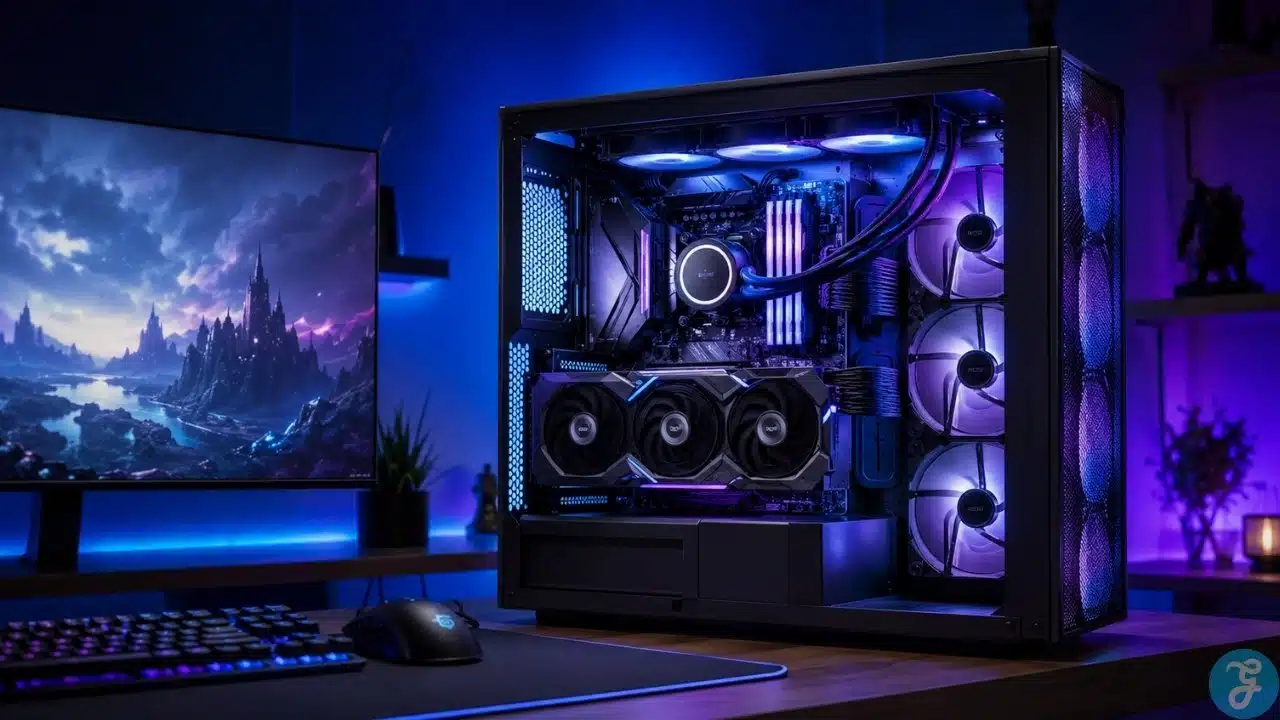
This is where many beginners get tricked. They see RGB lighting and a glass side panel and assume the build is good. I like a clean-looking setup too, but RGB does not fix a weak power supply. A beautiful case does not help if airflow is terrible. A giant GPU does not make sense if the CPU, monitor, or PSU cannot support it properly.
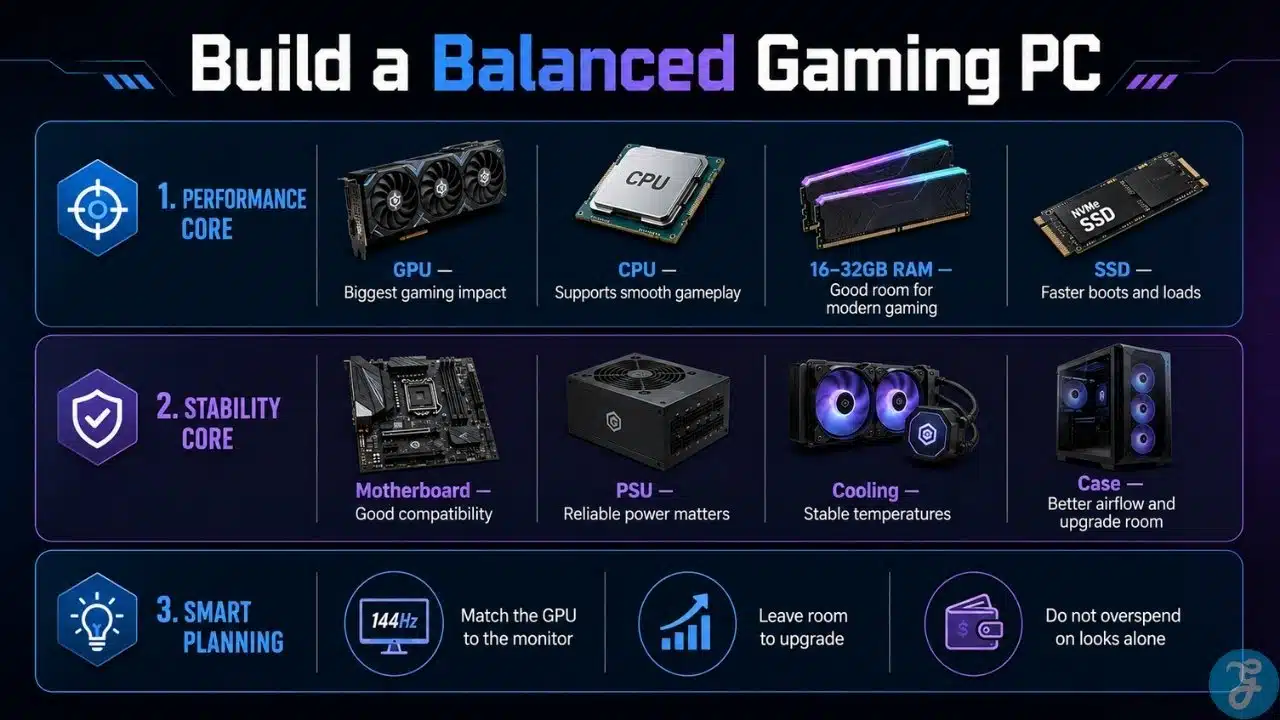
When I look at a build, I look for balance first. I want to know if the GPU matches the monitor, if the CPU is strong enough, if the RAM is enough, if the SSD is fast, if the PSU is reliable, and if the case can actually breathe.
That is the difference between a PC that only looks good and a PC that feels good to use.
Gaming PC Components At A Glance
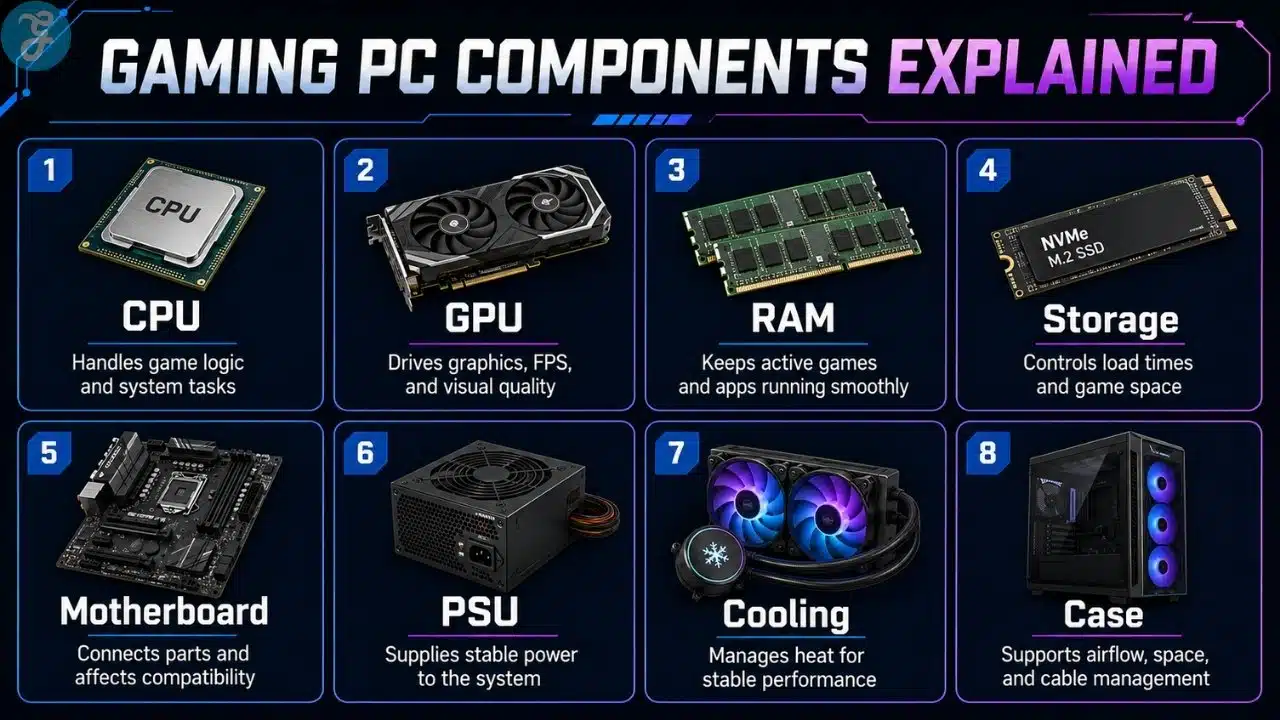
Before going deeper, it helps to see the full system as one connected setup. No single component works alone. Everything depends on the parts around it.
Here is the simple breakdown I usually give beginners.
| Component | Main Job | Why It Matters |
|---|---|---|
| CPU | Handles game logic and system tasks | Helps with smooth gameplay, multitasking, and CPU-heavy games |
| GPU | Renders graphics | Has the biggest impact on FPS, resolution, and visual quality |
| RAM | Stores active temporary data | Helps games and apps run smoothly |
| Storage | Holds games, software, and files | Affects loading speed and available space |
| Motherboard | Connects all parts | Controls compatibility and upgrade options |
| PSU | Supplies power | Keeps the system stable and safe |
| Cooling | Controls temperature | Helps performance stay consistent |
| Case | Holds the system | Affects airflow, space, and cable management |
This is why I always tell people not to judge a PC by one part. A strong build feels balanced across the whole system.
CPU: The Part Beginners Either Ignore Or Overbuy
The CPU is the processor. It handles game logic, background tasks, physics, AI behavior, system operations, and communication between parts.
In gaming, the CPU matters more than beginners think. It affects smoothness, frame stability, and performance in CPU-heavy games. Strategy games, simulation games, open-world titles, competitive games, and multiplayer games with many players can all lean on the CPU.
But I also see people overbuy CPUs for no reason. They spend too much on a high-end processor and then pair it with a weak GPU. That usually creates bad value for gaming.
The CPU should support the graphics card and match the kind of games you play. If your main goal is gaming, you usually do not need the most expensive processor on the shelf. You need one that keeps the system balanced.
How I Think About CPU Choice
When I choose or recommend a CPU, I think about three things: the GPU, the target resolution, and the user’s multitasking needs.
If someone only plays casual games at 1080p, they do not need a monster CPU. If someone plays competitive games at high FPS, the CPU becomes more important. If someone streams, edits videos, records gameplay, or keeps a lot of apps open, then a stronger CPU makes more sense.
I do not like buying a CPU just for bragging rights. I want it to solve a real need.
GPU: The Part Everyone Talks About For A Reason
The GPU, or graphics card, is usually the most important gaming part. It controls graphics quality, resolution, frame rates, ray tracing, textures, shadows, visual effects, and overall visual performance.
If someone asks me where most of the gaming budget should go, the GPU is usually high on the list. Not always first in every case, but close. For gaming, it has the biggest direct impact.
But this is also where people waste money. The best GPU is not always the strongest GPU. The best GPU is the one that matches your monitor, your games, your settings target, and your budget.
A GPU meant for 1080p gaming does not need to be treated like a 4K monster. A high-end GPU paired with a basic monitor can be wasted. A weak GPU paired with a demanding display can become frustrating.
That is why GPU selection for gaming needs real thought. It is not just about buying the most expensive card and hoping the rest of the PC keeps up.
RAM: The Part That Keeps Things Moving Smoothly
RAM is your system’s short-term memory. It helps your PC manage active tasks, open apps, background processes, and games while they are running.
For gaming, RAM helps reduce slowdowns and keeps things smooth when the system is under load. If you do not have enough RAM, games can stutter, apps can feel sluggish, and multitasking becomes annoying.
For most modern gamers, 16GB is still a reasonable starting point. If the budget allows, 32GB gives more breathing room, especially for multitasking, streaming, editing, or newer games.
I do not recommend going crazy with RAM just because it looks impressive. More RAM does not automatically mean more FPS. But too little RAM can definitely hurt the experience.
Here is how I usually explain RAM capacity.
| RAM Amount | Best For | My Take |
|---|---|---|
| 8GB | Very basic or older gaming | Too limited for many modern setups |
| 16GB | Mainstream gaming | Good starting point |
| 32GB | Gaming plus multitasking | Better long-term comfort |
| 64GB+ | Heavy creative workloads | Usually overkill for normal gaming |
Storage: The Upgrade People Appreciate Every Day
Storage does not usually get the same attention as the GPU, but it affects how the PC feels every day.
A good SSD makes the system boot faster, games load quicker, apps open faster, and updates feel less painful. A slow drive can make even a decent PC feel old and annoying.
For gaming, I prefer an SSD-based setup. A fast NVMe SSD for the operating system and main games is a great start. Extra storage can be added later when the game library grows.
Modern games are huge now. If someone buys a tiny SSD just to save money, they usually regret it quickly. You install a few big games and suddenly the drive starts begging for mercy.
Storage does not usually increase FPS, but it improves the overall experience. That matters.
Motherboard: The Part That Decides What Your PC Can Become
The motherboard connects everything. CPU, RAM, GPU, storage, fans, ports, and power cables all depend on it.
A motherboard does not directly make games run faster in the way a GPU does. But it controls compatibility, upgrade options, storage slots, RAM support, connectivity, and sometimes even how clean the build feels.
This is where I see two common mistakes. Some people buy the cheapest possible motherboard and then wonder why upgrade options are limited. Others buy an expensive board full of features they will never use.
I prefer the middle ground. A good motherboard should match the CPU, support the RAM properly, have enough storage options, fit the case, and leave some room for future upgrades.
Do not overspend, but do not trap your build either.
PSU: The Boring Part I Never Ignore
The PSU, or power supply, is one of the most boring parts of a gaming PC until something goes wrong. Then suddenly it becomes the most important part in the room.
The PSU supplies power to every component. A weak or low-quality PSU can cause crashes, shutdowns, instability, noise, and upgrade problems. In the worst cases, it can risk other parts too.
This is why I never like cutting corners here. A good power supply does not make your FPS higher, but it keeps the system stable. It also gives you confidence when upgrading later.
When I check a build, I look at wattage, quality, efficiency, protections, connectors, and whether it can support the GPU properly.
A cheap PSU in an expensive gaming PC is like putting bad tires on a fast car. It might move, but I would not trust it.
Cooling: Performance Is Not Just About Power
Gaming PCs create heat. The CPU and GPU work hard, and that heat needs somewhere to go.
Cooling helps keep temperatures stable. If the system gets too hot, performance can drop, fans can get loud, and the PC can become uncomfortable to use. Good cooling also helps long-term reliability.
Cooling does not have to be extreme. Not every build needs liquid cooling. Not every case needs a wall of fans. What matters is that the CPU cooler is suitable, the case has airflow, and the fans are arranged sensibly.
I care more about practical cooling than dramatic cooling. A simple, reliable setup with good airflow is better than an expensive mess that looks cool but performs badly.
Good cooling should keep the PC stable, quiet enough, and easy to maintain.
Case: Looks Matter, But Airflow Matters More
The case is the part everyone sees first, so I understand why people care about looks. I care too. A clean case with neat cable management feels satisfying.
But airflow matters more than looks.
A case should give enough room for the GPU, cooler, motherboard, storage, fans, and cables. It should allow air to move properly. It should not make building or cleaning painful. It should also leave room for future upgrades if possible.
Some cases look amazing in photos but suffocate the parts inside. That is not a good tradeoff.
When I choose a case, I look at airflow, build quality, size, cable management, fan support, dust filters, and how easy it will be to work inside later.
A case should make the build better, not just prettier.
How I Prioritize Gaming PC Components When Budget Is Tight
When money is limited, every part needs to justify itself. This is where gaming PC components should be chosen with a plan, not emotion.
I usually start with the gaming target. What resolution? What games? What FPS expectation? What monitor? Once that is clear, the budget becomes easier to divide.
For most gaming builds, I prioritize the GPU, a sensible CPU, enough RAM, SSD storage, a reliable PSU, and decent cooling. I do not like wasting money on excessive RGB, overkill motherboards, or premium features that do not help the user.
Here is how I usually think about budget priority.
| Build Goal | Spend More On | Avoid Overspending On |
|---|---|---|
| Budget Gaming | GPU, SSD, reliable PSU | Fancy case, excessive RGB |
| Competitive Gaming | CPU, GPU, high-refresh monitor | 4K display, unnecessary visuals |
| 1440p Gaming | Strong GPU, good CPU, 32GB RAM if possible | Extreme motherboard features |
| 4K Gaming | High-end GPU, quality PSU, strong cooling | Weak airflow or cheap PSU |
| Streaming Setup | CPU, RAM, storage, audio | Looks-only accessories |
A limited budget is not a problem if the build is planned well. Random spending is the real problem.
Monitor Match: The Part People Forget
Your gaming PC should match your monitor. This is one of the biggest points I repeat when helping people choose parts.
If the monitor is 1080p, you do not need the same GPU power as someone gaming at 4K. If the monitor has a high refresh rate, the CPU and GPU need to push enough frames to make it useful. If the monitor is weak, expensive hardware may feel wasted.
The monitor is where all the performance shows up. That is why gaming monitor specs should be considered before finalizing the build.
I have seen people spend big on a GPU and then use a monitor that cannot show the performance. That is painful. The PC may be powerful, but the user does not feel the full benefit.
The screen and the system should be planned together.
Prebuilt Gaming PC Components: What I Check First
When someone sends me a prebuilt gaming PC and asks, “Is this good?” I do not just look at the CPU and GPU.
That is what sellers want beginners to do. They highlight the processor and graphics card, then hide the weaker parts in vague descriptions.
I check the full parts list. What exact GPU? What CPU? How much RAM? Is it single-channel or dual-channel? What storage type? What PSU? What motherboard? What cooling? What case airflow?
A prebuilt can be good. I am not against prebuilts. But a bad prebuilt can look powerful while cutting corners in places beginners do not notice.
If the listing is vague, that is a warning sign. Good specs should not need to hide.
Upgrade Path: Build For Today, Leave Room For Tomorrow
A gaming PC does not need to be perfect forever. That is the advantage of the platform.
But upgrades are easier when the original build has a smart foundation. A good PSU, decent case, suitable motherboard, and reasonable cooling can make future upgrades much easier.
Storage and RAM are often easy upgrades. GPU upgrades can make a huge difference, but they may need more power and better airflow. CPU upgrades depend on motherboard compatibility.
This is why I do not like builds that trap the user. Saving a little money today can become expensive later if every upgrade requires replacing half the system.
A smart build should work well now and leave room for practical improvements later.
Common Mistakes I See With Gaming PC Components
The first mistake is overspending on looks. I like nice setups, but lights and glass do not replace performance, stability, or airflow.
The second mistake is ignoring the power supply. Beginners often treat the PSU like a boring box. I treat it like the part that keeps expensive hardware safe.
The third mistake is mismatching parts. A strong GPU with a weak CPU, a powerful PC with a weak monitor, or a hot build inside a poor airflow case can all create problems.
The fourth mistake is copying someone else’s build. A setup that works for one person may not fit another person’s budget, monitor, games, or upgrade plans.
The fifth mistake is buying for today with no thought for tomorrow. A little upgrade room can save money later.
Gaming PC Components Checklist
Before buying or building, I like going through a simple checklist. It keeps the build practical and prevents expensive mistakes.
Use this as a final scan before choosing parts.
| Component Area | What To Check |
|---|---|
| CPU | Matches your games, GPU, and multitasking needs |
| GPU | Fits your target resolution and refresh rate |
| RAM | Enough capacity for modern games and apps |
| Storage | SSD-based setup with enough space |
| Motherboard | Compatible with CPU, RAM, case, and upgrades |
| PSU | Reliable quality and enough wattage |
| Cooling | Good airflow and stable temperatures |
| Case | Enough space, airflow, and cable management |
| Monitor Match | Screen fits the power of the build |
| Upgrade Path | Parts allow future improvements |
A good checklist does not make the build boring. It keeps the build from becoming expensive regret.
Build Smart Before You Build Big
The smartest way to choose gaming PC components is to stop chasing the most expensive parts and start building around your actual needs. A good gaming PC is not the one with the flashiest case or the longest spec sheet. It is the one that feels balanced, stable, and useful every day.
I prefer builds that make sense. A strong GPU paired with the right monitor. A CPU that supports the games properly. Enough RAM. Fast storage. Reliable power. Practical cooling. A case that breathes. Upgrade room where it matters.
That is how you build a PC that lasts. Not by buying random parts because the internet shouted about them, but by understanding what each component does and how it fits into the full system.
Frequently Asked Questions About Gaming PC Components
These quick answers cover the common questions I hear from beginners before they buy or build.
What Are The Most Important Gaming PC Components?
The most important parts are the GPU, CPU, RAM, storage, motherboard, PSU, cooling, and case. For gaming performance, the GPU usually matters most, but the system still needs balance.
Is The GPU More Important Than The CPU For Gaming?
In most gaming builds, the GPU has the bigger impact on graphics quality, resolution, and FPS. The CPU still matters for smooth gameplay, high frame rates, CPU-heavy games, and multitasking.
How Much RAM Do I Need For Gaming?
For most modern gaming setups, 16GB is a good starting point. 32GB is better if you multitask, stream, edit, or want more room for newer games and software.
Does Storage Affect Gaming Performance?
Storage usually does not increase FPS directly, but it affects loading times, system responsiveness, updates, and how smooth the PC feels in daily use. An SSD is the better choice for modern gaming.
Should I Spend More On A CPU Or GPU?
For most gaming builds, I would usually give more attention to the GPU. But the CPU still needs to be strong enough to support the GPU and the games you play.
Can I Upgrade Gaming PC Components Later?
Yes, many gaming PC parts can be upgraded later. RAM, storage, GPU, cooling, and sometimes CPU can be improved depending on your motherboard, PSU, case space, and compatibility.