


Managing photos, documents, and videos daily can quickly fill up devices and slow performance. Choosing the right Cloud Storage Apps becomes challenging when balancing file sharing, security features, and seamless syncing—all without overspending.
With the cloud storage market surpassing $100 billion, pricing can vary significantly across platforms like Microsoft OneDrive and Google Drive. This guide compares top options based on storage plans, pricing, and key features such as two-factor authentication and file versioning.
Explore a clear, side-by-side comparison to find the best fit for Android, iOS, or Windows users—and make smarter storage decisions.
What to Look for in a Cloud Storage App
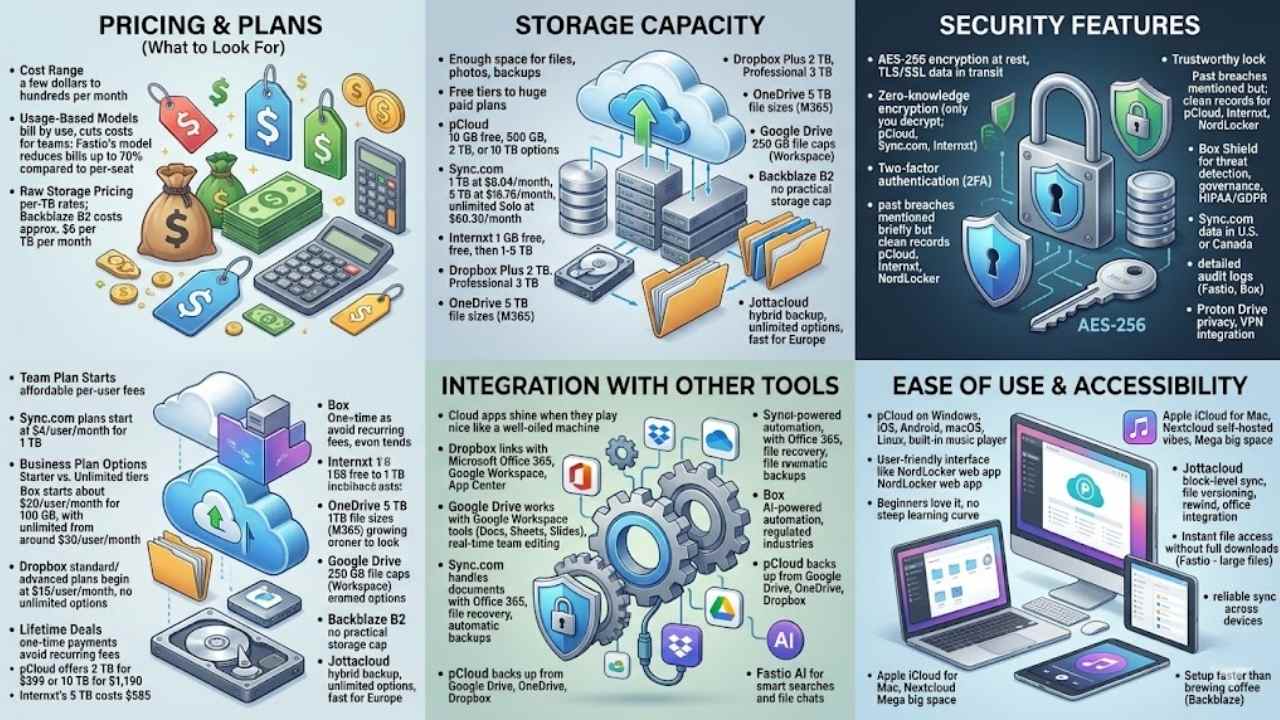
You want a cloud storage app that fits your life, like a comfy pair of shoes, right? Think about costs that match your budget, space for all your files, strong locks to keep data safe, easy links to apps you use daily, and a simple setup that anyone can handle, no sweat.
Pricing and plans (What to Look for)
Pricing plays a big role in picking the right cloud storage app, so let’s break down what to watch for, with real examples to guide you.
| Aspect to Consider | What to Look For | Real Examples |
|---|---|---|
| Cost Range | Check prices from a few dollars to hundreds per month. Providers and plans make the difference. | Cloud storage costs range from a few dollars to several hundred dollars per month, depending on provider and plan. |
| Usage-Based Models | Seek options that bill by what you use. This cuts costs for teams with varying needs. | Fastio’s usage-based model can reduce storage bills for agencies by up to 70% compared to per-seat pricing. |
| Raw Storage Pricing | Look at per-terabyte rates for basic needs. Compare to avoid overpaying on extras. | Backblaze B2 costs approximately $6 per TB per month for raw infrastructure storage. |
| Team Plan Starts | Find affordable per-user fees with decent space. Scale up for bigger groups. | Sync.com team plans start at $4/user/month for 1 TB, with unlimited options for groups of 100+ users. |
| Business Plan Options | Evaluate starter plans with limits and unlimited tiers. Match to your data volume. | Box pricing starts at about $20/user/month for 100 GB, with unlimited plans from around $30/user/month. Dropbox standard and advanced business plans begin at $15/user/month, with no unlimited options. |
| Lifetime Deals | Consider one-time payments to dodge monthly bills. Weigh upfront cost against long-term savings. | pCloud offers lifetime plans, such as 2 TB for $399 or 10 TB for $1,190, avoiding recurring fees. Internxt’s 5 TB lifetime plan costs $585, the cheapest among premium options. |
Storage capacity
Storage capacity matters a lot in cloud storage apps. You need enough space for your files, photos, and backups. Providers offer different amounts, from small free tiers to huge paid plans.
pCloud gives you a 10 GB free plan, plus options like 500 GB, 2 TB, or 10 TB for bigger needs. Sync.com starts with 1 TB at $8.04 per month, jumps to 5 TB at $18.76 per month, and offers an unlimited Solo plan at $60.30 per month.
Internxt provides 1 GB free, then scales up to 1 TB through 5 TB for more data management.
Unlimited storage changes the game for archival needs, says Jeffrey L. Wilson from PCMag.
Dropbox’s Plus plan delivers 2 TB, while the Professional plan boosts it to 3 TB for file organization. OneDrive handles file sizes up to 5 TB, perfect for large uploads in Microsoft 365.
Google Drive caps files at 250 GB, great for Google Workspace users. Backblaze B2 skips any practical storage cap, ideal for digital storage in remote work. Jottacloud mixes hybrid backup with unlimited options, and it speeds things up for European customers in data protection.
Security features
Security keeps your files safe, like a trusty lock on your digital door. Most cloud storage apps use AES-256 encryption at rest, and TLS/SSL for data in transit, protecting info from prying eyes.
Zero-knowledge encryption stands out with pCloud, Sync.com, and Internxt, meaning only you can decrypt your files, not even the company. Two-factor authentication adds an extra layer, like a secret handshake, to block unauthorized access.
Think about past issues, Dropbox faced a big breach in 2012 that leaked 68 million passwords, but pCloud, Internxt, and NordLocker have clean records, no breaches ever.
Box offers Box Shield for threat detection and governance controls, perfect for enterprise needs like HIPAA compliance or GDPR compliance. Sync.com lets you store data in the U.S. or Canada, helping with privacy laws and file management.
Fastio and Box provide detailed audit logs to track file access, crucial for legal workflows and customer support. Proton Drive shines in privacy, tying into VPN for secure connections.
These tools make sure your data stays yours, avoiding headaches from hacks or leaks.
Integration with other tools
Cloud storage apps shine when they play nice with your other tools, like a well-oiled machine in your daily grind. Dropbox links up with Microsoft Office 365 and Google Workspace, plus it has an App Center for adding third-party apps that boost your workflow.
Google Drive teams up seamlessly with Google Workspace tools such as Docs, Sheets, and Slides, letting teams edit files together without any lag, almost like passing notes in class but way more productive.
Sync.com handles documents through its Office 365 integration, making file recovery and automatic backups a breeze for user experience. Box steps in with AI-powered workflow automation and services designed for regulated industries, while pCloud backs up from Google Drive, OneDrive, and Dropbox.
Fastio adds AI for smart searches and file chats, turning your data storage into a helpful sidekick.
Ease of use and accessibility
pCloud works on Windows, iOS, Android, macOS, and Linux. It even has a built-in music player for your playlists, like having a jukebox in your pocket. NordLocker gives you a user-friendly interface through its web app.
Beginners love it, no steep learning curve here. Jottacloud brings block-level sync and file versioning to the table. You get rewind capabilities plus office integration, making edits feel like a breeze.
Platforms like Fastio let you access files instantly without full downloads. This shines for large files, saving you time on those massive videos or docs.
Dropbox and Google Drive stand out with intuitive interfaces. They sync reliably, so your files stay current across devices. Backblaze keeps things simple with an easy setup for backups.
Imagine setting it up faster than brewing coffee. Apple iCloud fits right in for Mac users, while free storage options pop up in many apps. TechRadar and CNET often praise these for seamless access on Linux too.
Nextcloud offers self-hosted vibes, and Mega provides big space without fuss.
Best Overall: Microsoft OneDrive
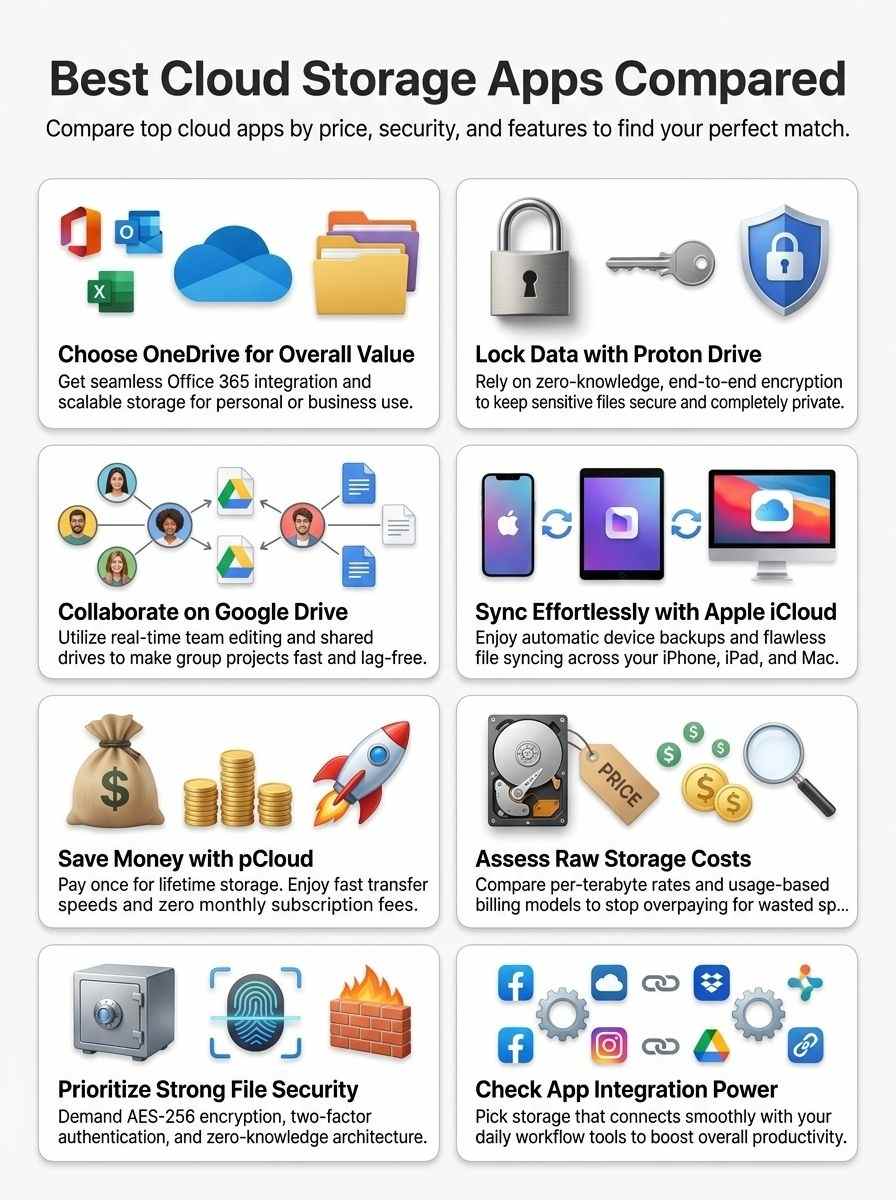
Microsoft OneDrive wins as the top pick for cloud storage, blending strong features with fair prices that beat out options like Google One or Dropbox Business. Imagine it as your reliable vault for files, syncing smoothly across devices while keeping things secure—stick around to see why it edges out the competition.
Key Features and Benefits (Microsoft OneDrive)
OneDrive stands out as a top cloud storage app, blending solid features with everyday ease. You get tools that fit your life, from work docs to personal files, without the hassle.
- Integration with Microsoft Office 365 lets you team up smoothly on Word and Excel files, making edits feel like a group chat over coffee.
- Built for Windows OS, this app syncs files seamlessly and grants quick access, so your stuff flows like a well-oiled machine across setups.
- Business plans tap into SharePoint for advanced team collaboration features, turning shared projects into a breeze, much like how Dropbox Business handles pro workflows.
- File versioning and trash history boost your file management game, letting you roll back changes or recover deleted items without breaking a sweat.
- Synchronization works across devices like Windows, macOS, and mobile platforms, keeping everything in step, whether you’re on the go or at your desk.
- Security ties in nicely with tools like HubSpot or Freshsales for business users, adding layers that protect your data during integrations.
- Unlike some rivals such as iDrive or Koofr, OneDrive offers extras for gaming files or streaming music services, giving you space for fun alongside work.
- Payment options integrate with Stripe or PayPal, so upgrading plans feels simple and secure, no headaches involved.
- Folks like Shelby Brown and Sarah Tew have praised its web hosting vibes, noting how it supports easy sharing of large files without slowdowns.
- Compared to Google One or iCloud Plus, OneDrive shines in cross-tool links, including Gemini for smarter searches within your storage.
Pricing and Plan Options (Microsoft OneDrive)
Microsoft 365 ties right into OneDrive’s pricing, making it a smart pick for many users.
| Plan Type | Key Details | Price Point |
|---|---|---|
| Personal Plans | Subscribers to Microsoft 365 get included storage, like 1TB for individuals. You can bump it up if you need more space. | Starts at $6.99 per month for Microsoft 365 Personal. |
| Business Plans | These follow a per-user model, just like rivals such as Google Workspace. Expand storage as your team grows, no sweat. | Begins at $6 per user per month for Business Basic, with 1TB per user. |
| Standalone Option | People rarely grab this alone, thanks to tight links with Microsoft 365 tools. Think seamless file sharing and Office app access. | Extra storage adds $1.99 per month for 100GB on top of free 5GB. |
| Expansion Perks | Business folks scale capacity on demand, perfect for growing data needs. It fits like a glove with email and collaboration features. | Additional pools cost extra, based on your setup. |
Best for Privacy: Proton Drive
If privacy tops your list, Proton Drive acts like a digital vault, locking away files with zero-access encryption that even the company can’t peek into. Check out its secure sharing options and free starter plan, they make safeguarding data feel effortless and fun.
Key Features and Benefits (Proton Drive)
Proton Drive stands out for folks who put privacy first in their cloud storage choices. It offers strong protection that keeps your files safe from prying eyes, much like a digital vault only you can open.
- Zero-knowledge encryption locks all your files tight, so even the provider can’t peek at your data, giving you peace of mind like hiding treasures in a secret spot no one else knows.
- End-to-end encryption shields your info during uploads and while stored, acting as an invisible force field that blocks threats in transit and at rest.
- Strong compliance with privacy laws and data residency rules fits users in strict regions, ensuring your files stay where they should, without unwanted moves across borders.
- Advanced security perks include password-protected links and access expiration dates, letting you share files safely, like handing out keys that self-destruct after use.
- No known history of breaches sets Proton Drive apart from less secure options, joining reliable names like Sync.com, pCloud, NordLocker, and Internxt in a spotless record that builds real trust.
- Seamless integration with tools like Boltic boosts your workflow, allowing easy data transfers and automation that feel as smooth as chatting with an old friend.
- Unlike ad-heavy services such as TeraBox, Proton Drive skips the noise for a clean interface, focusing on pure storage without distractions or hidden costs.
Pricing and Plan Options (Proton Drive)
Proton Drive keeps things simple with plans that fit your privacy needs.
| Plan Type | Details | Cost | Extras |
|---|---|---|---|
| Free Tier | Offers basic storage for starters, limited to 1-5 GB as with most privacy-first options. | $0 per month | Basic access, no frills, perfect if you dip your toes in privacy waters. |
| Paid Plans | Start with entry-level choices, scale up for more space and tools; privacy-centric storage shines here. | Begins at a few dollars per month, rises for advanced security features like extra encryption layers. | Adds value with strong protection, think of it as your data’s personal bodyguard. |
| Lifetime or Annual Plans | Lock in long-term deals for steady privacy, available sometimes for that extra assurance. | Varies, often a one-time fee or yearly rate that saves cash over time. | Boosts peace of mind, like buying a forever home for your files. |
| Refund Policy | Providers like this one offer trial periods to test the fit. | N/A | Common 14-day or 30-day money-back guarantees let you walk away if it doesn’t click, no hard feelings. |
Best for Collaboration: Google Drive
Team up like pros with Google Drive, where real-time file sharing turns group work into a breeze. Jump in and see how its tools boost your projects, sparking ideas that flow without a hitch.
Key Features and Benefits (Google Drive)
Google Drive shines as a top pick for teams who need seamless teamwork. It packs powerful tools that make sharing files a breeze, and you’ll love how it keeps everyone on the same page.
- Real-time collaborative editing lets you work on documents, spreadsheets, and presentations with your crew all at once, like a group jam session without missing a beat.
- Sharing and editing permissions at the file or folder level give you control over who sees what, so you avoid mix-ups and keep things smooth for your projects.
- Integration with a range of third-party apps extends your workflows, think of it as plugging in extra gadgets to supercharge your daily grind.
- Robust file versioning and trash history save the day for team projects, allowing you to roll back changes or recover lost files like a safety net in a circus act.
- Simultaneous editing with no lag suits distributed teams perfectly, imagine folks from different cities typing away as if they’re in the same room, no hiccups in sight.
Pricing and Plan Options (Google Drive)
Drive starts with a free tier that gives you 15 GB of space. This amount shares across all your Google services, like email and photos. Think of it as a starter pack, perfect for light users who just need basics. Paid options kick in when you want more room. They expand storage up to several terabytes, and add perks for teams. Prices follow a per-user model, common in cloud office setups. Businesses often bundle these with Google Workspace subscriptions, making collaboration a breeze.
Premium users upload files up to 5 TB each, no sweat. Solo folks pick from plans starting at a few bucks a month for 100 GB. Scale up to 2 TB or beyond if your needs grow. Teams get extras like shared drives in those Workspace deals. You pay per person, so costs fit your crew size. It’s like picking the right backpack for a hike, not too big, not too small.
Best for Apple Users: iCloud
Apple fans, you know the drill—your iPhone, iPad, and Mac need storage that syncs without a hitch, and iCloud steps up to the plate like a champ. Explore how its seamless backups and photo sharing make life easier, plus those budget-friendly plans that won’t break the bank.
Key Features and Benefits (iCloud)
iCloud shines for folks loyal to the Apple ecosystem, packing in tools that make life smoother. It syncs your stuff without a hitch, and keeps your data safe and sound.
- File syncing happens built-in across devices like iPhone, iPad, and Mac, so you grab your notes from the couch or the office, no sweat, like having a magic pocket that follows you everywhere.
- Photos, contacts, and documents back up automatically for users in the Apple world, imagine waking up to find your vacation snaps safe after a phone mishap, that’s the kind of relief it brings.
- Collaborative editing works in apps such as Pages, Numbers, and Keynote through iCloud, picture you and your team tweaking a spreadsheet in real time, laughing over changes without endless emails.
- Device backup and restore options ease migration between gadgets, think of switching to a new iPhone and having everything pop up just as you left it, simple as pie.
- “Find My” ties in to track lost devices, say you misplace your iPad at the airport, this feature pings its spot on a map, turning panic into a quick fix with a dash of tech wizardry.
Pricing and Plan Options (iCloud)
Apple gives you a free tier in iCloud with 5 GB of storage, perfect for starters who need just the basics. Jump to paid plans, and you get more room like 50 GB, 200 GB, or even 2 TB. These options fit different needs, whether you store photos, documents, or backups. Monthly fees stay competitive, so you won’t break the bank. Think of it as upgrading your digital closet without much hassle.
Family sharing lets up to six people pool their storage, making it a smart pick for households. Manage upgrades right from your Apple devices, quick and easy. This setup keeps everyone connected, sharing space like a team passing a ball. Pick the plan that matches your life, and watch your storage worries fade.
Best Lifetime Plan: pCloud
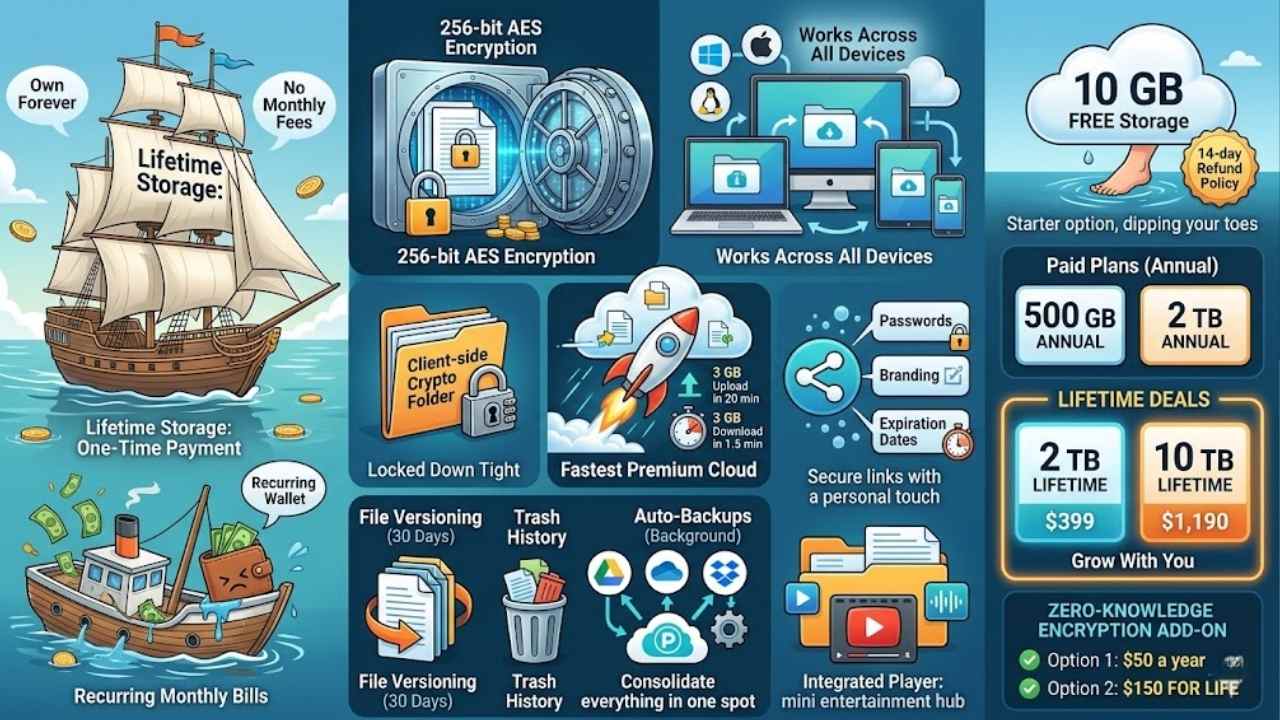
pCloud stands out with its one-time payment option, letting you own your storage forever without monthly fees nagging at your wallet. Imagine ditching those recurring bills, like trading a leaky boat for a sturdy ship that sails smoothly through your data needs.
Key Features and Benefits (pCloud)
pCloud packs a punch with top-notch security and blazing speed that keeps your files safe and accessible. You will love how it blends ease with powerful tools, making it a smart pick for everyday storage needs.
- Security shines here, as pCloud uses 256-bit AES encryption to protect your data, and it adds a client-side Crypto folder for those extra-sensitive files you want locked down tight.
- This service works across all your devices, supporting Windows, iOS, Android, macOS, and Linux, so you switch gadgets without missing a beat.
- Speed sets pCloud apart, earning it the title of fastest premium cloud storage in tests, where it uploaded 3 GB in just 20 minutes and downloaded the same in a quick 1.5 minutes.
- Advanced options keep things smooth, like file versioning that saves changes for 30 days, plus trash history to recover deleted items and auto-backups that run in the background.
- Sharing gets flexible and secure, letting you add passwords, branding, and expiration dates to links, almost like sending files with a personal touch and a timer.
- Backup extends to other services, with third-party options for Google Drive, OneDrive, and Dropbox, helping you consolidate everything in one spot without hassle.
- Media playback feels built for fun, as the integrated player handles your audio and video collections right inside the app, turning storage into a mini entertainment hub.
Pricing and Plan Options (pCloud)
pCloud offers a free plan with 10 GB of storage. You get a 14-day refund policy on upgrades. Folks love this starter option, it’s like dipping your toes in the water before jumping in.
Choose paid plans for more space. Go for 500 GB or 2 TB on annual terms. Lifetime deals shine here, grab 2 TB for $399 or 10 TB for $1,190. Add zero-knowledge encryption, it costs $50 a year or $150 for life. These choices fit different budgets, hey, who doesn’t like options that grow with you?
Final Thoughts
We covered top cloud storage picks like Microsoft OneDrive for all-around use, Proton Drive for privacy fans, Google Drive for team work, iCloud for Apple lovers, and pCloud with its lifetime deals.
These options make picking the right app simple and quick, fitting your budget and needs without hassle. Smart choices here protect your files, boost teamwork, and cut costs big time in a market worth over $100 billion.
Check out sites like Internxt for cheap lifetime plans or NordLocker for secure 2 TB storage to dive deeper. My own switch to fast upload speeds changed how I handle photos and docs every day.
Go ahead, grab a plan that clicks for you, and watch your digital life get smoother.
Frequently Asked Questions (FAQs) About Cloud Storage Apps
1. What’s the deal with comparing cloud storage apps by price and features?
Well, picture this, you’re juggling files like a circus act, and apps like Google Drive and Dropbox step in with different costs and perks. We break it down so you pick the winner without the headache.
2. Which cloud storage app offers the best bang for your buck?
Dropbox shines with solid sharing features at around $10 a month for 2TB. But hey, if you’re pinching pennies, Google Drive gives you 15GB free, and that’s no small potatoes.
3. Do these apps have cool features beyond just storing stuff?
Oh yeah, think of OneDrive as your trusty sidekick, syncing files across devices like magic. iCloud keeps Apple fans happy with seamless photo backups. And don’t forget security bells and whistles, like two-factor authentication, that guard your data from prying eyes.
4. How do I choose the right cloud storage based on price?
Start by eyeing your needs, buddy; if you want unlimited storage without breaking the bank, Amazon Drive might fit at competitive rates.






















