Choosing between SaaS and on-premise software can feel like comparing apples to oranges. If the question is, “SaaS vs On-Premise: Which Is Better for Enterprise?”, this guide provides a clear comparison. One option is quick to set up in the cloud, while the other remains secure on internal servers. Questions around payment timing, scalability, and integration are critical.
Factors such as data safety, cost, and control are essential considerations. SaaS often reduces upfront costs since there is no hardware to purchase. According to a 2026 report by Fortune Business Insights, the US SaaS market is projected to reach $141 billion, largely due to enterprises favoring the avoidance of server investments.
This guide walks through a detailed evaluation of these tools, covering costs, security, speed, and flexibility, making the decision process straightforward for enterprise teams.
What Is SaaS?
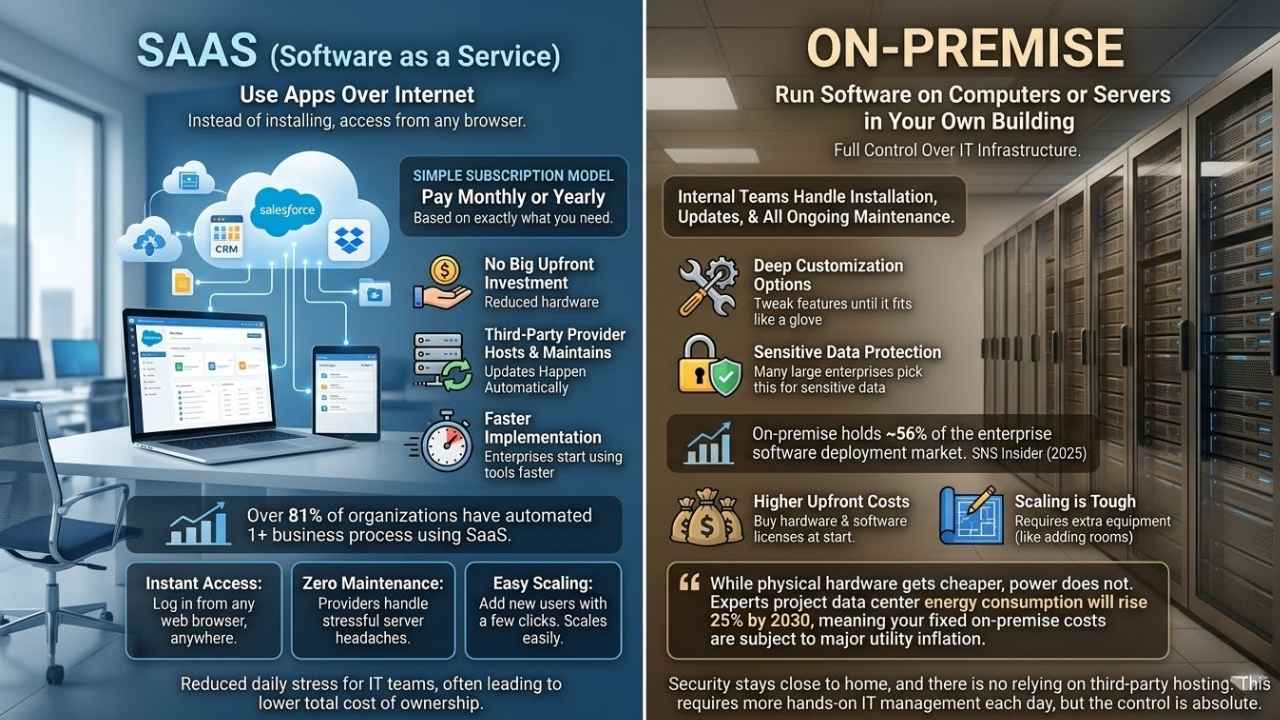
SaaS stands for Software as a Service. Instead of installing software on your own computers, you use apps over the internet.
Companies like Salesforce and Dropbox offer these cloud computing solutions through a simple subscription model. You pay monthly or yearly, based on exactly what you need.
There is no big upfront investment in hardware or IT infrastructure. The third-party provider hosts and maintains everything for you, so updates happen automatically in the background.
Enterprises can start using new tools faster since implementation time is shorter than with traditional options. In fact, over 81% of organizations have now automated at least one business process using SaaS applications.
- Instant Access: Log in from any web browser, anywhere in the world.
- Zero Maintenance: Providers handle the stressful server headaches.
- Easy Scaling: Add new users with just a few simple clicks.
SaaS scales easily as business needs change. This reduces daily stress for IT teams and often leads to a lower total cost of ownership.
What Is On-Premise?
On-premise means you set up and run software on computers or servers in your own building. Your company has full control over this IT infrastructure.
These servers often sit right behind locked doors and tight security. Your internal teams handle installation, updates, and all ongoing maintenance themselves.
Do you want to tweak every feature until it fits like a glove? On-premise allows deep customization options that cloud solutions sometimes miss.
According to a 2025 report from SNS Insider, on-premise setups still hold about 56% of the enterprise software deployment market. Many large enterprises pick this model specifically for sensitive data protection.
Companies choosing on-premise face higher upfront costs because they must buy hardware and software licenses at the start. Growing your system can feel tough since more users or data require extra equipment. Think of it like adding new rooms to a house instead of just moving furniture around.
“While physical hardware gets cheaper, power does not. Experts project data center energy consumption will rise 25% by 2030, meaning your fixed on-premise costs are subject to major utility inflation.”
Security stays close to home, and there is no relying on third-party hosting. This requires more hands-on IT management each day, but the control is absolute.
Key Differences Between SaaS and On-Premise
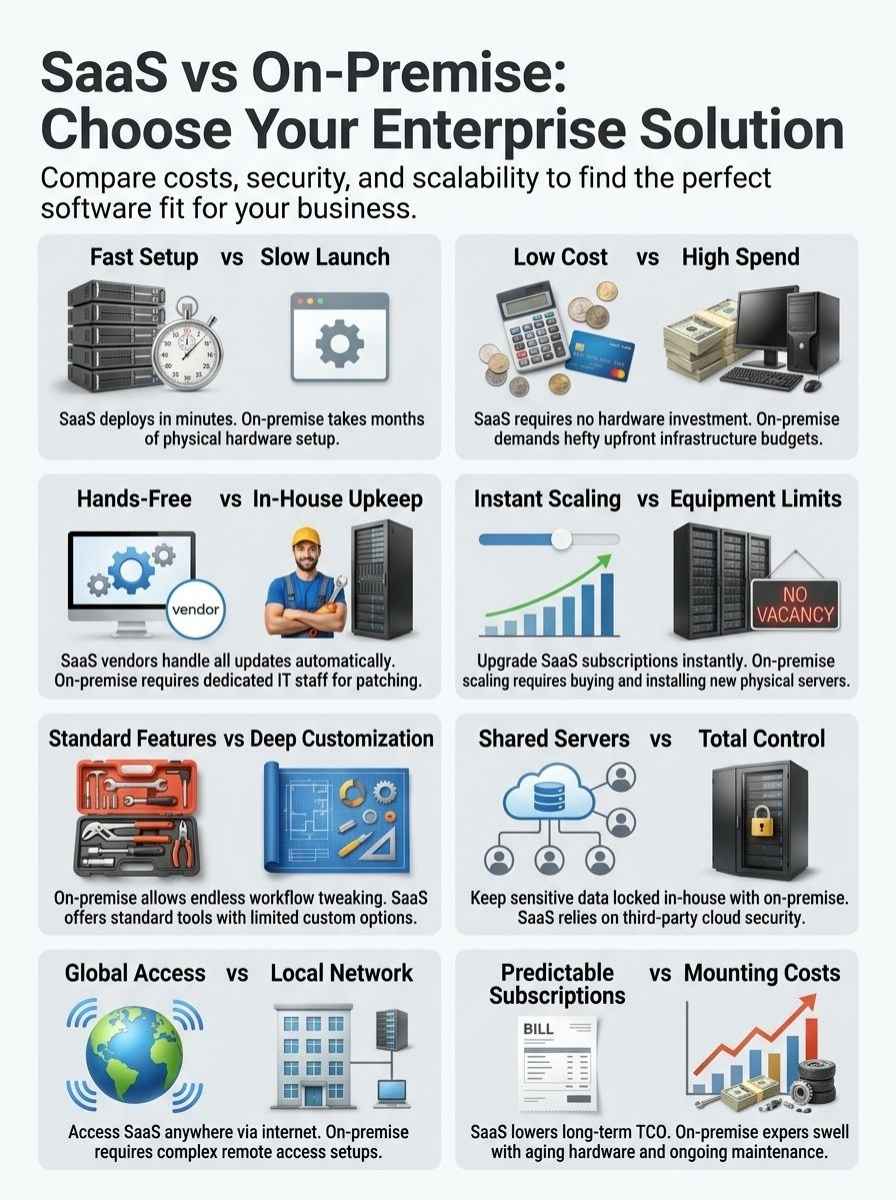
You will spot big changes between SaaS and on-premise, from how you install them to who handles updates. Are you curious which setup fits your business best?
Keep reading to see the direct comparisons.
Deployment and hosting
Every enterprise needs to decide where and how their software lives. Deployment and hosting set the stage for both SaaS and on-premise options.
Below, check out the major differences laid out crystal clear.
| Feature | SaaS | On-Premise |
|---|---|---|
| Deployment Location | Hosted in the cloud by a third party, always online, and accessed by browser or app. | Installed on company-owned servers, lives inside your walls, and accessed over your internal network. |
| Setup Time | Quick. This often takes just minutes or hours thanks to ready-to-go cloud infrastructure. | Slower. This sometimes takes weeks or months and needs procurement, installation, and setup of physical hardware. |
| Maintenance and Upkeep | The provider handles everything. There is no need to babysit servers or software updates. | Your in-house IT team must perform regular maintenance, patching, and hardware upgrades. |
| IT Resources Needed | Minimal. Your team can focus on business rather than server headaches. | High. You need more staff, more expertise, and more late-night calls when things go wrong. |
| Upfront Investment | Low initial cost. The subscription fee includes deployment and hosting. | Large upfront spend. You must buy servers and storage space before launch. |
| Accessibility | Globally accessible. Users log in from anywhere with the internet. | Usually local. Access offsite needs extra setup and tight security protocols. |
| Scalability | Scale up or down in real time. There are no hardware limits, so just change your subscription tier. | Scaling needs new equipment. This is often delayed by hardware ordering and complex configuration. |
| Control | Lower. Your data is on shared servers managed by outside providers. | Higher. You have full control of data and infrastructure with no shared environments. |
Cost structure
Comparing SaaS and On-Premise pricing can get complicated fast.
A 2025 analysis highlights a major hidden cost for the cloud: egress fees. While uploading data is cheap, cloud providers often charge hefty fees to move massive amounts of data out.
For data-heavy companies, these surprise fees can easily ruin a budget. Here is a side-by-side summary so you can spot the core financial differences at a glance.
| Aspect | SaaS | On-Premise |
|---|---|---|
| Upfront Expenses | Low. There is no need for expensive servers or hefty hardware. Pay-as-you-go starts at day one, providing immediate savings. | High. You face big initial investments in physical infrastructure, licenses, and setup. Budget planning gives some folks gray hair. |
| Ongoing Costs | Subscription-based. You make regular monthly or annual payments. Costs are predictable and easy to track. | Maintenance, upgrades, and IT staff keep generating expenses. Hardware replacements and surprise bills can add up fast. |
| Total Cost of Ownership TCO | Lower TCO, especially for small and mid-sized businesses. There are no surprise infrastructure costs lurking in the shadows. | Often higher TCO. Long-term expenses can swell as systems age and require more care and feeding. |
| Scalability Expenses | Scaling up is quick and cheap. Just tweak your subscription plan. No hardware shopping sprees are needed. | Scaling means buying and installing more equipment. It might involve hiring IT pros to wrangle the new gear. |
| Implementation Time | Short. Most teams get started quickly. There is no waiting for equipment delivery or physical installation. | Longer timelines. Physical installation, configuration, and testing can drag out deployment for months. |
Maintenance and updates
Ongoing maintenance and updates play a massive role in how these solutions fit enterprise needs.
A 2026 survey notes that companies use an average of 106 SaaS apps. Managing that many tools in-house would be nearly impossible, which is why vendor-managed updates are a lifesaver.
Check out how they stack up below.
| Feature | SaaS | On-Premise |
|---|---|---|
| Who Handles Maintenance? | Third-party vendors do the heavy lifting. There is no need to worry about patches or bug fixes in-house. | Your IT team is on the hook. Every single upgrade and patch is their direct responsibility. |
| Update Frequency | Automatic and regular. Most SaaS platforms push out updates monthly or even weekly. | Manual and slower. Updates can lag behind, especially with stretched IT staff or tight budgets. |
| Downtime During Updates | Usually minimal. Updates often happen in the background with very little user disruption. | Possible extended downtime. Sometimes, users must log off for hours during major updates. |
| Cost of Updates | Baked right into the subscription. There are no surprise expenses when new features roll out. | Extra charges are common. Licensing fees, new hardware, and staff overtime stack up fast. |
| IT Resource Drain | Light. There is much less burden on in-house teams since vendors handle most technical issues. | Heavy. IT teams must juggle multiple complex systems, often stretching their expertise thin. |
| Speed to Roll Out New Features | Fast. Features roll out to all users at once, so there is no waiting in line. | Slow. Each update is a major project, sometimes dragging on for several weeks. |
Customization options
On-premise solutions hand over the control keys for deep customization. Enterprises can tweak software, add unique features, and update tools exactly as they wish.
Many large businesses want this flexibility to fit unique workflows or strict compliance needs. This freedom comes at a price, bringing higher infrastructure costs and greater workloads for in-house IT teams.
Installing each custom change means more time and extra spending on hardware. SaaS applications play by very different rules.
Most SaaS products offer standard options with some room for tweaks, but less full control. Fortunately, vertical SaaS is changing this landscape.
A 2026 report projects the industry-specific vertical SaaS market will hit $499 billion by 2035. These niche tools offer much better out-of-the-box customization for specific industries.
- On-Premise: Complete code-level access to build exactly what your team wants.
- Horizontal SaaS: Broad features meant to serve every industry decently.
- Vertical SaaS: Highly specialized features built for one specific industry’s exact needs.
This cloud model saves money upfront but may limit special configurations needed to keep up with strict regulations like HIPAA or GDPR.
Security and compliance
Data security takes center stage in the enterprise software debate. With SaaS, your data lives securely on servers run by a third-party provider.
They handle encryption, routine updates, and compliance checks as part of their daily service. A 2025 Valence Security report found that 86% of US organizations made SaaS security a top budget priority.
Yet, some companies still worry. Giving control to an outside vendor can feel risky if highly sensitive information is involved.
“The same Valence report noted a massive confidence paradox. While 79% of organizations feel confident in their SaaS security, 55% admit employees actively bypass IT to adopt unauthorized shadow SaaS tools.”
Some firms choose local hosting because it offers a much tighter grip on security protocols. You decide exactly who enters the server room and how firewalls block outside threats.
This strict control gives peace of mind to banks or hospitals that need high-level protection. It also means higher costs and more daily work for internal IT teams.
Scalability and accessibility
SaaS solutions grow instantly with your business needs. You can add users or features fast, without needing to buy new servers.
Companies like Salesforce and Zoom help teams scale up in days instead of months. A 2026 Anchor Group study found that 70.4% of new enterprise resource planning deployments are now cloud-based, purely for this easy scaling.
You do not have to wait for IT to order equipment. You just log in and start working.
- SaaS Scaling: Click a simple button to upgrade your plan instantly.
- On-Premise Scaling: Order, receive, and manually configure new physical servers.
On-premise software ties your growth directly to how much hardware you own. If you want to add more users, you must buy expensive servers first.
These required steps severely slow down a company planning for quick change. SaaS models offer better accessibility too, letting workers sign in from any location using the cloud.
Benefits of SaaS for Enterprises
Cloud-based software makes work smoother and speeds things up right away. It shifts the worry about updates or heavy IT overhead entirely out of your hair.
This setup lets your team focus on the big goals that actually grow the business.
Faster implementation
SaaS solutions help businesses get up and running incredibly fast. You do not need to buy or set up your own IT infrastructure.
Most SaaS platforms only take days or weeks for software deployment. This compares favorably to the months of waiting required with on-premise tools.
Subscription models keep the entire process incredibly smooth. Updates come directly from the provider without any extra work for your team.
- Instant Access: Accounts are ready the moment your payment clears.
- No Hardware Delays: Skip the global supply chain waiting game for new servers.
- Quick Training: Modern cloud interfaces are highly intuitive for new users.
With a faster implementation time, enterprises save money right away. They can start using powerful cloud computing features much sooner.
Lower upfront costs
Getting started with cloud computing saves a bundle for most enterprises. You have no need to buy pricey servers, network gear, or brand new computers.
Setting up a basic on-premise server room can easily cost between $5,000 and $30,000 just for the initial hardware. A simple subscription model lets companies skip those big infrastructure costs entirely.
On-premise solutions often mean signing a fat check before use even begins. Software licensing, hardware upgrades, and IT staff salaries add up very quickly.
“Skipping the initial server purchase frees up critical cash flow. You can invest that money directly into marketing or product development instead.”
Teams can launch SaaS apps fast without calling in an army of tech workers. Lower initial bills free up your cash for other important projects.
Automatic updates
SaaS applications take care of all the complex updates for you. IT teams no longer scramble to patch and fix software manually.
Updates roll out quietly by the provider in the background. You can happily say goodbye to late nights fixing bugs or worrying about outdated versions.
Your team always has the newest features and the fastest security patches. This automation actively reduces manual errors and frees up valuable company time.
On-premise solutions work the exact opposite way. You need your IT staff to carefully plan each update, test it first, and then install it across every single device.
Greater flexibility and scalability
Cloud-based solutions make it incredibly easy for companies to grow fast. A company can add more users or features without buying extra hardware.
On-premise software asks for new servers and equipment with each leap in demand. That process takes serious money and time.
It is a slow train compared to the bullet speed of modern cloud computing.
“Growth should never be a penalty. SaaS lets you double your workforce’s software capacity in five minutes, something impossible with physical servers.”
With subscription models, businesses only pay for exactly what they use each month. This brings a much lower total cost of ownership over time.
Benefits of On-Premise for Enterprises
On-premise systems give you solid control, deep customization, and total peace of mind.
Stick around to see exactly why some enterprises swear by keeping their software safely close to home.
Enhanced control over data
Businesses keep their data entirely in-house using their own IT infrastructure. This setup lets your team decide exactly how and where to store sensitive files.
Security rules are set strictly by you, not by an outside vendor. Extra control means greater flexibility for handling strict compliance needs.
For example, organizations working with the US Department of Defense often require completely isolated, on-premise data centers to meet legal compliance.
- Total Ownership: You physically hold the hard drives containing your data.
- Custom Backups: Set precise backup schedules that match your exact workflow.
- Access Control: Physically lock the doors to your secure server rooms.
Many large enterprises pick this route for the sheer power it provides. You never have to wait on anyone else’s timeline for critical system updates.
High levels of customization
On-premise solutions let companies shape software exactly to their operational needs. Enterprises choose what features to build and exactly how the interface looks.
For example, a healthcare provider can add specific functions for HIPAA data security. They can also seamlessly tie the system directly into older hospital equipment.
A 2026 report notes that the manufacturing sector still leads with 47% of ERP purchases, largely because complex factory floors require highly customized on-premise integrations.
SaaS platforms simply offer fewer chances for this deep, code-level tweaking. Most cloud-based tools stick to standard options because many users share the exact same code base.
No reliance on third-party hosting
Enterprises get maximum control over their IT infrastructure by keeping everything strictly in-house. Your own staff handles the software deployment, data backups, and cyber security.
Your company decides who sees sensitive information and exactly how it moves. This setup cuts out subscription models tied to cloud providers entirely.
There are no worries about sudden service outages caused by a third-party host.
“Owning your software means you are immune to sudden vendor price hikes. When a SaaS provider doubles their subscription fee, you have to pay. With on-premise, you own the license.”
Large companies with strict rules on data security often need this level of oversight. Having full ownership keeps all vital decision-making strictly internal.
How to Decide SaaS Vs On-Premise: Which Is Better For Enterprise?
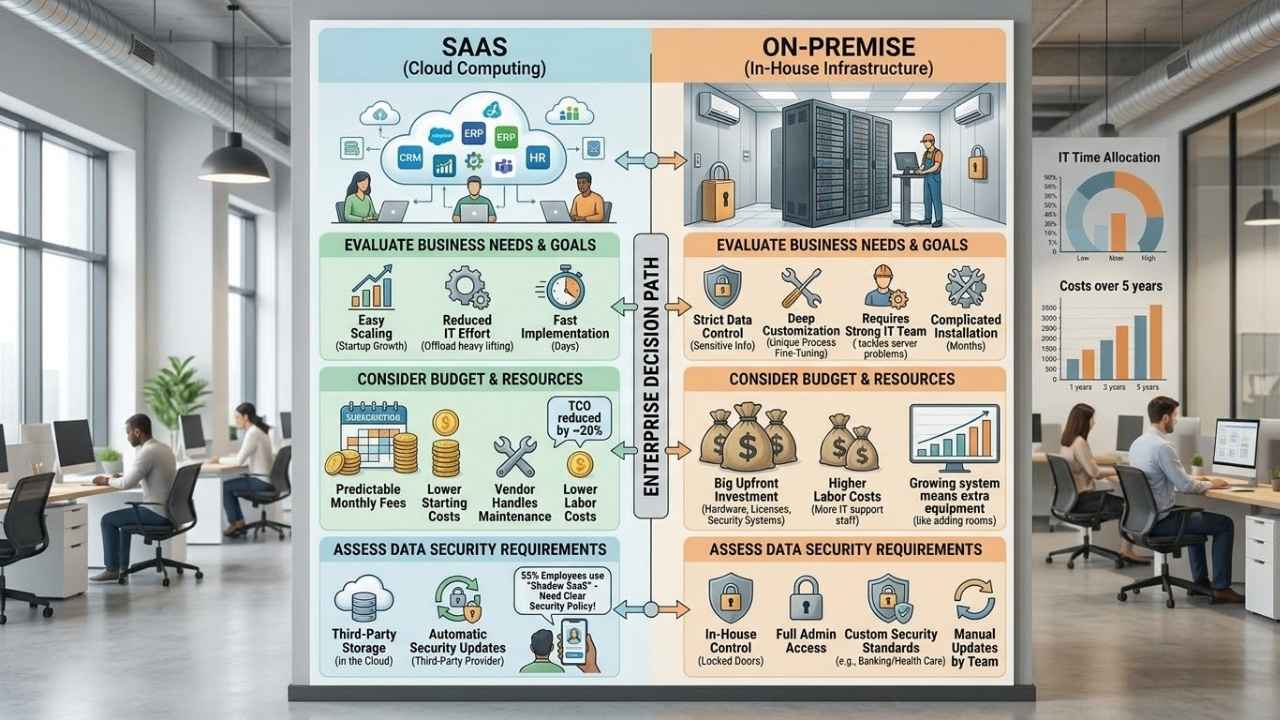
Choosing between SaaS and on-premise is not always a simple walk in the park. Your final answer depends entirely on what fits your company needs, wallet, and worry list.
Evaluate business needs and goals
Smart businesses set clear, achievable goals right from the start. The path you pick should fit your daily operations perfectly.
- List requirements: Detail all your current and future software needs clearly.
- Review growth plans: SaaS is wonderfully easy to scale for fast-growing startups, but large enterprises often need strict data controls.
- Assess IT staff: SaaS takes the heavy lifting off your plate. On-premise demands a strong IT team ready to tackle server problems at any hour.
- Check integration needs: On-premise allows more fine-tuning, which matters if your manufacturing or sales process is highly unique.
- Analyze your budget: SaaS runs on predictable monthly subscriptions. On-premise eats your budget early with big investments in hardware.
- Evaluate data security: Some industries require full control over sensitive information because of specific state or federal laws.
- Consider time limits: Implementation time for SaaS is measured in days. On-premise drags out for months with complicated installation.
Each business has its own recipe for success. Picking wisely means much smoother workdays ahead for your whole team.
Consider budget and resources
Enterprise leaders face very tough choices about software deployment. Cost analysis and resource planning make a massive impact on this final decision.
- Subscription model advantages: SaaS lowers the starting costs for businesses, making monthly fees highly predictable.
- Upfront investments: On-premise software needs a large initial investment in servers, hardware, and strict security systems.
- Implementation speed: Teams use SaaS software quickly without waiting months for physical setup.
- Maintenance duties: Ongoing maintenance falls directly to the vendor with SaaS, freeing up your internal IT staff.
- Labor costs: Managing on-premise means hiring more IT support staff, which quickly drives up labor costs over time.
- Scaling differences: Adding SaaS users takes just a few clicks. On-premise growth demands extra investments in physical equipment.
- TCO reductions: Current data shows that companies using SaaS cut their total cost of ownership by about 20% compared to traditional setups.
Both options affect IT management very differently. SaaS lightens the load, while on-premise keeps most tasks inside your business walls.
Assess data security requirements
Data security stands as a top concern for companies making this choice. Each option has different levels of control, cost, and daily risk.
With 55% of employees actively bypassing IT to use shadow SaaS tools, having a clear security policy is more critical than ever.
- Data location: SaaS solutions store data with third-party providers who manage the cloud computing infrastructure.
- In-house control: On-premise options keep all company data in-house, giving internal staff full administrative access.
- Compliance standards: SaaS meets common industry compliance but may not fit strict legal needs for highly sensitive data.
- Custom security: Companies in banking or health care often choose on-premise to set their exact security standards.
- Risk vs. Cost: SaaS comes with lower upfront expenses, but firms must carefully weigh the long-term risks if their data is highly regulated.
- Update frequency: Security updates in SaaS happen automatically. On-premise setups rely entirely on in-house teams to stop active threats.
Both models bring their own unique risks, like data loss from human error. It is vital to match your choice to your business needs and your comfort level with risk.
Final Thoughts
Answering the big question of SaaS Vs On-Premise: Which Is Better For Enterprise? starts with clearly knowing your goals. SaaS stands out for its quick setup, lower costs at the start, and incredibly easy scaling. It creates significantly less work for your busy IT teams.
On-premise wins if you absolutely need complete control over data or deep customization. It brings higher upfront bills and more work as your company grows, but offers unmatched security. Both options can take your business far if matched to what matters most in your daily operations.
Take small steps by checking trusted tech blogs or talking to experts before signing anything. Smart choices today will build a much stronger future for your company tomorrow.