


Ever notice website pages competing against each other for attention? Sometimes two blog posts or product pages cover almost the same topic and appear for the exact same keywords. This creates confusion in search results. Instead of one strong page ranking at the top, multiple weaker pages end up competing—often landing on page two or lower. The result is lost visibility and missed traffic.
Search engines struggle when there are too many pages answering the same query. When several pages target identical keywords, it becomes difficult for search engines to determine which one should rank. As a result, they may downgrade all of them.
This guide explains how to identify this issue and how to fix it quickly.
Follow the simple steps ahead to clean up your site structure and help the strongest content regain its position at the top of search results.
What Is Keyword Cannibalization?
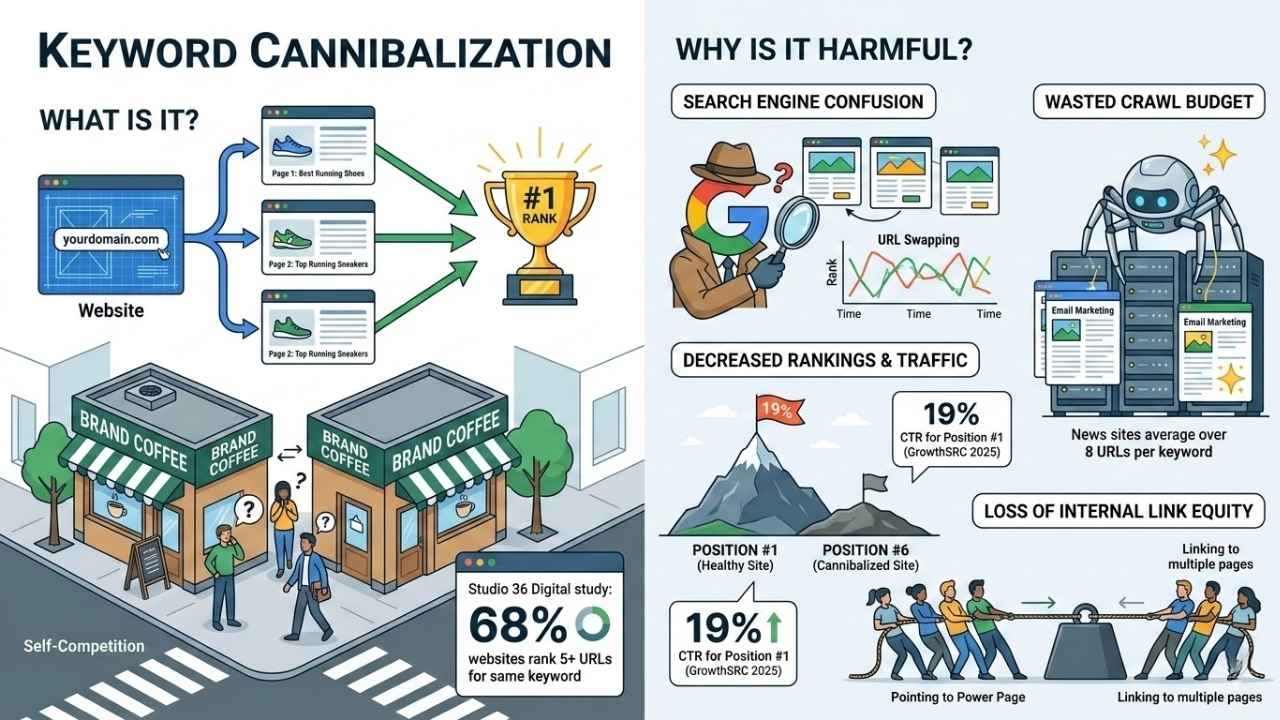
Keyword cannibalization happens when multiple pages on your website target the same or extremely similar search terms. Instead of helping you dominate the market, these pages end up competing against each other.
Think of it like owning two coffee shops on the same block. They aren’t taking customers from your competitors; they are just stealing customers from each other.
For example, if you run a shoe store and have one page for “Best Running Shoes” and another for “Top Running Sneakers,” Google struggles to decide which one is the authority.
“A 2026 study by Studio 36 Digital found that 68% of websites rank 5 or more URLs for the same keyword. This dilution is one of the most common reasons for stagnant growth.”
This often happens by accident. Over years of blogging or adding products, it is easy to forget what you have already written. You create a new post that overlaps with an old one, and suddenly, your site’s authority is split.
It is distinct from duplicate content, which is copying text word-for-word. Cannibalization is about intent—different pages trying to answer the exact same user question.
Why Is Keyword Cannibalization Harmful?
Keyword cannibalization acts like a brake on your SEO performance. When search engines can’t identify your best page, they often choose not to rank any of them highly.
Confusion for search engines
Search engines want to give users the single best answer. If you offer three different pages for the same topic, you force Google to guess which one is relevant.
Often, it guesses wrong.
You might see your product page ranking one week, and a blog post ranking the next. This “URL swapping” prevents either page from building the stability needed to reach the top 3 spots.
Decreased organic rankings and traffic
When you split your authority, you lose the “vote” that helps you rank. Instead of one page with 100% of your site’s power, you have two pages with 50% each.
The impact on your traffic is real. A 2025 report from GrowthSRC highlights that the click-through rate (CTR) for Position #1 has dropped to roughly 19% due to new features like AI Overviews. If cannibalization pushes you from Position 1 down to Position 6, you aren’t just losing a few clicks—you are losing nearly all of them.
Wasted crawl budget
Search engine bots have a limit on how many pages they crawl on your site each day. This is your “crawl budget.”
If bots spend their time scanning five near-identical pages about “email marketing tips,” they might miss your new, high-value content. For large sites, this is a critical efficiency killer. News and media sites, for instance, often average over 8 URLs per keyword, wasting massive amounts of crawl resources.
Loss of internal link equity
Internal links are like votes of confidence. When you link to five different pages for the same topic, you dilute that voting power.
Imagine a team trying to pull a heavy weight. If everyone pulls in the same direction (pointing to one main page), the weight moves. If the team splits up and pulls in different directions (linking to different pages), nothing happens.
| Factor | Healthy Site | Cannibalized Site |
|---|---|---|
| Link Equity | Concentrated on one “Power Page” | Spread thin across many weak pages |
| User Experience | Users find the best guide immediately | Users click through multiple shallow posts |
| Ranking Stability | Consistent top rankings | URLs constantly swap positions |
How to Identify Keyword Cannibalization
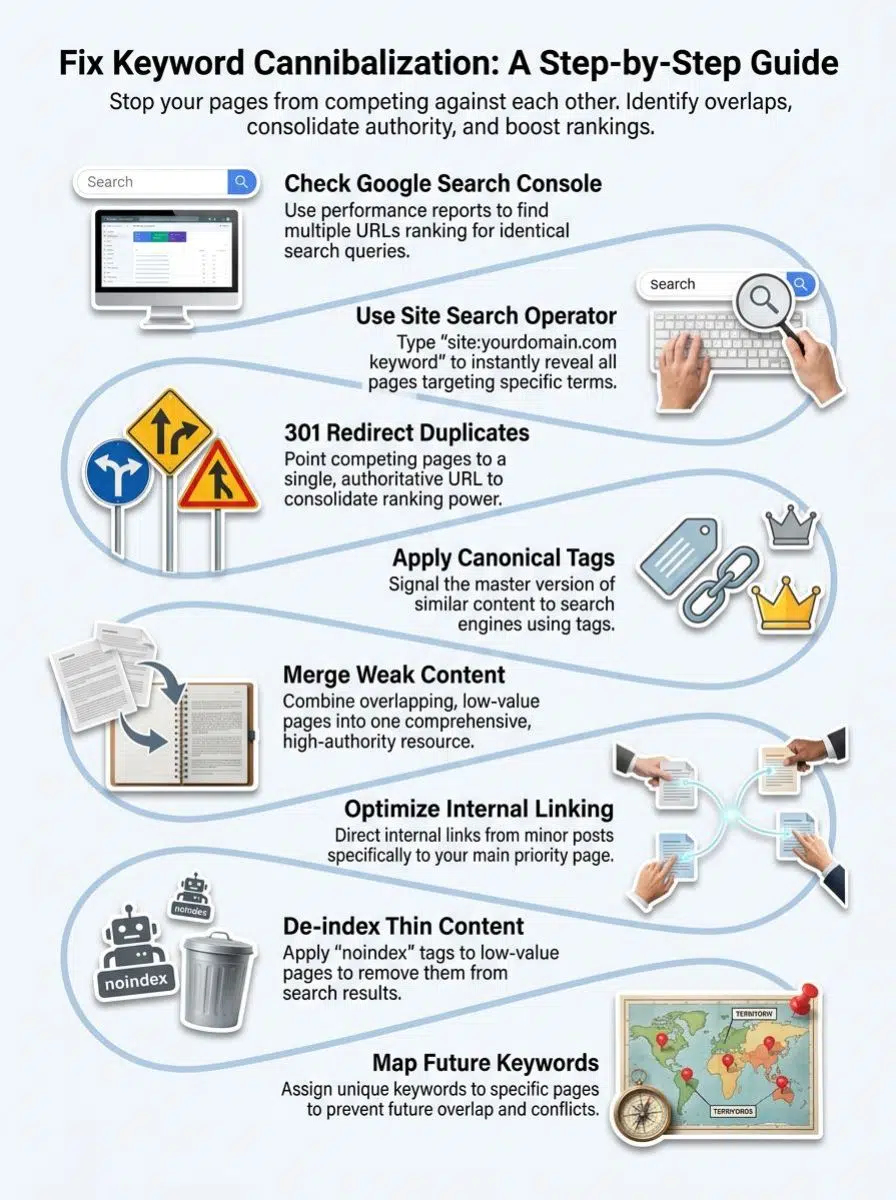
Finding these issues used to be like finding a needle in a haystack. Now, with the right data, you can spot them in minutes.
Use Google Search Console
This is the most accurate free method because it uses your actual traffic data.
- Step 1: Go to the “Performance” report and click on “Search Results.”
- Step 2: Click on a specific keyword in the “Queries” tab that you suspect is causing trouble.
- Step 3: Click on the “Pages” tab.
If you see more than one URL listed here with a significant number of impressions, you have found a cannibalization issue. Both pages are fighting for visibility for that single term.
Search your site using the search operator
You can do a quick manual check directly in Google using the “site:” operator. This commands Google to show you every page it has indexed from your domain for a specific topic.
Type this into the search bar:
site:yourwebsite.com "target keyword"
For example, searching site:nike.com "running shoes" will list every page Nike has on that topic. If you see two blog posts with nearly identical titles appearing at the top of the list, you likely need to merge them.
Leverage SEO tools like Semrush or Moz
Professional tools make this process automatic. Semrush, for instance, has a dedicated “Cannibalization” report inside its Position Tracking tool. It flags keywords where multiple URLs are ranking and shows you exactly when they swap places.
Ahrefs is another powerful option. By going to the “Organic Keywords” report and clicking the “Show History Chart” dropdown, you can see if the ranking URL has changed over time. If you see the line chart jumping between different blue URL lines, that is a clear sign of instability caused by cannibalization.
How to Fix Keyword Cannibalization
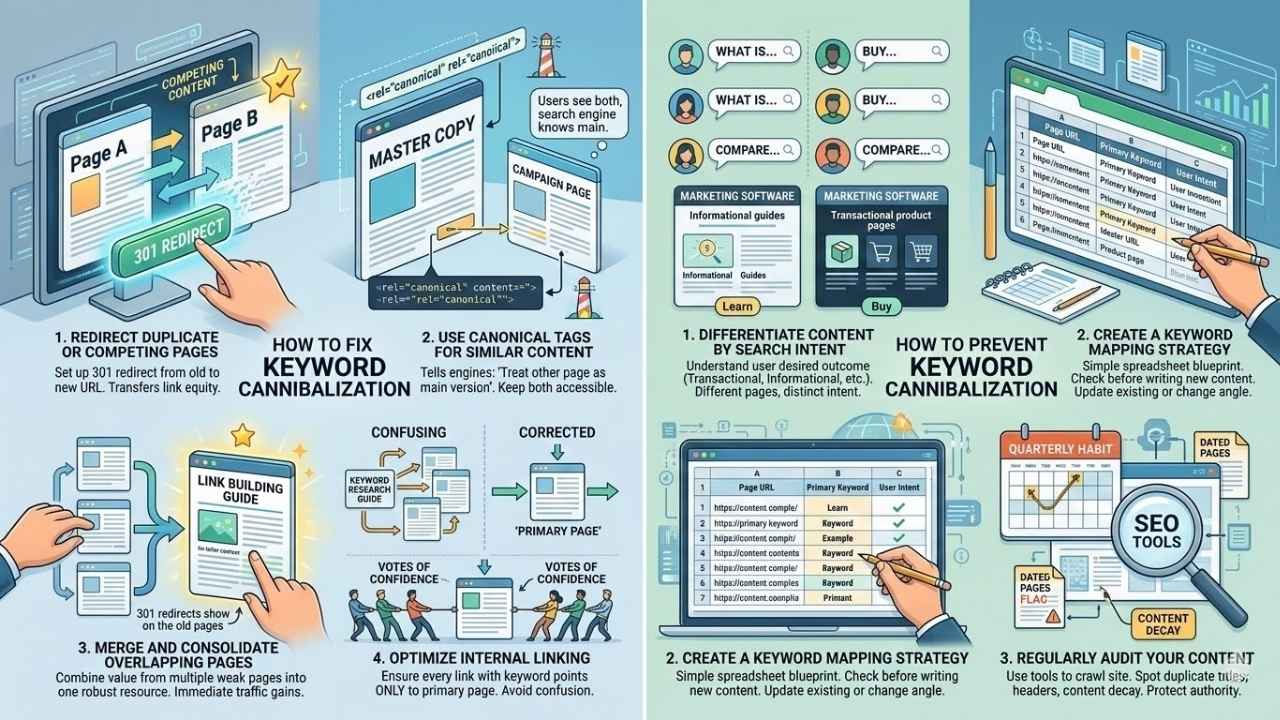
Fixing this issue is like decluttering a closet. You need to decide what to keep, what to throw away, and what to combine. Here are the four most effective strategies.
Redirect duplicate or competing pages
This is the “nuclear option” and often the most effective. If you have two pages and one is clearly better, keep the good one and delete the other.
Don’t just delete it, though. You must set up a 301 redirect from the old URL to the new one. This tells Google, “The content you used to find here has moved permanently to this new location.” It transfers all the ranking power (link equity) from the old page to the winner.
Sometimes you need to keep both pages. Maybe one is for a specific email campaign and the other is for SEO, but the content is nearly the same.
In this case, use a canonical tag. This is a line of code that tells search engines, “This page is a copy; please treat that other page as the main version.” It’s like a lighthouse guiding Google to the master copy while letting you keep the duplicate accessible to users.
Merge and consolidate overlapping pages
If you have three short articles about “link building,” none of them might be strong enough to rank on page one. But if you combine them, you could create a “Power Page.”
The Consolidation Process:
- Audit: Identify the 3-4 weak pages.
- Combine: Take the unique value from each and merge it into the strongest URL.
- Redirect: 301 redirect the other URLs to the main one.
This strategy often leads to immediate traffic gains because you are condensing authority into a single, comprehensive resource.
Optimize internal linking
You can vote for your favorite page using internal links. Search engines look at the anchor text (the clickable words) to understand what a page is about.
If you link to Page A using the text “keyword research guide” and link to Page B with the same text, you are confusing Google. Review your internal links and ensure that every link with your target keyword points only to your primary page.
Useful for category pages or tag archives that might be outranking your actual articles. A “noindex” tag allows the page to exist on your site for visitors to browse, but it tells Google not to include it in search results.
This removes the competition immediately without deleting the content.
How to Prevent Keyword Cannibalization in the Future
Stopping cannibalization before it starts saves you hours of cleanup work later. It all comes down to planning.
Differentiate content by search intent
Before you write, ask yourself: “What does the user want?”
If a user searches for “marketing software,” they might want to buy (Transactional intent). If they search “what is marketing software,” they want to learn (Informational intent).
You can have two pages targeting “marketing software” if one is a product page and the other is an educational guide. As long as the intent is different, they won’t compete.
Create a keyword mapping strategy
This is your blueprint. Create a simple spreadsheet with columns for “Page URL,” “Primary Keyword,” and “User Intent.”
Every time you plan a new piece of content, check your sheet. If the keyword already exists, you have two choices: update the existing page or choose a different angle. This simple step keeps your site organized and prevents accidental overlaps.
Regularly audit your content
Make this a quarterly habit. Use your SEO tools to crawl your site and look for duplicate title tags or headers.
Regular audits help you spot “content decay,” where old pages lose value and start conflicting with new ones. By catching these issues early, you protect your site’s authority and keep your rankings climbing.
Final Thoughts
Fixing keyword cannibalization is one of the quickest wins in SEO. By merging weak pages and directing Google to your best content, you can often see rankings improve without writing a single new word.
Start by checking Google Search Console today. You might find that your biggest competitor in the search results isn’t another company—it’s you. Take control of your structure, clarify your signals, and watch your traffic grow.





















