Is your website stuck on page two of the search results, even after all those late-night fixes? It feels a bit like shouting into the void, doesn’t it? Many site owners feel completely lost when their traffic drops or rankings slip without a clear reason. You know, I’ve found that this frustration is usually just a sign of a hidden technical glitch. It’s like trying to fix a squeaky door in the dark; you can’t repair what you can’t see.
Did you know that Google checks hundreds of signals before ranking any site? Even one small error in your technical setup can hold your pages back from being seen by the people who need them most. This post shares an easy-to-follow Technical SEO Audit Checklist for 2026.
I’m going to walk you through the exact steps I use to spot what is wrong and show you how to make things right, step by step. So, let’s go through it together. I’ll show you everything you need to know.
What Is a Technical SEO Audit?
Shifting gears from why SEO matters, it helps to know what makes a technical SEO audit tick. Think of a technical SEO audit as a thorough health check for your website. It spots weak points in site structure, crawling issues, indexing problems, slow page speeds, and URL hiccups.
You want Google’s bots to explore every nook and cranny of your website without hitting speed bumps or dead ends. If search engines can’t access your content easily, they simply won’t rank it.
“Think of your site as a house on the internet, Google knocks before visiting. If the door is stuck or the hallway is blocked, they just leave.”
Search engines crawl hundreds of billions of pages daily; if yours has broken links or jumbo images slowing things down, you might get left behind in the rankings race. Quick loads, friendly navigation for both users and bots alike, and solid HTTPS security all play their part in good search engine ranking.
Without regular audits using trusted technical audit tools like Screaming Frog SEO Spider or Semrush Site Audit, little gremlins can build up under the hood fast. In fact, for larger sites, managing your “Crawl Budget” (the number of pages Google is willing to crawl) becomes critical. If you waste it on broken pages, your best content might never get indexed.
Preparing for a Technical SEO Audit
Getting ready for a technical SEO audit is like packing your bags before a big trip; you want everything in order. A few simple steps now can save you headaches down the road, so roll up your sleeves.
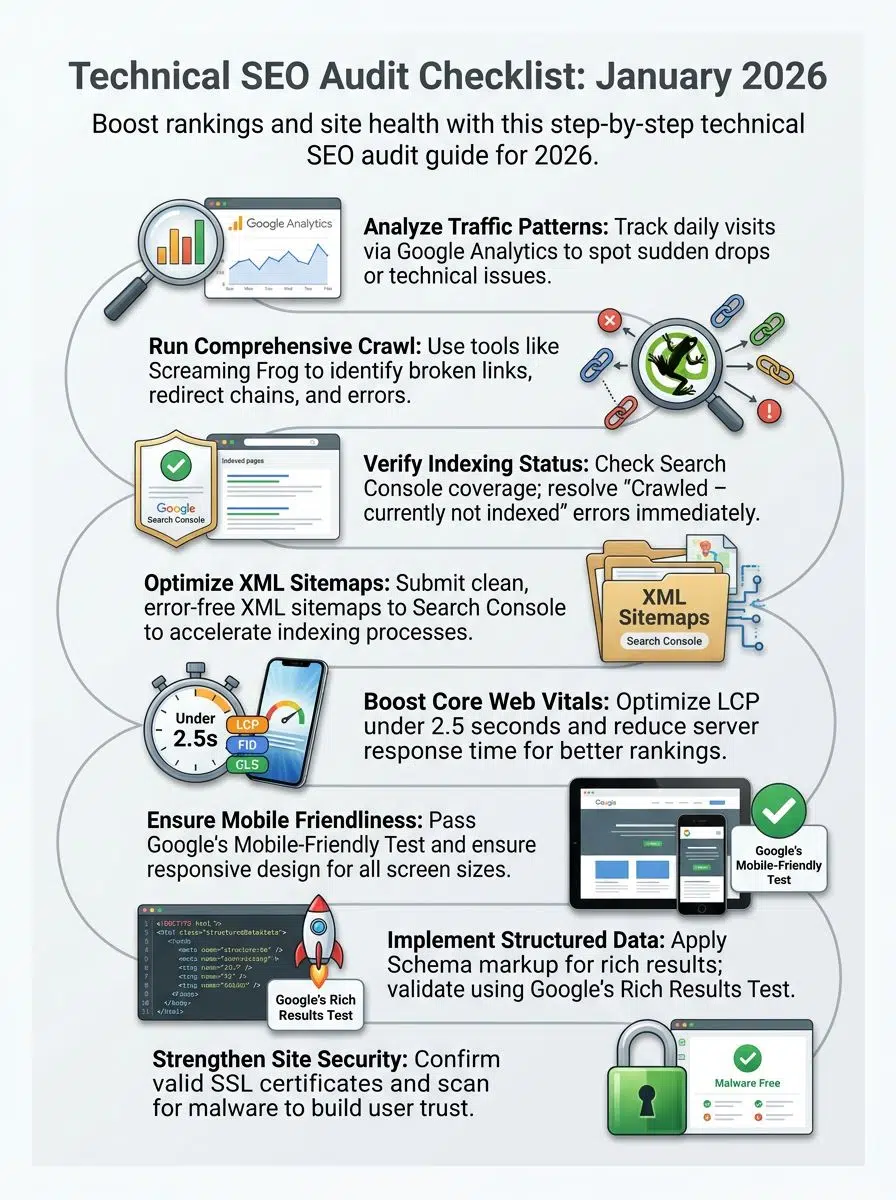
Analyze Web Traffic Patterns
Every website owner wants to know how users interact with their pages. Studying web traffic gives clues about what works and what needs fixing for SEO optimization.
I always start by looking at Google Analytics 4 (GA4). The “Exploration” reports here are much more powerful than the old Universal Analytics standard reports.
- Track daily visits using tools like Google Analytics. Note spikes or drops, since these can signal technical issues or crawling problems.
- Study user behavior flow to spot where visitors drop off. Pages with high exits might need faster load times or a better layout.
- Check which pages attract the most and least visits. Pages that get little attention might have indexing problems or broken links.
- Review referral sources to see if search engines are sending enough users. Poor referral stats hint at crawlability or indexation trouble.
- Look at bounce rates for landing pages. Very high bounce rates sometimes mean visitors do not find relevant content fast.
- Observe desktop versus mobile traffic splits. Low mobile numbers could suggest weak mobile optimization for your site structure.
- Compare new vs returning visitor data. A low return rate may show weak user experience UX or unappealing content structure.
- Analyze session duration and page depth metrics. Short sessions can point to performance issues or content not matching user intent.
- Keep an eye on Core Web Vitals-related metrics. In 2026, you must watch Interaction to Next Paint (INP), which replaced the old FID metric.
- Identify any sudden changes from previous months, especially in 2026, as these might result from algorithm updates affecting site speed, crawling, or indexation.
Using this information helps you target problem areas before a technical SEO audit moves forward.
Perform a Comprehensive Website Crawl
A website crawl checks how search engines see your site. It helps you spot SEO problems fast.
For this step, I rely heavily on Screaming Frog SEO Spider. Their version 23 update in late 2025 introduced excellent features for finding “semantically similar” pages, which help identify duplicate content even if the words aren’t exactly the same.
- Start by using an SEO audit tool like Screaming Frog or Sitebulb. These tools scan all your web pages and show missing titles, broken links, and slow pages.
- Spot duplicate meta titles and descriptions. Search engines do not like seeing the same descriptions on many pages.
- Find broken links that lead to dead ends. These hurt crawlability and user experience.
- Check for redirect chains or loops. Too many redirects slow down loading times and waste crawl budget.
- Review URL structure for long, messy URLs with weird symbols or numbers. Clean URLs help with indexing and look friendlier.
- Scan for missing or incorrect canonical tags. Canonicals tell Google which version of a page it should rank first.
- Check if blocked pages (robots.txt) are being crawled by mistake. Crawlers should not waste time on private or duplicate content.
- Identify very large pages or images that impact site speed. Big files slow down your website and lower Core Web Vitals scores.
- Spot unlinked orphan pages that have no internal links pointing to them. Orphaned content is hard for users and bots to find.
- Mark thin content pages with little value, as these lower website quality signals in 2026’s SEO best practices review.
A full crawl gives you a data-rich map of what needs work before moving forward with any other technical SEO tasks, fast fixes for quick wins!
Check for Proper Crawling and Indexing
Search engines must crawl and index your pages so users can find them. Errors here hurt site visibility and traffic.
The best place to check this is the Page Indexing report in Google Search Console. It tells you exactly why Google ignored a page, whether it was a “Crawl Anomaly” or a “404 Error.”
- Use Google Search Console to see how many pages Google indexes. Compare this number with your sitemap total. Large gaps point to indexing issues.
- Examine the Coverage report for “Crawled – currently not indexed” or “Discovered – currently not indexed” messages. These mean search engines see, but do not store, those URLs in results.
- Inspect robots.txt files for blocking rules that hide important content from crawlers. Mistakes in robot settings often block entire folders or key pages.
- Look at noindex tags in your source code. Sometimes, these tell search engines to ignore product or category pages by mistake.
- Check that vital landing pages appear in Google with a “site:” search followed by your domain and page name. Missing results hint at deeper problems.
- Remove any accidental canonical tags pointing away from original content. Wrong canonicals can drop good URLs from search listings fast.
- Scan for HTTP status errors like 404s or 500s on important URLs. Pages with errors cannot get properly indexed.
- Make sure JavaScript does not hide content during crawling. Some scripts stop bots from seeing menus, text, or products that matter for SEO optimization.
- Confirm that all submitted XML sitemaps list correct URLs without redirects or broken links. Up-to-date sitemaps guide crawlers through the site structure efficiently.
- Monitor crawl stats reports for sharp drops or spikes in activity. Changes might signal blocked resources, changed URL structure, or hosting issues holding up Googlebot visits.
Each item keeps your site open and clear for search engine bots, helping boost ranking and traffic flow into 2026!
Enhancing Crawlability and Indexability
Making your site easy to find, quick to load, and simple for search engines, honestly, it’s like rolling out a red carpet for Google bots; curious about how to shine even brighter? Keep reading.
Resolve Crawl Errors and Repair Broken Links
Crawl errors stop search engines from reaching your web pages. Broken links frustrate users and waste your crawl budget.

A recent study by Ahrefs showed that over 66% of links on the web rot somewhat significantly within a decade. This “link rot” is a silent killer for your site’s authority.
- Run Google Search Console’s Coverage report to check for crawl errors like 404 or server issues.
- Fix all 404 page errors by redirecting them to similar content or updating the link.
- Clean up any soft 404s, which show a “not found” message but still return a working code.
- Use a crawling tool, such as Screaming Frog, to spot broken internal and outbound links fast.
- Replace broken outbound links with relevant, working ones to keep value flowing out properly.
- Update the site architecture if you find too many dead ends that harm user experience and hurt SEO optimization.
- Sort URLs with redirect chains or loops by pointing old addresses directly to their new spot. This clears crawl paths for bots.
- Disallow crawling of pages that have no value with robots.txt so bots skip over deadweight.
- Check error logs monthly, as regular checks help keep your website audit healthy all year long.
- Keep users happy with clear “Page Not Found” messages that help them reach the next best thing fast.
Manage and Inspect XML Sitemaps
XML sitemaps guide search engines through your site. They help speed up the indexing process, so Google sees your fresh pages sooner.
In 2026, it is vital to use the tag correctly in your sitemap. This tells AI crawlers exactly when you updated a page, helping them prioritize fresh content over old, stale pages.
- Check that your XML sitemap includes every important URL you want indexed.
- Remove any blocked or redirected URLs from the sitemap to avoid errors.
- Submit your sitemap to Google Search Console for better SEO optimization.
- Make sure all links in the sitemap are working, with no dead ends or broken paths.
- Use only clean, full URLs; avoid session IDs or tracking strings in these links.
- Update your XML sitemap whenever you add new pages or change existing ones, keeping things current.
- Keep each sitemap file under 50,000 URLs and under 50MB to follow SEO best practices.
- Confirm that the sitemap’s location is listed in your robots.txt file for easy crawling.
- Monitor how often search engines access your sitemap using tools like Search Console or Bing Webmaster Tools.
- Use clear naming conventions like “sitemap.xml” to keep files simple to find.
Once XML sitemaps work smoothly, it is time to tackle duplicate content concerns next.
Tackle Duplicate Content Concerns
After you check and tidy up your XML sitemaps, it is time to fix duplicate content. Search engines get mixed signals if the same or very similar text shows up on different URLs. This may hurt rankings or confuse users who find repeated pages.
Find repeating titles, matching meta descriptions, or identical paragraphs across your site. Use simple tools like Copyscape or the “Near Duplicate” check in Screaming Frog for this step.
Set canonical tags on your main page version, so Google knows which one to keep in search results. If two blog posts say the same thing, rewrite one to make both useful and clear. Clear out URL strings that show the exact product twice; it helps boost SEO optimization and keeps your technical SEO audit tight as a drum!
Optimizing Website Performance and Speed
Fast websites make happy visitors, and search engines give them a nod too. Small changes in speed can mean big wins for both rankings and user smiles.
Improve Core Web Vitals Scores
Google made Core Web Vitals a ranking signal back in 2021. Scores matter even more in 2026 for search engine ranking and SEO optimization.
The most important recent change is that Interaction to Next Paint (INP) has officially replaced the old First Input Delay (FID) metric. You need to ensure your INP is under 200 milliseconds for a “good” score.
- Check your Largest Contentful Paint or LCP score. A site should load key content in under 2.5 seconds, or folks may bounce.
- Reduce server response time by choosing fast hosting. Every second counts for user experience.
- Use tools like PageSpeed Insights or Lighthouse 12+ from Google for tracking how pages perform.
- Remove unused third-party scripts and heavy plugins that slow pages down. Less clutter means more speed.
- Compress images into lighter file formats such as WebP before uploading them to your website.
- Set up lazy loading so images only load when the visitor scrolls to them, making first views faster.
- Minify CSS and JavaScript files. Smaller file sizes lead to quicker downloads.
- Fix any layout shifts, since Cumulative Layout Shift or CLS should stay below 0.1 according to SEO guidelines.
- Preload important fonts and resources, so text appears right away instead of flashing blank spaces.
- Monitor your INP. This metric replaced FID in March 2024 and measures how responsive your page is to clicks and taps.
Each step makes your site easy to use and boosts its SEO best practices at the same time.
Optimize Image Sizes and Formats
Big images make websites slow. Search engines want fast sites for happy users. While everyone talks about JPEGs, I highly recommend looking into the AVIF format. It often offers better compression than WebP, though WebP is still the safest bet for maximum browser compatibility in 2026.
- Compress each image before you use it on your site. Tools like TinyPNG, ShortPixel, or Squoosh shrink file sizes and keep quality.
- Pick the right format every time. JPEG works best for photos, PNG fits logos with clear backgrounds, and WebP is a smart choice for both quality and space-saving in 2026.
- Check that no image loads bigger than it needs to show on screen. Use smaller versions for mobile devices to boost loading times.
- Add descriptive file names with keywords like “seo-audit-checklist-2026.jpg” instead of “img1234.jpg” for better SEO Optimization.
- Always fill out image alt text with simple descriptions that match what’s shown, supporting accessibility and keyword targeting.
- Activate lazy loading so pictures download only as people scroll down; this trick saves bandwidth and makes your website feel quicker.
- Remove unused media files from your server. Keeping only needed images helps Core Web Vitals and keeps indexing smooth.
- Keep an eye on site speed tools such as Google PageSpeed Insights or Lighthouse to spot oversized image issues fast.
Once your images are fast and tidy, get ready to tackle JavaScript and CSS blocking problems next.
Reduce Render-Blocking JavaScript and CSS
Fast websites make people happy and help SEO rankings. Too much JavaScript or CSS can slow your site down right from the start.
If you check the “Coverage” tab in Chrome DevTools, you can actually see exactly how much code on your page is unused. It’s often shocking. I’ve seen sites loading 80% unused CSS!
- Use asynchronous loading for JavaScript files so your page loads faster before running scripts.
- Defer non-essential JavaScript to let the main content load first, making users see something useful sooner.
- Minimize your CSS and JavaScript files by removing spaces, comments, and extra lines to shrink file size.
- Combine small CSS files into one larger file to cut down on requests, speeding up loading times.
- Place critical CSS directly in the page’s HTML so important styles show at once without waiting for external files.
- Avoid big frameworks like jQuery if you only need a few functions; sometimes plain JavaScript works better and is lighter.
- Load third-party scripts last since these often cause delays that hurt user experience and impact Core Web Vitals scores.
- Test your site with Google PageSpeed Insights or Lighthouse to find out which resources block rendering and get clear steps to fix them.
- Compress JS and CSS files using gzip or Brotli to further reduce file sizes before they reach browsers.
Ensuring Mobile Friendliness and User Experience
People use their phones for almost everything, so your site must work well on all screens. A bumpy journey frustrates visitors, and they may never come back.
Achieve Mobile Optimization Standards
Google checks if your website works well on phones and tablets. More than 60% of searches in 2025 came from mobile devices, so this matters a lot.
Google retired the old “Mobile-Friendly Test” tool in late 2023, so don’t go looking for it. Instead, you should check the “Page Experience” report in Google Search Console or run a Lighthouse audit in your browser to catch these issues.
If words are too small or buttons sit too close together, fix them right away. Sites that pass these checks rank higher in search results for mobile users. Make sure every page loads fast and looks sharp, no matter the screen size. Update old templates that break on smaller screens, as even one broken page can sink rankings across your site.
Fix touch targets, nobody likes tiny buttons you have to wrestle with! A good rule of thumb is to make all clickable elements at least 48×48 pixels.
Implement Responsive Design and Uniform Content
Screens come in all shapes and sizes, so pages must look sharp on phones, tablets, and desktops. A responsive web design adapts your layout, buttons, and images to fit each screen size.
Uniform content keeps every visitor happy by showing the same facts or features no matter how they browse. I’ve noticed many sites hide content in “accordions” on mobile; Google says this is okay, but make sure the text is still in the HTML.
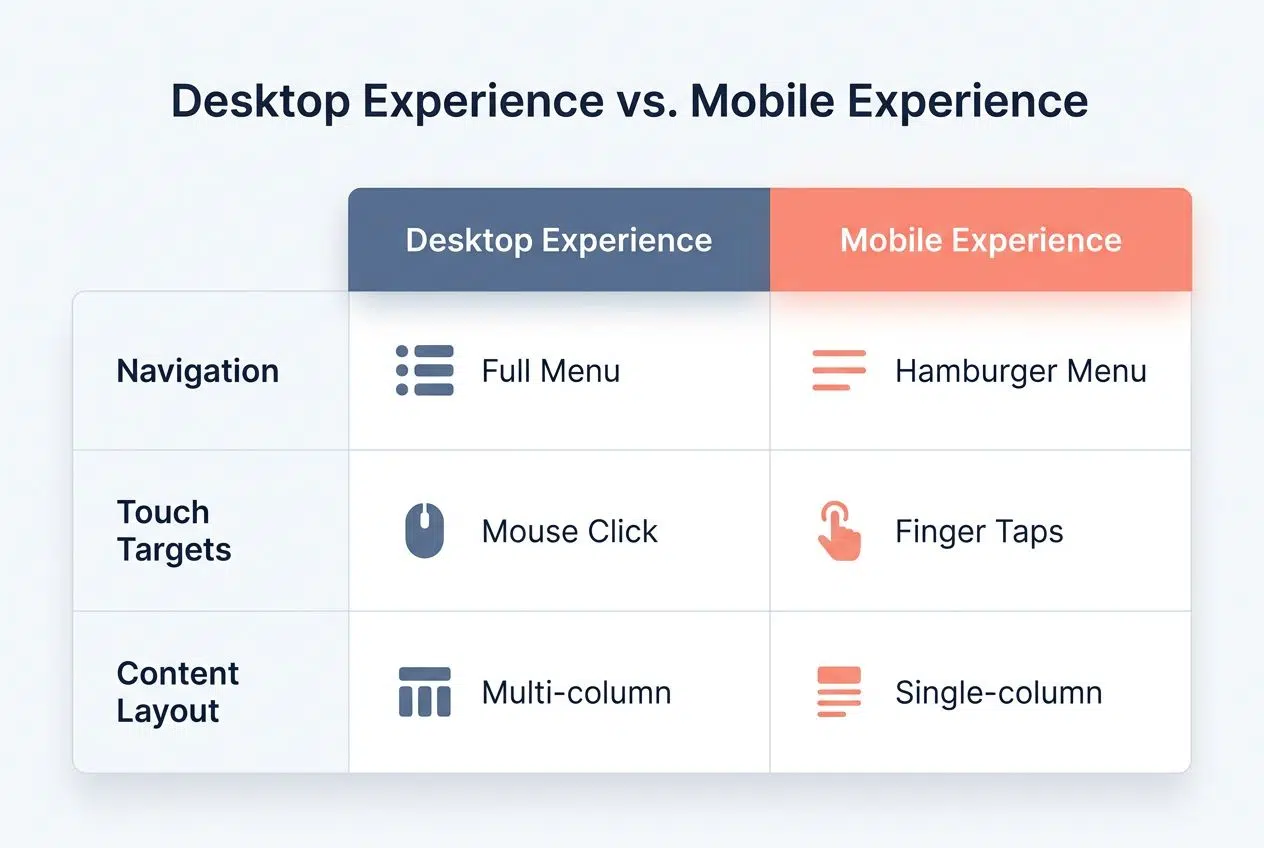
| Feature | Desktop Experience | Mobile Experience |
|---|---|---|
| Navigation | Full horizontal menu bars | Collapsible “Hamburger” menus |
| Touch Targets | Mouse clicks (precise) | Finger taps (needs 48px+ size) |
| Content Layout | Multi-column layouts | Single-column stacking |
Mobile optimization gives users fast page loads and a better user experience UX. Using one main URL for both desktop and mobile helps with crawlability and indexing. This also boosts search engine ranking since Google uses mobile-first indexing as of 2023.
Don’t let odd layouts or missing info cost you clicks; keep it simple and clear everywhere people visit your site!
Implementing Structured Data and Schema
Adding structured data lets search engines better understand your content, kind of like giving them glasses to see sharp details. Schema markup can also boost how your site appears in results, making it stand out from the crowd.
Test and Correct Schema Markup
Schema markup helps search engines understand your content. It’s like adding labels to your website’s details for Google to read with ease.
In 2026, schema is even more critical because AI Overviews (formerly SGE) rely on it to understand entities and facts about your business.
- Use Google’s Rich Results Test to check if schema markup exists on your pages. It flags errors fast and shows which sections need work.
- Fix any detected issues, such as missing fields or invalid code. Errors can block rich results, so accuracy is key.
- Match each schema type to the page topic. For example, use Product schema for a shirt listing or Article for a news story.
- Stick to supported formats like JSON-LD, which Google prefers in 2026 for easy crawling and indexation.
- Avoid stuffing one page with too many types of schema; keep it tight and relevant.
- Validate changes with the Schema.org validator once updates are made. This tool spots small mistakes before they hurt your SEO audit results.
- Update structured data often, especially if your site adds new features or covers trending topics.
Clear schema markup attracts better search engine ranking and helps users spot your content fast. Next up, you will learn how structured data boosts content visibility for both people and bots.
Employ Structured Data for Enhanced Content Visibility
Search engines use structured data to understand your site better. Use schema markup for things like reviews, products, events, or FAQs. Google and Bing highlight this extra info in search results through rich snippets.
These make your website more noticeable and can boost click-through rates. For example, adding “Merchant Center” data feeds alongside your Product schema can get your items into the visual Shopping Graph.
Double-check the markup using tools like Google’s Rich Results Test or Schema.org Validator. Mistakes in schema code can block enhanced listings from showing up. Marking up content helps keep technical SEO strong and supports a higher search engine ranking for 2026 and beyond.
Websites that do this well often see higher traffic numbers and sharper visibility on crowded result pages.
Securing Your Site and Using HTTPS
A safe site builds trust with visitors and search engines, plain and simple. Give your pages a security boost—think of HTTPS as a sturdy lock on your digital front door.
Confirm Valid SSL Certificate Installation
Your website must be safe for users. Secure sites improve SEO rankings and boost user trust. I recommend checking if your host supports HTTP/3 (QUIC). This newer protocol makes secure connections much faster than the older versions.
- Check the browser bar for a padlock icon next to your URL; this means HTTPS is active.
- Use free tools like SSL Labs or Why No Padlock to test your SSL certificate and see if it covers all subdomains.
- Make sure the certificate is not expired—search engines can block outdated certificates, hurting site traffic.
- Scan every page on your website. Mixed content warnings show up if some elements still use HTTP instead of HTTPS.
- Redirect all HTTP pages to their HTTPS versions with 301 redirects, keeping crawlability clean and user experience smooth.
- Review site settings in Google Search Console; confirm that Google indexes only the HTTPS version of your website.
- Update internal links, canonical tags, and sitemap URLs so they point to secure URLs only, supporting better indexing.
- Contact your web host for help if visitors report SSL errors or browsers say “Not Secure” on any page.
Scan for Malware and Remove Hacked Content
SSL keeps your site’s data locked up tight, but some threats can still sneak in through the cracks. Next up is checking for malware and cleaning out hacked content to protect your visitors and SEO rankings.
If you use WordPress, a plugin like Wordfence or Sucuri is non-negotiable. They block millions of attacks every single day that you never even see.
- Use a trusted website scanner like Google Search Console or Sucuri SiteCheck to spot malware quickly. These tools will flag suspicious code hiding in files or pages.
- Scan each folder, image, JavaScript file, and plugin for unwanted changes or strange scripts that could harm site speed or security.
- Look out for sudden spikes in unusual traffic patterns; sometimes bots attack vulnerable sites by inserting spammy redirects or phishing pages.
- Check if Google has blacklisted any URLs on your site, as this can crush search engine ranking overnight.
- Remove any suspicious code, unauthorized access points, spammy links, or fake login forms without delay.
- Update all passwords for admin accounts and plugins after removing infected files to stop hackers from waltzing right back inside.
- Install fresh software updates, WordPress core files, themes, and plugins, and get safety patches often to patch holes hackers might exploit.
- Turn on security alerts for future attacks; set them up with tools like Wordfence or SiteLock, so you stay ahead of threats before they bloom into big problems.
Optimizing for International and Multilingual Audiences
Does your site speak every language? Search engines may say otherwise if you skip a proper check. Get this step right, and your content opens doors around the globe, no passport needed.

Check and Correct hreflang Tags for International SEO
Websites that target users in different countries must speak their language. Hreflang tags help Google show the right page to the right person.
A recent study found that missing return tags are the most common hreflang error. Basically, Page A links to Page B, but Page B forgets to link back to Page A.
- Check that every webpage meant for a specific region or language has hreflang tags added in its code.
- Make sure each tag uses the correct ISO language and country codes, like en-us for English speakers in the US or fr-fr for French speakers in France.
- Test your tags using Google Search Console’s International Targeting report, checking for errors.
- Avoid mixing up self-referencing hreflang links; every page must point back to itself with its own tag.
- Fix any common mistakes, such as missing return links between pages or typos in region codes.
- Remove duplicated or extra hreflang entries, which can confuse search engines.
- Update sitemaps to include all language versions of every URL to help crawlers discover them faster.
- Use only valid pages: never link hreflang tags to broken URLs, redirects, or blocked resources.
- Keep a list of all regions and languages targeted so nothing slips through the cracks during each SEO Audit.
- Review site analytics after updates; see if traffic from other countries grows or stays flat.
Confirm Accurate Language and Regional Targeting
Targeting the right language and region boosts your search engine ranking. Your site must match both what people speak and where they live.
One pro tip: always define an “x-default” tag. This tells Google where to send a user if none of your specific languages match their settings (like a fallback homepage).
- Check if every page uses the correct hreflang tags for target countries and languages. Google needs these to show your site to the right audience.
- Use specific regional URLs such as example.com/us/ for the United States or example.com/fr/ for France, which helps with clear SEO optimization.
- Confirm that users landing from outside your country get sent to their local page version based on browser settings, not random choice.
- Avoid automatic redirection without user options because this frustrates visitors and can lead to high bounce rates.
- Translate all key content, menus, and buttons so users feel at home no matter where they are.
- Double-check language codes in your HTML, like en-US for American English or es-ES for Spanish-Spain; small errors here can break indexing.
- Content must fit both language and culture; use terms that locals understand instead of direct translations only.
- Search engines might penalize duplicate content if pages are too similar; use canonical tags wisely if needed.
- Correct local contact details on each version of the site, like phone numbers or addresses—searchers expect them to be accurate.
- Test your setup with Google Search Console’s International Targeting report; it flags the most common issues fast, so you do not need guesswork.
Wrapping Up
Start your technical SEO audit checklist for 2026 with a sharp eye and keep those best practices close. Tackle site speed, fix broken links, refresh URLs, and boost your search engine ranking. Use technical audit tools often to check crawlability and indexation.
Google updates its guidelines all the time; keeping up builds an edge. Technical SEO means building trust with both users and search engines.
Give attention to mobile optimization since over 60% of searches now happen on phones. Core Web Vitals also count more than ever for SEO Optimization in 2026. Fast sites earn traffic; secure ones keep it coming back.
Keep making small fixes because every detail counts toward better performance metrics and user experience UX.