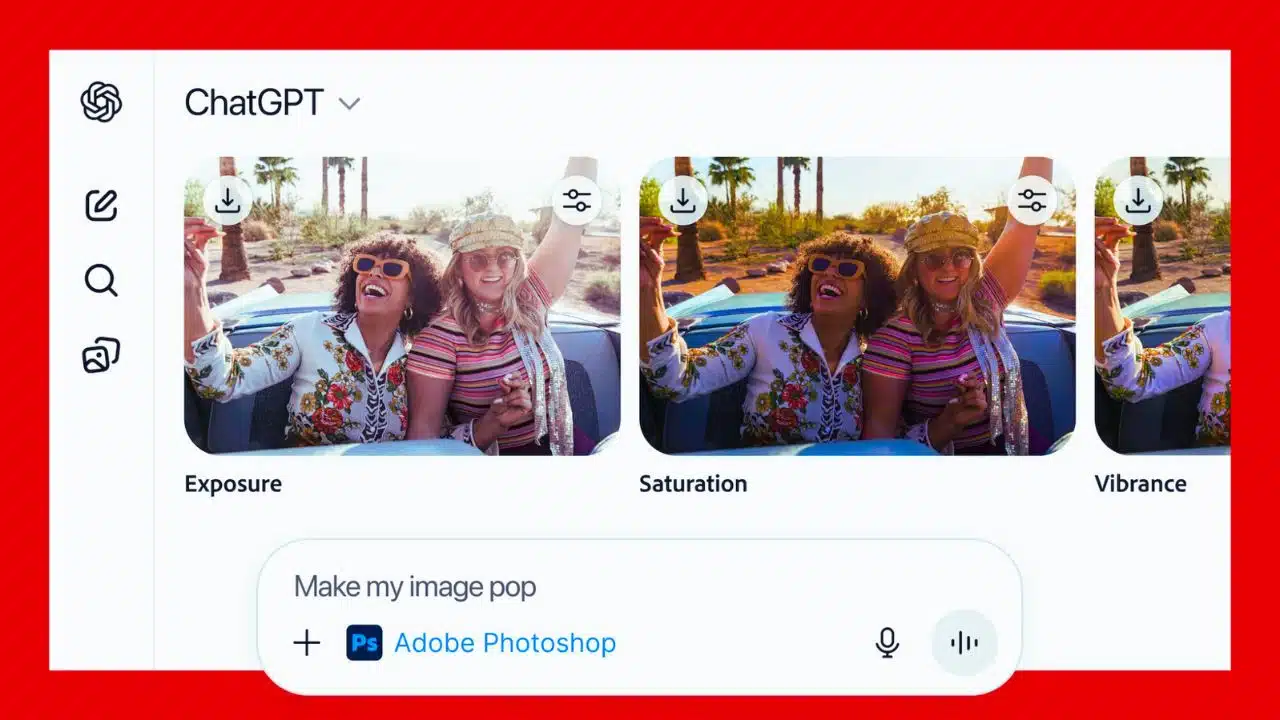
OpenAI has integrated Adobe Photoshop, Adobe Express, and Adobe Acrobat directly into ChatGPT, letting users edit images, create designs, and manage PDFs through simple text prompts. The apps are rolling out as free ChatGPT integrations from December 10, 2025, across web, desktop, and iOS, with broader mobile support to follow.
OpenAI integrates Adobe tools into ChatGPT
Adobe announced on December 10, 2025, that Photoshop, Adobe Express, and Acrobat are now available as apps inside ChatGPT, building on OpenAI’s new app platform for third‑party software. Users can invoke the tools either by naming them in a prompt or by selecting them from ChatGPT’s interface, without opening separate Adobe applications.
According to Adobe and OpenAI, the goal is to make professional‑grade creative and document workflows accessible to hundreds of millions of ChatGPT users who may not be trained designers or PDF experts. Adobe has not disclosed financial terms, but emphasizes that the integration is designed to introduce its flagship tools to new audiences while complementing OpenAI’s own generative AI features.
What users can do inside ChatGPT
Inside ChatGPT, Photoshop focuses on common editing tasks such as adjusting brightness and contrast, changing exposure, blurring or replacing backgrounds, and applying artistic styles to all or part of an image. Users can upload a photo, describe the desired change in plain language, and then refine the result using sliders or by opening the file in the web version of Photoshop for more control.
Adobe Express within ChatGPT lets users generate social posts, posters, marketing graphics, and other layouts using templates and Adobe’s design library, all driven by conversational prompts. Acrobat for ChatGPT supports editing existing PDFs, compressing and converting files, merging documents, and extracting text or tables, with current uploads limited to around 100MB per document.
Key capabilities of Adobe apps in ChatGPT
| App | What users can do from ChatGPT | Availability and notes |
| Photoshop | Adjust brightness, contrast, exposure; blur or replace backgrounds; edit specific regions; apply artistic effects such as stylized filters, all via text prompts. | Free to use in ChatGPT at launch; not full desktop parity but can hand off edits to the web version of Photoshop for finer control. |
| Adobe Express | Create social posts, flyers, ads, and other graphics using templates; swap images, change colors and text, and iterate designs through conversation. | Available globally in ChatGPT; positioned for small businesses, students, and non‑designers who need fast, on‑brand visuals. |
| Acrobat | Edit PDFs, reorganize pages, merge files, compress and convert documents to and from PDF, and extract text or tables directly in chat. | Free at launch in ChatGPT, with a roughly 100MB file size limit and sign‑in via an Adobe account for some document features. |
Access, rollout, and target users
Adobe’s ChatGPT apps are initially available on the web, desktop, and iOS versions of ChatGPT, with Adobe Express already supported on Android and Photoshop and Acrobat Android compatibility planned for a later update. The tools are free to use inside ChatGPT at launch, although users will typically need to sign in with an Adobe account to connect their projects and documents.
The integration is pitched at a broad audience that includes small businesses, marketers, students, and office workers who want to generate visuals or polish PDFs without leaving a chat window. For Adobe, tapping into ChatGPT’s reported base of more than 800 million users offers a way to widen the funnel for its creative and document services, while lowering the learning curve for casual users.
Key milestones in the Adobe–ChatGPT collaboration
| Date | Milestone |
| March 31, 2024 | Adobe launches an Adobe Express GPT experience, allowing ChatGPT users to move from text prompts to Express‑powered content creation in minutes. |
| October 2025 | OpenAI introduces its Apps SDK and brings third‑party services like Spotify and Canva into ChatGPT, laying the groundwork for deeper software integrations. |
| December 8–10, 2025 | Adobe confirms and then officially announces the launch of Photoshop, Adobe Express, and Acrobat apps inside ChatGPT, with free access starting December 10. |
Strategic stakes and what comes next
For OpenAI, Adobe’s flagship tools are one of the strongest signals yet that ChatGPT is evolving into a general‑purpose interface or operating system for everyday applications rather than a standalone chatbot. The company has already experimented with promoting third‑party apps in conversations, and is expected to keep expanding integrations as it refines how apps are surfaced without feeling like ads.
Adobe, meanwhile, is pursuing an agentic AI strategy in which assistants across its products, powered in part by initiatives like Project Moonlight, cooperate to move users from ideas to finished assets more quickly. Industry observers note that the partnership puts Adobe alongside, rather than against, OpenAI’s own image generators, suggesting a coexistence model where professional creative tools and general AI platforms share users and workflows.