Many schools and town halls struggle to pick a CMS with strong security and ADA compliance. Agencies now use headless CMS and hybrid CMS to speed content delivery on websites, apps, and portals.
We cover the open source framework, the blog builder, the engagement platform, the town site service, and more to help you build secure, easy sites with the right integrations. Keep reading.
Key Takeaways
- Drupal powers 25.5% of state sites and 8.3% of U.S. agency sites. It uses frequent security patches, cloud scaling, API integrations, and multi-site, multilingual support with no license fees.
- WordPress runs over 40% of all websites, including 10% of city and 13.8% of county governments. It offers drag-and-drop design, free plugins, open APIs, ADA compliance tools, and mobile-friendly themes.
- Granicus serves 11.1% of agencies and 16.3% of city governments. CivicPlus runs on 26.6% of agencies, 32.3% of cities, and 22.3% of counties. Both SaaS platforms include modules for civic engagement, payments, and agendas, plus ADA/WCAG compliance and automatic cloud security patches.
- Adobe Experience Manager runs on 7.8% of state government sites. It scales up for heavy traffic, links to Adobe Cloud and Sensei for AI personalization, and meets FedRAMP, ADA, and WCAG standards with a high license fee and a steep learning curve.
- Revize serves 5% of agencies, 4.4% of city councils, and 5.8% of counties with a simple drag-and-drop CMS and prebuilt civic modules. Modern Campus targets colleges and universities with course catalogs, student record integration, ADA checks, and SaaS deployment in weeks.
What makes Drupal secure and scalable for government and education sites?
Drupal is an open-source CMS that gives government agencies a fortress-like security setup. It accounts for 25.5% of state government CMS use and 8.3% of U.S. government agencies. Frequent security updates and a solid security architecture keep websites safe.
A large developer community hunts down vulnerabilities and ships security patches fast.
Sites can scale up during traffic surges, thanks to cloud infrastructure, load balancing, and CDNs. The platform handles database queries and third-party integrations via APIs in a snap.
It offers multi-site management and supports multilingual content. Agencies pay no licensing fees, but must budget for setup costs and skilled PHP developers. Local schools and the White House trust this CMS for web development and citizen experience.
Why is WordPress accessible, flexible, and cost-effective for these sectors?

Agencies pick WordPress for its ease of use, open source cms, and zero licensing fees. It powers over 40 percent of all websites globally. City governments adopt it at a 10 percent rate.
County governments use it at 13.8 percent. A large developer community supplies plugins, themes, and community support. Teams apply drag and drop interface for fast web design. They meet ada compliance and accessibility standards with ease.
They rely on third party integrations and open api tools. They craft mobile responsive design for tablets and smartphones. They improve citizen experience with intuitive navigation.
Agencies gain control over website maintenance, security patches, and software updates.
Teams scale with multi site management across departments. They host content delivery networks for high traffic. They add multilingual pages for diverse audiences. They use seo and performance tools to boost speed.
They tune page layouts and load balancers for peak performance. They tap google analytics for data insight. They handle cloud security or use managed hosting. They still need plugin maintenance and custom code updates.
They drop vendor lock in and curb future fees. They embrace flexible website integration with saas tools.
What features does Granicus offer for government websites and citizen engagement?
Granicus powers 11.1% of U.S. government agencies and 16.3% of city governments with a cloud-hosted cms for public service. It uses a saas model. The platform packs in civic engagement, legislative management, and digital services.
The platform feels like a digital town hall, giving citizens a stage to comment, share, and file requests online. Users tap its drag-and-drop tool, open-api interfaces, and multi-site management.
It meets ADA and WCAG criteria, and it holds federal security authorization.
A workflow and approval engine cuts red tape. Security patches roll out automatically in the cloud. Teams review and sign off on content in one place, no endless email chains. It links with gis systems, social media networks, and open data portals for richer user experience.
Licensing fees and ongoing maintenance costs run on subscription. Some clients report slow page loads under heavy traffic. Ease of use draws praise from staff who go live in days.
What comprehensive features does CivicPlus provide for local governments?
CivicPlus holds a 26.6% share among U.S. agencies and tops city and county government charts at 32.3% and 22.3%. It delivers online payments, agenda management, and emergency notifications through a mobile-responsive, drag-and-drop interface.
Staff handle meeting and agenda management modules with ease. Public records management and digital services tools sit alongside ADA compliance and data security scans.
Integrated hosting and community support keep websites online with prompt security patches, website security measures, and consistent website maintenance. Licensing fees can rise for larger implementations and some staff report slow page loads on shared hosting.
The proprietary cms has fewer third-party integrations than open-source cms options. Agencies still praise the scalable saas design, multi-site management tools, and high usability.
How does Adobe Experience Manager deliver enterprise functionality and personalization?
AEM is an enterprise content management system (cms) from Adobe that handles large workloads and assets at scale. This platform runs as software-as-a-service. Teams link it with other Adobe products such as Experience Cloud, Marketo, and Creative Cloud for smooth flows.
About 7.8 percent of state governments use it, so government agencies trust its power. The platform scores high on website security and delivers regular security patches. Admins control content with strict governance and multi-site management.
It shines on high-traffic websites from large agencies, due to its ability to scale horizontally. Third-party integrations let teams add event registration, payment systems, and digital marketing jigsaws.
A deep toolset feels like a Swiss Army knife for every task. Complex setup and licensing fees can make small offices squirm. Big teams treat the steep learning curve like a rite of passage.
AI personalization tunes the site to each visitor. The system tracks clicks and suggests content in real time. Editors swap images, text, or video for local language variants with multi-language support.
A dashboard shows asset health, traffic, and patch status, in a single view. Connections with Adobe Sensei power smart recommendations behind the scenes. It feels like a digital concierge guiding each user.
Government websites must meet ada compliance and accessibility compliance rules, so AEM keeps them in check. Custom workflows let agencies fine-tune user journeys. That kind of granular design customization keeps citizens happy and engaged.
Secure APIs guard against cyber threats, so teams can breathe easy. Backups and version control stand ready if anyone needs a quick rollback.
Why is Revize user-friendly for municipal website design?
Local teams pick Revize for its simple admin interface, ready-made government modules, and mobile responsive design. Five percent of U.S. government agencies, 4.4 percent of city councils, and 5.8 percent of county bodies use this content management system.
The platform suits small and mid size municipal offices without deep IT staff.
Subscription fees cost less than big enterprise licenses, and cloud hosting includes website security patches and ongoing support. Non technical staff like the drag and drop editor, and they update event calendars or post public notices on government websites without tapping IT.
Vendor lock in can appear if you need extra customization, and the setup limits third party integrations compared to WordPress or Drupal.
How is Modern Campus optimized for higher education institutions?
Modern Campus is the only content management system built for colleges and universities. It includes course catalog modules and faculty directory tools. It links with the student records platform at Fresno State and similar systems.
It runs as a cloud-based software-as-a-service platform and cuts setup and maintenance costs. It goes live in weeks, not months.
The system deploys automatic updates to keep sites fresh and secure. It bundles marketing and communication tools with drag-and-drop multimedia features. Its Accessibility Check supports ADA compliance and meets strict accessibility standards.
It offers guided pathways and page-level personalization to help users explore careers. The team works with design and technical experts for smooth website integration. Prospects can schedule a demo or consult the CMS Buyer’s Guide for more advice.
Key factors to consider when choosing a CMS
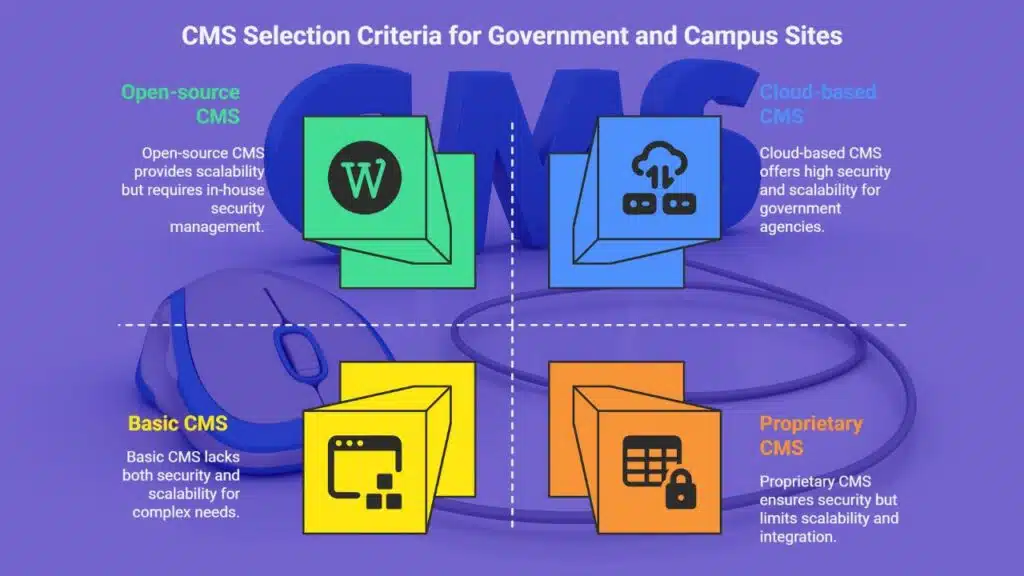
Picking a CMS for a government or campus site can feel like herding cats, as you juggle ADA compliance, security patching, and growth. You need a solution that links with your apps, scales for traffic spikes, and offers real support, whether you pick a SaaS model or a closed-source package.
What are the security and compliance requirements?
Agencies face constant cyberattacks on government websites, so they apply security patches every month. Developers set up secure user roles, limiting access by design. Cloud-based CMS offer built-in encryption and FedRAMP compliance for government agencies.
Proprietary CMS draw 52.4 percent of agencies with closed-source code to meet strict cybersecurity rules.
Teams also meet ADA rules and WCAG guidelines to support accessible design. Open-source CMS demand in-house hosting and patching unless agencies use managed service providers. Enterprise CMS and headless CMS must handle third-party integrations safely.
Agencies require audit logs, secure APIs, and multi-site management to block exploits.
How important is scalability and future-proofing?
Scalability makes sites flexible and ready to grow. This open-source solution, and the enterprise tool, scale to state deployments and heavy loads. The cloud-based service lets IT teams spin up new pages and cut maintenance costs.
A headless cms or hybrid cms can serve web pages, intranets, and portals at once. It adds multi-site management and multilingual support without a big rebuild.
Future-proofing cuts long-term work. Hybrid cms models free developers to add new digital channels and keep old systems in place. Certified security patches roll out across sites in minutes.
CivicPlus and Granicus scale nicely but may hit limits with huge rollouts. Quick microsite launches boost citizen experience for short campaigns. A content management system helps government agencies stay ahead.
What integration capabilities should a CMS have with existing systems?
Government clients need a CMS that talks to social platforms, payment gateways, and digital public record systems. It must use open APIs and SDKs so IT staff can hook into student records platforms.
Open-source cms options offer huge plugin libraries for meeting agendas, public archives, and more. Subscription-based SaaS systems often block third-party integrations and hamper website integration.
Adobe Experience Manager taps into analytics tools, Adobe’s suite, and other enterprise systems. Modern Campus syncs with a student records platform for attendance, grades, and alumni notes.
Granicus and CivicPlus ship with modules for public notices, agenda management, and citizen feedback but keep API access tight. Hybrid headless cms use REST calls to let devs build features without vendor limits.
How do accessibility and user experience standards affect CMS choice?
Sites must meet ADA and WCAG rules. Agencies often pick a content management system that has built in accessibility tools. Modern Campus includes an Accessibility Check so campus sites pass ADA tests.
Granicus meets WCAG rules and holds a FedRAMP security pass. CivicPlus adds shielded data paths and keyboard navigation. Each tool clears accessibility compliance for government websites.
Mobile friendly pages and responsive design boost user experience. Drag and drop editors and content preview speed up work for staff. Platforms that link with third-party integrations fit education portals and state agency sites.
Every choice must reinforce website security. Systems that support accessible creation and publishing help avoid fines and loss of public trust.
What support and maintenance options are available?
Proprietary CMS platforms like CivicPlus, Granicus, and Revize include integrated support and cloud hosting. These vendors apply security patches, run automatic updates, and keep sites ADA compliant.
Agencies with small IT staff rely on this service for software-as-a-service website maintenance and high-traffic websites. Modern Campus adds 24/7 customer support, ongoing maintenance, and third-party integrations.
You can also choose a headless CMS with multi-site management to boost citizen experience.
Open-source CMS require agencies to manage their own support, unless they hire a managed hosting vendor. Teams may outsource to firms like Inclind for web development, design, and accessibility audits.
Those experts can set up website integration, mobile-responsive design, and community support platforms. They also handle custom integration services, documentation, and training materials to lower licensing fees and cut the total cost of ownership.
Takeaways
We covered seven top CMS tools for US agencies and schools. Each solution shines in website security, mobile responsive design, and drag and drop features. Drupal, WordPress, and headless systems bring open source power, third party integrations, and community support.
Granicus and CivicPlus drive citizen experience, ADA compliance, and smooth website integration. Adobe Experience Manager meets big traffic needs with front end personalization, license controls, and cloud SaaS setups.
Revize keeps local site builds easy, while Modern Campus links to student systems for higher education. Always weigh your compliance needs, traffic load, and future growth when choosing a content management system.
FAQs
1. What is a content management system for government websites?
A content management system or CMS is software that lets government agencies build and run sites. It offers design customization, mobile-responsive design, and ADA compliance. It acts like a Swiss Army knife for website development.
2. How do CMS tools meet accessibility standards and ADA compliance?
Most top CMSs include built-in checks for accessibility compliance and accessibility standards. They guide you through website integration with screen readers and keyboard navigation. That helps you keep citizen experience high.
3. Can I manage multiple high-traffic websites at once?
Yes, some CMS tools scale horizontally so you can handle multi-site management and high-traffic websites without a hitch. They offer third-party integrations for analytics, search engine tools, and social media platforms like Facebook and Twitter. You stay fast, even under pressure.
4. What is the difference between open-source CMS and proprietary CMS?
Open-source CMSs come free, they have no licensing fees, and they boast strong community support. Proprietary CMSs charge licensing fees, they offer dedicated support teams, and they often include closed-source software with a drag-and-drop interface.
5. How does a headless CMS fit into government or educational sites?
A headless CMS separates front end and back end, so you deliver content to apps, websites, or IoT devices. You pick your programming languages, and you use APIs for smooth website integration. It lets you stay nimble, like a cat on a hot tin roof.
6. Should I pick a SaaS CMS or host my own?
SaaS or software-as-a-service CMSs cut out most server work. They roll out security patches and website maintenance in the cloud. You avoid outsourcing server upkeep to places like Trivandrum, and you focus on UI/UX design and citizen experience.