

Gaming is no longer just a hobby for many—it’s a way of life. As gaming technology advances, players demand a more immersive experience.
Audio plays a pivotal role in that, and choosing the best headset for surround sound gaming can elevate your experience, whether you’re exploring vast RPG worlds or competing in high-stakes multiplayer matches.
This guide will walk you through everything you need to know to make an informed decision.
Why Surround Sound Matters in Gaming?
Surround sound creates a three-dimensional soundscape, allowing you to hear where every sound is coming from. Imagine hearing the footsteps of an enemy creeping behind you or the roar of a dragon echoing from above.
This level of immersion enhances gameplay, making your adventures feel lifelike and unforgettable. With advancements in spatial audio technology, modern surround sound headsets now deliver pinpoint accuracy, enhancing every subtle detail.
Competitive Advantage in Multiplayer Games
In competitive multiplayer games, sound is critical. Accurate audio cues from the best headset for surround sound gaming can mean the difference between victory and defeat. Hearing the exact direction of gunfire or enemy movement provides a tactical edge, giving you crucial moments to react before your opponent.
For example, professional esports players frequently rely on premium headsets to maintain an edge during tournaments.
Key Factors to Consider When Choosing the Best Headset
Sound Quality
The cornerstone of any gaming headset is its sound quality. Here’s what you need to know:
- Stereo vs. Surround Sound: While stereo sound provides left and right channels, surround sound creates a 360-degree audio field. For serious gaming, surround sound is the way to go.
- Frequency Response: Look for headsets with a wide frequency range (20 Hz to 20,000 Hz) for richer audio details.
- Drivers: Larger drivers (e.g., 50mm) often produce better bass and overall sound clarity.
Comparison Table: Sound Quality Features
| Feature | Description | Recommended Specs |
| Stereo vs. Surround | Basic left/right sound vs. immersive 360-degree audio | Surround sound for gaming |
| Frequency Response | Range of sounds the headset can produce | 20 Hz to 20,000 Hz |
| Driver Size | Determines sound clarity and bass depth | 50mm or larger |
Comfort and Build Quality
Gaming sessions can last for hours, so comfort is non-negotiable.
- Ergonomics: Opt for lightweight headsets with adjustable headbands and soft ear cushions made of memory foam or breathable fabric.
- Durability: High-quality materials like metal or reinforced plastic ensure longevity.
- Clamping Force: Ensure the headset doesn’t press too tightly on your head, which could lead to discomfort.
Comparison Table: Comfort Features
| Feature | Description | Recommended Options |
| Cushion Material | Memory foam or breathable fabric | Memory foam for extended comfort |
| Weight | Determines comfort for long sessions | Lightweight (< 300g) |
| Build Material | Ensures durability | Reinforced metal or sturdy plastic |
Compatibility with Your Gaming System
Not all headsets work seamlessly with every platform. Check compatibility before buying:
- Wired vs. Wireless: Wireless headsets offer freedom of movement but may have latency issues. Wired headsets provide a more stable connection.
- Console Compatibility: Make sure your headset is compatible with your gaming platform, whether it’s PC, PlayStation, Xbox, or a Nintendo Switch.
Microphone Quality
Clear communication is essential for team-based games. Look for these microphone features:
- Noise Cancellation: Reduces background noise for crystal-clear voice communication.
- Detachable or Retractable Mic: Provides flexibility for single-player games or casual use.
Budget and Value for Money
Your budget plays a big role in your choice. Here’s how to maximize value:
- Entry-Level Options: Affordable headsets often compromise on build quality but can deliver decent sound for casual gaming.
- Premium Models: Higher-end models provide superior sound, build quality, and additional features like customizable RGB lighting.
Surround Sound Technologies to Know
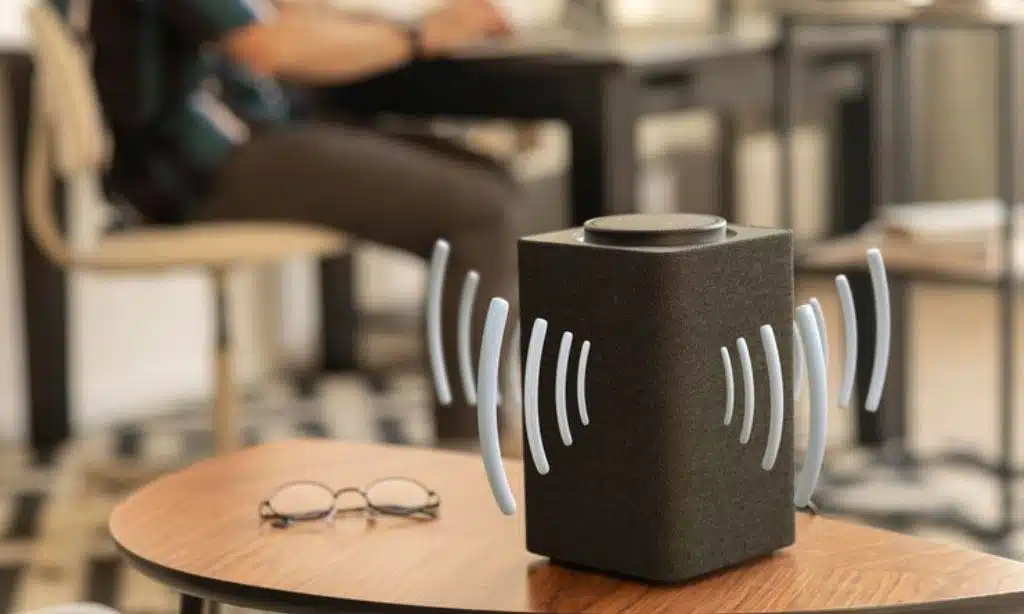
Virtual Surround Sound vs. True Surround Sound
- Virtual Surround Sound: Simulates a surround effect using software. It’s more affordable and compatible with most systems.
- True Surround Sound: Utilizes multiple drivers in each earcup to create a more authentic surround experience. While expensive, it’s ideal for audiophiles and hardcore gamers.
Popular Surround Sound Standards
- Dolby Atmos: Offers precise positional audio, widely supported in modern games.
- DTS:X: Delivers immersive 3D audio with less processing power.
- 7.1 Surround Sound: Traditional multi-channel audio for spatial precision.
Comparison Table: Surround Sound Technologies
| Technology | Description | Ideal Use Case |
| Dolby Atmos | Highly accurate positional audio | FPS and RPG games |
| DTS:X | Immersive 3D audio with less CPU usage | General gaming and movies |
| 7.1 Surround | Multi-channel audio for spatial precision | Competitive multiplayer gaming |
Top Headset Recommendations for Surround Sound Gaming
Budget-Friendly Picks
- SteelSeries Arctis 1 SteelSeries Arctis 1 is a versatile and affordable gaming headset that delivers clear audio quality and a detachable microphone for convenience. Its lightweight design and decent surround sound make it a popular choice for casual gamers. Additionally, it is compatible with multiple platforms, including PC, Xbox, PlayStation, and mobile devices, making it highly adaptable.
- HyperX Cloud Stinger HyperX Cloud Stinger is an excellent entry-level headset for beginners. It features intuitive on-ear controls, decent surround sound emulation, and a comfortable fit for long gaming sessions. Its 50mm drivers produce clear audio, while its lightweight build ensures comfort during extended use. Gamers on a budget will appreciate its value.
| Model | Features | Price Range |
| SteelSeries Arctis 1 | Clear audio, detachable mic, multi-platform support | $50 – $70 |
| HyperX Cloud Stinger | Lightweight, comfortable fit, intuitive controls | $40 – $60 |
Premium Choices for 0Serious Gamers
- SteelSeries Arctis Pro Wireless The SteelSeries Arctis Pro Wireless is a top-tier gaming headset designed for audiophiles and serious gamers. With dual wireless technology, it offers lossless audio and Bluetooth connectivity simultaneously. Its Hi-Res audio certification ensures premium sound quality, while the dual-battery system allows uninterrupted gameplay by enabling quick battery swaps.
- Astro A50 Wireless Astro A50 Wireless is a standout headset for gamers seeking exceptional Dolby Atmos support and superior comfort. Its base station offers seamless charging and connection, while the customizable EQ settings allow gamers to fine-tune their audio experience. The Astro A50 excels in delivering immersive soundscapes for both competitive and casual gamers.
Comparison Table: Premium Picks
| Model | Features | Price Range |
| SteelSeries Arctis Pro Wireless | Hi-Res audio, dual-battery system | $300 – $350 |
| Astro A50 Wireless | Dolby Atmos, customizable EQ settings | $250 – $300 |
Best Headsets by Platform
- For PC: Logitech G Pro X Logitech G Pro X is a PC gamer’s dream headset, offering Blue VO!CE technology for studio-quality microphone output and DTS Headphone:X 2.0 for immersive surround sound. Its durable build and customizable settings make it ideal for competitive gaming.
- For PlayStation: Sony Pulse 3D Sony Pulse 3D is designed to optimize the PS5’s Tempest 3D AudioTech, providing spatial audio for a fully immersive gaming experience. Its sleek design and integrated controls make it a perfect companion for PlayStation gamers.
- For Xbox: Razer Kaira Pro Razer Kaira Pro integrates seamlessly with Xbox consoles, offering low-latency wireless connectivity and customizable RGB lighting. With Triforce Titanium 50mm drivers, it delivers crisp, clear sound for an enhanced gaming experience.
- For VR: Oculus Quest 2 Headphones Designed for virtual reality, Oculus Quest 2 Headphones provide spatial audio to complement VR gaming. Lightweight and comfortable, these headphones ensure an immersive experience without distractions.
Platform-Specific Headsets Comparison Table
| Platform | Recommended Headset | Key Features |
| PC | Logitech G Pro X | Pro mic, customizable sound settings |
| PlayStation | Sony Pulse 3D | Optimized for 3D AudioTech |
| Xbox | Razer Kaira Pro | Wireless, RGB lighting, low latency |
| VR | Oculus Quest 2 Headphones | Spatial audio, lightweight design |
Tips for Testing and Optimizing Your Headset
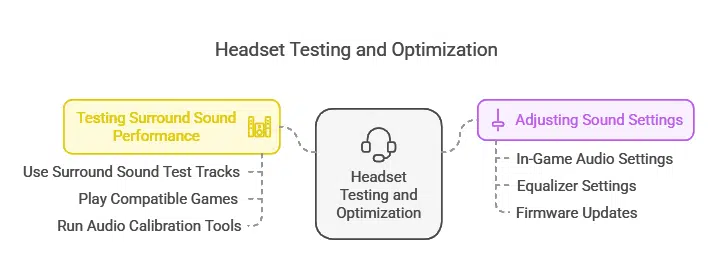
How to Test Surround Sound Performance
- Use Surround Sound Test Tracks: Search for specific audio tracks designed to test surround sound capabilities.
- Play Compatible Games: Games like Call of Duty or Battlefield have robust surround sound support.
- Run Audio Calibration Tools: Many headsets come with companion software for sound testing and calibration.
Adjusting Sound Settings for the Best Experience
- In-Game Audio Settings: Adjust sound output to match your headset’s capabilities (e.g., 7.1 surround or Dolby Atmos).
- Equalizer Settings: Customize bass, mids, and treble to suit your preferences.
- Firmware Updates: Keep your headset’s firmware updated for the best performance.
Takeaways
Choosing the best headset for surround sound gaming is a critical decision for any gamer. Whether you’re battling enemies in a competitive arena or exploring immersive game worlds, the right headset can enhance every moment.
Consider your budget, gaming platform, and personal preferences, and you’ll find a headset that meets your needs. Now, it’s time to take your gaming experience to the next level!























