In the world of web hosting, VPS (Virtual Private Server) hosting has emerged as a powerful solution for individuals and businesses. It offers the perfect balance between affordability and performance, making it an attractive option for websites, applications, and various online projects. However, when it comes to VPS hosting, one of the most significant decisions you’ll face is choosing between Linux vs. Windows VPS hosting.
Both Linux and Windows are popular operating systems with unique features, strengths, and challenges. Your choice can significantly impact the performance, scalability, and cost of your hosting setup. Linux, known for its open-source flexibility and stability, appeals to tech-savvy users and developers. On the other hand, Windows, with its user-friendly interface and seamless compatibility with Microsoft tools, is often preferred by businesses and less technical users.
In this article, we’ll provide a comprehensive comparison of Linux vs. Windows VPS hosting. From cost and usability to performance and compatibility, we’ll cover everything you need to make an informed decision tailored to your hosting requirements.
What is VPS Hosting?
VPS hosting is a type of web hosting where a physical server is divided into several virtual servers. Each virtual server functions independently, with its own operating system (OS), storage, and resources. This makes VPS hosting a bridge between shared hosting and dedicated servers, offering the best of both worlds.
Benefits of VPS Hosting:
- Dedicated resources for each user.
- Improved performance compared to shared hosting.
- Flexibility to install custom software.
- Greater control over the server environment.
Linux and Windows are the two primary operating systems used in VPS hosting. Let’s dive deeper into their features and differences.
Overview of Linux VPS Hosting
Linux VPS hosting runs on the Linux operating system, which is open-source and widely known for its stability, flexibility, and performance. It is especially popular among developers and tech-savvy users.
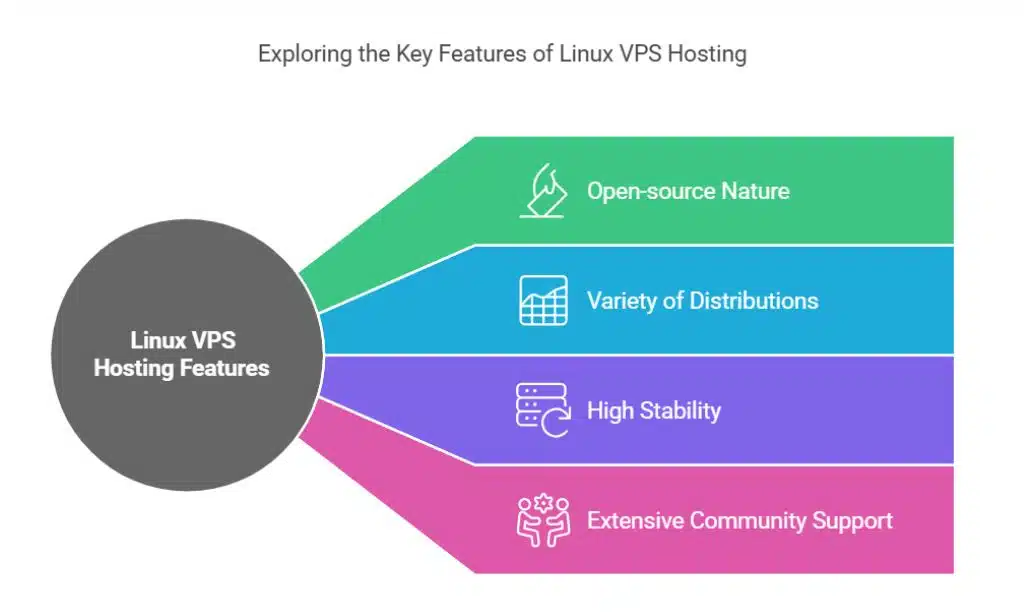
Key Features of Linux VPS Hosting:
- Open-source nature: Linux is free to use, which significantly reduces hosting costs.
- Variety of distributions: Options like Ubuntu, CentOS, and Debian allow users to choose the one that best fits their needs.
- High stability: Linux servers are known for their uptime and reliability.
- Extensive community support: A vast online community provides solutions to technical issues.
Linux VPS Hosting Pros and Cons
| Advantages | Disadvantages |
| Cost-effective (often free) | Steeper learning curve for newbies |
| High customization options | Limited compatibility with some proprietary software |
| Stable and reliable | Requires technical expertise |
| Supported by a large community |
Popular Use Cases for Linux VPS Hosting:
- Hosting websites with open-source CMS platforms like WordPress or Joomla.
- Application development using languages such as Python, PHP, or Ruby.
- Running game servers or other performance-intensive applications.
- Organizations prioritizing budget and long-term scalability.
Overview of Windows VPS Hosting
Windows VPS hosting runs on Microsoft’s Windows Server operating system. It is a great choice for users who rely on Microsoft-based applications and tools.
Key Features of Windows VPS Hosting:
- User-friendly interface: The familiar GUI makes it easy for users of all skill levels.
- Compatibility: Works seamlessly with Microsoft products like ASP.NET, MSSQL, and other proprietary software.
- Professional support: Backed by Microsoft’s support system and regular updates.
Windows VPS Hosting Pros and Cons
| Advantages | Disadvantages |
| Easy to use for all skill levels | Higher cost due to licensing fees |
| Native support for Microsoft apps | Limited flexibility compared to Linux |
| Regular updates and professional support | Performance may lag on lower-end hardware |
Popular Use Cases for Windows VPS Hosting:
- Running websites or applications built with ASP.NET.
- Businesses are reliant on Microsoft SQL Server for database management.
- Organizations needing full compatibility with Microsoft tools like SharePoint or Exchange.
- Users who prefer an intuitive GUI over command-line interfaces.
Pros of Linux VPS Hosting
- Cost-Effectiveness
- Linux is open-source and free, reducing overall hosting costs. Many hosting providers pass these savings on to customers.
- High Customization
- Users can modify the OS to suit their specific needs, thanks to Linux’s open-source code.
- Stability and Reliability
- Linux servers are less prone to crashes, making them ideal for critical applications.
- Community Support
- A large online community of developers offers extensive support, guides, and documentation.
- Efficiency
- Linux is lightweight and consumes fewer resources, ensuring faster performance.
Cons of Linux VPS Hosting
- Steep Learning Curve
- Users need technical skills to manage the server, as it often involves using the command line.
- Compatibility Issues
- Some proprietary software and applications are not available for Linux.
- Time-Intensive Management
- Troubleshooting and maintenance can require significant time and expertise.
Pros of Windows VPS Hosting
- Ease of Use
- The graphical user interface (GUI) is intuitive and user-friendly, even for beginners.
- Compatibility with Microsoft Tools
- Windows VPS seamlessly integrates with Microsoft applications like MSSQL, .NET frameworks, and SharePoint.
- Regular Updates
- Microsoft provides frequent updates, improving functionality and security.
- Professional Support
- Users can access professional support directly from Microsoft, ensuring issues are resolved quickly.
Cons of Windows VPS Hosting
- Higher Costs
- Licensing fees for Windows Server increase the overall cost of hosting.
- Resource-Intensive
- Windows servers require more resources, potentially leading to slower performance on budget plans.
- Limited Flexibility
- Compared to Linux, Windows offers less freedom for customizations.
- Security Concerns
- Without proper management, Windows servers can be more vulnerable to security threats.
Linux vs. Windows VPS Hosting: Key Comparison Points

VPS hosting has gained popularity as a versatile solution for websites and applications. Deciding between Linux vs. Windows VPS hosting often boils down to understanding their features, compatibility, and overall usability. Below, we’ll explore each option in depth to help you make an informed decision.
| Feature | Linux VPS Hosting | Windows VPS Hosting |
| Cost | Free or low-cost | Higher due to licensing fees |
| Ease of Use | Requires technical knowledge | Intuitive GUI for all users |
| Performance | Lightweight, faster | Resource-intensive |
| Software Compatibility | Open-source tools | Proprietary Microsoft software |
| Updates and Support | Community-driven | Professional support from Microsoft |
| Scalability | Flexible and customizable | Scales well within Microsoft ecosystem |
How to Choose the Right VPS Hosting for Your Needs
When deciding between Linux and Windows VPS hosting, consider the following:
- Budget
- Opt for a Linux VPS if you need an affordable solution. Choose Windows VPS if you require Microsoft software.
- Technical Skills
- Linux is better suited for tech-savvy users. Windows is more beginner-friendly.
- Application Requirements
- If your projects rely on Microsoft tools like ASP.NET, go for Windows VPS. For open-source tools, Linux is the best choice.
- Performance Needs
- Linux VPS is ideal for high-performance applications due to its lightweight nature.
- Long-Term Goals
- Consider your future scalability and compatibility needs when choosing a VPS hosting type.
Takeaways
Deciding between Linux vs. Windows VPS Hosting is a critical step in shaping the success of your online projects. Both options offer unique benefits, but the right choice depends on your specific needs and priorities.
If you value cost-effectiveness, high customization, and scalability, Linux VPS hosting might be your best bet. It’s particularly suited for developers, businesses with open-source dependencies, and users who prioritize long-term savings. Conversely, if your focus is on ease of use, seamless integration with Microsoft tools, and professional support, Windows VPS hosting could be the ideal solution.
Remember, there’s no one-size-fits-all answer when it comes to VPS hosting. Carefully analyze your technical expertise, budget constraints, and project requirements before making your decision. Hosting providers often offer trial periods or consultations, allowing you to test the waters and find the perfect fit. With the right choice between Linux vs. Windows VPS Hosting, you’ll have a solid foundation to support your online endeavors, ensuring reliable performance and scalability for years to come.