As a passionate content creator, you take pride in making content that attracts your audience. But sometimes, you face common challenges while creating content, such as unwanted sounds, background music, etc. These unwanted sounds can easily destroy a fantastic recording. Don’t worry you are not alone. Many Podcasters and Content creators face similar audio issues, and there’s a fantastic solution – AI audio Enhancers. These AI-based tools use artificial intelligence to clean up and enhance your audio, making it sound professional. This guide has mentioned the top 7 AI Audio Enhancers available online that will help you quickly create professional-looking audio.
What is an AI Audio Enhancer?
A free AI audio enhancer is a program that uses machine learning algorithms to improve the audio quality. With this technology, you can easily remove background noises, add sound effects and more to create a professional-looking sound recording.
AI audio enhancers have been revolutionizing the audio industry for some time, and they show no signal to slow down. It automatically improves the sound quality, taking it to new heights. Many content creators use this tool to create appealing content for their audience. For Example, if you are creating video content in a noisy place, then with the help of an audio enhancer, you can easily remove the background noises.
Top 7 AI Audio Enhancers Online in 2024
Here are the top 7 Audio Enhancement tools that will help you create professional-looking audio recordings.
1. HitPaw Online Audio Enhancer
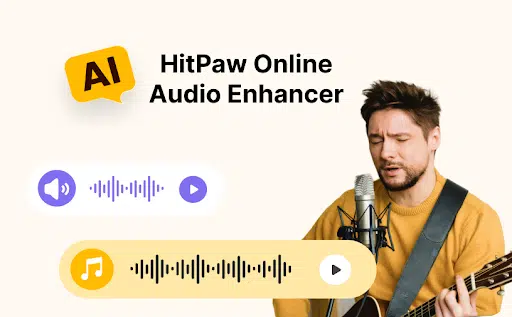
The first audio enhancer online on our list is HitPaw Online Audio Enhancer. This program is the best AI audio enhancer available online to reduce background noise, unwanted sounds and more from audio recordings. It offers features like auto background noise remover, which analyzes and filters out extraneous sound and automatically removes background noise from your audio.
Further, it offers a wide range of voice effects that you can use in your recordings. This program’s best part is that it cleans up audio in real-time during voice or video calls.
Pros
- Automatically remove background noises.
- Offers a wide range of voice effects to choose from
- The online program requires no downloading
- Allows you to download Audio in popular formats such as MP3
- Straightforward and easy-to-use interface
- Compatible with various devices such as Windows and macOS
- Makes audio clearer and more pleasant to listen
Cons
- The free version has fewer features
Price
- $9.99 Per Month
User-Friendliness: Easy-to-use interface, making it easy to operate
2. Audioalter
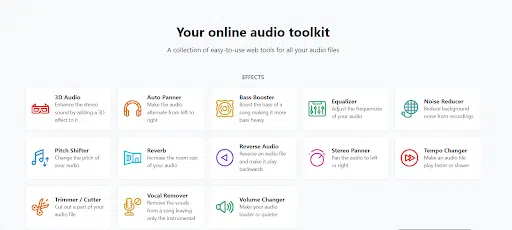
Audioalter offers a unique noise reduction technique that is suitable for the vast majority of audio recordings. This tool is best for speech recordings, eliminating unwanted noises without affecting the audio quality. It includes a wide range of tools such as removing background noise, denoising audio, etc. This enhanced audio meets your requirements, and the best part of this program is that it provides its services for free.
Pros
- It provides various audio enhancement features, such as vocal remover, bass booster and more
- Remove background noises from the audio recording
- Provides clear and crisp sound recordings
- Allows you to add watermarks
Cons
- No previewing option is available
Price
- Free
User-Friendliness: Intuitive and straightforward interface
3. Kapwing
Want to enhance audio recordings? Then, choose Kapwing Audio Enhancer. It is an online audio enhancer that will enhance your audio files by removing background noises or silences and boosting volume. Further, it provides a wide range of voice effects that will make your recordings sound professional. Kapwing allows you to upload multiple audio files, including MP3s, WAVs, AVIs, M4As, and more. It also lets you share your audio file as a link with friends and family.
Pros
- Support popular formats such as MP3 and WAV.
- Offers a wide range of voice effects, such as human and alien
- Allows you to remove background noise without affecting the recording quality
- It offers a wide range of audio enhancement features to get excellent audio quality.
Cons
- Needs more integration
Price
- $16.00 Per Month
User-Friendliness: Kapwing make it easy to create high-quality audio recordings
4. Media.io
Media.io is another AI Audio Enhancer that allows you to create high-quality audio and video recordings. With its AI technology, users can easily remove background noises. It is powered by artificial intelligence, so the noise reduction process is automated. Further, it offers many audio tools, such as audio compressors. Audio joiner allows you to join multiple audios together. It also offers an audio-to-text feature, allowing you to create text by audio.
Pros
- Noise reduction is automated due to its AI technology
- Offers features like an Audio joiner to join multiple audio
- Audio Text feature to create speeches from audio-only
- Produce high-quality audios
Cons
- No free version is available
Price
- $19.99 Per Month
User-Friendliness: AI makes it easy to enhance audio recordings via this program.
5. FXsound
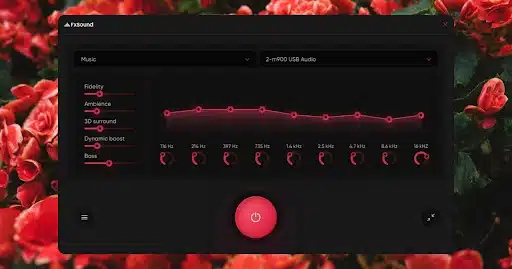
FXsound is a powerful audio enhancer with a superior audio experience. This program enhances your low-quality audio recording to a professional-looking recording. It eliminates the unwanted sound from the background, making it clearer. With this tool, you will enjoy crystal-clear sounds.
Pros
- Full-featured audio enhancer with 9 frequency bands
- Save changes as a cab file
- Download recordings in popular formats
- Uses a powerful DFX audio engine
Cons
- Only support Windows 10
Price
- $29.99 for the full version
User-Friendliness: Easy-to-use interface
6. Krisp
Krisp is an exceptional audio enhancer tool that uses AI to filter out noise from your surroundings, ensuring excellent meeting quality. The best part of this program is that it enhances audio in real-time and supports many meeting applications such as Teams, Zoom, Skype and more. Further, with its Audio to-Text feature, you can create editable text and download it from the user’s interface.
Pros
- Supports platforms like Google Meet, Teams, Zoon and more
- Provides AI and background cancellation features
- Offer its services in real-time
- Audio recordings are stored in the cloud and can be downloaded
Cons
- Expensive as compared to other audio enhancers
Price
- $8.00 Per Month
User-Friendliness: Sleek interface that seamlessly integrates with many platforms
7. Magic Audio Enhancer

The last audio enhancer on our list is Magic Audio Enhancer. It is a versatile program that offers a wide range of audio enhancement features. This tool gives users complete control over audio settings, from volume normalization to dynamic range compression. It includes a wide range of audio enhancement features such as noise reduction, volume leveling, compression, etc.
Pros
- Offer features like noise reduction, volume leveling and more
- User-friendly interface suitable for beginners
- Dynamic range compression to enhanced audio
Cons
- Only available on Windows
Price
- $16.99 Per Month
User-friendliness: User-friendly interface
Conclusion
In this guide, we have mentioned the top 7 AI Audio Enhancers available online. But the best among them is HitPaw Online Audio Enhancer; this tool offers a wide range of features to enhance your audio recording. It includes noise reduction, noise cancellation, volume leveling and more. The best part of this program is that it is an online program, and no downloading is required.