
Tools for Reconciling Payment Processor Payouts With Individual Orders help an ecommerce operator trace a bank deposit back through a processor payout to the orders, fees, refunds, and adjustments that produced it. The bank usually receives one net amount, while the processor and store hold the detail. Choose a tool based on whether you need an order-to-transaction match, a payout summary for bookkeeping, or both.
What we checked
On November 20, 2026, we reviewed current official documentation for Stripe, Shopify Payments, Synder, A2X, Link My Books, QuickBooks Online, and Xero. We focused on how each product or integration connects order identifiers, processor transactions, settlements, accounting entries, and bank deposits. This is documentation research; we did not connect accounts, import actual orders, or test reconciliations with customer data. Features depend on the processor, sales channel, accounting platform, and plan, so confirm your exact combination before migration.
A payout is not the same thing as an order. A typical settlement combines captured payments, refunds, processing fees, disputes, and adjustments, then transfers the net. A match on the payout amount can prove the bank deposit ties to the processor, but it does not by itself prove every order was included exactly once. For the broader distinction between authorization, capture, and settlement, see Editorialge’s payment settlement explainer. U.S. businesses can also consult the IRS recordkeeping guide on supporting sales and deposit entries. This is general bookkeeping information, not tax advice.
At a glance: payment processor payout reconciliation tools
| Tool | How it connects orders to a payout | Best fit | Check first |
|---|---|---|---|
| Stripe Dashboard | Shows the transactions and adjustments included in eligible automatic payouts | Merchants that process directly through Stripe | Manual payouts lack the same transaction breakdown. |
| Shopify Payments | Payout details and CSV exports connect payment activity with order records | Shopify stores using Shopify Payments | Other gateways and multi-tender orders follow different paths. |
| Synder | Per-transaction sync and reconciliation compare platform IDs with accounting entries | Businesses needing order-level records plus clearing-account workflows | Summary Sync groups records; matching depends on IDs and correct settings. |
| A2X | Settlement summaries flow to accounting; Subledger traces payouts back to orders and SKUs | Marketplace or ecommerce sellers and finance teams | Accounting entries may be summarized rather than one invoice per order. |
| Link My Books | Settlement summaries plus an audit export that can locate an order ID | Marketplace sellers and bookkeepers who need payout-level posting | Order lookup relies on exported audit data, not an in-app order search. |
| QuickBooks Online | Supported sales-channel integrations record sales, fees, and net deposits | Small businesses already using QuickBooks for accounting | Supported integrations and multiple-processor setup are limited. |
| Xero | Stripe or processor feeds and clearing accounts connect payments to invoices and deposits | Teams that reconcile online receipts in Xero | Feed timing and clearing-account configuration matter. |
1. Stripe Dashboard: inspect the transactions inside an automatic payout
Stripe’s payout detail can show the individual transactions included in an automatic payout, with gross amounts, fees, final amounts, and transaction dates. A merchant can open the payout, review its summary, and inspect the included charges, refunds, and adjustments. Stripe metadata can also carry an internal reference such as an order ID, which helps a finance team connect the processor record to the store record.
This is a useful starting point when Stripe is the source of truth for payment movement. Its main limitation is important: Stripe says manual payouts do not have the same breakdown because there is no explicit connection between specific activity and the amount chosen for payout. A detail view is also not a substitute for an accounting reconciliation; export or retain the transaction records, then confirm the related orders and fees in your books.
2. Shopify Payments: use payout details and transaction exports
Shopify Payments lets a store review each payout’s transactions and export payout or transaction data. Shopify’s help documentation says payments are synced with their orders and identifies charges as customer payments for orders. A payout-specific export is useful when a shop owner needs to follow a settlement total back to payment activity, including fees and pending transactions, without first building a separate report.
The fit is clearest for stores using Shopify Payments. If a shop accepts several methods, handles partial payments, or uses a third-party processor, the same payout screen will not describe every route in the same way. Separate processor accounts and currencies should remain distinguishable. Use the transaction ID and order ID together, and investigate refunds, disputes, Shop Cash, and other balance adjustments before deciding a net payout is short.
3. Synder: compare platform transactions with accounting records

Synder offers both Per-Transaction Sync and Summary Sync. In Per-Transaction mode, it records sales, fees, refunds, and payments as separate entries and can compare transaction IDs from a payment platform with accounting records. Its reconciliation view can identify matched entries, amount differences, or records missing from one side. For a Shopify or Stripe seller, that can help answer both “which orders made up this payout?” and “did the bookkeeping import all the source transactions?”
Do not assume the two modes provide the same granularity. Summary Sync groups activity by period or payout, while Per-Transaction Sync is designed for individual transaction detail. Matching depends on IDs and the selected integration; dates alone do not establish a match. Payout processing, clearing account, and bank account settings also need to be configured correctly. Businesses with several channels should keep them separate enough to trace an exception to the right source.
4. A2X: bridge marketplace settlements to accounting, with order traceability
A2X prepares settlement entries for accounting systems such as Xero and QuickBooks, separating the sales, refunds, fees, taxes, and other settlement components so the net can match a bank deposit. For some store connections, it deliberately posts one batch rather than sending every order as a separate accounting invoice; the attached settlement data preserves more detail for audit. Its newer Subledger offering describes matching settlements back to originating orders and SKUs, then flagging mapping gaps.
This makes A2X worth comparing when payout-level bookkeeping needs an order-level trail for review. Verify which A2X product, sales channel, and accounting connection you are evaluating: a summarized settlement entry and an order-traceable subledger are different outputs. Also confirm how refunds, fees, multicurrency sales, and adjustments are mapped before relying on a clean net total.
5. Link My Books: trace order IDs through a settlement audit file
Link My Books imports payout reports and creates settlement summaries with sales, refunds, fees, and taxes. Its audit data can include order IDs, amounts, and the settlement that contains a transaction. That makes the downloadable CSV useful when a bookkeeper needs to investigate one specific order after the accounting system has received a grouped settlement entry. The product’s setup also separates connecting sales channels from posting entries to Xero or QuickBooks.
The trade-off is the lookup workflow. Link My Books says there is not currently an in-app search that returns the settlement for a specific order; users download audit data and search the file. That can be adequate for periodic exception handling, but less convenient for a team that needs a live order-to-payout trace inside its accounting interface. Check supported channels, currencies, and how negative settlements or delayed refunds appear in your case.
6. QuickBooks Online: connect sales, fees, and the bank deposit
QuickBooks Online’s Stripe integration can add payment activity to the books, match transactions to existing invoices or sales receipts, and record payouts as deposits linked to individual sales transactions and fees. Supported sales-channel connections, including Amazon or Shopify workflows, can create sales receipts, expenses for fees, and a net deposit for bank matching. This can suit a business that wants the order-side entries and payout reconciliation to live in its accounting system.
The exact integration matters. QuickBooks documentation notes that its Stripe connection currently does not support multiple Stripe integrations at once, and other processors may require a separate app or manual workflow. Before enabling imports, compare the first payout against the original processor report and look for duplicated sales, fees, or deposits. A bank-feed match is only reliable when the source transactions were recorded correctly and the channel’s connector is current.
7. Xero: use the feed and clearing account to reconcile the movement

Xero can receive Stripe transaction data through a feed and reconcile imported Stripe statement lines. A clearing-account workflow keeps the gross customer payments and fees apart from the later bank transfer: the payout moves the net from the processor clearing account to the bank. When the invoices or store orders are also connected correctly, a bookkeeper can trace the payment at the transaction level and then match the payout to the bank deposit.
Xero is an accounting platform, so the result depends on setup rather than a single universal payout button. Feed arrival can follow the processor’s payout schedule and region; matching may require a clearing account, a supported app, or manual review. If multiple processors share one account, use distinct source references and avoid treating one net deposit as proof that every order was posted. Editorialge’s ACH collection tool comparison covers another part of the payment workflow: how businesses collect funds before settlement.
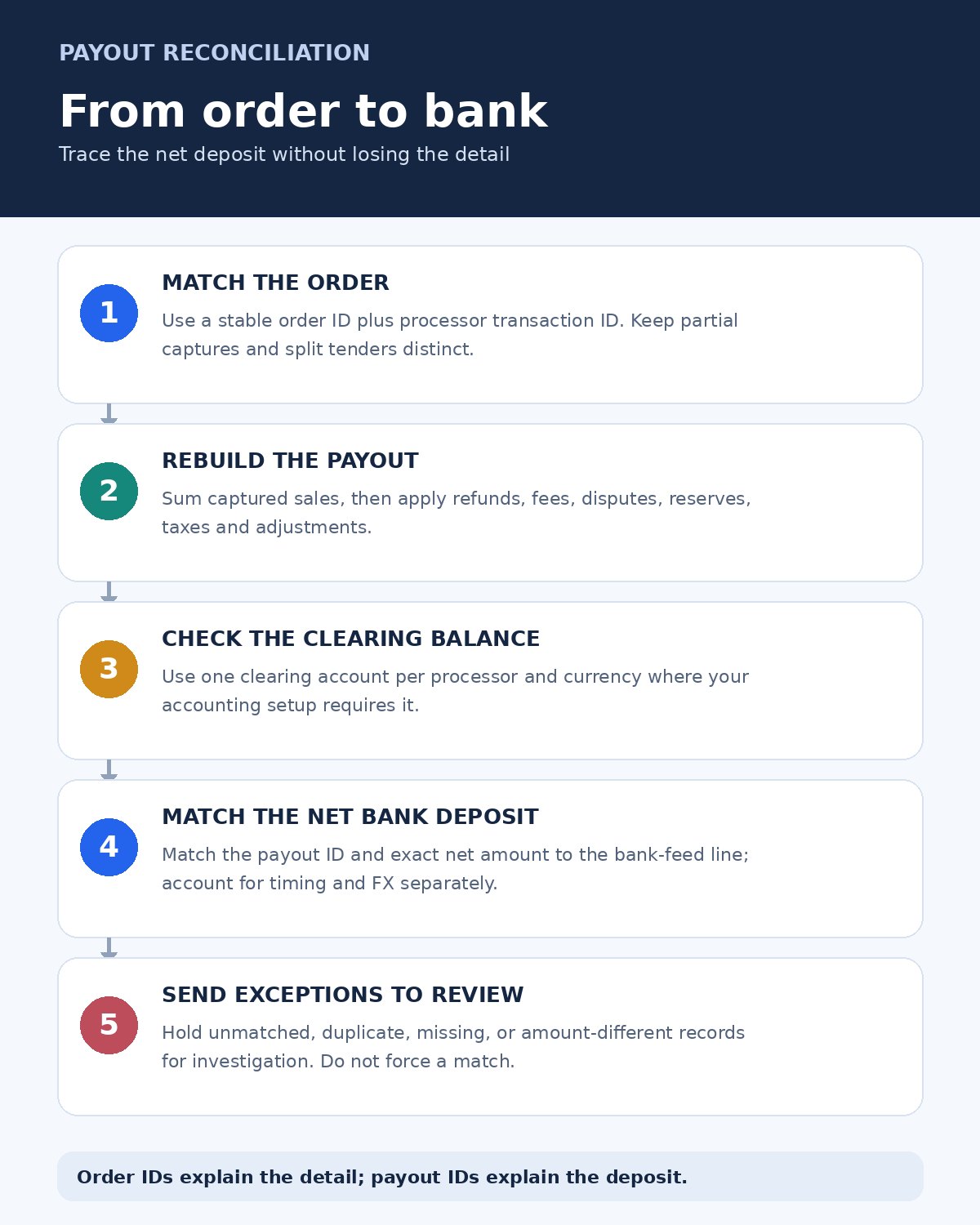
How to reconcile without forcing a false match
Start with a payout ID and a defined settlement window. Rebuild the net amount from captured sales, refunds, processing fees, disputes, reserve movements, taxes, and adjustments. Then compare it with the processor’s payout breakdown and the amount on the bank statement. The order-level test is separate: each paid order should map to a processor transaction, and each transaction should appear once in the settlement or in a clearly documented later payout.
- Keep IDs: retain the store order ID, processor transaction ID, payout ID, and accounting reference.
- Use a clearing account: separate money held by the processor from cash that has arrived in the bank.
- Track partials and timing: a refund, dispute, reserve, split tender, or delayed settlement may land in a later period.
- Review exceptions: unmatched, duplicate, or amount-different rows should remain visible until someone explains them.
- Preserve exports: retain payout reports and order records that support the accounting entry.
For a related collection-side guide, see Editorialge’s fintech tools for receiving payments. Collection and reconciliation are connected, but they answer different questions: how a customer can pay is not the same as which orders are inside a payout.
Tools for Reconciling Payment Processor Payouts With Individual Orders: how to choose
Choose a processor’s own payout detail when you need a direct view of the transactions it sent to your bank. Look to Shopify Payments when your store and processor are both Shopify-based. Compare Synder when transaction IDs and missing-record exceptions matter, A2X or Link My Books when settlement summaries must post cleanly to accounting, and QuickBooks Online or Xero when your accountant wants the reconciliation in the ledger and bank feed.
Before rolling anything out, test one completed payout with a small, closed period. Reconcile the order count and order IDs, sales total, fees, refunds, adjustments, net payout, and bank deposit. If the tool shows only a balanced summary, ask where its order-level audit trail lives. Tools for Reconciling Payment Processor Payouts With Individual Orders are most useful when they make both levels visible: the individual sale and the net cash movement.