


Pixel Watch Gets Scam Call Detection with Google’s New Update


In a significant move to bolster user security, Google has expanded its real-time Scam Detection feature to include the Pixel Watch 2 and Pixel Watch 3. This development allows users to receive immediate scam alerts directly on their smartwatches, enhancing protection against fraudulent calls even when their smartphones are not within reach.

Scam Detection on Pixel 9 Series

Introduced with the Pixel 9 series—including the Pixel 9, Pixel 9 Pro, Pixel 9 Pro XL, and Pixel 9 Pro Fold—Scam Detection leverages Google’s advanced on-device AI model, Gemini Nano with Multimodality. This technology is designed to identify suspicious patterns commonly employed by scammers during phone conversations. Upon detecting a potential scam, the phone promptly alerts the user through vibrations, audible signals, and an on-screen “Likely scam” warning. All processing is conducted on-device, ensuring user privacy and data security.

Integration with Pixel Watch

Building upon this foundation, Google has extended Scam Detection capabilities to the Pixel Watch 2 and Pixel Watch 3. When these smartwatches are paired via Bluetooth with a Pixel 9 series phone, they can receive mid-call scam alerts. If a call taken on the watch exhibits characteristics indicative of a scam, the watch will notify the user through notifications, sounds, and vibrations. This feature is particularly beneficial for users who frequently handle calls directly from their smartwatch, allowing them to be alerted to potential scams without needing to access their phone. It’s important to note that direct LTE calls made solely through the watch are not covered by this feature, as the scam detection processing relies on the paired phone.

Availability and Activation

The Scam Detection feature is rolling out to Pixel Watch 2 and 3 users in the United States, specifically for calls conducted in English. To activate this feature, users should ensure that Scam Detection is enabled on their paired Pixel 9 series phone by navigating to the Phone app, accessing Settings, and selecting Scam Detection. This proactive measure ensures that the watch can effectively alert users to potential scams during calls.

User Experience
User Experience

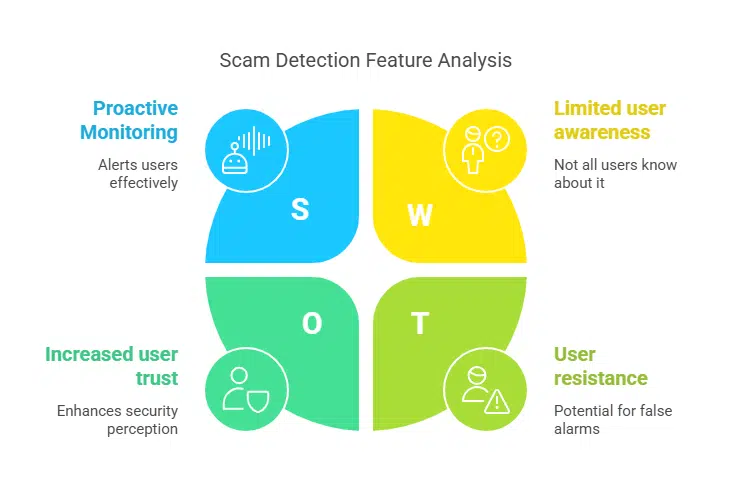
When Scam Detection is active, an audible beep will sound at the beginning of the call and periodically throughout, indicating that the feature is monitoring the conversation. If the system determines a high likelihood of a scam, it will promptly alert the user through notifications, sound, and vibration. Users have the option to dismiss the notification or end the call directly from their watch, providing a seamless and proactive approach to handling potential scam calls.

Privacy Considerations

Google emphasizes that Scam Detection is designed with user privacy in mind. All processing occurs on-device, and no conversation audio or transcription is recorded, stored, or sent to Google or third parties. This ensures that users’ conversations remain confidential while still benefiting from real-time scam protection.

Future Prospects

This integration of Scam Detection into the Pixel Watch lineup underscores Google’s commitment to leveraging AI advancements to enhance user safety and privacy across its device ecosystem. As scammers continually evolve their tactics, features like real-time Scam Detection provide users with essential tools to recognize and avoid fraudulent activities, thereby safeguarding their personal information and financial assets.



Subscribe to Our Newsletter

Related Articles

Top Trending

How to Find That Your Child Is Guessing Letters
Is Your Child Guessing Letters? How to Tell and Fix It
Protect a Small Business From Cyberattacks
How to Protect a Small Business From Cyberattacks on a Budget
How to Rebuild Alphabet Skills
How to Rebuild Alphabet Skills After a Long Break: A Parent's Guide
On This Day September 4
On This Day September 4: History, Famous Birthdays, Deaths & Global Events
Rotate Learning Tools Without Losing Progress
How to Rotate Learning Tools Without Losing Progress [Strategies Explained]

Technology & AI

Protect a Small Business From Cyberattacks
How to Protect a Small Business From Cyberattacks on a Budget
Best Calendar Apps for Different Ways of Working
8 Best Calendar Apps That Leave Default Tools Behind
artificial intelligence in cybersecurity
How AI Is Changing Cybersecurity on Both Sides of the Fight
how to forecast SaaS revenue with limited data
How to Forecast SaaS Revenue With Limited Data: A Simple Framework
Best Productivity Apps
10 Best Productivity Apps for Linux to Supercharge Your Workflow

GAMING

Complete Guide on Game Programgeeks
Game Programgeeks: A Complete Guide on PC, Game Dev, and Tech
Online Color Game Philippines
Online Color Game Philippines: What Every Beginner Should Know Before Playing
Ways to Reduce Game Development Costs
12 Ways Studios Cut Game Development Costs
NFT game development cost
How Much Does NFT Game Development Cost? A Realistic Budget Breakdown
Reasons Why You No Longer Need the Best Roblox AI Scripter
Forget Best Roblox AI Scripter: 10 Reasons Why You No Longer Need It

Business & Marketing

Low Minimum Order Merchandise
Big Impact, Small Batch: The Strategic Power of Low Minimum Order Merchandise
A side-by-side illustration exposing link building myths by contrasting budget lost on spammy backlinks with long-term SEO growth to help marketers protect their investment.
Stop Wasting Money: 10 Link Building Myths Ruining Your ROI
Circular infographic diagram breaking down key elements of a project charter for small teams, including scope, vision, and risks
What Is a Project Charter and Why Small Teams Skip It at Their Peril
How to Run a Project
How to Run a Project Without Using Any Project Management Softwares
A photo of a laptop on a wooden desk displaying a complex digital data visualization of a marketing channel network where green nodes indicate success and one highlighted red path visualizes the clear signs to fire a marketing channel that is underperforming. This image helps viewers grasp the data necessary for auditing channel viability.
Stop Wasting Ad Spend: 9 Signs to Fire a Marketing Channel

EdTech & E-Learning

How to Find That Your Child Is Guessing Letters
Is Your Child Guessing Letters? How to Tell and Fix It
How Games Teach the Alphabet Better Than Drills
Best Time Management Apps for Students
12 Best Time Management Apps for Students
EdTech Emerging Markets Trends
How EdTech Is Evolving in Emerging Markets: Bridging the Digital Divide
phonemic awareness
What Is Phonemic Awareness and Why Does It Matter?

Software & Apps

Best Calendar Apps for Different Ways of Working
8 Best Calendar Apps That Leave Default Tools Behind
Best Productivity Apps
10 Best Productivity Apps for Linux to Supercharge Your Workflow
Best Influencer Marketing Platforms
9 Best Influencer Marketing Platforms in 2026: Features, Pricing & Comparison
Customer Success for SaaS Companies
What Is Customer Success and Why SaaS Companies Invest in It
Best SEO Tools for Small Teams
10 Best SEO Tools for Small Teams




















