
Learning how to take effective work breaks is one of the most impactful habits you can build for daily productivity and cognitive health. Many professionals attempt to push through mental fatigue, operating under the assumption that longer hours produce better output. In practice, continuous mental effort without structured recovery leads to declining performance, higher error rates, and executive burnout.
Taking effective work breaks requires moving beyond passive idle time. Real focus recovery relies on specific physiological processes that clear metabolic waste from the brain, calm the nervous system, and restore executive function.
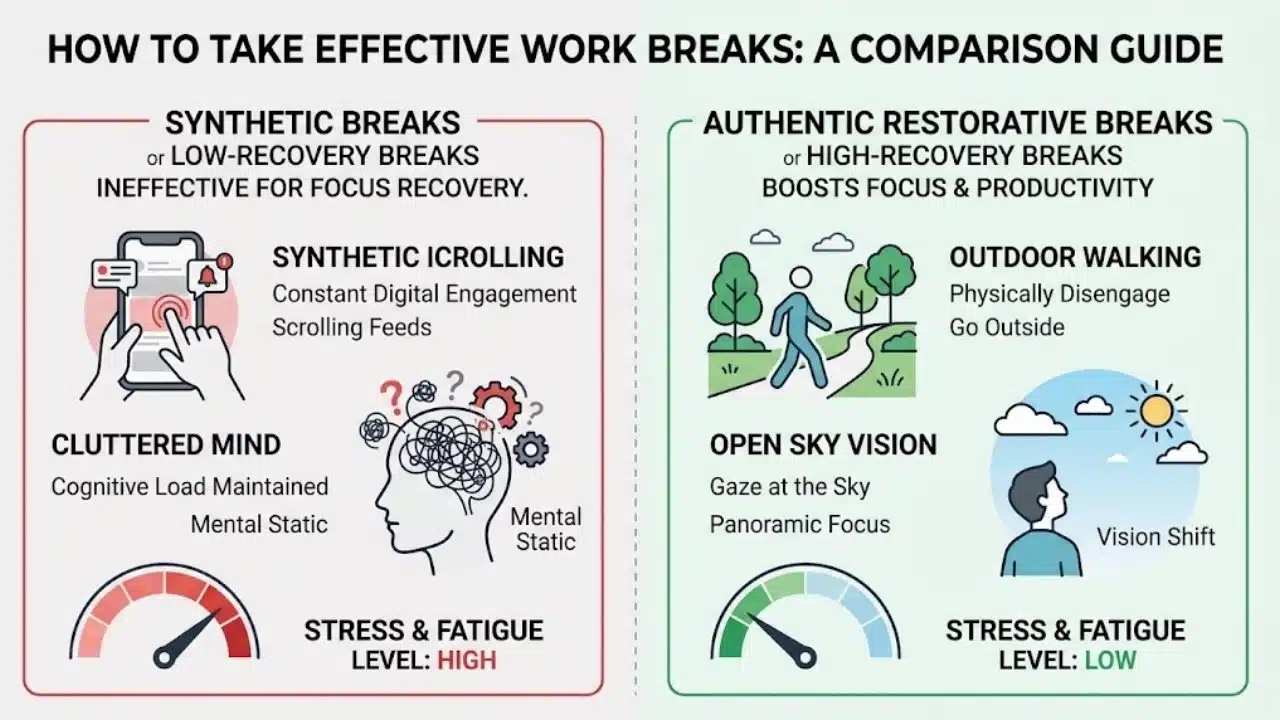
| Break Aspect | Low-Recovery Breaks | High-Recovery Breaks |
| Primary Activities | Social media feeds, news sites, personal emails | Walking outdoors, breathwork, visual unfocusing, light stretching |
| Cognitive State | Sustained central processing, focused attention | Default Mode Network (DMN) engagement, passive processing |
| Visual Focus | Fixed short-distance focus on digital screens | Panoramic vision, optic flow, looking at distant horizons |
| Autonomic Impact | Keeps the sympathetic nervous system active | Activates the parasympathetic nervous system |
| Post-Break Result | Eye strain, lingering brain fog, delayed re-entry | Restored alertness, lower stress levels, faster focus re-entry |
The Neuroscience of Mental Fatigue and Focus Recovery
Understanding how to structure work breaks requires looking at what happens inside the brain during sustained concentration. Intense mental work relies heavily on the prefrontal cortex, which handles decision-making, impulse control, and analytical tasks.
Prefrontal Cortex Exhaustion and Adenosine Accumulation
Deep concentration consumes significant cellular energy in the form of adenosine triphosphate (ATP). As ATP breaks down during work sessions, a metabolic byproduct called adenosine builds up in neural synapses. Elevated adenosine levels create mental fatigue, showing up as difficulty concentrating, slower problem-solving speeds, and reduced patience.
Default Mode Network (DMN) Activation
During active problem-solving, your brain relies on the Executive Control Network. When you step away from active tasks and let your mind wander, your brain shifts activity to the Default Mode Network (DMN).
The DMN handles memory consolidation, connects separate ideas, and processes complex problems passively. Creative breakthroughs rarely happen while staring directly at a spreadsheet; they usually occur when the DMN runs in the background during a restful break.
Optic Flow and Autonomic Regulation
Staring at digital screens keeps your eyes fixed in narrow forward vision, which signals your autonomic nervous system to stay alert.
Stepping outside or looking down a long corridor expands your visual field into panoramic vision. Combining panoramic vision with forward movement, such as walking, produces optic flow. Research indicates that optic flow calms the amygdala and reduces sympathetic nervous system arousal, lowering physical stress.
Distinguishing Low-Quality Breaks from Restorative Rest
Break quality varies based on your chosen activities. Common workplace break habits often function as low-quality rest, activities that feel like breaks because work has stopped, but still consume mental energy.
| Break Recovery Tier | Typical Activities | Impact on Focus and Recovery |
| Low-Quality Breaks | Social media feeds, news updates, mobile gaming | Keeps visual and central processing systems active; maintains mental strain |
| Neutral Breaks | Brewing coffee, quick office chat, simple desk cleanup | Pauses direct work tasks; provides moderate mental relief |
| Restorative Breaks | Outdoor walking, optic flow viewing, NSDR, breathwork | Triggers parasympathetic recovery; lowers stress and clears cognitive fatigue |
Why Screen Swapping Keeps the Brain Working
Swapping your computer monitor for a smartphone screen keeps your visual and processing systems active. Your brain continues to evaluate visual data, process text, and make micro-decisions while reading feeds or checking notifications. This activity maintains high-frequency brainwave states and prevents the prefrontal cortex from resting.
The Mechanics of Restorative Rest
Restorative rest disengages your focused visual and cognitive systems. It allows your nervous system to shift into recovery mode while giving your eyes a break from close-up screen distance.
The 4 Pillars of a High-Restoration Break Protocol
To get the highest recovery value from your breaks, integrate these four evidence-based pillars into your daily routine:
-
Physical Movement and Optic Flow: Spend 5 to 15 minutes engaging in low-intensity movement. An outdoor walk is ideal because it combines physical motion with natural light and panoramic vision. When going outdoors is not an option, walk around your building interior or perform simple mobility stretches away from your desk.
-
Non-Sleep Deep Rest (NSDR) and Targeted Breathwork: To address heavy midday fatigue, practice 10 to 15 minutes of Non-Sleep Deep Rest (NSDR) or yoga nidra. Alternatively, using brief breathwork protocols like the Physiological Sigh (two quick inhales through the nose followed by a long exhale through the mouth) for two minutes lowers heart rate and balances nervous system activity.
-
Visual Decompression: Give your eyes relief from blue light and close-up focus. Follow the 20-20-20 rule throughout the day: every 20 minutes, look at an object 20 feet away for 20 seconds. During full 15-minute breaks, step away from screens entirely and look out a window toward the horizon or sky.
-
Cognitive Disengagement: Disconnect from work thoughts, complex planning, and intense conversations. Listen to music, notice your physical environment, or let your thoughts drift without trying to solve a specific problem.
Workplace Implementation: Remote vs. In-Office Environments
Structuring effective breaks requires adapting your setup to fit your working environment.
| Environment | Common Challenges | Effective Break Strategies |
| Remote / Home Office | Overlapping work and home boundaries, easy screen access, physical isolation |
• Step outside into a yard, balcony, or neighborhood path.
• Perform brief stretching routines or non-screen light tasks.
• Use a dedicated quiet area away from your desk for relaxation. |
| Traditional Office | Social distractions, limited private space, restricted outdoor access |
• Walk loops around the building perimeter or nearby sidewalks.
• Use wellness rooms, quiet office corners, or outdoor patios.
• Practice visual relaxation near large floor-to-ceiling windows. |
Practical Tips for Remote Workers
-
Change Physical Locations: Avoid taking breaks at the desk where you work. Move to a different room, a porch, or an outdoor space to build a clear distinction between work and rest.
-
Filter Household Tasks: Avoid filling breaks with stressful home admin tasks, such as reviewing bills or handling complex family logistics. Keep break time light and relaxing.
Practical Tips for Office Workers
-
Establish Screen-Free Habits: Let colleagues know your break routines so stepping away from your desk to stretch or walk becomes a recognized part of your schedule.
-
Identify Quiet Spaces: Locate a quiet meeting room, outdoor bench, or building lobby where you can step away from office noise and reduce sensory input.
Work-Rest Frameworks: Selecting Your Frequency
Matching break timing to your work type maintains steady concentration without interrupting deep focus states.
| Framework | Work Window | Rest Window | Best Suited For |
| Classic 90/20 Ultradian Cycle | 90 minutes | 20 minutes | Deep focus work, complex analytical writing, coding, strategic planning |
| 52/17 Performance Rule | 52 minutes | 17 minutes | General knowledge work, project coordination, document drafting |
| 25/5 Pomodoro Technique | 25 minutes | 5 minutes | Administrative backlogs, rapid email clearing, overcoming task inertia |
| Micro-Break Protocol | Every 20 to 30 mins | 1 to 2 minutes | Continuous data entry, heavy reading, intense screen monitoring |
Common Break Pitfalls to Avoid
Avoid these frequent habits that compromise break quality:
-
Staying in Your Workstation Chair: Remaining seated keeps your body in the posture associated with work stress. Change your physical position and location during rest periods.
-
Engaging with High-Stimulus Media: Reading intense news updates, watching fast-paced videos, or monitoring financial markets triggers stress hormones that prevent nervous system relaxation.
-
Experiencing Break Guilt: Viewing rest as wasted time creates unnecessary mental stress. Proactive recovery is a necessary part of sustained professional output.
-
Delaying Rest Until Exhaustion: Waiting until you are completely drained to stop means recovery takes longer. Take scheduled breaks while you still have energy in reserve.
Building a Sustainable Recovery Routine
Mastering how to take effective work breaks turns your daily schedule into a balanced rhythm of high performance and steady recovery. Protecting your break windows, stepping away from screens, adding light movement, and relaxing your visual focus protects your mind against fatigue. Start by adding one screen-free, restorative break to your schedule today, observe how your energy responds, and adjust your routine to support lasting focus.