
A chatbot that qualifies sales leads is a tool that sorts serious buyers from casual visitors by asking questions in a natural order, then tags each person so your sales team knows who to call first. The best ones feel like a conversation, not a form with a personality. They adapt based on what page someone landed on and what they’ve already told you. When done right, they collect contact details and pain points without making the visitor feel trapped.
Most companies ruin how chatbots can qualify sales leads by treating them like an automated interrogation. I’ve seen the pattern working with ImaginLab.art‘s conversational tools: the chatbots that actually qualify leads without annoying people do something counterintuitive. They give value before they ask for anything. I’ll show you why the timing of your questions matters more than the questions themselves and how to build a qualification flow that feels helpful instead of extractive.
Why Most Chatbots Feel Like Interrogations
Most sales chatbots fail because they ask for too much, too fast. Here’s what drives visitors away:
- Asking for an email address in the first exchange before offering anything useful: The visitor hasn’t decided you’re worth their inbox yet. They arrived looking for an answer or a price, not a relationship. When the first message is “What’s your email?” the conversation feels transactional before it’s been helpful. Trust hasn’t been built, and the request feels premature.
- Using the same generic script regardless of what page the visitor landed on: Someone reading a pricing page has a different intent than someone reading a blog post. A pricing visitor likely wants to know cost or feature details. A blog reader might be exploring a topic with no immediate buying intent. Ignoring that context makes the bot feel tone-deaf. The same opening line on every page signals that the bot doesn’t actually care where the person is or what brought them there.
- Phrasing questions like a form with a personality instead of an actual conversation: Visitors can tell when a chatbot is really just ten fields in a row. Adding “Great!” or “Awesome!” between form fields doesn’t make it conversational. It makes it feel like a survey wearing a smile.
The pattern is clear: these bots prioritize what the company wants to know over what the visitor came to learn. That’s why people close the chat window within seconds.
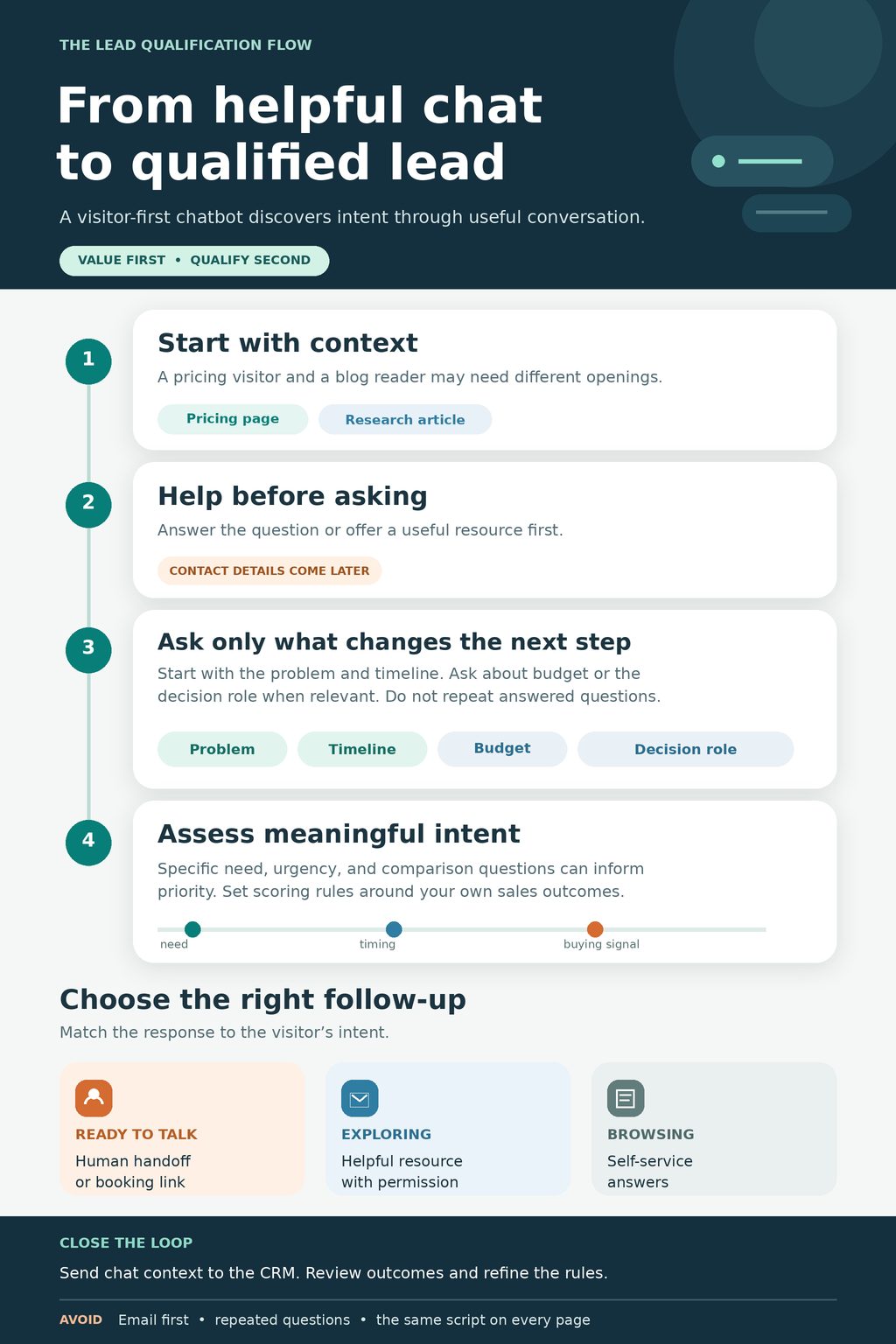
What Lead Qualification Actually Means for a Chatbot
Your sales team gets a list of who to call first, based on what each visitor typed into the chat. The bot collects contact details and pain points without a static form, then scores each conversation so serious buyers rise to the top.
The bot asks questions like “What brought you here today?” and “What’s your biggest challenge with?” The visitor explains their situation in their own words. The chatbot listens for keywords that signal buying intent: budget, timeline, or mentions of competing products. When someone types “We need a solution by Q3” or “I’m comparing you with Product X,” that tells you more than a checkbox ever could.
Each answer gets a score. The scoring happens in the background, invisible to the visitor. High scores go to sales immediately, people who mentioned a deadline, named a specific problem your product solves, or asked about pricing. Medium scores go to email nurture. They showed interest but lack urgency or authority to buy right now. Low scores get helpful content with no pressure. They stay in your system, but your sales team does not waste time chasing them down.
Check the scoring rules your platform uses and adjust the thresholds based on what actually converts.
How a Chatbot Decides Who’s Worth Following Up With
The chatbot figures out who’s a good lead by following a simple scoring system. Here’s how it works:
- Ask questions in a natural order: problem, budget, timeline, authority: Start with the visitor’s biggest challenge. This feels natural because people expect you to understand their pain point before pitching anything. Then ask about budget ranges if they seem interested. This question filters out tire-kickers without making serious buyers uncomfortable. Next, ask when they need a solution. Timing tells you whether this is a real project or a vague future idea. Finally, find out if they make buying decisions. You want to know early if you’re talking to the person who signs the contract or someone gathering information for their boss.
- Assign points based on answers that signal buying intent: Mentions of budget get high scores. A visitor who shares a number is already thinking about spending money. Urgent timelines score higher than “just looking.” Someone who needs a solution this quarter is more valuable than someone planning for next year. Visitors comparing your product to competitors are usually ready to buy. They’ve already decided to purchase something and are now choosing which option.
- Tag leads as hot, warm, or cold so your CRM knows what to do next: Hot leads book a call immediately. Warm leads get a resource via email. Cold leads see self-service content. These tags route each person to the right follow-up without manual sorting.
- Real example from working with ImaginLab.art’s ImagineAsk chat: I’ve seen how free chat interactions reveal user intent. Someone asking detailed questions about specific features is a stronger lead than someone asking what the product does.
The system scores in real time, so your sales team sees qualified leads before the visitor leaves your site.
The Questions That Work Without Feeling Like an Interrogation
Visitors will answer questions if those questions help them get what they came for. The trick is asking in a way that moves the conversation forward for them, not just your CRM.
Start with what brought them to the page. “What are you hoping to solve today?” feels helpful because it centers their need. “What’s your role?” feels like data collection. Starting with their goal also gives you better context than a job title ever could. Someone might be a VP but still be researching on behalf of their team, or they might be an individual contributor with full buying authority.
Ask about their biggest challenge before asking for an email. Give the visitor a reason to trust you first. Once they’ve shared their problem, offering a resource in exchange for contact info feels fair. They’ve already invested in the conversation and seen that you understand their situation. Handing over an email address becomes a reasonable next step rather than an upfront toll.
Use multiple choice when possible so people tap instead of type. “Are you looking for a solution now, in the next few months, or just exploring?” gets more responses than an open text box. Buttons are faster and require less effort. They also give you cleaner data because everyone picks from the same set of answers.
The goal is to make each question feel like the bot is trying to help them solve their problem.
Where Most Chatbots Lose the Visitor
Visitors close the chat window when the bot feels extractive instead of helpful. Here’s what kills engagement:
- Asking for contact details before offering any value: A visitor who landed on your site 10 seconds ago isn’t ready to hand over their email. The bot needs to demonstrate it can help solve a problem or answer a question before asking for anything in return. Think of it like meeting someone at a conference who immediately asks for your business card without introducing themselves or explaining why you’d want to stay in touch.
- Using ten questions when three would work: Every extra question cuts your completion rate. Visitors have limited patience, and each additional field increases the mental burden of completing the conversation. Prioritize the information that truly changes how your sales team would approach the lead.
- Ignoring what the visitor already told you in a previous answer: If someone said, “I need a solution this month,” and the bot asked, “When are you looking to buy?” the visitor knows the bot isn’t listening. This breaks trust immediately and makes the interaction feel automated in the worst way.
- Forcing every visitor through the same script regardless of their page or intent: Someone on a pricing page is further along than someone reading a blog post. The conversation should reflect where they are in their research process.
Check what your chatbot is actually asking and when. If you wouldn’t answer those questions yourself at that stage, rewrite the flow.
Setting Up Your Chatbot So It Actually Helps Your Sales Team
Connecting the chatbot to your sales process takes three steps:
- Sync qualified leads straight to your CRM with their score and conversation history: Your sales team needs context. A name and email aren’t enough. Send the full chat transcript and the qualification score. That means your rep can see exactly what the visitor asked about, which pain points they mentioned, and what objections they raised. They walk into the conversation already informed, not starting from scratch. Most CRM platforms let you map chatbot fields directly to lead records, so the handoff happens automatically without manual data entry.
- Route hot leads to a calendar booking, warm leads to email nurture, and cold leads to self-service content: Hot leads (high budget, urgent timeline) should book a call immediately. Warm leads (researching solutions, no timeline yet) get a helpful resource via email. Cold leads (just browsing) see a knowledge base or blog post. The chatbot should make this routing decision instantly based on the answers it collected. A hot lead shouldn’t have to wait for someone to notice them in the CRM queue.
- Test your qualification logic on real conversations and adjust the scoring rules: Watch what your sales team does with the leads. If they’re calling people who aren’t ready, your scoring is too loose. If they’re ignoring people who wanted to buy, it’s too strict.
Start with a simple scoring system and refine it based on what actually converts.
Common Questions About Using Chatbots for Lead Qualification
Do chatbots work better than forms for collecting leads?
A static form asks the same ten questions no matter what the visitor needs. A chatbot can ask three questions for one person and five for another, depending on their intent. That flexibility keeps more people engaged, which is why chatbots typically convert better; they feel like a conversation and adapt based on answers.
How many questions should a lead qualification chatbot ask?
Three to five questions is usually enough to qualify someone without annoying them. More than that and completion rates drop.
Ask the minimum needed to route the lead correctly. Problem and timeline matter most; budget range helps but isn’t always necessary up front. Everything else can wait until the sales call.
Keep each question short and use simple words. The visitor should never have to read a sentence twice to understand what you’re asking.
Can a chatbot qualify leads outside of business hours?
Yes. The bot never sleeps, so someone visiting your site at 11 p.m. gets the same qualification flow as someone at 11 a.m. Qualified leads wait in your CRM until morning while others get instant resources. By morning, your sales team has a list of scored leads ready to call.
When to Route to a Human and When to Let the Bot Finish
The decision comes down to intent signals and timing. Getting this wrong means your sales team chases people who aren’t ready, or you lose buyers who wanted to talk right away. Here’s how to split the flow:
- High-intent signals like mentioning budget, urgent timelines, or comparing your product to competitors warrant immediate handoff. These visitors are ready to talk now. They’ve already done their homework. Route them to a live agent or a calendar booking link. Don’t make them wait. Every minute of delay gives a competitor the chance to respond first.
- Medium-intent visitors researching solutions benefit more from a resource sent via email than a sales call they aren’t ready for. They need to learn before they buy. Send a case study or guide. If you push for a call too early, they vanish. Follow up in a few days when they’ve had time to review what you sent.
- Low-intent traffic should get helpful content with no pressure, because forcing contact details loses them entirely. Someone reading a blog post isn’t ready for a sales call. Point them to more content. If they come back, the bot will remember them. Repeat visits signal growing interest, and that’s when you can ask for more.
The Bottom Line: How Chatbots Can Qualify Sales Leads
Chatbots qualify leads successfully when they prioritize being useful over being efficient. That means designing the conversation for the visitor’s goals first, not what makes your sales pipeline easier to manage. Ask fewer questions, especially at the beginning when trust is lowest. Give value before you ask for contact info, answer a question, solve a small problem, or point someone in the right direction before requesting their email address.
Route people based on their intent, not your sales quota. If someone wants pricing information, connect them to that resource. If they need technical support, send them there instead of forcing them through a sales funnel where they don’t belong.
The best qualification flows feel like help, not homework. When a visitor finishes a chat thinking “that was actually useful,” you’ve built it right. That perception matters more than how many fields you filled in your CRM. Start there, and the lead data will follow naturally from conversations people actually want to have.