

How to Convert MOV to WAV with No Size Limit?

Convert MOV to WAV

MOV is usually the format used for videos recorded by iPhone iPad, DJI, Cannon and more, or the videos created by some Apple software like Final Cut Pro. WAV, shorted from Waveform Audio File Format, is an audio format standard which can store the audio bitstream. This is very important for audio editing. Whether you want to convert MOV video to WAV for audio observation, editing or just the soundtrack music, you can find the solution in this post.

Online MOV to WAV converter website is a choice for MOV video in small size. Almost all the online websites sets a limitation of the video file size for uploading and converting. Some sites make 400MB as the largest size and some allow MOV file less than 1GB. These make sense when you understand that the uploading process of large file is very time-consumption.

Besides, video in any format including MOV with large file size will impose a huge burden to the server of online converter. It’s a disaster if the website go crashing during the conversion of MOV to WAV. In a sudden, the long wait becomes a waste.

In the interest of converting MOV to WAV without file size limit, it’s suggested to use a MOV to WAV converter. Some software may also stop working when converting 4K UHD MOV videos. WinX Video Converter is a desktop software that allows you to convert HD/UHD videos with no file size limit. It can convert MOV to audio in WAV, FLAC, MP3, AAC, ALAC, etc. as well as convert MOV to video in MP4, WMV, AVI, and so forth.

All you need to do before converting MOV to WAV with this software is to download and install it on your PC or Mac computer. Then go after the steps below to start convert MOV video to WAV audio.

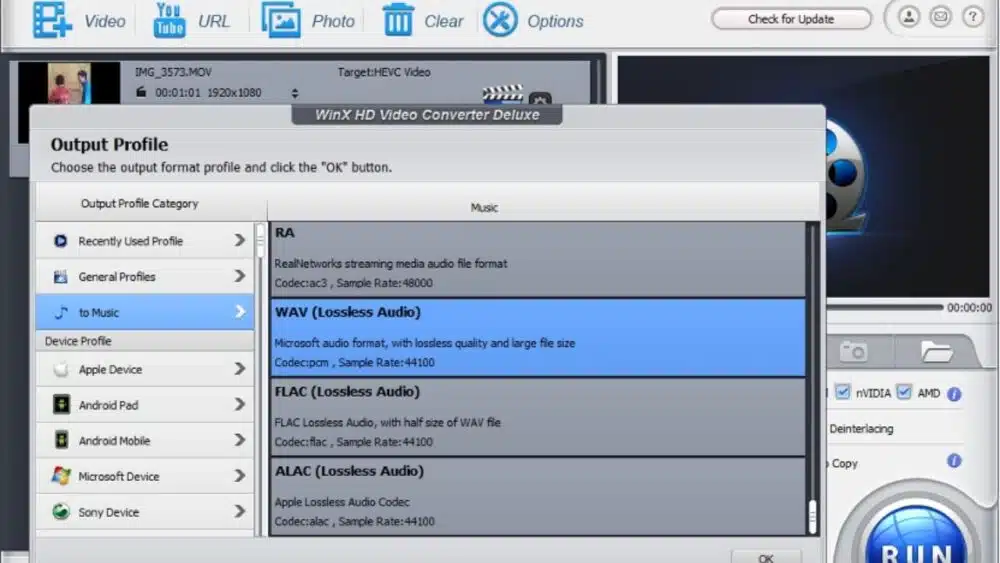
First, open WinX Video Converter, click “+Video” icon to add the video in MOV format that you want to convert. Or, you can directly drag the video file to this converter, it will automatically added to conversion queue.
Convert MOV to WAV

Then, click “to Music”, and scroll down to choose “WAV (Lossless Audio)” as output profile.          

In the end, if you don’t need any other changes, you can click the “Run” button to convert the MOV file.

Tips: you can use the edit function to cut off unwanted part before converting. Although this software offers the option to adjust audio parameters, if you need WAV audio for further editing, it’s not recommended to adjust the audio bitrate, sample rate or channel.  

It’s quite easy to convert any MOV to WAV, right? Only a few clicks and a moment of wait, you can get what you want in the local folder on computer. 

If you don’t need the soundtrack with lossless quality, it’s better to convert it to AAC. Unlike WAV, it is widely compatible with many devices and applications as MP3. Besides, it can compress the audio file in size a lot comparing with WAV format. WAV is an audio format without compressing, the file size will be very large. Thus AAC is more convenient for storing, uploading or sharing. But the audio quality is not good as WAV. Regarding to MP3, it’s the format with lowest audio quality among these three, while it is larger than AAC.   


Subscribe to Our Newsletter

Related Articles

Top Trending

expansion revenue
What Is Expansion Revenue? Meaning, Formula, and Ways to Grow It
Solo attorney reviewing financial software at a desk for legal trust accounting
6 Trust Accounting Software Options for Solo Attorneys
AI-Generated Contract Risks to Know Before You Sign
7 Risks of Using AI-Generated Contracts Without Legal Review
reading apps that teach phonics
12 Best Reading Apps That Actually Teach Phonics
Legal Intake Software Tools for Small Law Firms
10 Best Legal Intake Software Tools for Small Law Firms

Technology & AI

expansion revenue
What Is Expansion Revenue? Meaning, Formula, and Ways to Grow It
Solo attorney reviewing financial software at a desk for legal trust accounting
6 Trust Accounting Software Options for Solo Attorneys
AI-Generated Contract Risks to Know Before You Sign
7 Risks of Using AI-Generated Contracts Without Legal Review
Legal Intake Software Tools for Small Law Firms
10 Best Legal Intake Software Tools for Small Law Firms
azure services for saas
10 Azure Services SaaS Teams Lean on Most and When to Use Them

GAMING

FPV Freerider FREE on Windows
FPV Freerider FREE on Windows: What the Sim Feels Like With a Real Controller
Esports Contracts: What Professional Gamers Should Know
What Every Professional Gamer Should Know About Esports Contracts
7 Benefits and Risks of Gamified Investing Apps
Intentional Screen Time
How to Spend Your Screen Time More Intentionally
Complete Guide on Game Programgeeks
Game Programgeeks: A Complete Guide on PC, Game Dev, and Tech

Business & Marketing

marketing books that aged well
10 Marketing Books That Aged Surprisingly Well
Registered Agent Services to Compare Before Forming an LLC
6 Registered Agent Services to Compare Before Forming an LLC
Augmented Reality Employee Onboarding
How Augmented Reality Is Changing Employee Onboarding
How to Calculate the ROI of Digital Transformation
Affordable cybersecurity for small businesses
How Small Businesses Can Build an Affordable Cybersecurity Strategy

EdTech & E-Learning

reading apps that teach phonics
12 Best Reading Apps That Actually Teach Phonics
Warning Signs a Kids’ App Isn’t Safe
10 Warning Signs a Kids' App Isn't Kid-Safe: Parents Checklist
learning analytics
What Is Learning Analytics and What Does It Track About Students?
co-play vs independent play for kids
Co-Play vs Independent Play: How Parents Can Change the Learning Experience
Letter Reversals in Preschoolers
Letter Reversals in Preschoolers: Normal or Not?

Software & Apps

Solo attorney reviewing financial software at a desk for legal trust accounting
6 Trust Accounting Software Options for Solo Attorneys
Legal Intake Software Tools for Small Law Firms
10 Best Legal Intake Software Tools for Small Law Firms
International Money Transfer Apps With Low Fees
10 Best International Money Transfer Apps With Low Fees
Injury Settlement Calculator Tools
7 Best Injury Settlement Calculator Tools [and How Accurate They Are]
sensory-friendly app design
What Is Sensory-Friendly App Design and Why It Matters






















