Corporate training webinars fail when they feel like passive meetings. The best platforms solve that with better control, better interaction, and better proof of learning, like attendance duration, engagement, and completion-style reporting. They also make it easier to reuse sessions as on-demand training so your best workshops do not disappear after one live run.
How We Picked Our List of Webinar Platforms for Corporate Training?
Here are the criteria we used to filter:
-
Training-ready engagement: Polls, moderated Q&A, breakouts, and interactive elements that keep learners active.
-
Measurement: Attendance duration, engagement signals, and exportable reporting for L&D stakeholders.
-
Scale and control: Host/co-host roles, audience management, and admin-friendly configuration for larger orgs.
-
Replay value: Strong recording and post-session consumption features (chapters, hubs, on-demand experiences).
Comparison Table
| Platform | Best For | Training Strength | Reporting Strength | Replay/On-Demand Strength | Main Watch-Out |
|---|---|---|---|---|---|
| Zoom Webinars/Events | Mixed training formats at scale | Polls, Q&A, engagement metering | Engagement + attendance metering | Strong recordings + event structure | Pricing tiers can rise with scale |
| Microsoft Teams Webinars/Town hall | Internal training in M365 | Moderated Q&A, large-event controls | Attendance + engagement reports | Good for internal distribution | Best when your org is already on Teams |
| Webex Webinars | Enterprise training + structured Q&A | Slido polling + Q&A | Strong enterprise reporting options | Strong webinar/event heritage | Setup can feel “enterprise-heavy” |
| GoTo Webinar | Simple corporate webinar operations | Mature webinar workflow | Strong organizer analytics + updates | Recording chapter stops | Some features vary by plan |
| ON24 | Certification-style training + analytics | Quizzes/passing criteria + certificates | Advanced analytics focus | Strong on-demand + content hubs | More “platform” than “simple webinars” |
| BigMarker | Training + evergreen content library | In-player interactivity + resources | Solid engagement tracking | “Perpetual asset” webinars | May be overkill for basic internal sessions |
| Livestorm | Browser-based training + integrations | Built-in engagement + CRM links | Analytics + exports emphasized | On-demand webinars supported | Advanced needs can require higher tiers |
| Demio | Clean delivery + engagement tracking | No-download attendee experience | Engagement analytics focus | Live + automated formats (workflow-dependent) | Best for mid-size sessions vs huge broadcasts |
| ClickMeeting | Attendance certificates + SMB training | Certificates of attendance highlighted | Solid webinar reporting | Works well for scheduled training | UX and depth vary by plan |
| Adobe Connect | True virtual classroom style | Quiz pod + training tools | Engagement dashboard for training | Strong “classroom” feel | Can take setup discipline to run well |
 10 Best Webinar Platforms for Corporate Training
 10 Best Webinar Platforms for Corporate Training
Here are 10 Webinar Platforms for Corporate Training that help you deliver engaging sessions, track participation, and reuse training at scale.
1) Zoom Webinars / Zoom Events
Zoom is a strong all-rounder for corporate training because it supports structured webinars and larger event-style sessions while still keeping interactive tools close at hand. It also offers attendance and engagement metering that helps L&D teams evaluate participation and improve future sessions.
-
Best For: Companies that run frequent live training across teams and regions
-
Pros: Polling/Q&A in webinar plans; engagement metering and attendance insights
-
Cons: Pricing and capacity needs can push you into higher tiers
2) Microsoft Teams Webinars / Town hall
If your organization already lives in Microsoft 365, Teams is an efficient training choice because scheduling, identity, and internal access are streamlined. Teams provides attendance and engagement reporting plus moderated Q&A options for larger training sessions.
-
Best For: Internal training, onboarding, and enablement inside Microsoft 365
-
Pros: Attendance + engagement reports; moderated Q&A for webinars/town halls
-
Cons: Best experience depends on your org’s Teams policies and configuration
3) Cisco Webex Webinars
Webex is a strong fit for enterprise training environments where moderation and structured interaction matter. Webex supports Q&A workflows and polling via Slido on the Webex Suite platform, which can be helpful when you need consistent engagement patterns across large sessions.
-
Best For: Enterprise training with formal moderation and governance
-
Pros: Q&A and polling through Slido; mature webinar controls
-
Cons: The “enterprise” depth can feel heavier than lighter browser-first tools
4) GoTo Webinar
GoTo Webinar is a dependable corporate option when you want a mature webinar workflow and straightforward operations for recurring training. It has continued to add post-session usability features, like chapter stops in recordings that make replays easier to consume.
-
Best For: L&D teams running recurring, repeatable training programs
-
Pros: Stable webinar workflow; recording chapter stops for replay learning
-
Cons: Some capabilities vary by plan and organizer setup
5) ON24
ON24 shines for corporate training when you need more than attendance, like knowledge checks and completion logic. It explicitly supports setting passing criteria using polls, quizzes, or time spent, and can automatically generate digital certifications.
-
Best For: Certification-style training, partner training, and compliance-like programs
-
Pros: Passing criteria + certificates; strong analytics posture
-
Cons: More of a full platform investment than a “simple webinar tool”
6) BigMarker
BigMarker is built for turning webinars into reusable training assets, not just one-off live sessions. It supports “evergreen” experiences where recordings can feel live using in-player polls, Q&A, resources, and CTAs, which is useful for scalable training libraries.
-
Best For: Companies building an on-demand training hub alongside live cohorts
-
Pros: Strong evergreen/on-demand approach; in-player interactivity + resources
-
Cons: May be more than you need if training is small and purely internal
7) Livestorm
Livestorm is a modern, browser-based platform that keeps attendee friction low, which helps participation in corporate training. It highlights integrated webinar features like registration, analytics, on-demand webinars, and CRM integrations for tracking outcomes.
-
Best For: Fast-moving teams that want browser-based delivery and clean integrations
-
Pros: On-demand webinars; analytics + integrations emphasized
-
Cons: Advanced analytics and scale features may require higher tiers
8) Demio
Demio focuses on a simple, no-download attendee experience while still giving teams engagement and analytics tooling. It’s a strong fit for training sessions where you want smooth attendance plus measurable engagement signals without adding complexity.
-
Best For: Mid-size corporate training sessions where simplicity boosts attendance
-
Pros: No-download experience; engagement analytics focus
-
Cons: Not typically the first pick for massive broadcast-style internal events
9) ClickMeeting
ClickMeeting is a practical choice for corporate training when you want built-in webinar mechanics plus extras like certificates of attendance (useful for training proof). Forbes Advisor specifically highlights certificates of attendance as a ClickMeeting strength in its webinar software roundup.
-
Best For: Training programs that need lightweight attendance proof
-
Pros: Certificates of attendance; solid webinar feature set
-
Cons: Plan details matter, especially around roles and limits
10) Adobe Connect
Adobe Connect is one of the most “virtual classroom” style tools on the list, which is ideal when training needs interactive learning elements built into the room. It supports a dedicated Quiz pod with multiple quiz types and timing options, and it emphasizes reusable virtual classrooms with an engagement dashboard for training effectiveness.
-
Best For: Instructor-led training that needs built-in quizzes and classroom-style control
-
Pros: Quiz pod with multiple formats; training engagement dashboard
-
Cons: Requires a bit more facilitator discipline and room setup planning
How to Choose the Right Webinar Platform for Corporate Training?
These are the things you should look for:
-
Audience size: Pick webinar/town hall formats for large sessions; meeting-style for workshops.
-
Engagement intensity: If you need real knowledge checks, prioritize quiz/certification capabilities.
-
Measurement requirements: Look for attendance duration plus engagement reporting that you can export.
-
Replay strategy: If training must scale, prioritize chapters, hubs, and evergreen interactivity.
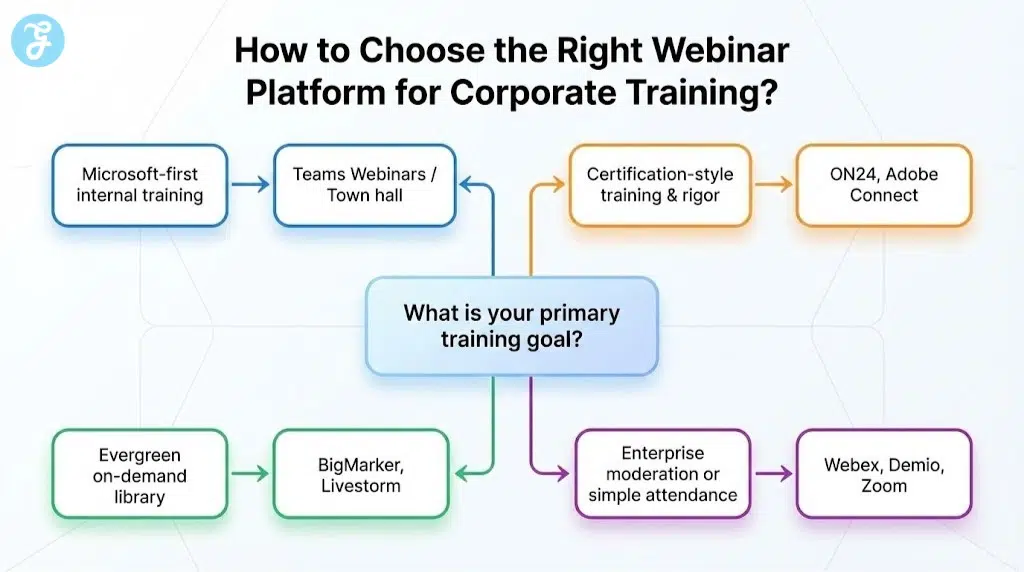
Small Decision Table
| Your Priority | Best-Fit Picks |
|---|---|
| Microsoft-first internal training | Teams Webinars / Town hall |
| Certification-style training | ON24, Adobe Connect |
| Evergreen on-demand library | BigMarker, Livestorm |
| Enterprise moderation + governance | Webex Webinars |
| Fast, simple attendance | Demio, Zoom |
Corporate Training Webinar Best Practices
Just follow these best practices:
-
Format: Mix 10–15 minutes of teaching with an interaction every 5–8 minutes.
-
Interaction: Use moderated Q&A for large groups and polls/quizzes for knowledge checks.
-
Reuse: Publish recordings with chapters or an on-demand hub so the session becomes a reusable asset.
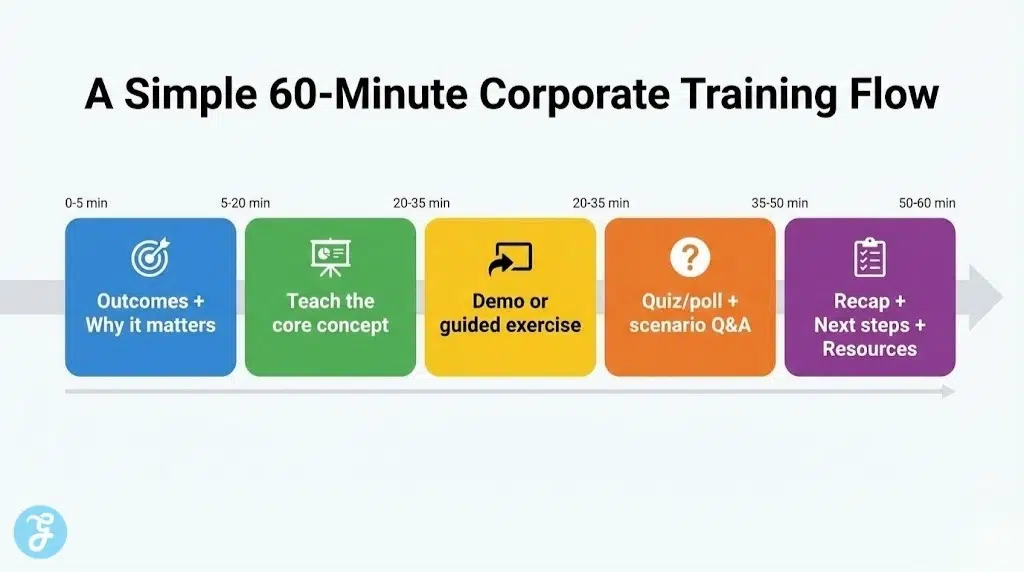
A Simple 60-Minute Training Flow
-
0–5 min: Outcomes + why it matters
-
5–20 min: Teach the core concept
-
20–35 min: Demo or guided exercise
-
35–50 min: Quiz/poll + scenario Q&A
-
50–60 min: Recap + next steps + resources
The Verdict?
The best corporate training webinar platform is the one that makes learning measurable, not just watchable. If your priority is internal scale and reporting inside a familiar stack, Teams is hard to beat. If your priority is certification-style rigor and deep engagement analytics, ON24 and Adobe Connect stand out. And if your goal is to turn every session into a training asset you can reuse for months, BigMarker and Livestorm make that “library mindset” much easier.