


You are scrolling through your company’s software stack, and you spot three different tools promising to handle your work. They are an AI copilot, an AI agent, and workflow automation. They all sound similar, right?
You start wondering which one actually does what, and more importantly, which one will save you the most time. The confusion hits hard when you realize your team is already using all three. Nobody can quite explain how they differ or why you need each one.
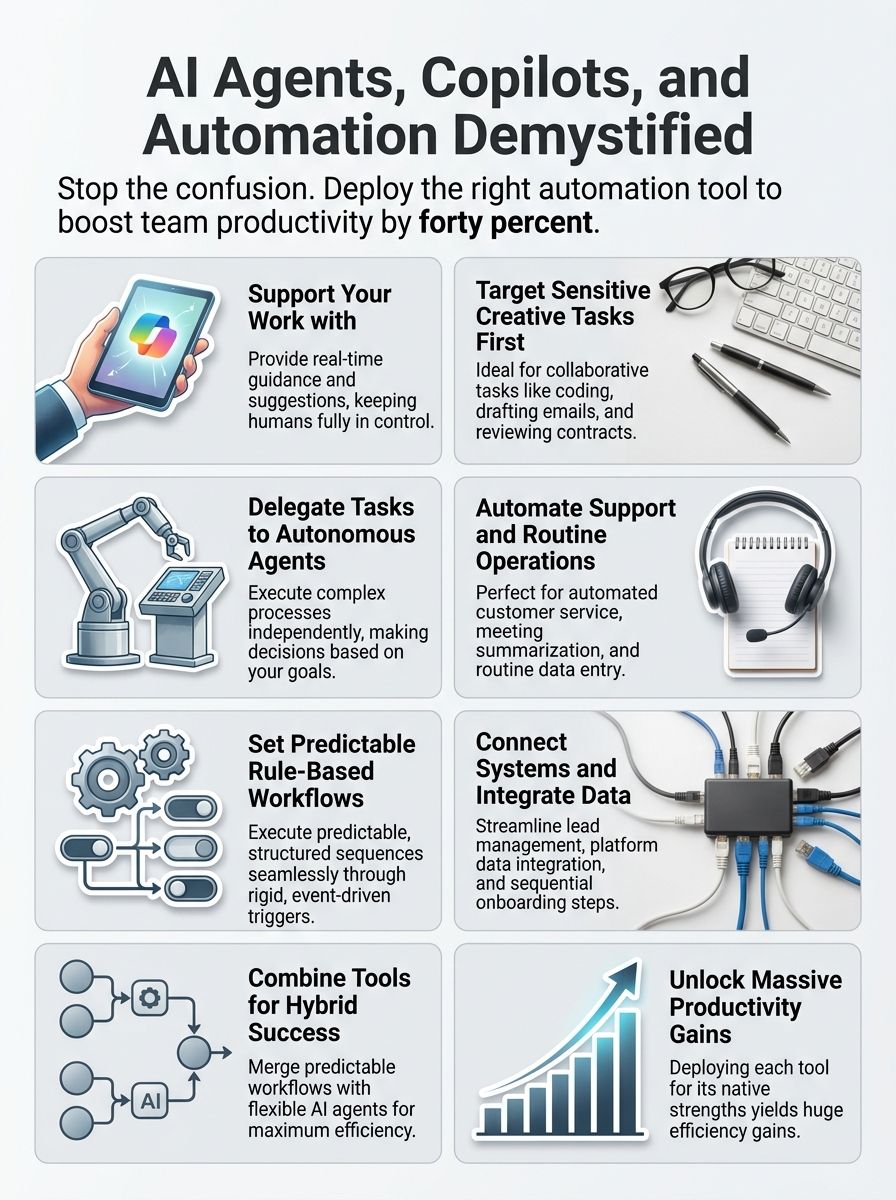
I have been there, staring at these tools with that same blank expression. But after reading countless reports and testing these systems, I discovered a practical secret. Companies that understand the difference of AI agents vs copilots vs workflow automation, report a 40 percent boost in productivity.
They get this boost because they deploy each tool for what it does best. The problem is not that these tools are bad. Most people just throw them at problems without understanding their actual strengths.
So, grab a cup of coffee, and let’s go through it together. I will break down these three technologies in plain language so you can finally see which tool fits your needs. By the end, you will know exactly which technology solves your specific problem.
What Is an AI Copilot?
I think of AI copilots as your digital sidekick, sitting right beside you as you work through tasks. They watch what you do, learn your patterns, and jump in with suggestions or help when you need it most.
In fact, Microsoft reported in 2026 that over 20 million paid users now rely on Microsoft 365 Copilot to speed up their daily routines. Their telemetry data shows that these users save between 14 and 26 minutes every single day just by letting the copilot handle formatting and email summaries.
Key Features of AI Copilots
AI Copilots serve as your digital teammate, supporting decision-making by offering guidance, suggestions, and insights that reduce manual effort. I have found that these tools improve productivity greatly by providing personalized suggestions for tasks like coding and email drafting.
- Contextual Task Assistance: Copilots deliver personalized suggestions that change how I approach daily work. They recommend improved code or assist with document summaries, freeing me to focus on strategic thinking.
- Seamless Environmental Adaptability: The copilot functions remain relevant wherever I use them. This ensures the assistance suits my specific workflow and industry needs without requiring constant manual adjustment.
- Human Expertise Augmentation: These tools focus on enhancing what I already do well rather than trying to replace my skills entirely. They support my decision-making by helping me evaluate options more thoroughly.
- Intuitive Collaboration and Support: User-friendly design allows intuitive interaction without extensive training. I can share copilot insights with colleagues immediately, which builds teamwork and improves project results.
- Continuous Process Optimization: Copilots identify inefficiencies in my processes and suggest practical improvements I can use right away. They help optimize my work quality across writing, analysis, coding, and research.
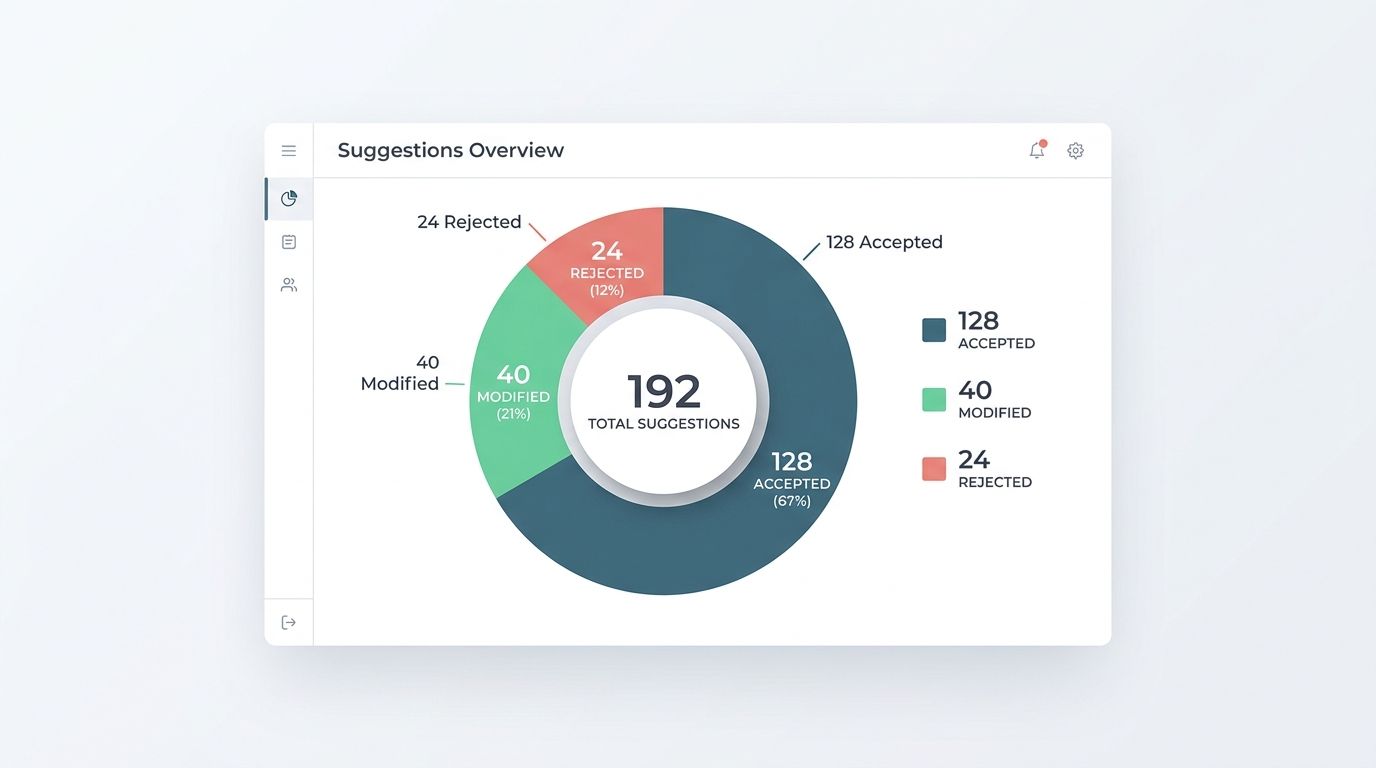
“The copilot’s suggestions were useful most of the time and cut my weekly reporting time substantially, though I still reviewed every suggestion before publishing.”
What Is an AI Agent?
An AI agent operates independently, making decisions and taking actions without waiting for your input at every step. I find that these systems learn from their environment, adapt to new situations, and accomplish goals with minimal human guidance.
Gartner’s 2026 market report indicates that 40 percent of enterprise applications will feature task-specific AI agents by the end of the year. This represents a massive shift from basic chat tools to actual automated workers.
Key Features of AI Agents
I have discovered that AI agents operate as independent powerhouses, handling tasks while keeping you informed every step of the way. These systems separate themselves from copilots through their ability to work autonomously and make decisions that align with your goals.
- Autonomous Operation: AI agents function without constant human oversight to tackle assignments and complete workflows on their own. This independence allows organizations to scale operations without immediately hiring additional staff.
- Dynamic Adaptability: These systems adjust to evolving business needs and shifting workloads without requiring manual reconfiguration. I notice this flexibility prevents bottlenecks when circumstances change rapidly.
- Intelligent Task Delegation: The system handles task delegation across various projects. It manages everything from small assignments to large-scale operations by distributing work intelligently based on available resources.
- Continuous Machine Learning: AI agents improve their performance over time by learning from past interactions and outcomes. This continuous learning creates smarter systems that get better with experience.
- Rule-Based Execution: These agents operate based on clear rules that you or your organization sets. This ensures they align with business goals while providing quick answers to customer queries without human intervention.
- Built-in Version Control: Coding agents like Cursor and Replit include version control systems that allow rollbacks of code edits. I value this feature because it makes mistakes easy to fix.
What Is Workflow Automation?
Workflow automation handles repetitive tasks through predefined rules and processes that run without constant human guidance. I find that these systems excel at following set paths, but they lack the flexibility that AI agents bring to complex, unpredictable situations.
According to 2026 data from Zapier, teams utilizing their workflow automation tools save an average of 6.4 hours per week per person. This represents a massive return on investment for small and large businesses alike.
Key Characteristics of Workflow Automation
Workflow automation operates through event-driven triggers that respond to external events, making it a powerful tool for handling predictable sequences of tasks. I have found that these systems work best when you define specific control mechanisms and integration points with your existing platforms.
- Event-Driven Triggers: External events, like a lead creation in your CRM system, launch the entire sequence. I do not need to manually start each process.
- Deterministic Sequences: I define exactly which steps execute in which order. There is no room for the AI to formulate its own plans or deviate from the path I have set.
- Precise Task Management: I specify exact tasks for the automation to complete. I control both the input data I provide and the expected output I receive from each step.
- Seamless Third-Party Integration: Workflows pull information from one system and push results to another seamlessly. They connect smoothly with platforms such as CRMs and messaging tools.
- Strict Control Mechanisms: I set boundaries around what the software can do. This ensures the workflow stays within the framework I have established rather than making independent decisions.
- Unattended Background Operation: These workflows run without constant monitoring. The system executes tasks automatically based on the triggers and rules I have configured.
How It Differs from AI Agents and Copilots
Automation systems execute known rules with predictability, while agents handle situations where the rules are incomplete and context matters. I find that workflow automation lacks the adaptability and decision-making capabilities inherent to AI agents, making it ideal for tasks with clear, defined steps.
These systems orchestrate tasks using predefined steps and allow software to transfer data between applications seamlessly. Rule-based systems provide an audit trail I can track, ensuring human oversight remains intact throughout the process.
“Automating the lead orchestration trimmed our touchpoints and costs dramatically, and reduced data errors that used to trigger manual fixes.”
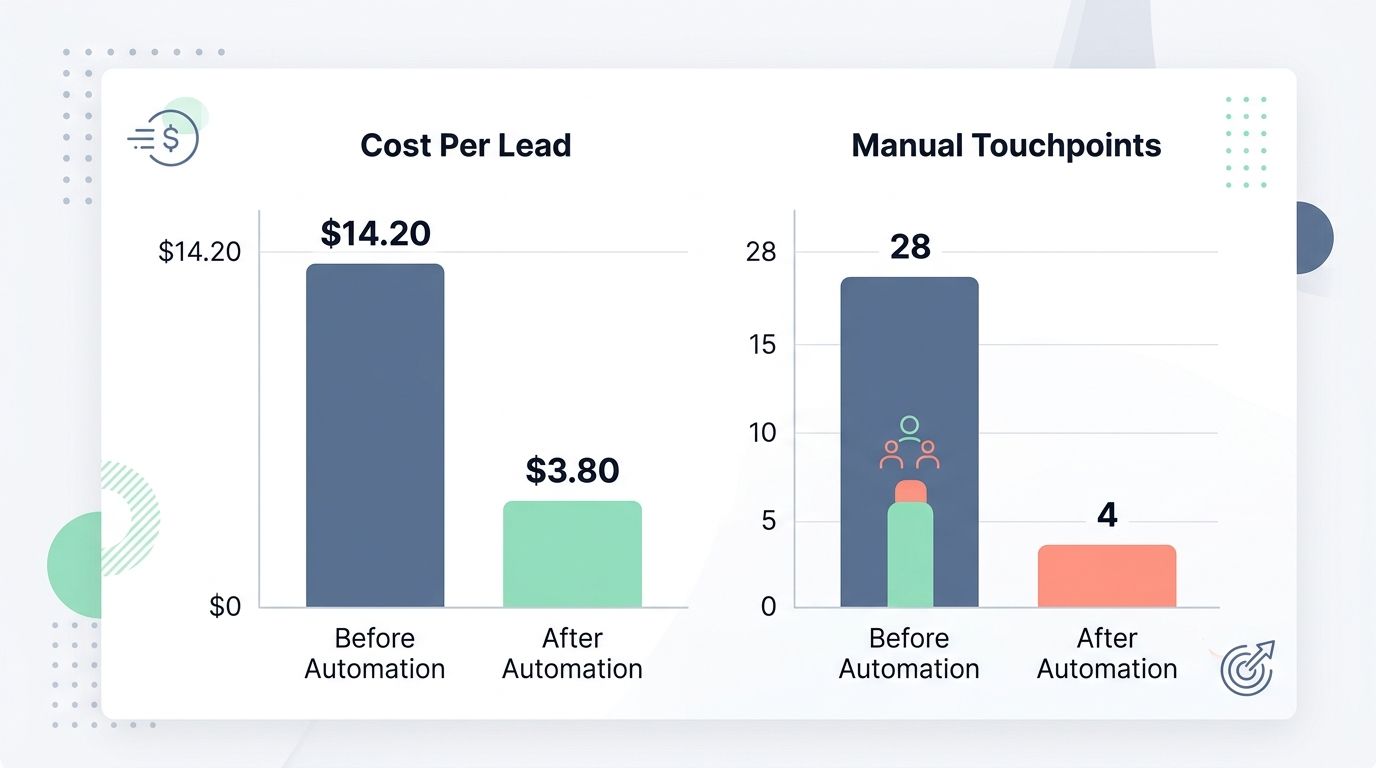
A specific cost breakdown from an operations group illustrates this predictability perfectly. The group evaluated a CRM lead-to-onboarding workflow before and after implementing rule-based automation across their email and billing systems.
Before the change, the average processing cost per lead was $14.20 and required 28 manual touchpoints. After setting up the workflow automation, the cost per lead fell to $3.80 with manual touchpoints dropping to just 4.
For a volume of 12,000 leads, this translates to a projected annual savings of $124,800 in labor costs. The error rate on data fields decreased from 6.5 percent to 1.1 percent.
Unlike AI agents, automation cannot manage unstructured data or make decisions beyond its programming scope, which means I need agents when complexity and flexibility enter the picture. Copilots work alongside humans as decision support tools, whereas agents operate with greater autonomy to accomplish goals independently.
Key Differences: AI Agents, Copilots, and Workflow Automation
I need to understand what sets these three technologies apart because they each solve different problems in different ways. Each one operates on its own timeline, demands different levels of human involvement, and delivers results through separate mechanisms.
Choosing the wrong tool for your objective often leads to wasted budget and frustrated employees.
Purpose and Functionality
When I look at how these three technologies work, their purposes split into distinct lanes. Each one handles tasks differently, and understanding those differences shapes everything about how you would deploy them. Let me break down what separates them.
| Technology | Core Purpose | Primary Function |
| AI Copilots | Enhance your productivity through real-time suggestions and guidance | Provide personalized suggestions for tasks like coding and email drafting. Work alongside you, offering ideas without taking action on your behalf. |
| AI Agents | Execute tasks on your behalf with minimal oversight | Perform actions independently, suitable for routine activities requiring minimal user interaction. Call APIs and tools to accomplish goals. |
| Workflow Automation | Orchestrate sequences of tasks through predefined steps | Enable you to control task sequences, offering structure without allowing AI autonomy. Integrate with third-party platforms such as CRMs and messaging tools using tools like Make or Zapier. |
The distinction matters because each serves different operational needs. Copilots sit in your corner, whispering suggestions while you steer the ship. Agents take the wheel for stretches, handling things you have authorized them to handle. Workflow automation keeps everything moving along tracks you have already laid down.
Tools enable AI Agents to perform their functions, whether your development team builds them or you source them from APIs such as ActionKit. Copilots stick closer to analysis and suggestions, staying in an advisory role. Workflows marshal these capabilities together, moving information where it needs to go.
Level of Autonomy
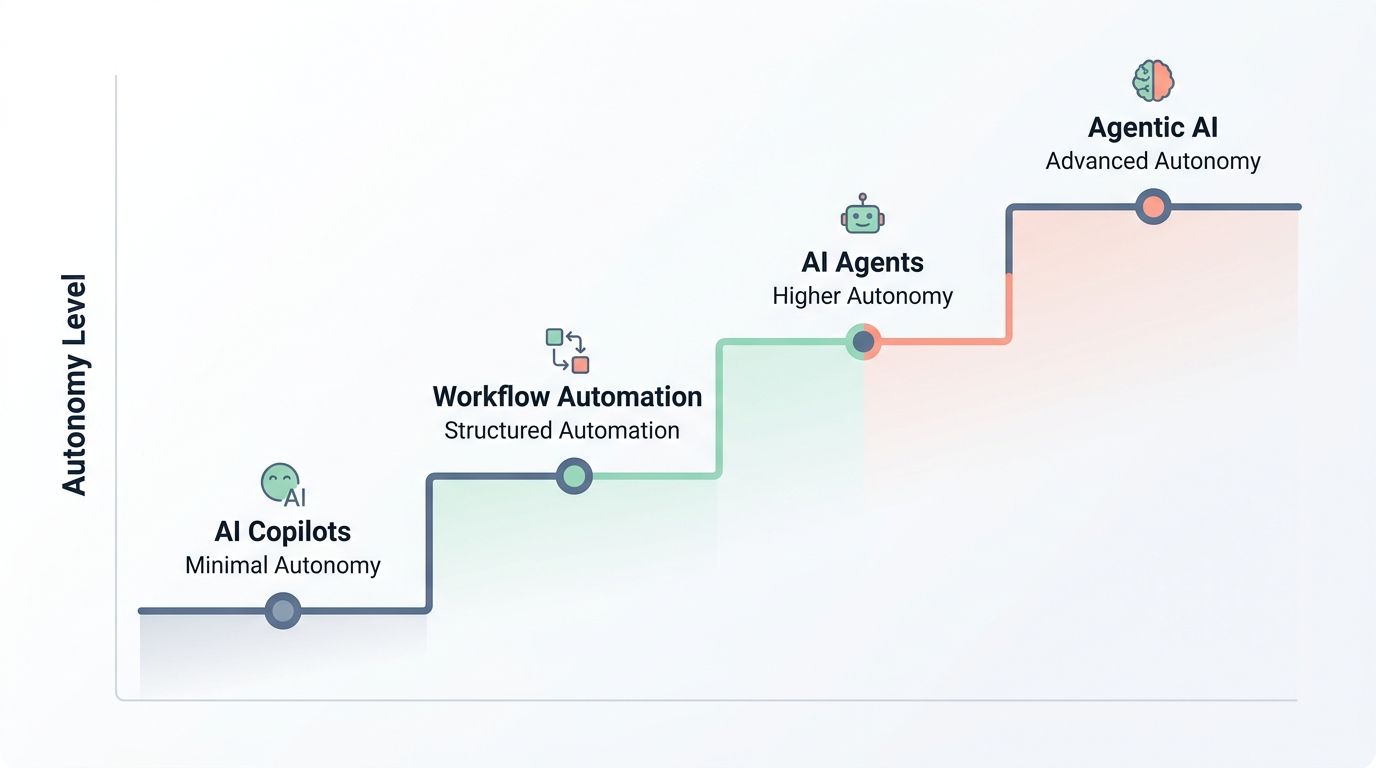
I have observed that autonomy separates these three technologies more sharply than anything else. Picture the spectrum as a ladder, with copilots sitting at the bottom rung and agents climbing higher into independent decision-making territory.
| Technology | Autonomy Level | Key Characteristics |
| AI Copilots | Minimal Autonomy |
|
| AI Agents | Higher Autonomy |
|
| Agentic AI | Advanced Autonomy |
|
| Workflow Automation | Structured Automation |
|
I have found that the gap between these technologies matters most when stakes get high. Copilots stay in their lane, offering suggestions while you retain full control. Agents venture further, taking action based on your goals while you focus on bigger priorities.
Agentic AI pushes even further, learning from outcomes and refining its approach over time. Workflow automation never leaves the rails you have laid down for it. Your choice depends on how much autonomy you feel comfortable handing over.
Human Interaction and Input
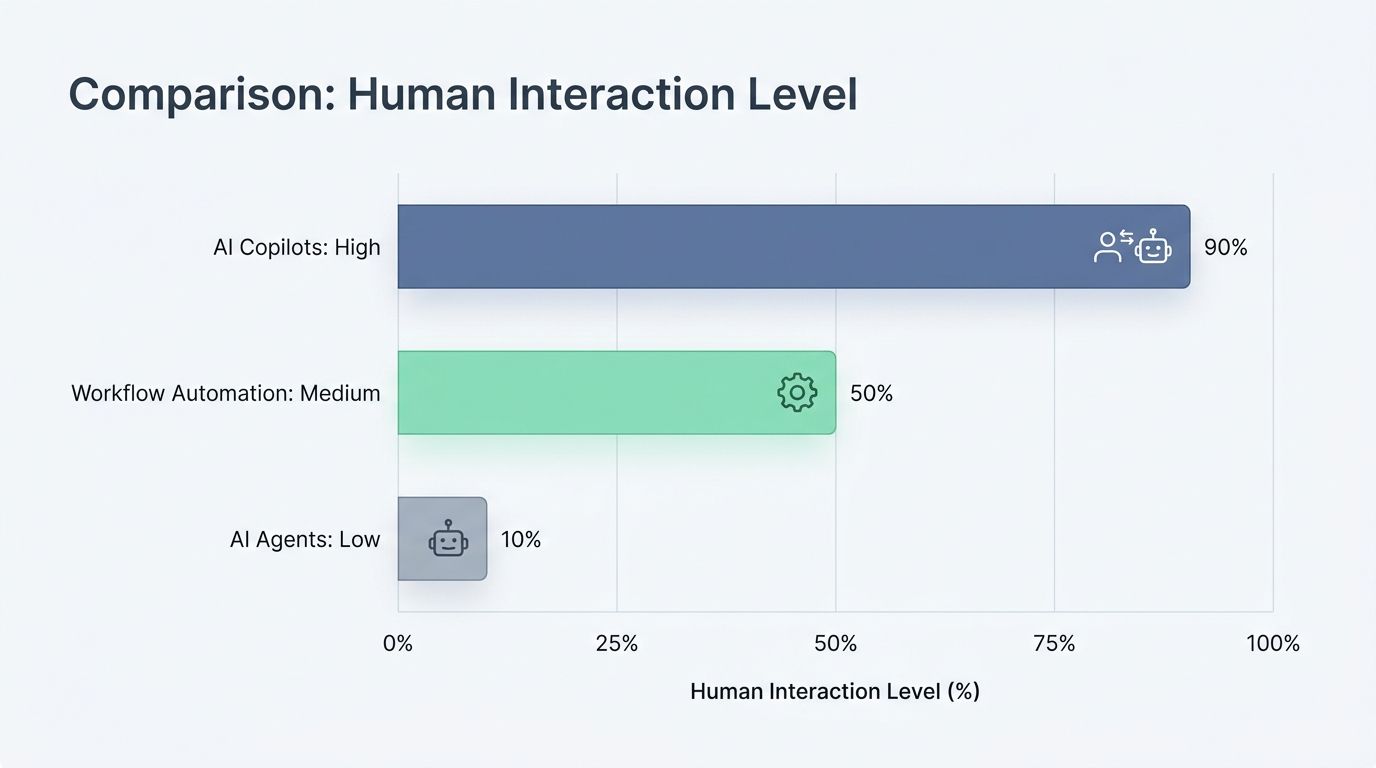
Human interaction and input separates these three AI approaches more than almost any other factor. I want to walk you through how each one handles the human element differently.
| Technology | Human Interaction Level | Validation Requirements | Real-World Application |
| AI Copilots | High. Humans drive every decision. Copilots offer suggestions that require human validation. You remain in control throughout the entire process. | Critical validation needed. Users must review, approve, or reject suggestions before implementation. This prevents errors in sensitive work. | A lawyer using a copilot to draft contract language reviews every suggestion before finalizing documents. |
| AI Agents | Low. Agents operate autonomously, making decisions without human input. They execute tasks in the background using event-based webhook triggers. | Minimal validation upfront. Human oversight happens after execution. You need strong monitoring systems in place to catch problems. | An agent triggered by a customer support ticket automatically logs the interaction and sends a confirmation email. |
| Workflow Automation | Medium. Humans set parameters but do not control execution. You design the rules, then automation handles the rest. | Validation occurs through defined rules and checkpoints. Every step leaves a traceable record. Humans can intervene if exceptions occur. | A purchase request automatically routes through approval chains. The finance team reviews only when amounts exceed limits. |
My experience shows that misaligning AI paradigms with use cases hinders effective implementation. Organizations must prioritize data quality and effective measurement of human interaction during AI adoption, since each technology demands different oversight models.
Copilots need constant human attention. Agents need vigilant monitoring. Workflows need clear rules and exception handling. Getting this right separates smooth deployments from chaotic ones.
Use Cases for Each Technology
I find that each technology shines in different situations, and picking the right tool makes all the difference. Let me show you where each one performs best, so you can match the technology to your actual needs.
Understanding these practical applications will save you hours of trial and error.
Best Applications of AI Copilots
AI Copilots shine brightest when tasks demand personality, human judgment, and a personal touch. I have found that these tools excel in situations where customization and user expertise matter most.
- Content and Storytelling Generation: Microsoft 365 Copilot in Word generates drafts that need human refinement. I can tweak suggestions to match my style, ensuring the final product feels authentically mine rather than robotic.
- Sales Email Personalization: Gmail’s Gemini offers excellent email suggestions for user customization. The AI proposes language, but I control the tone and personal touches that make each outbound sales email resonate with its recipient.
- Complex Data Analysis: Microsoft 365 Copilot in Excel analyzes data and recommends visualizations, helping me spot trends I might miss. This accelerates my analysis without removing my judgment from the equation.
- Advanced Code Generation: GitHub Copilot assists by suggesting code snippets and debugging within editors. Engineers strongly prefer a copilot over an agent for legacy code because they want to maintain control over unusual situations.
- SQL Query Construction: Snowflake Copilot operates within the Snowflake Data Cloud to convert my natural language requests into SQL queries. I review and modify the suggested queries before executing them.
- Legal Contract Review: Professionals use AI Copilots for sensitive tasks like legal contracts where user intervention proves crucial. The copilot highlights potential issues, but I make the final decisions on every clause.
Best Applications of AI Agents
AI agents excel at handling routine tasks that do not need a human touch, and I have seen them transform how companies operate. They work best when you need speed, consistency, and round-the-clock availability.
- Real-time Customer Service: I deploy agents like Intercom to handle inquiries instantly. They reduce resolution times and boost customer satisfaction scores by solving problems without waiting for a human to step in.
- Automated Meeting Summarization: Tools like Otter and Fireflies capture key discussion points, action items, and decisions automatically. They save teams hours of manual note-taking and ensure nobody misses critical information.
- Virtual Educational Support: These systems serve as 24/7 tutors in self-paced courses. They answer repetitive questions about course materials, deadlines, and technical issues whenever students need guidance.
- Financial Portfolio Management: Agents adjust investment portfolios automatically based on market trends, economic indicators, and risk parameters. They execute trades and rebalance holdings faster than any human analyst could.
- Task Prioritization Workflows: Agents define which tasks matter most and execute responses to specific situations without manual oversight. This reduces human error and keeps operations moving forward consistently.
- Structured Data Processing: These systems excel at data entry, invoice processing, and appointment scheduling. They eliminate tedious manual effort and free up your team for more meaningful work.
Best Applications of Workflow Automation
I find that workflow automation excels when organizations need to handle routine processes broken down into discrete steps. These systems orchestrate tasks using predefined steps and allow software to transfer data between systems with remarkable efficiency.
- Lead Management and Nurturing: Copy.ai’s AI Workflows enable automatic responses when a lead is created. They perform actions like sending messages and creating pages, saving teams hours while maintaining consistent follow-up.
- Cross-Platform Data Integration: The orchestration capabilities handle data transfer between applications and back-end systems without manual intervention. Each step executes in order, ensuring information flows exactly where it needs to go.
- Customer Onboarding Sequences: I can set up workflows that verify customer information, assign resources, and trigger welcome communications. The predictability of these processes makes them ideal candidates for automation at scale.
- Invoice Routing and Approval: I structure these workflows with decision points that determine routing based on invoice amounts. The system moves documents through approval chains automatically, reducing processing time significantly.
- Support Ticket Escalation: Tickets move through assignment, prioritization, and escalation steps without human intervention. This keeps support teams focused on solving problems rather than organizing work.
- Automated Report Distribution: I schedule workflows to compile data, format business reports, and send them to stakeholders on fixed intervals. This consistency ensures decision-makers receive information without manual compilation effort.
Wrapping Up
I have watched the landscape shift dramatically as specialized AI agents outpace generalist software tools in both efficiency and cost-effectiveness. ThoughtSpot, named a leader in the 2026 Gartner Magic Quadrant for Analytics and Business Intelligence Platforms, demonstrates this transformation through tools like Spotter.
These solutions help businesses scale smarter and faster by delivering actionable insights in real-time analysis. The future belongs to those who blend AI Agents Vs Copilots Vs Workflow Automation: What Is The Difference? strategically, creating hybrid systems that leverage each tool’s strengths.
Collaboration among technologists, ethicists, and users becomes essential as AI autonomy grows stronger. Ethical design in AI systems will matter more than ever, especially as these tools gain independence.
I recognize that responsible AI advancements require thoughtful partnerships across disciplines, ensuring that business intelligence serves humanity well. The agentic analytics guide available today helps users leverage AI throughout the data-to-insights workflow.
Your competitive edge depends on choosing wisely, implementing thoughtfully, and staying committed to ethical decision-making.
I know you will find the right balance for your team.
Frequently Asked Questions on AI Agents vs Copilots vs Workflow Automation
1. What is the main difference between AI agents, copilots, and workflow automation?
AI agents make decisions independently without needing your approval. Copilots suggest actions while you maintain control and make the final call. Workflow automation, like Zapier, follows preset rules to complete repetitive tasks the same way every time.
2. How do AI agents help compared to workflow automation?
AI agents learn from data and adapt their problem-solving approach over time, while workflow automation runs the same scripted steps repeatedly. I’ve seen AI agents like those in Salesforce Einstein improve their predictions by analyzing thousands of customer interactions.
3. When should I use a copilot instead of an AI agent?
I use a copilot when I want intelligent assistance but need to stay in the driver’s seat. GitHub Copilot, for example, suggests code snippets that I review and modify before accepting.
4. Can I mix workflow automation with AI agents or copilots in my business?
Absolutely, and I’ve found this combination delivers the best results. Many CRM platforms now pair workflow automation for data entry with AI copilots that guide sales teams through complex customer conversations.
























