Apart watching interesting videos on YouTube, you can also find some charming music videos, live performances, podcast and more on YouTube. To better enjoy these audio content without any limitations, you can try to download audio from YouTube for offline listening on any device. As there is not a real downloading feature provided by YouTube, even the YouTube Premium, then how can you download YouTube audio?
Don’t worry. We have prepared two useful methods for you to download audio from YouTube with ease. With the provided methods, you can download YouTube music to MP3, extract audio from YouTube videos or convert YouTube playlists to MP3. Let’s get started.
Legal Notice: Downloading audio from YouTube is subject to copyright laws. Ensure that you download audio for personal, non-commercial use only, respecting the rights of content creators. We do not endorse or assume liability for any unauthorized distribution or commercial use of downloaded audio.
1. Download YouTube Audio with SurFast Video Downloader
SurFast Video Downloader is an all-in-one YouTube audio downloader that meets all your video and audio downloading needs at one time. With it, downloading audio from YouTube has never been so easier. You just need to input the video link, and the rest will be done by this tool. You can download high quality video in 320 Kbps and save them in MP3 or WAV format. You can either add 50 YouTube video links to rip audio from all of the videos or extract sound tracks from an entire YouTube playlist. Both are easy to operate. Check what you can get from SurFast Video Downloader:
- Download audio from YouTube videos
- Download YouTube Music in MP3
- Covert YouTube playlists to MP3 or WAV
- Download 8K videos from YouTube and other 1000+ sites
- Covert videos to MP3 from 10+ video formats
- Batch download videos and audio from various sites
- Download live streams from YouTube and Twitch
Now let’s learn how to download YouTube audio with SurFast Video Downloader.
- Install and launch SurFast Video Downloader on your computer.

- Find the videos you want to rip audio from, copy it link and paste it into SurFast Video Downloader.
- In the Options window, go to Audio (MP3) or Audio (WAV) tab, select a quality for the downloaded YouTube audio. You can also choose to rip the video thumbnail and customize the save folder here. Then click Download to save the audio from YouTube.
- Wait for the downloading process to finish, then you can listen to the downloaded audio on your computer, phone, or MP3 player without an internet connection.
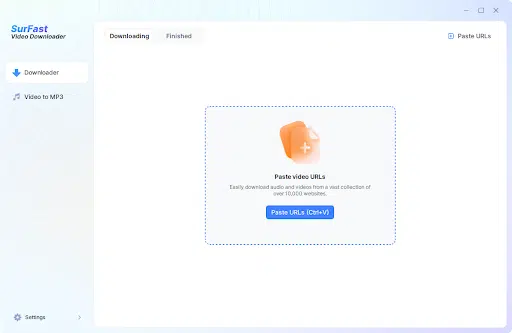
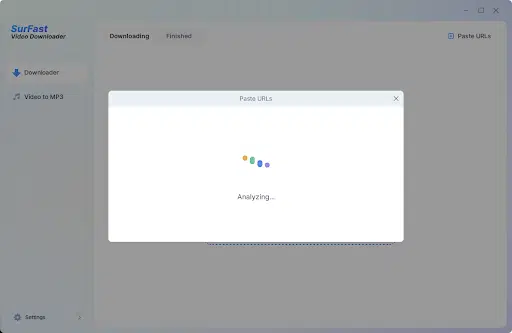
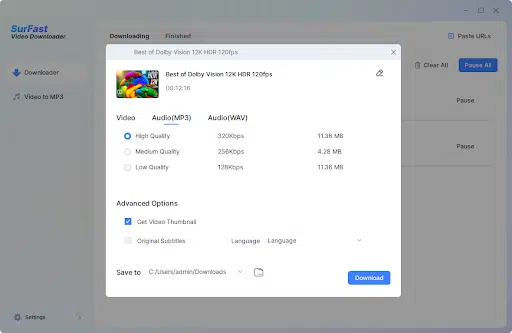
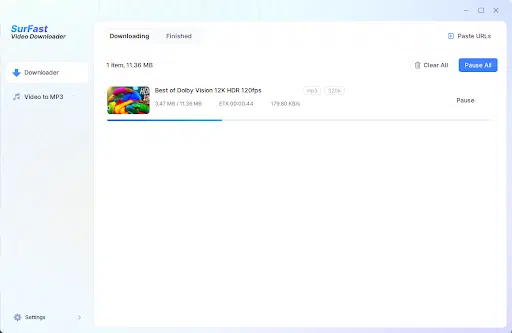
This is all about how to download audio from YouTube using SurFast Video Downloader. If you want to download audio from a YouTube playlist, reply the video link with a playlist link, and the rest operations are completely same.
2. Download Audio from YouTube Videos Online
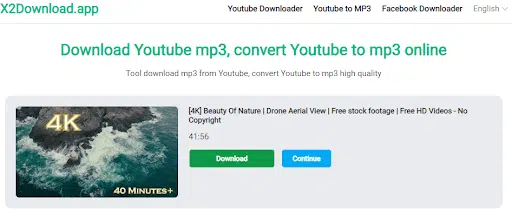
X2Download.app is a free online YouTube audio downloader that offers a convenient YouTube audio extraction feature. It allows you to download YouTube audio in MP3 format, with a wide range of quality option to choose from. With this tool, you can easily extract audio track from individual videos. As an online downloader, you can access it from various devices like computers, phones, and Tablets.
However, it’s worth noting that there may be ads displayed on the webpage. As a free tool, the YouTube audio downloader currently does not offer batch downloading or downloading audio from playlists. See below for how to use X2download to rip audio from YouTube videos.
- Go to X2Download.app from a browser on your computer.
- Copy the YouTube video link, and past it into this online YouTube audio downloader. Click “Get link MP3”.
- Select a audio quality for the MP3 file. Click “Get link” to convert YouTube video to MP3.
- Then click “Download” to save the MP3 audio track to your computer.

Conclusion
SurFast Video Downloader and X2download are the two tools we tried and find useful. Below are a brief comparison of the two tools.
|
SurFast Video Downloader |
X2Download |
|
|
Type |
Desktop |
Online |
|
Support |
Windows and Mac |
Windows, Mac, Phone, Tablet |
|
Price |
Paid |
Free |
|
Audio formats |
MP3, WAV |
MP3 |
|
Quality |
Multiple, high quality |
Multiple, high quality |
|
download audio from playlist |
Yes |
No |
|
Extra features |
Yes |
No |
|
Ads |
No |
Yes |
|
Free customer support |
Yes |
No |
If you want a free tool with basic YouTube audio download, you can choose X2download. If you prefer a powerful video and audio downloader that provides you better experience and value-add services, you can select SurFast Video Downloader. The two tools represents two different kinds of YouTube audio downloader, you can find their alternatives on the Internet if you want.