
Suppose you’re in a pet shop to buy a dog. You don’t know much about dogs, so you did an Eeny Meeny Miny Moe, landed on a cute German Shepherd, and bought it.
You brought it into your house, and all your family members are happy to have it. Then, suddenly, one thing struck your mind. The dog can run, walk, lick, and bark loudly. But it has a funny-looking tail.
After a closer look, you find that the dog has two tails. A bit odd, isn’t it?
Imagine a similar scenario on your e-commerce website interface. A new page opens with two “Buy Now” buttons whenever you click on a product. Yes, clicking one of the buttons does your job, but it’s still FAULTY.
To stay out of this problem, Visual Testing comes into play. It verifies whether software or webpage appears to the users the way it should be.
Formally, a visual test confirms all of the elements in the UI of a webpage or software are in right shape and working correctly. In this comprehensive article, I’ll try to answer all the what, when, and how questions. So, without further ado, let’s find out!
How Does Visual Testing Differ from Functional Testing?
Go back to the previous example of you buying a dog. The dog you bought can perform or “Function” all sorts of activities. But when it comes to “Visual Perfection,” it doesn’t look like a regular dog. Rather, I should say, it doesn’t look what it is supposed to look.
Like this, in software testing, Functional Testing confirms all of the features of the software work correctly. On the other hand, Visual Testing checks whether the User Interface is on the same page as your plan.
If a website or software works fine but has problems with the interface, a functional test won’t be able to detect it. To solve this problem, Visual Test is the only option.
How Does Visual Testing Work?
The working mechanism of Visual Testing is a bit more complex and time-consuming. However, some Automated Tools can make your job smoother than ever. Hence, Visual Testing splits into two categories: Manual and Automated.
I’ll talk briefly about the types in the next segment. Let me give you a general idea as of now.
At first, the developer (or the Quality Analyst) makes a “Baseline” out of the web application’s User Interface. To do that, the tester runs the raw code and records the screen as a form of snapshots. The baseline is basically the IDEAL form of the interface that they compare with the resulting UI later.
Hence, it’s necessary to do this part correctly.
In the second phase, the QA runs the current code in another panel and records everything as snapshots.
After that, the developer compares the above two results with one another. If the results match, the application passes the Visual test and vice versa.
Visual Testing is another form of debugging. General debugging finds out back-end-related problems. Whereas, this one finds User Interface aka front-end errors.
Most QAs do Visual Tests and also find where the problems are. After this, they generate a report and pass it on to the app or web developer.
Types of Visual Testing
As mentioned earlier, there are two types of Visual Testing: Manual and Automated.
Manual Testing is where QAs work everything manually to detect UI-related problems. On the other hand, Automated Testing involves tools or web applications that detect problems making life a bit easier for the QAs.
Let me give you a brief idea of how these two types of visual testing work.
Manual Testing
You already know that a tester, developer, or QA does everything manually here. They take manual snapshots of a website’s layout or page and compare these with the baseline screenshots. Generally, testers try to find any dissimilarity in the elements in Interface.
Another effective way of doing a Manual Test is to use a component explorer tool.
Don’t get too excited by just reading “Tool” in this section. Yes, the tester may have a tool here, but he/she needs to do all the work by hand.
In a component explorer tool, a tester selects different states and components to check. The selection process is often known as test cases or test states. For various test cases, the tool will return one result. And then, the developer will decide on the final result based on all the previous results.
In short, it’s a blend of automated and manual testing. Since the work of a tool is pretty minimal here, it falls into the manual testing category.
If I have to point out the manual testing steps in a few words, I would say,
The tester first makes a baseline from the “Good” version of the web page, which means it has the screenshots of the desired look.
After that, he makes another file consisting of screenshots from the current look of the web page.
Lastly, he compares both and tries to find all the visual errors. If an app has zero errors, it passes the test.
This is pretty much all about Manual Testing. Now, it’s time for you to get some ideas about Automated Testing.
Automated Testing
In Automated Testing, your Quality Analyst isn’t a human. Here, software replaces the position. Or, should I say you’ve chosen a Visual Testing Tool over a human? The tool automatically runs tests on the User Interface to find visual bugs.
Well, of course, this one has its perks over manual tests. One of the best advantages is that automated tests are almost accurate (with the best tools), saving a healthy portion of your time.
However, you need a person in your team capable of using the tools. In most cases, companies spare two to three weeks for a person to learn automated testing software.
These are moderately complex tools. So, a person with below-average computer skills might be unable to handle the software without assistance.
Despite being troublesome to handle, the working method is somewhat simple. Most tools use the Snapshot Testing algorithm to find visual bugs.
It enables the software to iterate over each pixel in the current webpage. After that, it compares the hex code of each pixel with the baseline pixel. If it doesn’t match, the software will notify a visual bug.
Yes, humans made all these tools and algorithms. But it’s also true that they are better than humans if you consider efficiency. QAs can’t detect all the pixel differences. Moreover, this whole manual process requires a lot of time and patience.
Hence, Snapshot Testing has been a vast improvement. But it has its own problems too.
A BIG Problem with Snapshot Testing
As you know, Snapshot Testing covers pixel-to-pixel checking and detects visual bugs. The problem lies here. Factors like graphics cards, image resizing, and font soothing algos can tamper with pixels.
For this reason, minor pixel differences (which should be ignored) get recognized as visual bugs in the algorithm. That’s why the all-so-great-and-mighty snapshot test doesn’t always come in handy.
So, what’s the solution? Isn’t there any tool that conducts an ACCURATE visual test?
The solution isn’t that simple. Yes, too many companies in the industry claim to have the perfect software for you. Unfortunately, most of them are a hoax.
If you want anywhere near “Perfect,” visual tools that run on an AI algorithm should be the best option.
Snapshot Algo was an upgrade from the manual test. In this case, AI Test is an upgrade from Snapshot Test. Now, let me give you a short description of how it works.
How AI Works in a Visual Test?
Artificial Intelligence in Automated Visual Test is relative a new concept. Here, tools use a set of AI algorithms (known as computer vision) as a core technology for visual comparison of two different objects, aka web pages.
AI-powered testing unifies a learning algorithm to provide the relationship between the intended page (baseline) and rendered display as an output. There, it shows the problem and its location as well.
These also work on snapshots. But unlike the other testing method, the AI test doesn’t purely depend on pixel matching. Instead, it uses an algorithm of different pixels and compares it with the intended display. This way, the tool avoids all sorts of minor pixel differences.
Do I sound a bit more like Mr.-Know-it-all-Gibberish-Guy? Ok, let me explain it to you in a more uncomplicated way.
What does a snapshot test do?
Compares pixel pairs and detects if one matches another, right?
In an AI-powered test, algorithms try to find any “Relationship” between each pixel pair. If two pixels match with one another, it will have a relationship. Thus, the tool will detect no problem.
Since AI works with a set of algorithms for a webpage, it also shows great results in dynamic tests. According to a different study, AI-Powered Automated tools have only 0.005% false-positive results. So I guess it’s safe enough to label AI tools as ACCURATE.
Does Automated Testing Win the Race?
Before answering the question, let’s play a game. Look at the picture below.
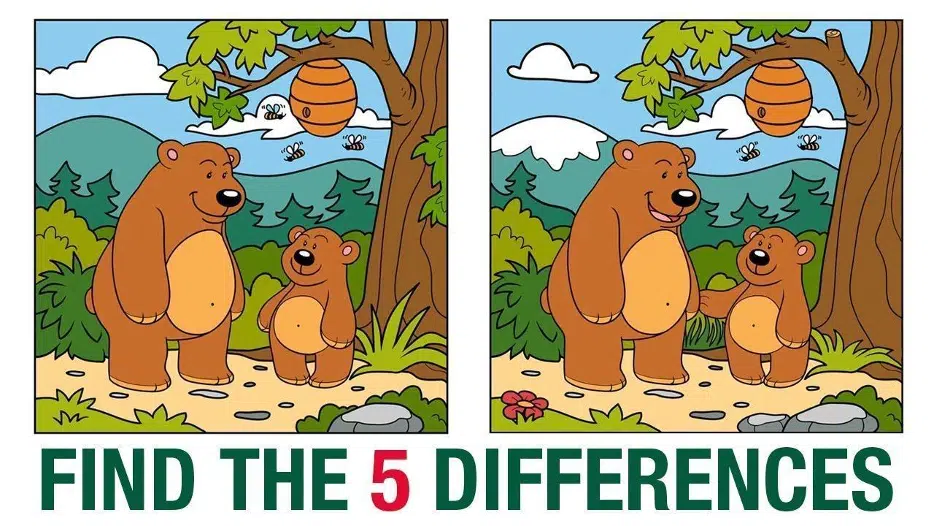
Yes, spot the five differences.
Did you get all of them?
Bees, Hand, Smile, Flower, and cut-down edge, right? I knew you were sharp. Let’s play one more.

Now, find all the differences in this one. Okay, to make it easier for you, there are eight changes in the second picture. Try to find out!
It is a bit difficult, isn’t it? Time-consuming too. What to do here?
Imagine I have a tool that can detect all the changes within seconds. Would you like it for yourself?
Of course, you would LOVE it. Because why not?
In the first case, the objects are minimal. As a result, detecting changes were so much effortless.
On the other hand, the second one has too many objects in the pictures, which makes it a bit harder for naked eyes to detect.
I’m not saying it’s impossible. I am saying that it’ll take a lot of time to detect errors when dealing with an enormous number of elements.
Apply the same idea to Visual Testing. Manual Test is dependent upon the human eyes. As a result, it takes time and effort. Moreover, short-time manual testing isn’t error-free. Also, it requires a company to hire an expert for the job.
On the contrary, Automated Test does the job with higher efficiency and saves a big chunk of your time. Furthermore, it gives you an option not to hire an extra expert.
Yes, you need to pay an upfront fee for automated tools. But it’s much lower than a QAs salary.
Looking at all the facts, Automated Testing is far ahead in the race.
Best Automated Testing Tools in the Market
There are two types of automated tools: Snapshot and AI-Powered. For my best picks, I’ve chosen both types. I know that Snapshot testers are not that accurate compared to AI ones. Still, there are a few tools that stand out. The list also contains both commercial and non-profit tools.
- Applitools: It is an AI-Based Automated Visual Tester that supports over 40 languages and testing frameworks. With this, you can easily monitor and test hundreds of UI components without writing a block of code.
- Testsigma: It is an end-to-end open source automated testing platform where you can test your mobile application, web application, API, and so on. The tool works in an open-source automated platform. Besides, you can easily customize the platform according to your need.
- Percy: Probably, it is the most powerful Snapshot-based tool on my list. The application takes screenshots from different browsers of a UI and runs baseline comparison to detect problems. Since it features execution, integration, and review, you can easily take action based on the result.
- io: The automated testing tool comes in handy while doing a real-time test. It is capable of executing Visual Tests in Cloud. And, it requires zero coding to conduct tests. In addition, the screener simultaneously supports functional and visual tests in the same test case. This increases the efficiency of the tool.
- Specter: It is a code-based automated visual testing tool. Like most free testers, it works with each component of a newly created web page. In addition, the app takes screenshots and compares them with the baseline to ensure everything is fine.
- Needle: The tool is almost similar to Specter. However, it also works with the individual elements of a new webpage and compares it with good screenshots.
- Gemini: Gemini is another code-based visual tester. But the work method of this one is a bit different from Needle and Specter. Here, it uses CSS Properties of components as a factor with their position and size.
- Endtest: The tool uses a machine learning algorithm to run visual tests. It also features a chrome extension by which you can record everything in your tests.
- LambdaTest: It works on image-to-image comparison technology. First, it creates two layouts, one from the baseline and one from the current page. After that, the tool compares them side-by-side to find visual bugs.
- Kobiton: If you’re looking for a mobile UI/UX tester, this is the one. The tool is mainly famous for mobile testing. It is among the best in the market for mobile Visual UX and Validation testing.
Public reviews, work methods, and personal experience suggest that the above tools are best for Automated Visual Testing. Let me know what you think about the list.
An Economical Point of View
I think, at this point, you already understand that Automated Visual Testing is far ahead of Manual Testing. Now, what about the cost? Are all tools free? Do you have to invest a fortune in it?
Well, they’re free tools available. But you and I both know that anything with the label “free” doesn’t work. Hence, free tools aren’t capable of pulling off such significant tasks.
Mostly, paid visual testing tools to rule the market. You have to pay an upfront fee to be able to use these and renew your subscription year after year. The price starts from 50 USD to 800 USD per year.
Sounds so much for an app? Okay then, perhaps you may hire a QA and give him/her 77000 USD per year (Glassdoor).
Yes, hiring a QA can be helpful for your company in other ways, including visual testing. But when it comes to a startup or small company, tools are the best option.
The Final Words
User Interface is the most vital aspect in dealing with clients or viewers. Nobody wants to surf around an odd-looking interface. For this reason, Visual Testing is necessary before launching a website or app.
In this article, I’ve covered every bit of information about visual testing and its work mechanisms. Also, I’ve given an automated tester’s list for your future help.
I hope I was able to answer all the questions regarding Visual Testing.