
Training external resellers on product updates takes more than uploading a new presentation. A partner may have completed last quarter’s onboarding and still be quoting an old feature limit today.
The right learning platform helps you deliver the changed information to the right people, check what they understood, and distinguish an old completion from readiness to sell the current product.
What We Checked
We reviewed official product and support information for 7 platforms that support external learning audiences. The comparison focuses on partner access, course updates, enrollment, reporting, and meaningful limitations. We also inspected public documentation in the browser for TalentLMS, LearnUpon, and Thought Industries, capturing the relevant settings and explanations. These were documentation checks, not authenticated deployments or tests with real reseller accounts. Recommendations below are workflow-based judgments; they are not measured performance rankings.
The most revealing question is simple: after an important release, can your channel manager identify which individual sellers still need the update? A platform that can answer that question is more useful than a polished academy whose completion numbers combine several product versions.
Which Platforms Fit Training External Resellers?
Start with the problem your current process cannot solve. LearnUpon deserves attention when course versions are central to your reporting. TalentLMS offers branch-based organization for distinct audiences. Thought Industries adds client-specific content access and delegated management. Docebo fits more elaborate domain and organizational structures. Absorb addresses mixed internal and external access, while Skilljar and iSpring offer different approaches to external education and ongoing learning.
| Platform | Useful starting point | Question to resolve before buying |
|---|---|---|
| TalentLMS | Separate partner branches and catalogs | Will shared course changes affect every branch? |
| LearnUpon | Versioned courses and progress reporting | How will completed learners receive the new version? |
| Thought Industries | Client portals and controlled learning paths | Does access also create an enrollment and due date? |
| Docebo | Multiple branded learning environments | What access does the branch hierarchy permit? |
| Absorb LMS | External access alongside employee SSO | Who must configure the external login route? |
| Skilljar | External academies with business-system reporting | Can reports separate reseller organizations and releases? |
| iSpring LMS | Assigned learning plus a reference knowledge base | How will updated content affect existing completions? |
These are different starting points, not seven interchangeable recommendations. Do not infer that a capability is included in every subscription. Portal allowances, integrations, administration rights, and reporting entitlements should be checked against the actual configuration you would purchase.
1. TalentLMS: Organize Reseller Groups Into Branches
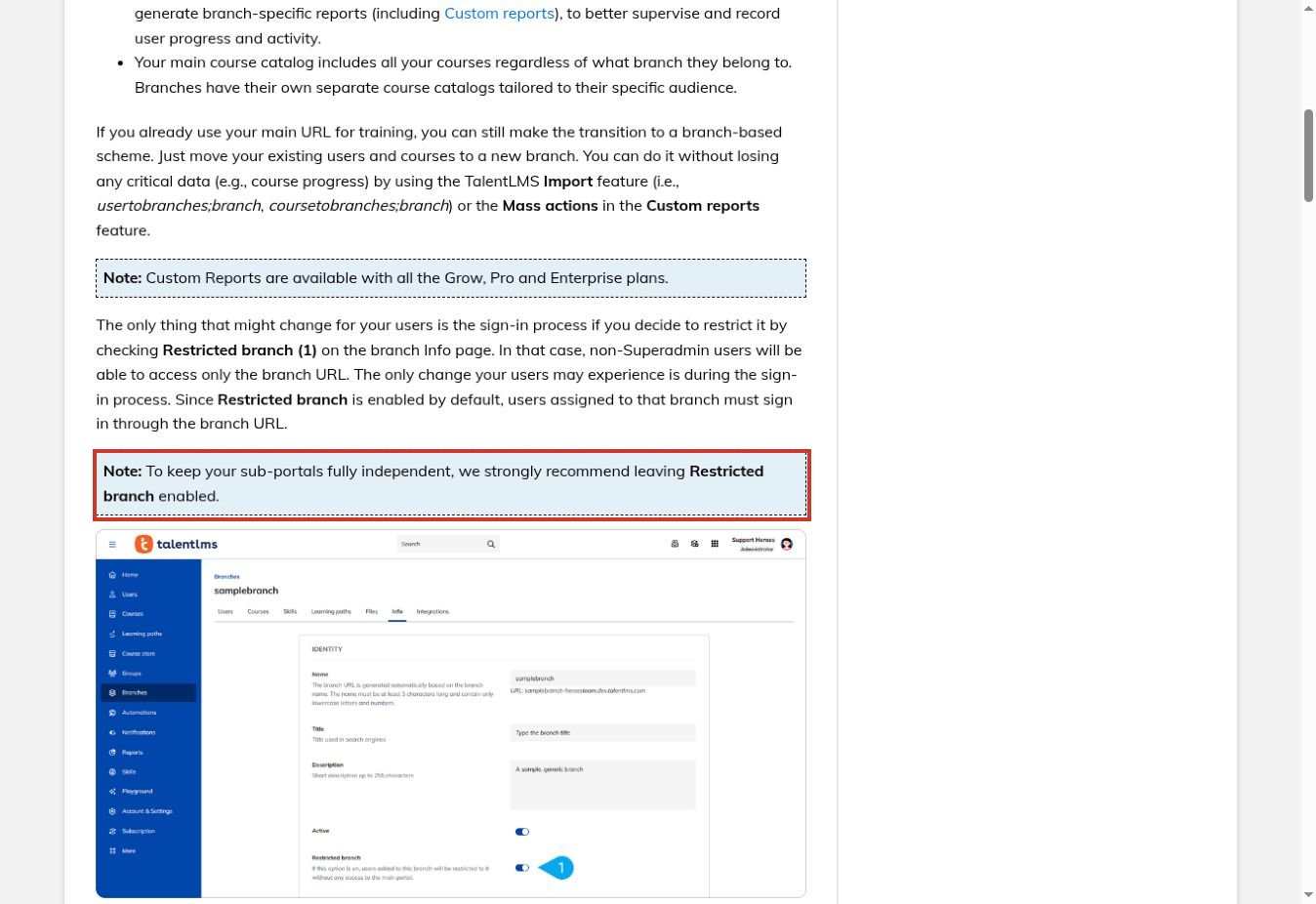
TalentLMS is a practical candidate when several partner groups need different catalogs and administrators. Its branch documentation describes separate training environments, branch-specific reports, and restricted access through a branch URL. Branches are unavailable on the Free plan, and their number depends on the subscription.
For a product launch, that structure can separate sales training from implementation training without giving partner managers access to the entire account. Leave access design on the checklist: an administrator assigned to several branches retains their user-type permissions across those branches.
The content model needs equal attention. Changes to a shared course affect enrolled users across the branches sharing it. Separate courses with linked units offer another approach, but tests, surveys, assignments, and instructor-led units cannot be linked. That matters when a common product explanation should change everywhere while a partner-specific assessment remains separate.
Shortlist TalentLMS for organized partner cohorts. In your pilot, change one shared lesson and inspect both branches before sending a release announcement.
2. LearnUpon: Make Course Versions Visible
LearnUpon stands out for a question that broad LMS comparisons often skip: which version did this person actually complete? Its documentation describes numbered course versions and reporting by version. Its portals also support distinct audiences and reuse of licensed content across learning spaces.
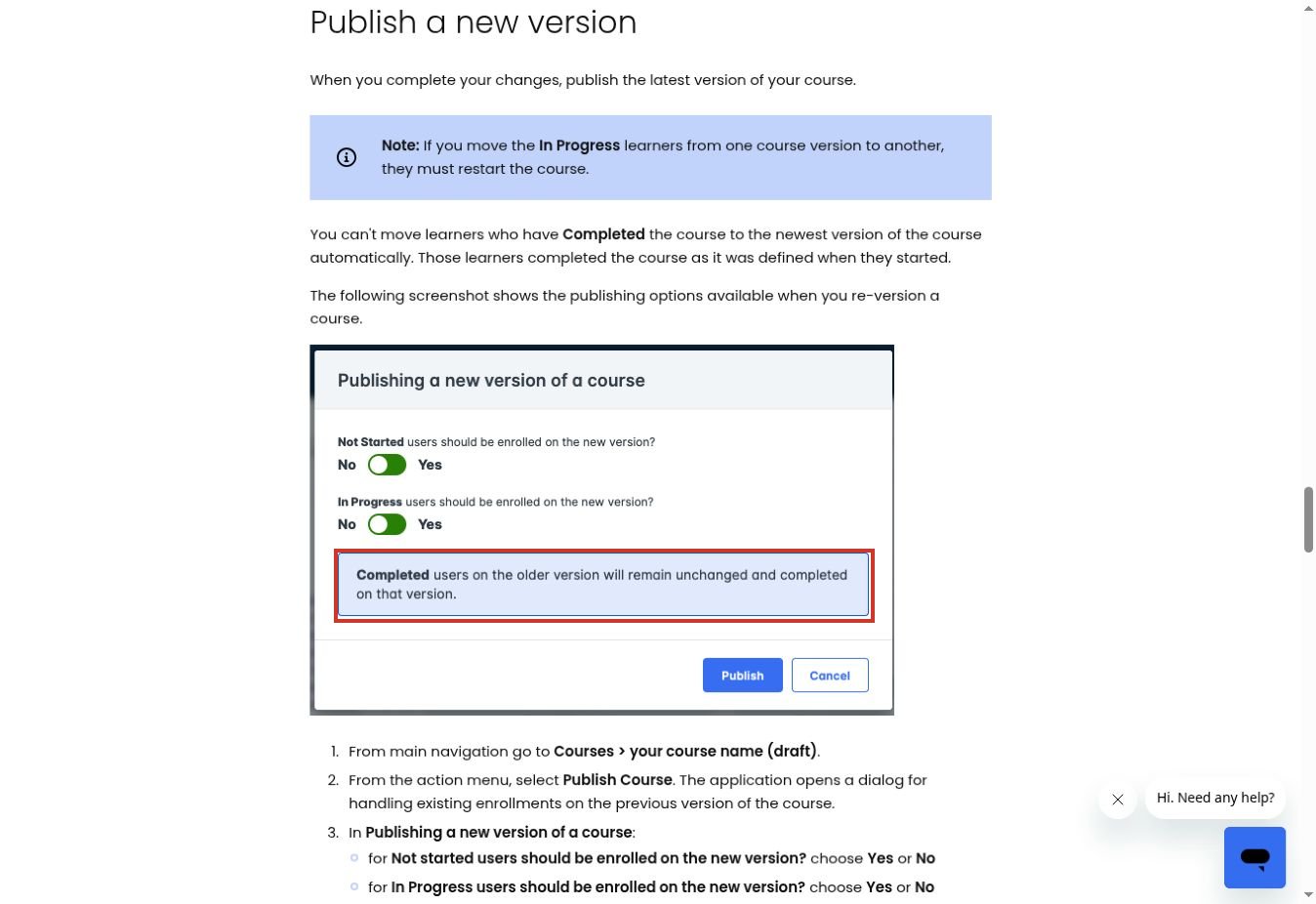
A new version does not automatically turn every past learner into a current learner. Completed enrollments remain associated with their completed course; those people can be enrolled in the new version when required. Moving an in-progress learner to a new version makes that person restart. Separately, configured recertification can re-enroll learners into the latest course revision when renewal is triggered.
There are publishing details to check as well. Catalog settings, categories, and group restrictions need attention on a new course version. Learning journeys require manual replacement of changed course versions, according to the current guide.
That makes LearnUpon worth evaluating when your channel team needs an explicit record of release-specific training. Plan the enrollment transition before publishing: a technical update should not unexpectedly erase a reseller’s unfinished work.
3. Thought Industries: Delegate Training Within Client Boundaries
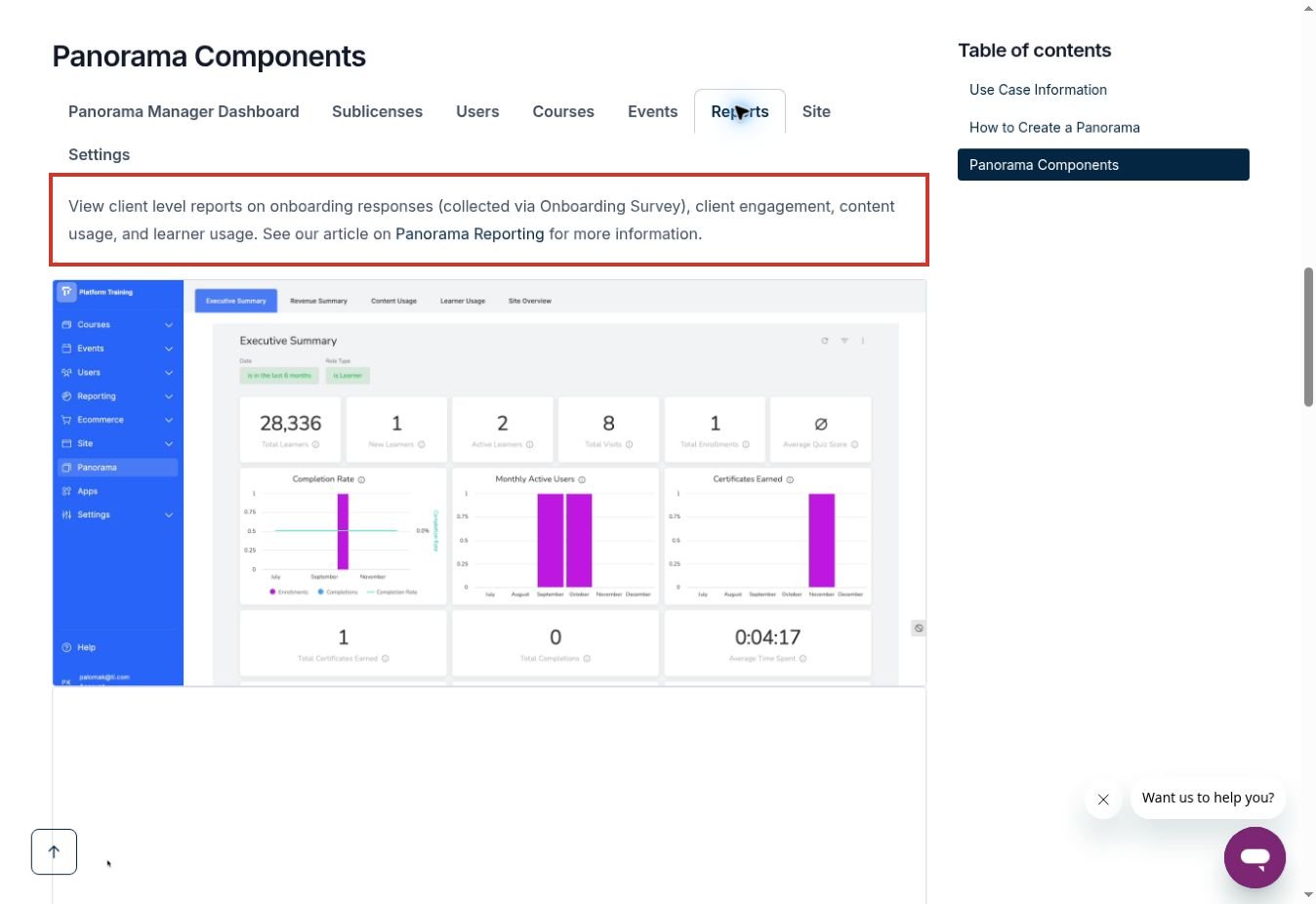
Thought Industries uses Panorama portals to organize specific learner cohorts. Its documentation covers client content access, licensing, branding, progress tracking, and manager roles. This is useful when a reseller company has someone responsible for its own learners but should not manage other partners.
The important distinction is between making a learning path available and assigning it. In the Assigned Programs documentation, adding content through access settings lets eligible learners enroll without assigning a due date. Enrollment settings can make paths available to customized Panorama roles for direct enrollment with due dates. Role permissions affect which content those managers can assign.
For a product update, use that distinction to avoid a common failure: the new lesson exists in the portal, but nobody is responsible for taking it. Also confirm the commercial scope. Panorama custom domains are a premium feature requiring activation; a branded portal is not automatically a separately administered instance.
Thought Industries is a strong candidate for delegated partner education, provided someone owns the access and enrollment design.
4. Docebo: Map Complex Partner Structures Carefully
Docebo’s Extended Enterprise app connects client learning environments to organizational branches. Each environment can have its own URL and configured branding, language, catalogs, single sign-on, and registration settings. Activation depends on plan eligibility and involves the account manager.
That flexibility suits a network with several distinct partner audiences, but the hierarchy deserves a real test. A learner in a nested branch can also belong to its parent branch and therefore access both associated environments. Superadmins retain broad platform visibility; Extended Enterprise is not a way to give each partner an isolated superadmin account.
Certification terminology also requires care. Current documentation distinguishes legacy certifications from the redesigned certification experience. The legacy workflow has specific renewal conditions and can archive an enrollment and reset progress when a learner retakes training.
Ask the demonstrator to use the certification experience actually enabled in your proposed account. Docebo belongs on a shortlist for structured networks, but a domain diagram alone does not prove that confidential release material is isolated.
5. Absorb LMS: Solve External Login Before Course Design
Absorb is relevant when the organization already trains employees and wants resellers to join without employee credentials. Its support guidance documents a specific arrangement: a separate portal route outside the employee SSO configuration, associated with a designated department for external learners.
This is more than a cosmetic login page. If the main route sends everyone to the company identity provider, a reseller without an employee account can fail authentication before seeing a course. Absorb says the separate-route setup requires backend work by its team; customers cannot complete that part themselves.
Evaluate the invitation and reminder emails as part of the same workflow. After configuration, those links should send the external learner to the appropriate route. A successful administrator login says nothing about the experience of a newly invited reseller.
Absorb is therefore a sensible candidate for mixed audiences. Make a release-specific completion report and partner-manager permissions part of the demonstration, rather than assuming that solving authentication also solves every reporting requirement.
6. Skilljar: Connect an External Academy to Channel Operations
Skilljar focuses on external education and supports branded academies, certificates, instructor-led training integrations, and learning analytics. Its product overview describes course- and learner-level completion reporting, CSV exports, and connections to Salesforce and Gainsight. Those capabilities can help a channel team use training information alongside its existing account records.
Another documented option lets people outside the organization assign, track, and swap training licenses without access to the main dashboard. That is worth exploring when a reseller manager needs to allocate seats to changing staff.
Do not confuse license administration with unrestricted learning administration. For your use case, demonstrate exactly which learner information a partner manager can see, how a seller maps to the right partner organization, and how a newly required update appears in reports.
Skilljar is a candidate for an established external academy with integration needs. The evidence reviewed here does not establish that editing a lesson automatically requires existing completers to retake it; make that release workflow an explicit pilot question.
7. iSpring LMS: Combine Required Updates With Reference Material
iSpring’s extended-enterprise offering explicitly includes partner, dealer, and reseller training. It describes audience grouping, learning paths, automated assignments and reminders, recertification, and a searchable knowledge base. It also supports SCORM- and xAPI-compatible training.
The combination is useful when a seller needs two things: a short required lesson explaining what changed and a dependable place to look up the current answer during a customer conversation. Putting every reference document into a mandatory course can make simple questions unnecessarily difficult to answer.
The buying check is how those two experiences stay aligned. Ask what happens when an administrator replaces a lesson, revises the reference article, or changes a learner’s partner group. Inspect the old completion record as well as the learner’s next assignment.
iSpring is worth considering for teams that want structured learning and ongoing reference material together. Confirm partner-specific administration and the exact reporting fields in your proposed edition rather than treating general audience grouping as proof of complete partner isolation.
Build a Product-Update Lesson Resellers Can Use
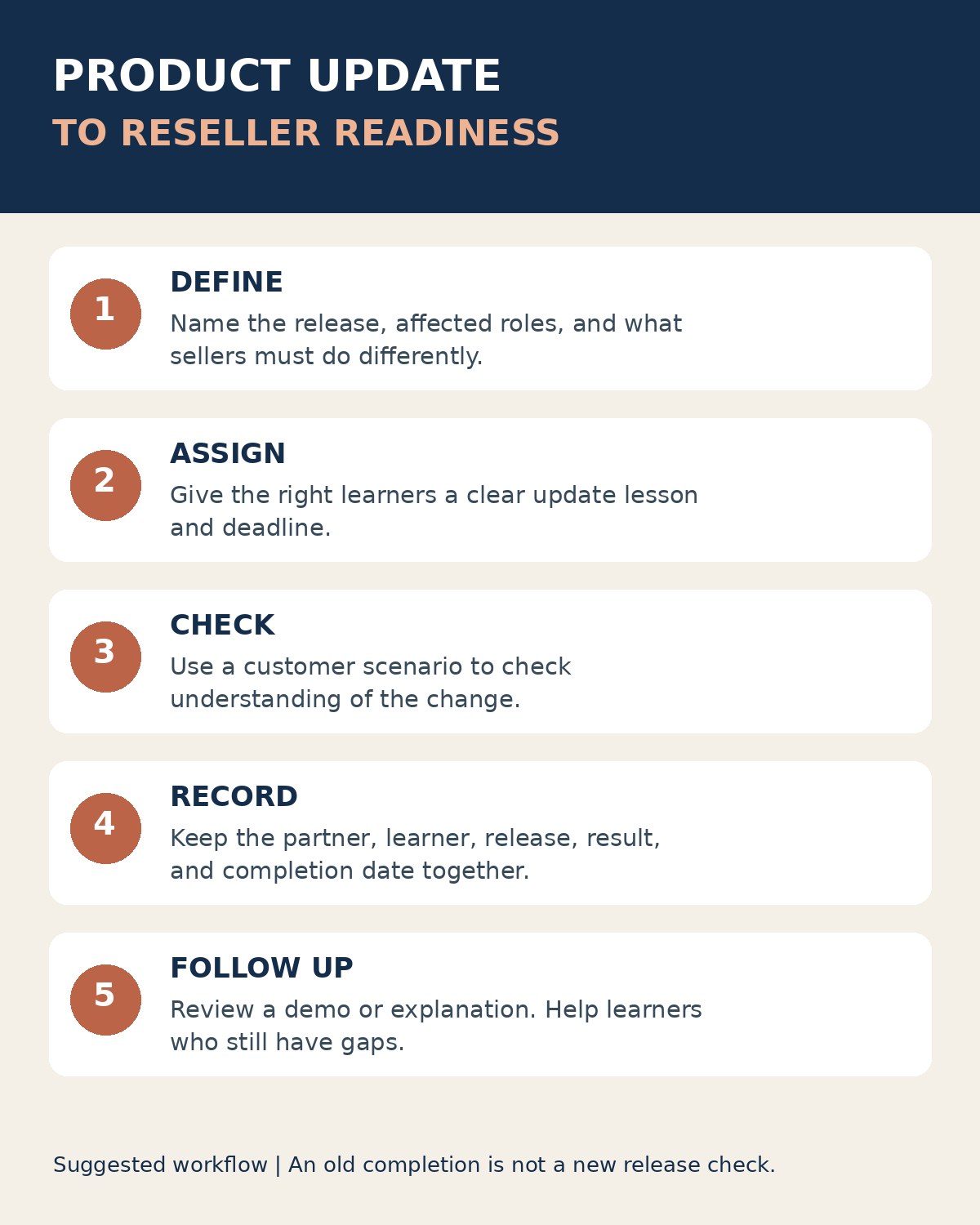
Begin with a change statement, not the release notes. “The analytics screen has changed” is too vague. A useful lesson explains what the reseller must now say, show, or stop promising. A small interface improvement may need only a reference update. A changed entitlement or implementation requirement may justify assigned training and an assessment.
For example, imagine a fictional software release that moves an export feature into a different plan. The lesson should show the new eligibility rule, the correct demo path, the answer to a likely customer objection, and when to escalate an uncertain case. The assessment should ask the learner to choose an appropriate response to a customer scenario. Memorizing the release date would not demonstrate the required judgment.
Give every training update a product-release label, an owner, and an effective date. State which reseller roles must complete it. Technical implementers and sales representatives may need different examples even when they share the same core explanation. Keep the current reference material accessible after the course is finished.
For the wider operating context, our guide to SaaS partner marketing explains how training fits alongside partner responsibilities and enablement. The LMS should support those responsibilities, not silently redefine them.
Run a Release-Change Pilot Before Committing
Use a small, deliberately varied test group with permission to participate. Include two partner organizations, a partner manager, a new learner, someone halfway through the old course, and someone who already completed it. These are suggested test cases, not tests performed for this article.
- Create a release-specific lesson and record the starting enrollments. Keep an export of the original completion data.
- Make a meaningful change to the training. Choose whether to revise the existing course or publish a new update course, and record why.
- Inspect what each learner sees. Check invitations, due dates, previous progress, and links sent before the change.
- Open the partner-manager view. Confirm that it includes the intended people and excludes the other organization’s records.
- Complete the new assessment with test accounts. Export a report that identifies the person, partner, release, completion date, and result.
- Remove a test learner’s access using the normal supported workflow. Check that access ends while the required historical record remains available to authorized administrators.
Record failures in plain language. “Manager can see another partner’s learner” is more actionable than “permissions need work.” “Old email opens retired enrollment” is more precise than “navigation problem.” Ask the vendor to demonstrate the correction in the same configuration rather than accepting a general promise about the platform.
What Should the Completion Report Prove?
A useful report separates delivery, learning, and application. An invitation tells you that training was sent. A completed assessment gives evidence about the learner’s response to the questions. Neither alone proves that the reseller can explain the change accurately to a customer.
The CDC’s guidance on evaluating training recommends assessing learning and, where possible, how learners apply it. For a reseller program, a practical follow-up might be a short product demonstration or a review of an approved customer explanation.
Keep release readiness separate from general onboarding completion. If a seller completed onboarding in March but missed November’s pricing update, the report should make that gap visible. Use partner organization identifiers rather than relying only on email domains, particularly when contractors serve several businesses.
Questions to Settle Before Choosing a Platform
Should every update create a new certification?
No. Match the requirement to the change. A corrected typo does not need a new credential. A material change in product behavior may need a targeted lesson and assessment. Reserve formal renewal rules for requirements your partner program actually defines.
Is a separate branded portal enough to protect partner information?
No. Branding describes appearance. Access depends on roles, memberships, catalog rules, and reporting permissions. Test what a learner and a delegated manager can see, including exports and links forwarded from another account.
What should the commercial proposal include?
Request a clear breakdown of learner charging, portal or domain allowances, administrator roles, reporting, integrations, implementation, and support. Specify whether seasonal reseller activity changes the cost. The relevant price is the cost of your required workflow, not an entry-level package that cannot run it.
Choose the Platform That Keeps Release Readiness Clear
Training external resellers works when a product change becomes a clear learning requirement, reaches the correct audience, and leaves a useful record of understanding. Start with LearnUpon for version-sensitive workflows, TalentLMS for branch organization, or Thought Industries for delegated client education; evaluate the other platforms against the access and integration needs that distinguish your program.
Then run the same release-change pilot on your shortlist. The strongest choice is the one that lets your channel manager answer who knows the current product, who still needs help, and what evidence supports that answer.