
A personal injury demand letter can look complete while containing a serious mistake. A medical expense may be counted twice. A treatment date may be wrong. An account of the accident may imply that liability is undisputed when the evidence says otherwise.
That is the problem demand-letter software must solve—not simply the time it takes to generate several pages of persuasive writing.
The strongest tools help law firms organize medical records, reconstruct treatment histories, document liability, prepare damages schedules, and produce editable settlement demands. Some also include source references or professional review. Others focus on drafting inside the case-management systems attorneys already use.
EvenUp, Supio, and Eve are prominent options for firms seeking substantial personal injury automation. Arches Demands and CaseMark offer more focused demand-preparation workflows, while Filevine, Clio Work, CloudLex, and SmartAdvocate bring drafting closer to the existing matter file.
The right choice depends on case volume, medical-record complexity, staff capacity, and how much additional software a firm is willing to adopt.
This comparison covers 15 tools with documented demand-related capabilities as of November 4, 2026. The recommendations reflect publicly available product information and relevant workflow differences—not independent testing of settlement outcomes, accuracy, or processing speed.
How the 15 Tools Were Selected
Each product had to offer a credible way to produce or substantially assist with a personal injury settlement demand. Pure medical-record retrieval, general legal research, intake-only software, and outsourced writing services without a usable software workflow were excluded.
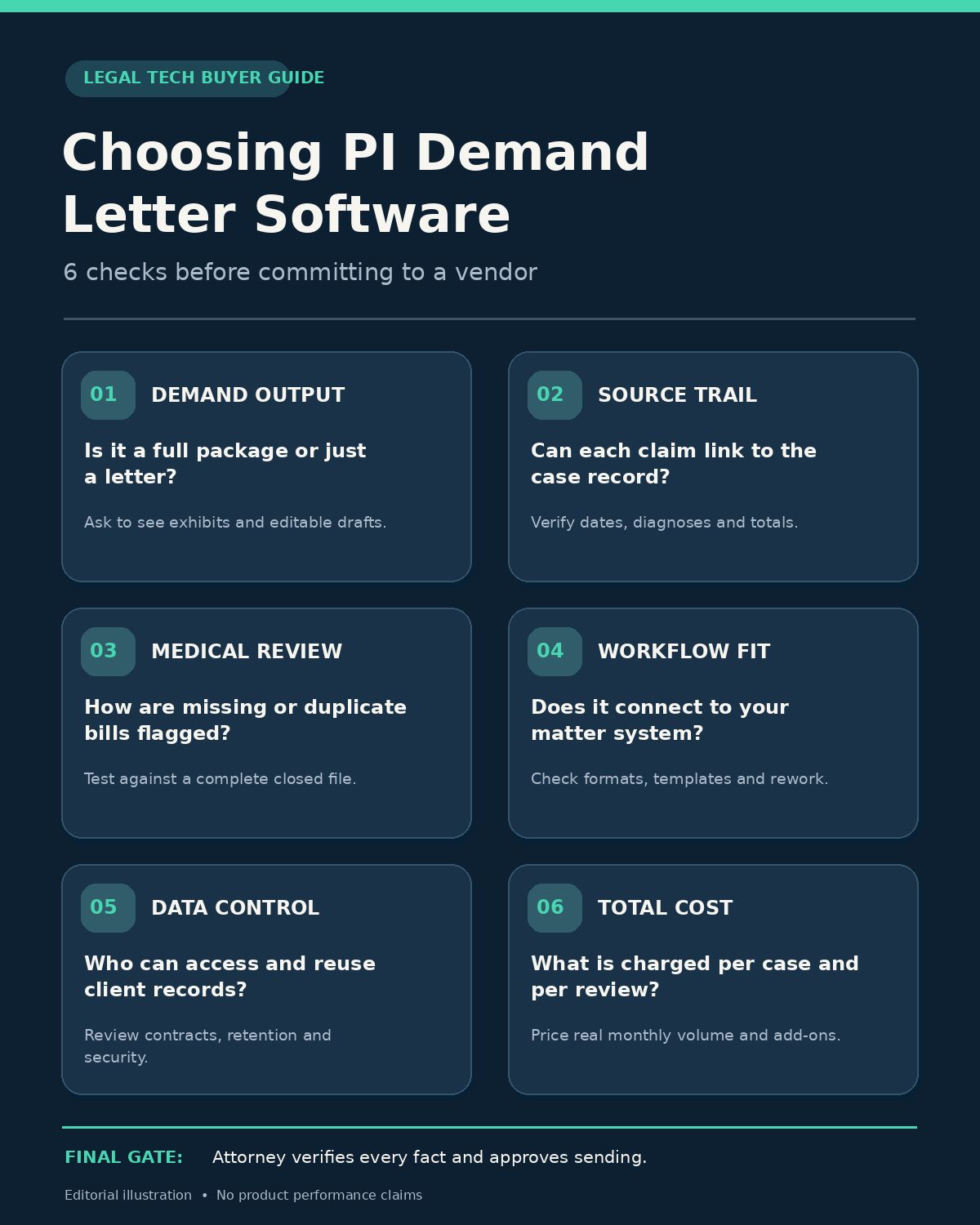
Products were evaluated through six practical questions:
- Demand functionality: Does the product generate an actual letter or demand package?
- Record grounding: Can the attorney connect assertions to medical records and other evidence?
- Workflow: Does drafting happen inside the existing case-management system or a separate platform?
- Review: Who checks the facts, financial figures, and legal arguments before the letter is sent?
- Security: What controls govern sensitive case files and client information?
- Pricing: Is the cost published, usage-based, or available only by quotation?
The “best for” labels below identify plausible fits based on the documented feature sets. They do not represent performance awards, comparative test scores, or independently verified client outcomes.
Quick Comparison: 15 Demand Letter Software Tools
| Software | Best suited for | Demand workflow | Pricing visibility |
|---|---|---|---|
| EvenUp | PI firms needing comprehensive demand packages | AI-generated and professionally reviewed options | Custom quote |
| Supio | Record-heavy injury cases | Medical evidence and source-linked AI drafting | Custom quote |
| Eve | Plaintiff firms seeking broader AI workflows | Customizable drafting inside EveOS | Custom quote |
| Arches Demands | Dedicated PI demand preparation | Case-record analysis and narrative drafting | Contact sales |
| Filevine LOIS for Word | Existing Filevine users | Matter-aware drafting directly in Word | Contact sales |
| CaseMark | Firms wanting a defined, self-service drafting workflow | Upload, generate, edit, export | Credit-based options |
| Anytime AI | Firms combining demands with medical analysis | Case-grounded AI demand drafting | Contact sales |
| ProPlaintiff | PI firms considering AI-native case management | Demand generation plus case management | Contact sales |
| Clio Work | Firms using Clio or needing broad legal AI | Demand drafting from matter data | Plan-dependent |
| CloudLex Lexee AI | PI firms seeking a guided preparation process | Human-guided drafts within CloudLex | Contact sales |
| SmartAdvocate | Firms using PI case-management workflows | SmartIntelligence AI demand generation | Contact sales |
| TrialBase AI | Firms preferring usage-based litigation AI | Source-linked demand and litigation drafting | Pay-as-you-go |
| Fast Demands AI | Firms seeking focused demand automation | Pre-litigation drafting and case summaries | From $97/month |
| Settlement Intelligence | Auto and premises-liability practices | AI demand generation with insurer-oriented formatting | From $600/month |
| CaseAgent | Firms seeking a fixed subscription | Case-file-based demand drafting | From $149/month per firm |
Published prices are vendor-advertised starting figures, not independently verified final quotations. Available features, contract terms, integrations, and limits may vary by plan.
1. EvenUp — Best for Comprehensive PI Demand Packages
EvenUp focuses on plaintiff-side personal injury work and offers AI-assisted demand packages built around liability, injuries, treatment, damages, and supporting evidence.
Its demand offering includes an AI-generated option that firms edit and finalize internally, alongside an option reviewed by EvenUp legal professionals.
For a high-volume PI practice, that distinction matters. A straightforward motor-vehicle collision claim might be suitable for an internally reviewed AI draft. A complex injury case may justify additional preparation and review before the final attorney approval.
EvenUp also promotes medical chronologies, exhibit organization, line-level citations, and verdict-related data within its wider platform.
What stands out: The ability to select between different demand-preparation and review workflows instead of treating every case alike.
What to check: The chosen service tier, records included, professional-review scope, pricing commitments, and how source references survive revisions.
EvenUp publishes positive settlement-performance claims, but those claims should not be treated as independently established comparative results.
2. Supio — Best for Medical-Record-Intensive Demands
Supio concentrates on the medical and factual documentation underlying a personal injury case.
Its AI demand product draws from case materials to prepare treatment descriptions, injury narratives, billing information, and damages-related content. Supio also advertises linked sources and customization based on a firm’s previous demand templates.
For a practice managing substantial treatment records, those features are potentially valuable.
An attorney handling a multi-provider injury claim needs to understand not just which diagnoses appear in the file, but when treatment occurred, what evidence supports each description, and which claimed expenses require confirmation.
Supio’s case-focused approach is intended to connect this analysis with demand drafting.
What stands out: Medical-record analysis linked to customizable demand-letter production.
What to check: Treatment chronology accuracy, citation depth, invoice reconciliation, editing controls, and the boundaries of any optional review service.
Its ability to produce polished drafts should not be confused with independent verification of medical causation or a defensible settlement valuation.
3. Eve — Best for Plaintiff Firms Seeking Broader AI Automation
Eve positions demand drafting within a larger plaintiff-law operating system.
Its platform includes medical overviews, document drafting, research, intake support, and additional litigation workflows. For demand preparation, Eve advertises configurable drafting agents that can follow a firm’s writing style and use information from the relevant case file.
This can be useful when a law firm wants demand generation connected to its broader legal operations rather than purchasing a separate product for every workflow.
Eve also describes exhibit assembly and editing capabilities.
A firm should nevertheless examine whether its existing templates, case types, and approval procedures work as expected inside the platform.
What stands out: Customizable drafting within a wider plaintiff-side AI environment.
What to check: File preparation requirements, template consistency, source references, exhibit handling, and the work necessary to integrate Eve with current systems.
The vendor’s estimates about draft readiness and time savings are marketing claims, not measurements established by this comparison.
4. Arches Demands — Best for Firms Prioritizing Dedicated Demand Drafting
Arches Demands is the current branding of AI Demand Pro.
That name change matters because older comparisons may present the two names as if they refer to different products.
Arches focuses on turning personal injury records into structured demand work product. Its process involves analyzing the available case documents, organizing the treatment and liability narrative, and preparing a draft for attorney review.
The platform emphasizes medical chronology, supporting evidence, and adapting the document to the firm’s preferred format.
For practices that already have satisfactory case-management software, a focused demand workflow may be easier to evaluate than a complete replacement platform.
What stands out: Purpose-built personal injury demand drafting and analysis.
What to check: Subscription terms, export capabilities, source traceability, medical-bill reconciliation, and the exact review requirements.
Arches’ published AI disclaimer expressly recognizes that outputs may be inaccurate and require attorney review.
5. Filevine LOIS for Word — Best for Drafting Inside Microsoft Word
Filevine’s LOIS for Word connects AI-assisted drafting with the familiar Microsoft Word environment.
Its demand-drafting offering uses case information, medical records, billing data, and related material to generate a draft with references to source documents.
That may be attractive to firms whose paralegals and attorneys already make detailed revisions in Word.
Rather than repeatedly exporting documents between tools, staff can work within an environment suited to editing and final legal review.
Filevine has also documented a DemandsAI workflow, but buyers should verify the current product architecture and licensing instead of assuming that every historical feature is still supplied under the same name.
What stands out: Demand drafting within Word, informed by the Filevine matter record.
What to check: Product entitlement, integration requirements, source citations, template compatibility, document versioning, and whether migration from an older demand workflow is necessary.
For firms outside the Filevine ecosystem, integration and licensing requirements may make this less straightforward than a standalone generator.
6. CaseMark — Best for Structured, Self-Service Demand Generation
CaseMark offers a defined demand-letter generation workflow.
The published process asks users to supply relevant case facts and client information, with optional supporting records such as medical bills, expert reports, correspondence, and damages documentation.
The system generates a structured letter that users can review, customize, and export.
That clear input-to-output approach may appeal to smaller firms that want to evaluate a specific demand drafting task without adopting a full plaintiff case-management platform.
CaseMark advertises credit-based access and an initial promotional credit.
What stands out: A focused drafting workflow with clear document inputs and editable outputs.
What to check: Credit consumption, how additional records affect cost, accuracy of legal references, support for large medical files, and whether the resulting draft includes usable evidence links.
Vendor-stated generation times are not independently verified.
7. Anytime AI — Best for Demands Connected to Case Analysis
Anytime AI provides AI-assisted demand drafting as part of a broader personal injury and litigation support platform.
The company describes demand generation grounded in case facts and medical chronology information, with drafting that can be adapted to a law firm’s preferred format.
Its larger offering also addresses medical-record analysis, discovery, and legal research.
For a practice handling personal injury alongside other document-heavy claims, keeping those activities connected may be preferable to repeatedly uploading records into separate systems.
What stands out: Demand drafting connected with broader medical and case analysis.
What to check: Supported practice areas, case-specific source verification, chronology accuracy, research validation, and whether the subscription includes the necessary workflows.
A marketing description of a demand as persuasive or ready to send does not remove the need to verify the facts, legal claims, and financial figures.
8. ProPlaintiff — Best for AI-Native PI Case Management
ProPlaintiff combines personal injury case management with AI document generation.
Its platform includes a dedicated demand-letter generator, medical chronologies, case analysis, and an AI assistant for working with case files.
The vendor says firms can build customized demand templates and export documents in editable formats.
For a solo attorney or growing plaintiff firm, the appeal is having the case file and demand preparation inside the same operating environment.
However, adopting an entire case-management platform is a larger decision than purchasing one drafting tool.
What stands out: Demand generation integrated into a PI-oriented case management system.
What to check: Migration requirements, import/export options, data ownership, case-management reliability, integration maturity, and the availability of every advertised feature under the selected plan.
Firms should evaluate the case-management workflow independently from the demand generator.
9. Clio Work — Best for Firms Already in the Clio Ecosystem
Clio Work for Personal Injury offers AI-assisted work involving medical records, case summaries, demand letters, and document drafting.
Clio’s published guidance includes creating a pre-suit motor-vehicle demand and building a reusable workflow that produces a demand letter together with a medical-summary addendum.
This makes Clio relevant to firms that prefer to keep drafting connected to their existing matters and documents.
Unlike a narrowly specialized demand vendor, Clio Work is part of a broader legal technology environment.
What stands out: Matter-based drafting and reusable workflows for firms using Clio.
What to check: Required subscriptions, which Clio products share case data, the availability of source citations, and how much PI-specific customization is necessary.
A general legal drafting capability should not be assumed to perform as well as a specialized medical-demand system without a controlled comparison.
10. CloudLex Lexee AI — Best for Human-Guided Demand Preparation
CloudLex Lexee AI takes a different approach from a purely self-service drafting generator.
According to CloudLex, a request to prepare a demand becomes a tracked task. Relevant case information is gathered, and a human-guided workflow produces a structured draft that is returned to the matter for attorney review.
The proposed output includes liability information, medical summaries, damages details, and exhibit organization.
This may suit firms that want preparation support but do not want an AI-generated document to move directly into a final workflow without intermediate review.
What stands out: A tracked, human-guided demand preparation process inside PI case management.
What to check: Who performs the review, expected turnaround, pricing per matter, which materials are included, and what the reviewing attorney remains responsible for.
The presence of professional review should not be treated as a guarantee of accuracy.
11. SmartAdvocate — Best for Established PI Case-Management Workflows
SmartAdvocate announced a 2026 release featuring expanded SmartIntelligence AI capabilities.
The October 7, 2026 announcement identifies demand-letter generation, medical chronologies, document classification, and case-related AI assistance among those capabilities.
This makes SmartAdvocate especially relevant for firms already managing personal injury cases in the platform.
The potential advantage is reducing duplicate data entry across different applications.
However, a software release announcement is not the same as independently verified effectiveness, universal availability, or compatibility with every existing installation.
What stands out: AI demand capabilities within an established PI case-management environment.
What to check: Release eligibility, deployment requirements, pricing, templates, source references, and whether a particular feature needs an additional module.
Existing users should confirm their version and entitlements with the vendor.
12. TrialBase AI — Best for Usage-Based Litigation Drafting
TrialBase AI offers litigation-oriented AI tools, including demand preparation, medical summaries, discovery work, and trial preparation.
Its platform emphasizes connecting generated assertions to the underlying source documents so reviewers can inspect the supporting record.
TrialBase also advertises usage-based access without a mandatory subscription for its core AI offering.
That purchasing model could be attractive to practices whose demand volume changes significantly from month to month.
A firm handling only occasional demands may value avoiding a large fixed commitment. A busy practice may find a predictable subscription more economical, depending on actual usage.
What stands out: Source-linked litigation drafting with a pay-as-you-go model.
What to check: The cost of a realistic complete demand, file-size limits, usage accounting, document retention, and the time required for attorney corrections.
Free promotional credits are not evidence of the long-term cost of production.
13. Fast Demands AI — Best for Focused Pre-Litigation Automation
Fast Demands AI describes a pre-litigation platform focused on personal injury and lemon-law demand preparation.
The product combines case information, document collection, summaries, and AI demand generation.
Its published plans start at $97 per month, with higher tiers for expanded needs.
The relatively accessible public entry price may make it worth evaluating for smaller firms seeking a dedicated workflow.
What stands out: A narrower pre-litigation focus with published starting subscription prices.
What to check: Included demand volumes, document limits, medical-record handling, exhibit preparation, integrations, support, and the legal accuracy of jurisdiction-specific templates.
The vendor also advertises statutory-compliance-related features. Firms should verify those claims against applicable law rather than assume that a generated letter satisfies every jurisdiction’s requirements.
14. Settlement Intelligence — Best for Auto and Premises-Liability Demand Workflows
Settlement Intelligence markets its Plato platform to personal injury practices handling auto and premises-liability cases.
Its software emphasizes structured demand preparation and formats intended to communicate claim information effectively to insurers.
The vendor publishes subscription starting prices of $600 per month for its Solo tier, with higher tiers for larger organizations.
For firms concentrating on the case categories the platform targets, that specialized focus may warrant evaluation.
What stands out: A demand-focused platform oriented toward auto and premises-liability matters.
What to check: Supported case types, editable output, transparency of any insurer-oriented methodology, evidence handling, and complete subscription costs.
Settlement Intelligence makes numerical claims about settlement improvement. Those figures have not been independently validated for this comparison and should not be used to predict an individual firm’s financial results.
15. CaseAgent — Best for a Flat-Fee, Case-File-Based Workflow
CaseAgent describes demand drafting within personal injury case management.
According to the company’s product information, the system uses material from the case file to prepare a draft held for attorney approval.
Its advertised pricing begins at $149 per month per firm, making the subscription model different from per-demand outsourcing.
CaseAgent may be attractive to practices that produce demands regularly and want a predictable starting subscription cost.
What stands out: Case-file-based drafting under a published firm-level subscription model.
What to check: Plan limits, included users, total case volume, document storage, medical-record capacity, and the quality of the draft against a known case file.
Its published price is a useful purchasing reference, but the resulting value depends on how much attorney and staff review remains necessary.
Which Demand Letter Software Should a PI Firm Choose?
The answer changes when the firm’s actual bottleneck becomes clear.
A high-volume practice seeking complete packages and an optional professional-review layer may begin by evaluating EvenUp. Firms dealing with large medical records may want to examine Supio, while practices considering broader plaintiff-law automation may find Eve or ProPlaintiff more relevant.
An established Filevine practice should consider its existing LOIS for Word options before buying separate software. The same reasoning applies to Clio Work, CloudLex, and SmartAdvocate for firms already using those ecosystems.
For a narrower demand-writing workflow, Arches Demands, CaseMark, or Fast Demands AI may deserve attention. A firm prioritizing usage-based spending could examine TrialBase, while CaseAgent offers an advertised firm-level subscription starting point.
These are selection starting points, not comparative performance verdicts.
The distinction between specialized software and integrated systems matters because the acquisition cost is only part of the investment. A product that drafts quickly but requires extensive manual reconciliation, duplicate data entry, or a disruptive migration may provide less practical value than its demonstration suggests.
Six Things to Check Before Buying Demand Letter Software
Check the complete package, not just the letter
A persuasive narrative is only one part of a demand package.
Ask whether the software produces a usable treatment chronology, medical expense schedule, supporting exhibits, and editable final document.
A firm may otherwise save time on writing while spending the same amount of time organizing supporting material.
Require source traceability
Ask the vendor to show where each important medical and factual assertion originated.
Relevant checks include diagnosis dates, treatment providers, medication information, billed amounts, accident descriptions, and material contradictions.
A citation should lead to a supporting record, not simply a document with a similar topic.
Test the arithmetic separately
Medical damages may involve billed charges, paid amounts, write-offs, outstanding balances, liens, and anticipated future expenses.
These categories must not be combined or characterized incorrectly.
The applicable treatment of medical expenses and recoverable damages also depends on jurisdictional law and case-specific circumstances.
An attorney should independently verify material calculations and decide which amounts are properly claimed.
Examine client-data protections
Personal injury matters contain sensitive information, including medical histories, employment records, and financial details.
Before uploading real files, review the vendor’s contractual commitments, retention rules, access permissions, subprocessors, model-training policies, and incident-response procedures.
Ask whether the platform offers an appropriate business associate agreement when one is legally required.
HIPAA applicability depends on the parties and relationships involved; it does not automatically follow from a law firm possessing medical information.
Professional confidentiality duties remain relevant regardless.
Compare the full cost of production
A useful cost comparison includes the software fee, per-case charges, review costs, setup and migration expenses, and any document-processing limits.
Then add the time staff still spend correcting drafts and organizing evidence.
For example, a firm sending 20 demands per month may find that a higher fixed subscription is economical if it meaningfully reduces repeated work. A firm sending two demands may benefit more from flexible usage pricing.
That conclusion requires actual cost information and testing, not a generic ROI claim.
Establish who approves the final document
The firm needs a documented process for checking facts, medical descriptions, valuation inputs, legal assertions, and sensitive information before a demand is delivered.
Editorialge’s law firm automation guide discusses why automating repetitive legal work must not eliminate professional review. Its comparison of legal document automation tools also helps distinguish template-driven assembly from broader AI drafting.
Those distinctions remain important even when the generated letter looks complete.
A Practical Way to Test Demand Software Before Purchasing
The most revealing evaluation may be a closed personal injury case with a complete, authorized, suitably protected record set.
The firm already knows what the documents contain, which facts were contested, and what the actual settlement preparation required.
Run the same case through each candidate product under reasonably comparable conditions.
Ask reviewers to record:
- Missing or invented facts and unsupported legal assertions.
- Treatment chronology errors and incorrect medical descriptions.
- Duplicate, omitted, or misclassified expense figures.
- Incorrect descriptions of disputed liability or causation.
- Errors in exhibit references and source citations.
- Time spent preparing input files, reviewing output, and correcting the final document.
- Total vendor cost under the applicable plan.
The review should also examine whether the software omitted unfavorable evidence that an attorney needed to consider.
A convincing AI draft that selectively ignores a pre-existing condition or contradictory record can be more dangerous than an obviously incomplete document.
A controlled test cannot guarantee performance across every case type. It can, however, provide a more reliable basis for selecting software than promotional claims about faster settlements.
Can AI Demand Letter Software Replace a Personal Injury Lawyer?
No.
Software can assist with extracting records, organizing facts, generating documents, and supporting case preparation. It cannot independently assume a lawyer’s professional responsibilities for an actual client’s case.
The American Bar Association’s Formal Opinion 512 addresses how existing duties involving competence, confidentiality, communication, supervision, and fees apply to generative AI.
Lawyers also need to consider state-specific ethical duties, applicable law, and any relevant court or procedural requirements.
That responsibility is especially important when a demand includes contested factual claims, medical causation opinions, consequential damages calculations, or settlement conditions.
A demand letter is a legal and strategic communication, not merely an automatically assembled report.
The Best Tool Is the One Your Firm Can Verify
Demand-letter software has become more specialized. Many vendors now offer tools aimed at the distinctive work of personal injury practices, rather than general-purpose document generation alone.
The strongest buying decision begins with the case file and the firm’s real workflow.
If attorneys cannot trace a material assertion to its source, confirm the expense calculations, edit the draft efficiently, and control the final communication, faster generation offers limited practical benefit.
Compare products using the cases your firm handles, not just the sample demands supplied during a sales demonstration.
The purpose of automation is to give legal professionals more time for analysis, strategy, and client representation while preserving the accuracy and accountability the work requires.