Artificial intelligence is changing how legal departments research cases, review contracts, analyze documents, and manage daily workloads. While AI tools can save time and improve efficiency, they also raise important concerns about client confidentiality, data privacy, accuracy, and regulatory compliance. Without clear guidelines, employees may unknowingly expose sensitive information or rely on AI-generated content that contains errors.
That’s why creating an AI use policy for a legal department is essential. A well-defined policy helps legal teams understand which AI tools they can use, what information they can share, and when human review is necessary. In this guide, you’ll learn how to develop a practical AI use policy that protects sensitive data, reduces legal risks, and supports the responsible use of AI across your organization.
What Is an AI Policy Template?
An AI policy template is a reusable framework a company or legal department fills in to create its own rules for how employees use artificial intelligence tools. It gives legal teams a starting structure instead of drafting from a blank page, which saves time and reduces the chance of missing a compliance requirement.
A good template includes sections for purpose, scope, acceptable use, data privacy, intellectual property, employee responsibilities, procurement, bias, monitoring, legal compliance, and policy review. Templates from sources like the ABA, state bar associations, and vendors such as WitnessAI give legal departments a head start, but every template still needs customization for the firm’s specific tools, jurisdiction, and risk tolerance.
Why Is an AI Policy Needed for a Legal Department?
A legal department needs an AI policy because generative tools create real risks around confidentiality, accuracy, and professional responsibility that generic IT policies do not address. Without clear rules, employees may paste client data into public tools or rely on AI output without verifying it.
As of the 2026 Government Legal Department Report, nearly two-thirds of government legal departments worldwide either have an AI use policy or are developing one, while about one in five still lack any policy at all. That gap creates a risk of “unofficial use” of prohibited tools, meaning staff quietly use AI anyway, just without any guardrails. A written policy gives the company a documented standard it can point to during an audit, a malpractice claim, or a bar complaint.
What Should an AI Use Policy for Lawyers Actually Include?
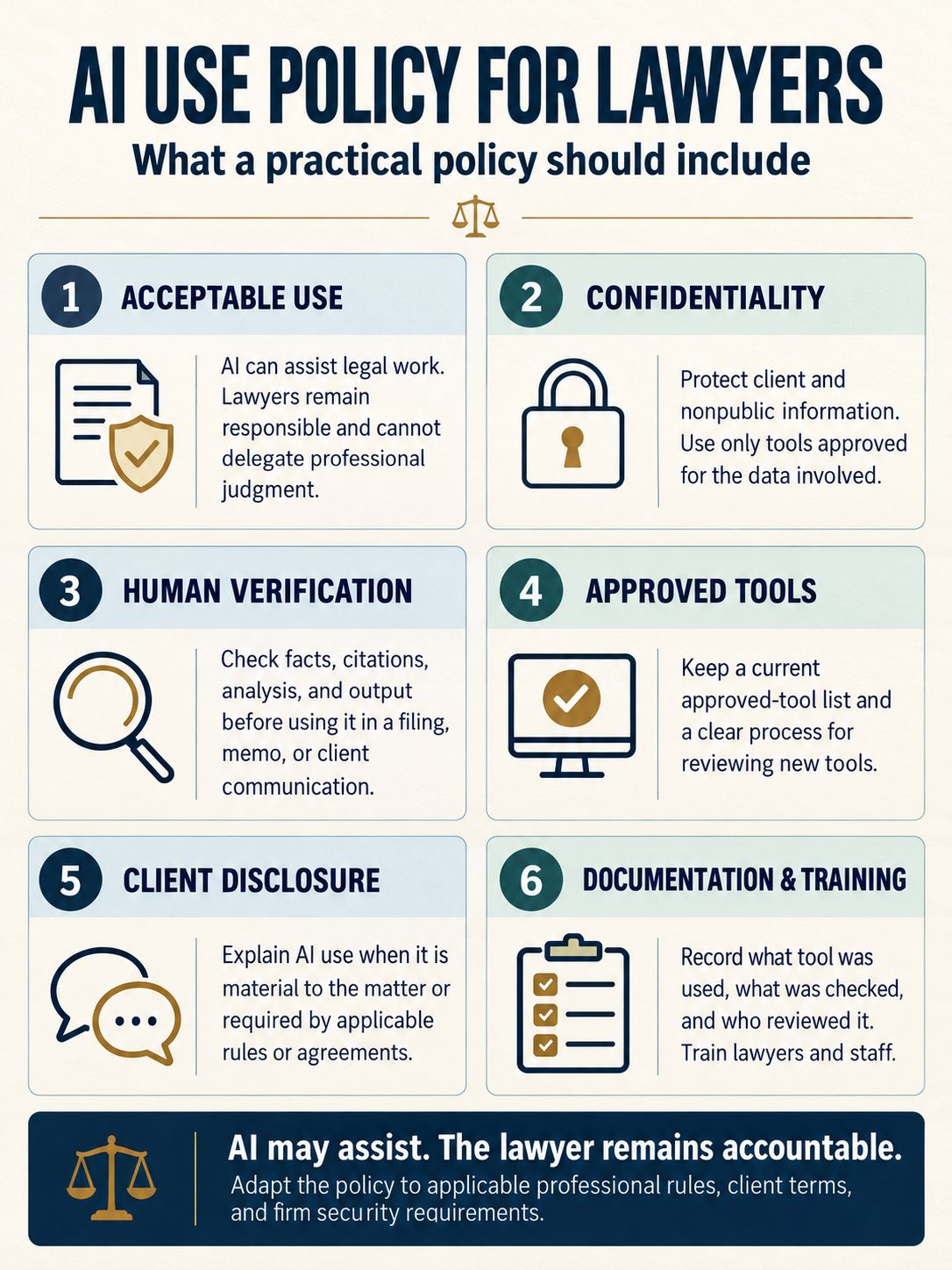
An AI use policy for lawyers should include acceptable use rules, confidentiality protections, mandatory human verification of AI output, approved tool lists, and training requirements. These elements map directly to professional conduct rules that already govern lawyers.
Specific items a legal department’s policy should include:
- A clear statement that lawyers cannot delegate the practice of law to AI tools.
- Rules requiring protection of confidential and nonpublic client information.
- A requirement to verify AI-generated content before it goes into any filing, memo, or client communication.
- A list of approved, secure tools versus banned public tools.
- Disclosure rules for telling clients when AI use is material to their matter.
- Documentation standards so the firm can show what was checked and by whom.
The 2026 report mentioned above recommends legal departments adopt a formal governance framework covering acceptable-use rules, confidentiality protections, mandatory verification, documentation standards, training, and procedures for approving new tools. That framework is a solid backbone for any legal department policy template.
Can Lawyers Use ChatGPT and Stay Ethical and Compliant?
Yes, lawyers can use ChatGPT and other generative tools and remain ethical, but only with safeguards in place. The tool itself is not the problem; unsupervised or unverified use is.
The California State Bar’s Board of Trustees approved updated 2026 practical guidance clarifying that attorneys may not delegate the practice of law to AI, must protect confidential information, and must reasonably verify AI-generated content and correct any hallucinations. The ABA’s Formal Opinion 512 similarly says lawyers must protect client confidentiality under Model Rule 1.6, get informed consent before entering case information into an AI tool, and tell clients when AI use will materially affect their matter. An October 2026 ABA commentary piece described this well: treat generative AI like a new hire who needs supervision, not an outside expert whose work can go unchecked.
What Are the Main Risks of Using AI in Legal Work?
The main risks of using AI in legal work are hallucinated citations, exposure of confidential client data, biased or unfair outputs, and unsupervised reliance on unverified content. Each of these risks can trigger malpractice exposure or bar discipline.
Common risk categories for a legal department:
| Risk | Example | Mitigation |
|---|---|---|
| Hallucinated content | Fake case citations in a brief | Mandatory human review before filing |
| Confidentiality breach | Pasting client details into a public tool | Approved tools list, data handling rules |
| Bias | Skewed outcomes in predictive tools | Bias testing, diverse review teams |
| Overreliance | Treating AI output as final | Training on verification duties |
| Vendor data misuse | Model trained on submitted data | Vendor contracts, data privacy terms |
A multi-jurisdictional ethical best practices guidance document released in spring 2026 flagged seven focal areas for policy drafters: competence and diligence, confidentiality, communication, billing, candor to courts, bias, and supervision. A legal department’s policy should map directly onto these categories.
Client Confidentiality Concerns When Using AI Tools as a Lawyer
The biggest confidentiality concern is that public AI tools may store, train on, or expose data entered into them, so lawyers risk breaching client confidentiality the moment they paste in case details. This is why policy language on data privacy is not optional.
The Singapore Ministry of Law’s Guide for Using Generative AI in the Legal Sector, published in 2026, bans entering client names, case details, or sensitive data into public tools and requires secure, approved systems for anything confidential. It also requires informing clients when GenAI use is substantial. A legal department policy should mirror this by naming which categories of data can never go into an AI system, and which systems are cleared for limited, lower-risk use.
Do I Need a Separate AI Policy or Add It to Existing Policies?
Most legal departments should extend their existing technology, confidentiality, and data privacy policies rather than build a totally separate document from scratch. A standalone policy only makes sense for larger firms with dedicated AI governance teams.
Choose a standalone AI policy if the firm uses multiple AI systems across departments, has a dedicated compliance team, or operates under strict regulatory oversight like HIPAA or GDPR. Choose an addendum to existing policy if the firm is small, already has solid confidentiality and IT-use policies, and just needs AI-specific language added. Either way, the new rules must connect clearly to the firm’s existing code of conduct so employees see AI use as part of normal professional responsibility, not a separate “extra” rule nobody checks.
What Does the Bar Association Say About Lawyers Using AI?
Bar associations generally say lawyers may use AI tools as long as they protect client confidentiality, verify output accuracy, disclose material use to clients, and supervise staff who use the tools. No major bar association has banned AI use outright.
The ABA’s Formal Opinion 512 stresses candor to tribunals, reasonable fees, and informed consent before inputting case information into AI systems. The State Bar of Georgia’s 2026 Generative AI Toolkit concludes that lawyers may ethically use generative AI so long as use does not violate the state’s Rules of Professional Conduct and is backed by appropriate safeguards. These are consistent messages: use is fine, unsupervised or undisclosed use is not.
How to Get Lawyers to Actually Follow an AI Use Policy
Lawyers follow an AI use policy when it’s short, practical, and tied to training and real consequences, not when it’s a long legal document nobody opens. Policies that sit in a shared drive and get ignored don’t reduce risk at all.
Practical steps that improve compliance:
- Keep the policy to a readable length with plain language, not dense legal jargon.
- Require a short training session before giving employees access to approved tools.
- Build the policy into onboarding and annual refresher training.
- Make a named person or committee responsible for answering questions.
- Audit usage logs periodically and address violations quickly and fairly.
A firm profiled in 2026 by The Legal 500’s intelligence section took the opposite approach entirely: it banned generative AI for substantive legal work altogether, refusing to use it on client matters or let clients use it to communicate with the firm, specifically to protect privilege and avoid what the piece called “chaos slop.” That’s a legitimate approach for risk-averse firms, but most legal departments will do better with clear, enforced rules rather than an outright ban.
Liability Insurance for Law Firms Using AI
Liability insurance for firms using AI should be reviewed with a broker to confirm that malpractice coverage extends to AI-related errors, such as hallucinated citations or missed deadlines caused by faulty AI research. Standard malpractice policies do not automatically address every AI-specific risk.
Lawyers mutual insurance carriers and other professional liability providers increasingly ask firms about their AI policy and tool usage during underwriting. A firm with a documented AI use policy, training records, and verification procedures is in a stronger position when filing a claim or renewing coverage than a firm with no policy at all.
Which AI Tools Are Safe and Approved for Legal Departments?
Safe, approved AI tools for legal departments are those with enterprise-grade data protections, clear contractual terms on data handling, and no training on submitted confidential data by default. Public, free-tier consumer tools rarely meet this bar for confidential legal work.
Thomson Reuters’ 2026 analysis on AI and law advises legal teams to start by identifying specific use cases, such as research or document review, then evaluate vendor data-handling practices, secure leadership buy-in, and choose tools that meet ethical and data-protection requirements. Enterprise AI governance platforms such as WitnessAI help companies monitor, observe, control, and protect how employees use generative tools across the organization, giving legal and compliance teams visibility they would otherwise lack.
Common Mistakes Law Firms Make When Adopting AI
The most common mistake is rolling out AI tools without any written policy, training, or verification step, which leaves staff guessing about what’s allowed. A close second is banning tools outright without offering any approved alternative, which pushes usage underground.
Other frequent mistakes include failing to update the policy as new tools launch, skipping legal and compliance review before publishing the policy, not disclosing AI use to clients when required, and ignoring bias testing for AI tools used in decision-adjacent legal work. New guidance and proposed rule changes reported in October 2026 emphasize operational safeguards like internal policies, limited access to confidential data, supervision of staff, and review procedures to catch inaccurate output before it reaches client-facing work.
How Often Should We Update Our Legal AI Policy?
A legal department should review its AI policy every six to twelve months, or immediately after a major regulatory change, a new tool rollout, or a bar association update. AI tools and guidance change fast enough that a policy written two years ago is likely outdated.
Set a fixed review date on the calendar, assign ownership to a specific person or committee, and treat the review as mandatory, not optional. Depending on firm size, smaller legal departments might combine this review with their annual compliance audit, while larger departments may need quarterly check-ins given how often new AI systems and regulations appear.
Do We Need to Disclose AI Use to Clients?
Yes, in many cases disclosure is required or strongly advised when AI use is material to the client’s matter, affects costs, or touches how their data is handled. Several guidance documents treat transparency as a core ethical pillar.
The Singapore Ministry of Law’s guide names transparency as one of three core pillars, alongside professional ethics and confidentiality, and specifically calls for informing clients when GenAI use is substantial or affects data handling in a way the client may not expect. The ABA’s Formal Opinion 512 similarly calls for client communication when AI use will materially influence a decision in the representation. A legal department’s policy should spell out exactly when disclosure is required so lawyers aren’t left making that call case by case.
Who Should Be Involved in Creating an AI Use Policy for Lawyers?
Creating an AI use policy for lawyers should involve legal and compliance leadership, IT or security staff, a senior partner or general counsel, and representatives from the employees who’ll actually use the tools day to day. Leaving any one of these groups out tends to produce a policy that doesn’t survive real-world use.
A workable team usually includes:
- General counsel or a senior partner to own final sign-off.
- IT and security staff to assess tool safety and data handling.
- Compliance staff to map rules to GDPR, HIPAA, or other applicable law.
- A cross-section of working attorneys and paralegals who’ll flag practical gaps.
- Outside ethics counsel or bar association resources when the firm wants an extra compliance check.
How to Develop an AI Policy Template
Developing an AI policy template for a legal department follows a repeatable process: gather stakeholders, audit existing rules, define real use cases, pick a format, build in flexibility, train staff, and get legal sign-off before publishing. Skipping any step tends to produce a policy that’s either too vague or too rigid.
Step 1: Identify Stakeholders
Pull in general counsel, IT, compliance, HR, and working attorneys before writing a single clause. Each group sees different risks the others miss.
Step 2: Assess Existing Policies
Check what the firm’s current confidentiality, data privacy, and IT-use policies already say about tools and data, so the new AI language doesn’t contradict or duplicate existing rules.
Step 3: Define Use Cases
List the specific tasks employees actually want AI for, such as legal research, contract review, or document summarization, and separate those from uses the firm wants to ban outright.
Step 4: Choose a Policy Format
Decide whether the firm needs a standalone AI policy document or an addendum to existing technology and confidentiality policies, based on firm size and tool complexity.
Step 5: Build in Flexibility
Write the policy so new tools can be added to an approved list without rewriting the whole document. A policy that names specific products by brand risks becoming outdated within months.
Step 6: Conduct Training
Hold a mandatory training session before any employee gets access to AI tools, and repeat it annually or whenever the policy changes meaningfully.
Step 7: Review with Legal and Compliance Teams
Have legal and compliance teams review the final draft for conflicts with bar rules, GDPR, HIPAA, or other applicable law before the policy goes live.
AI Policy Template Examples
AI policy templates vary by organization type, but all share the same backbone of purpose, acceptable use, confidentiality, and review. Below are four example structures a legal department can study.
Example 1: Corporate AI Policy Template
A corporate AI policy template usually covers approved tools, data classification rules, employee responsibilities, and a review schedule, with legal and IT jointly owning enforcement.
Example 2: Nonprofit AI Usage Policy
A nonprofit’s AI usage policy tends to focus more on donor data privacy and grant compliance than on litigation risk, since nonprofits handle sensitive personal data but less courtroom exposure.
Example 3: SMB Generative AI Policy
A small or midsize business’s generative AI policy is usually shorter, naming a handful of approved consumer-grade tools and setting basic rules against entering client or employee personal data.
Example 4: Tech Company Developer Policy
A tech company’s developer-facing AI policy typically addresses source code exposure, intellectual property ownership of AI-assisted code, and security review before AI-generated code ships to production.
Final Thoughts
A legal department’s AI use policy works best when it’s specific, enforced, and reviewed regularly rather than written once and forgotten. Build the policy around real use cases, confidentiality protections, mandatory verification, and clear disclosure rules, and get legal, compliance, and working attorneys involved from the start. Pair the written policy with short, repeated training and a named owner who keeps it current as bar guidance, tools, and regulations such as GDPR and HIPAA continue to evolve through 2026 and beyond. Start with a free template from a bar association or government guide, customize it with your own legal and compliance teams, and set a calendar reminder to revisit it within six months.
Frequently Asked Questions
What are the legal implications of AI?
AI use carries legal implications around confidentiality breaches, malpractice exposure from unverified content, intellectual property disputes over AI-generated work, and potential liability under data protection laws like GDPR. Courts and bar associations increasingly expect lawyers to supervise AI output the same way they’d supervise a junior associate’s work.
What are the 5 rules of AI?
There’s no single universal “5 rules,” but common guidance converges on: protect confidentiality, verify all AI output, disclose material use to clients, supervise staff using AI, and document how and when AI tools are used in legal work. These map to existing professional conduct rules rather than creating entirely new standards.
How can AI be used in government?
Government legal departments use AI for legal research, document review, and case management, typically under strict data-sensitivity and public records rules. Many agencies require internal policy approval and audit trails before any AI tool can touch case files or public records.
How can I use AI for legal research?
Use AI tools built on verified legal databases to find relevant cases and summarize documents, then manually verify every citation and confirm the law cited is still current before using it in any filing. Never submit AI research output as final work without a human check.