You land, wait at the carousel, and your suitcase never shows up. In 2025, airlines mishandled about 24 million bags, or 4.9 for every 1,000 passengers. The odds are much higher on international trips with a connection. The best apps for tracking lost luggage let you see where your bag is, send that location to the airline, and push for a faster return.
The good news is that 2026 brought big changes. Apple and Google now both let you share a tracker’s location directly with many airlines. Below are 10 apps that help, how each one works, and what to do the moment your bag goes missing.
Tracker Apps vs Airline Apps: Which Do You Need?
The best apps for tracking lost luggage fall into two groups, and smart travelers use one of each.
- Tracker apps work with a small tag you put inside your bag, like an AirTag. Nearby phones spot the tag over Bluetooth and report its location to you. You see the bag on a map almost anywhere people carry phones.
- Airline apps use the airline’s own scans, such as the barcode or RFID chip on your bag tag. They show the last place your bag was scanned, like “loaded on plane” or “at claim area 5.” They do not need a tag, but they go dark once the bag leaves the airline’s system.
A tag tells you where the bag really is. The airline app tells you what the airline thinks happened. When the two disagree, the tag’s location is the proof you send to the airline.
The 10 Best Apps for Tracking Lost Luggage
Here are the best apps for tracking lost luggage in 2026, starting with tracker apps and ending with airline tools.
1. Apple Find My: Best for iPhone Users
Works with: AirTag and other Find My tags
Cost: Free app
Find My uses a huge network of Apple devices to locate your AirTag. Since iOS 18.2, you can tap Share Item Location to make a secure link and send it to the airline. As of April 2026, 36 airlines accept these links, including American, Delta, United, British Airways, and Lufthansa. The link ends after 7 days or when you get your bag back. For iPhone owners, it is the strongest of the best apps for tracking lost luggage.
2. Google Find Hub: Best for Android Users
Works with: Find Hub tags and some Samsonite suitcases
Cost: Free app
In March 2026, Google added its own Share Item Location button to Find Hub. Partner airlines at launch included Air India, AJet, China Airlines, the Lufthansa Group, Saudia, SAS, and Turkish Airlines. Google also teamed with Samsonite, so some new Samsonite suitcases pair with Find Hub right out of the box.
3. Samsung SmartThings Find: Best for Galaxy Phones
Works with: Galaxy SmartTag2
Cost: Free app
SmartThings Find uses nearby Galaxy devices to locate your SmartTag2. The tag’s battery lasts about 500 days, or 700 in power-saving mode, so you will not need to recharge it before a trip.
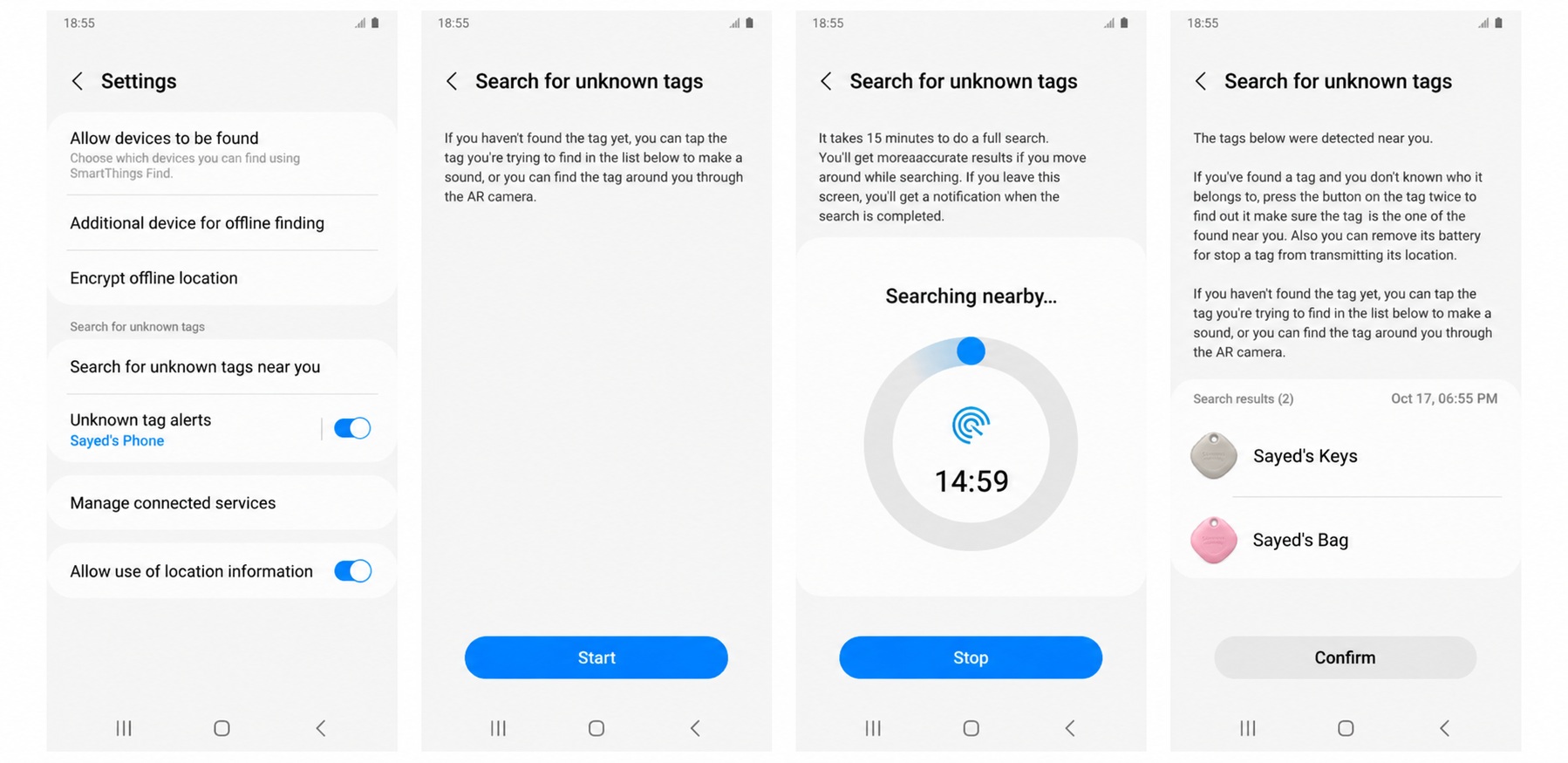
Watch out: it only works with Samsung Galaxy phones and tablets.
4. Life360 (Tile): Best for Mixed iPhone and Android Families
Works with: Tile trackers
Cost: Free app, paid plans add extras
Tile trackers now run through the Life360 app on both iPhone and Android. Life360 says its network reaches over 230 countries and territories. That makes it one of the best apps for tracking lost luggage when your family uses different phone brands.
Watch out: its network is smaller than Apple’s or Google’s, so updates can be slower.
5. Chipolo: Best Budget Tags for Either Network
Works with: Chipolo tags
Cost: Free app
Chipolo makes low-cost tags built for Apple Find My or Google Find Hub, so you can pick the one that matches your phone. Apple confirms its compatible tags work with Share Item Location, so you can still send the airline a link.
6. Pebblebee: Best Rechargeable Tags
Works with: Pebblebee tags
Cost: Free app
Pebblebee tags charge with a cable instead of using coin batteries. Like Chipolo, they plug into Find My or Find Hub, so airline sharing still works. They are a good pick if you hate swapping batteries before a trip.
7. Tracki: Best Real GPS Tracker
Works with: Tracki GPS device
Cost: Device plus a monthly data plan
Tracki uses cell networks and GPS instead of nearby phones. It connects in over 180 countries, which helps if your bag ends up somewhere with few people.
Watch out: you pay a monthly fee, and you should check your airline’s rules for cell devices in checked bags.
8. Fly Delta: Best Airline App for Bag Tracking
Works with: Delta flights
Cost: Free app
Delta puts an RFID chip in every bag tag. The Fly Delta app shows each scan on a map and sends push alerts from check-in to the carousel. Delta says its RFID tags are read with a 99.9% success rate. Among airline tools, it is one of the best apps for tracking lost luggage you can use without any tag.
9. United App: Best for United Flyers
Works with: United flights
Cost: Free app
The United app shows the status of your checked bags and lets you report a delayed bag without waiting in line. United was also one of the first airlines to accept Apple Find My links, so you can attach your tag’s location to your claim.
10. SITA WorldTracer: Best for Following Your Claim
Works with: 500+ airlines
Cost: Free
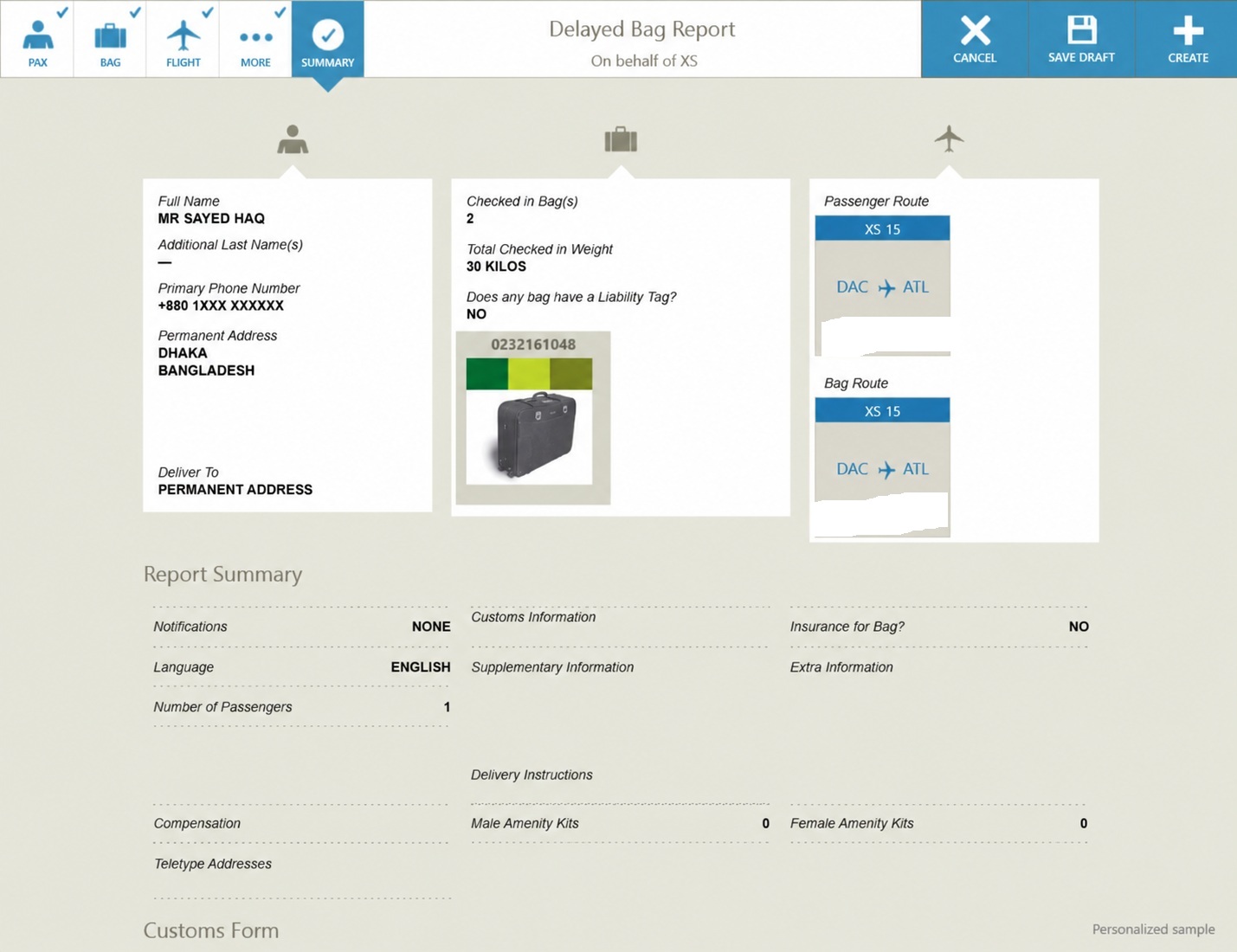
WorldTracer is the system airlines use behind the scenes to trace missing bags at more than 2,800 airports. When you file a report, you get a file reference number, and many airlines let you check your claim’s progress online with it. WorldTracer now accepts location links from both Apple Find My and Google Find Hub.
Quick Comparison Chart
Use this chart to pick from the best apps for tracking lost luggage based on your phone and airline.
| App | Type | Phone | Needs | Share with airline |
|---|---|---|---|---|
| Apple Find My | Tracker | iPhone | AirTag or Find My tag | Yes, 36 airlines |
| Google Find Hub | Tracker | Android | Find Hub tag | Yes, 10+ airlines |
| SmartThings Find | Tracker | Samsung Galaxy | SmartTag2 | Send screenshots |
| Life360 (Tile) | Tracker | iPhone and Android | Tile tag | Send screenshots |
| Chipolo | Tracker | iPhone or Android | Chipolo tag | Yes, through Find My or Find Hub |
| Pebblebee | Tracker | iPhone or Android | Pebblebee tag | Yes, through Find My or Find Hub |
| Tracki | GPS tracker | iPhone and Android | Tracki device and data plan | Send screenshots |
| Fly Delta | Airline | iPhone and Android | Delta flight | Built in |
| United app | Airline | iPhone and Android | United flight | Built in, accepts Find My links |
| SITA WorldTracer | Airline system | Any browser | File reference number | Accepts Apple and Google links |
What to Do When Your Bag Goes Missing
Even the best apps for tracking lost luggage only help if you act fast. Follow these steps before you leave the airport:
- Check your tracker app. See if the bag is still at your departure airport, at a connecting stop, or nearby.
- File a report at the airline desk. Ask for a written report and a file reference number. In the US, this report is what makes you eligible for a bag fee refund.
- Share your bag’s location. Send a Find My or Find Hub link through the airline’s app, website, or desk.
- Keep receipts. Airlines must cover reasonable costs, like a toothbrush or a change of clothes, while your bag is delayed.
- Follow up daily. Use your file number to check progress online.
Your Rights and Refunds
The best apps for tracking lost luggage give you proof, and the law gives you leverage. Under the US Department of Transportation refund rule, US airlines must refund your checked bag fee if you file a report and the bag is not delivered within 12 hours of a domestic flight. For international flights, the limit is 15 hours, or 30 hours if the flight is longer than 12 hours.
On most international trips, the Montreal Convention caps what an airline pays for a lost, damaged, or delayed bag at 1,519 SDR, about $2,000 per passenger. If your bag holds more than that, travel insurance can fill the gap. Compare the best travel insurance for international trips, and check your travel insurance credit card benefits, since many cards cover delayed bags. Insurance can also help when the problem starts earlier, as explained in our guide to the role of travel insurance in flight cancellation.
Frequently Asked Questions (FAQs)
These are the questions travelers ask most about the best apps for tracking lost luggage.
Is there an app to track lost luggage?
Yes. Tracker apps like Apple Find My and Google Find Hub show where a tag inside your bag is. Airline apps like Fly Delta and United show where the airline last scanned your bag.
Can I track my lost luggage without a tracker?
Partly. Your airline’s app or website shows the last scan of your bag tag. Once you file a report, you can follow your claim with the file reference number.
Do airlines accept AirTag locations?
Yes. As of April 2026, 36 airlines accept Apple’s Share Item Location links, and more than 10 accept Google Find Hub links.
Are AirTags allowed in checked luggage?
Yes. Small Bluetooth trackers like AirTags are widely allowed in checked bags. Check your airline’s rules for larger GPS devices with cell service.
How long does it take to get lost luggage back?
Most delayed bags come back within a day or two. A bag that is truly lost is much rarer, but your claim can take weeks.
What is the best luggage tracker for Android?
A Find Hub tag used with the Google Find Hub app, since it now supports airline sharing. Galaxy owners can also use a SmartTag2.
Final Words
The best apps for tracking lost luggage work best as a pair: a tracker app that shows where your bag really is, and your airline’s app that shows what the airline knows. Put a tag in every checked bag, learn where the Share Item Location button is before you fly, and file a report before you leave the airport if your bag goes missing. With your location link and file number in hand, you turn a stressful wait into a quick, clear fix.