Choosing the right immigration case management software can make a significant difference in how efficiently immigration law firms, consultants, and legal teams handle their daily work. From tracking application deadlines and organizing client documents to managing case updates and improving communication, the right software helps simplify complex immigration processes and reduce administrative workloads.
However, with so many solutions available, finding one that fits your firm’s needs, budget, and workflow can be challenging. In this guide, we’ll explore how to choose immigration case management software, the essential features to consider, and the key factors that can help you make an informed decision.
What Is Immigration Case Management Software and How Does It Work?
Immigration case management software is a specialized platform that tracks clients, forms, deadlines, documents, and billing for immigration cases in one connected system. It works by centralizing every stage of a case, from intake through filing, tracking, and long-term recordkeeping, so staff do not need separate spreadsheets, email threads, or paper files.
Most platforms organize work around four functions:
- Intake and questionnaires that collect client information through online forms, often in multiple languages.
- Form preparation that auto-fills USCIS forms and other government applications using stored client data.
- Deadline and task tracking that flags filing windows, RFE responses, and renewal dates.
- Billing and reporting that connects time tracking, invoicing, and case outcome data for firm management.
A paralegal at a small firm, for example, might use the software to send a client a smart questionnaire, pull the answers directly into an I-130 petition, and get an automatic reminder 30 days before a biometrics deadline. That kind of connected workflow is the main reason firms move away from generic spreadsheets once their caseload grows past a handful of active files.
Key Features to Look for When Choosing Immigration Case Management Software
The most important features to look for are immigration-specific form libraries, AI-assisted document handling, compliance tracking, and a client portal with multi-language support. A platform missing any one of these will likely require workarounds that slow down staff over time.
When evaluating options, compare vendors against this feature checklist:
- Full lifecycle coverage, intake, forms, filing, tracking, billing, and reporting in one system, not separate tools stitched together.
- Immigration form libraries, pre-built USCIS forms and country-specific forms that update when agencies change requirements.
- AI and automation, tools that extract data from uploaded documents, translate intake materials, and auto-populate forms.
- Client portal and questionnaires, secure, multi-language intake that reduces back-and-forth emails.
- Deadline and compliance alerts, automatic tracking of visa expirations, RFE windows, and renewal dates.
- Reporting and analytics, dashboards that show caseload volume, bottlenecks, and billing performance.
- Integrations, connections to e-signature tools, accounting software, and document storage.
Best Immigration Case Management Software in 2026: Top Platforms Compared
The leading immigration case management platforms in 2026 are Docketwise, eimmigration by Cerenade, INSZoom, LawLogix Edge, Filevine, and CampLegal, each suited to a different firm profile. Independent review sites including G2, SoftwareSuggest, and TopSoftwareAdvisor consistently list these names among top-rated tools, with eimmigration recognized as the fastest-growing product in the category as of October 2026 based on G2’s month-over-month rating data.
Here is how the main platforms compare at a glance:
| Platform | Best For | Standout Feature | Typical Buyer |
|---|---|---|---|
| Docketwise | Solo and small firms | Simple, modern intake and smart questionnaires | Independent immigration attorneys |
| eimmigration (Cerenade) | High-volume firms | AI tools that extract, translate, and summarize documents | Mid-size to large immigration firms |
| INSZoom | Corporate and global immigration | Compliance tracking across U.S., Canadian, and global cases | Corporate immigration departments |
| LawLogix Edge | Power users and large firms | I-9 compliance plus HR and client portals | Businesses with employer-sponsored cases |
| Filevine | Firms wanting broad AI automation | AI-enhanced data pulls across case files | Growing firms scaling case volume |
| CampLegal | Budget-conscious small firms | Lower-cost entry tier with immigration basics | New or very small practices |
For firms outside North America, Migration Manager is frequently cited as the strongest option for Australian migration practices, with a large library of migration-specific templates, while tools like Complize are built specifically around integration with government systems such as Australia’s Home Affairs department.
How Much Does Immigration Case Management Software Cost?
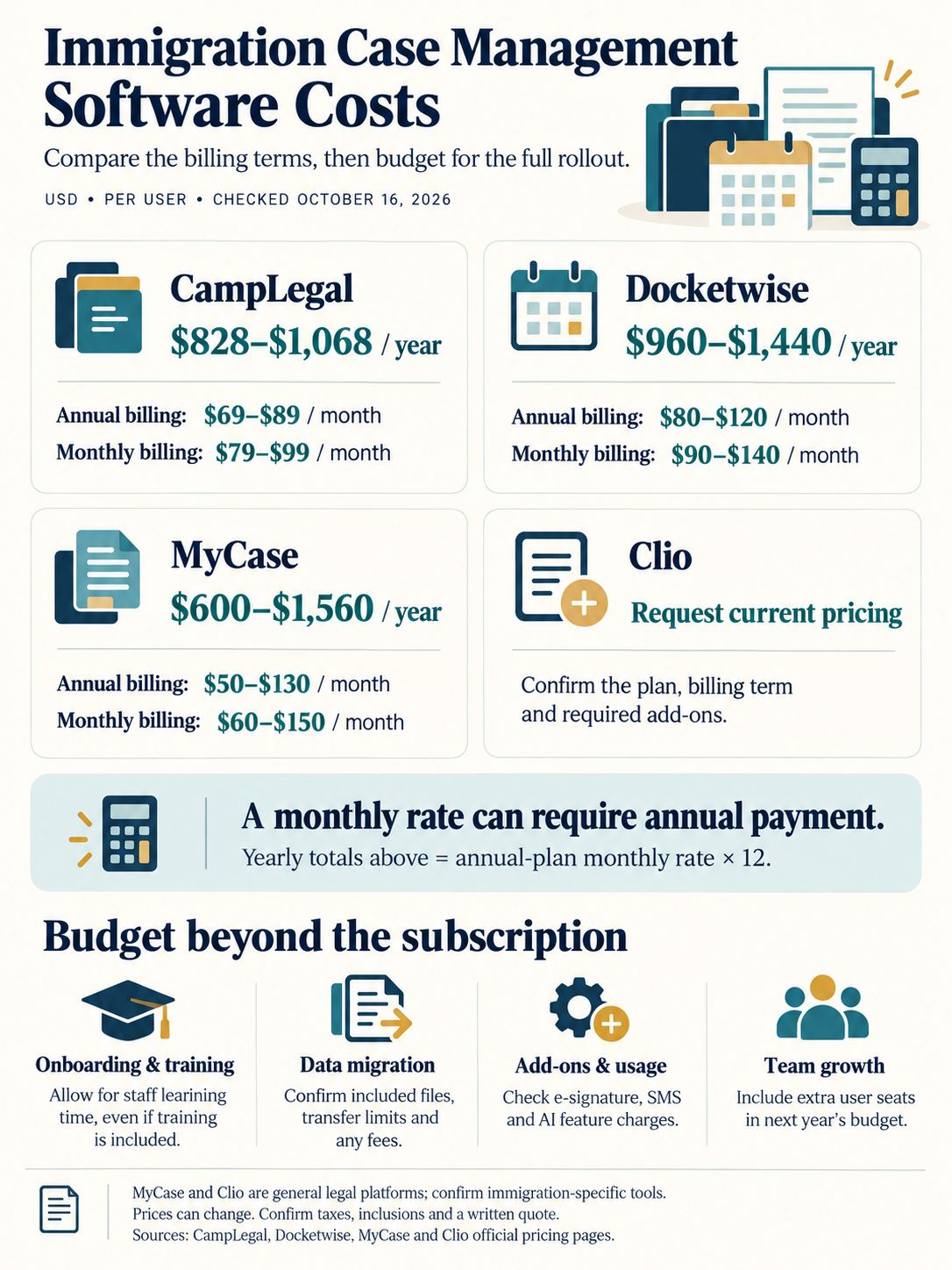
Immigration case management software typically costs between $600 and $1,800 per user per year, depending on the tier and features included, though some tools price per month instead. Mid-2026 comparison data put CampLegal around $828 to $1,068 annually, Docketwise around $828 to $1,428 annually, MyCase around $600 to $1,560 annually, and Clio around $588 to $1,788 annually, with higher tiers unlocking more automation and reporting.
Some platforms, like Docketwise, advertise a lower monthly entry point, starting near $69 per user per month for base plans, which appeals to solo practitioners testing the waters before committing to annual contracts.
When budgeting, factor in costs beyond the subscription fee:
- Onboarding and training time, which can run several weeks for larger teams switching from spreadsheets.
- Data migration, especially if you are moving thousands of historical case files from a legacy system.
- Add-on modules, such as e-signature, SMS reminders, or advanced AI document extraction, which are sometimes priced separately.
- Per-user pricing scaling, which matters if your firm expects to hire within the next year.
Immigration Case Management Software for Small Firms and Solo Practitioners
Small firms and solo practitioners generally get the best value from immigration-specific platforms with simple pricing and fast onboarding, rather than enterprise tools built for large caseloads. Docketwise and CampLegal are frequently recommended starting points because they focus on core immigration workflows without the complexity (or cost) of enterprise compliance modules.
For a solo practitioner handling family-based petitions and a modest caseload, the right software usually needs to:
- Offer a low monthly or annual price with no long-term contract requirement.
- Include ready-to-use USCIS form templates so there is no setup delay.
- Provide a client-facing portal so clients can upload documents directly instead of emailing attachments.
- Scale affordably if the practice adds a paralegal or second attorney within a year or two.
Immigration Case Management Software vs. General Legal Practice Management Software
Immigration case management software is purpose-built for immigration forms and workflows, while general legal practice management tools like Clio and MyCase cover broader legal work but require immigration add-ons to match that depth. Firms where immigration makes up most of their caseload are better served by dedicated platforms; firms with mixed practice areas sometimes prefer general tools with bolt-on modules.
Here’s the practical difference:
| Factor | Immigration-Specific Software | General Legal Practice Software |
|---|---|---|
| Form libraries | Pre-built, immigration-specific, regularly updated | Requires add-on modules or manual templates |
| Setup time | Faster for immigration workflows | Slower, needs customization |
| Billing and trust accounting | Often included but sometimes basic | Usually more mature, covers all practice areas |
| Flexibility across practice areas | Limited outside immigration | Strong across multiple practice types |
| Best fit | Immigration-focused firms | Mixed-practice firms with some immigration work |
Does Immigration Case Management Software Integrate with USCIS and Other Government Systems?
Most immigration case management platforms do not file forms directly with USCIS through a live API, but they do generate USCIS-compliant forms and track filing status and deadlines tied to government processing timelines. Some compliance-focused tools go further by integrating directly with specific government systems outside the U.S.
For example, Complize is built to connect with Australia’s Home Affairs systems for real-time compliance tracking, which is a more direct government integration than most U.S.-focused tools currently offer. In the U.S. market, platforms like INSZoom and LawLogix Edge instead focus on keeping form templates current with USCIS edition dates and automating deadline alerts tied to posted processing times, rather than submitting forms electronically on the firm’s behalf.
Can Immigration Case Management Software Handle Multiple Jurisdictions?
Yes, several platforms are specifically built to handle multiple jurisdictions, but the depth of coverage varies widely by vendor and region. INSZoom is positioned for complex U.S., Canadian, and global immigration operations with configurable workflows for different countries, while tools like Migration Manager and Complize focus more narrowly on Australian migration law.
If your firm or corporate immigration team works across borders, check these points before choosing a platform:
- Does the vendor maintain updated form libraries for each country you operate in, or just one primary jurisdiction?
- Can the platform run separate compliance alerts for different countries’ visa renewal and reporting rules?
- Does the reporting dashboard let you filter caseload and deadlines by jurisdiction, not just by case type?
- Is customer support available in the time zones and languages relevant to your international offices?
Document Automation and AI: What to Expect from Modern Platforms
AI-driven document automation in 2026 generally means the software can extract data from uploaded client documents, translate intake materials, and auto-populate immigration forms without manual re-typing. This has become one of the most competitive feature areas among vendors over the past year.
Specific capabilities worth testing during a demo:
- Data extraction, where the system pulls names, dates, and case numbers from scanned passports or prior filings.
- Document summarization, which condenses long supporting files into readable case notes for attorneys.
- Multi-language form preparation, useful for firms serving clients who are not fluent in English.
- Automated report generation, which pulls case data into client or management reports without manual spreadsheet work.
Security, Compliance, and Free Trials: What to Verify Before You Buy
Immigration case management software must meet strict data security and compliance standards because it stores sensitive personal information including passport numbers, immigration status, and employment history. Before signing a contract, confirm the vendor’s security certifications, data encryption practices, and whether a free trial is available to test these claims with real workflows.
Checklist for security and compliance review:
- Confirm data encryption both in transit and at rest, and ask for documentation, not just a sales claim.
- Check where client data is physically stored and whether that location matters for your jurisdiction’s privacy laws.
- Ask about role-based access controls so paralegals, attorneys, and clients see only what they need to see.
- Review audit logs and backup/recovery procedures in case of a system outage or data loss.
- For compliance-heavy practices, confirm whether the platform supports I-9 tracking, visa expiration alerts, and audit-ready reporting.
Most major vendors, including Docketwise, eimmigration, and CampLegal, offer free trials or live demos. Use the trial period to upload a handful of real (or anonymized) case files rather than relying only on sample data, since sample data often hides workflow friction that only shows up with messy, real-world documents.
Common Mistakes When Choosing Immigration Case Management Software
The most common mistake firms make is choosing software based on price alone without checking whether it covers the full case lifecycle their team actually needs. Other frequent errors include underestimating training time and ignoring how well the tool scales as the firm grows.
Watch for these specific pitfalls:
- Picking a tool without immigration-specific forms, then discovering staff must manually build templates for every filing type.
- Ignoring data migration costs, which can take weeks and sometimes requires manual re-entry of older case files.
- Underestimating staff training time, especially for firms moving off spreadsheets or paper files for the first time.
- Choosing enterprise features you don’t need yet, paying premium pricing for compliance dashboards a two-person firm will rarely use.
- Skipping reference checks, relying only on vendor marketing instead of checking recent reviews on sites like G2 or SoftwareSuggest.
- Forgetting about client experience, picking a backend-strong tool with a clunky client portal that frustrates the people filling out intake forms.
A practical way to avoid most of these mistakes is to write down your firm’s top five recurring case types before shopping, then score each vendor against how well it handles those specific workflows, not just their general feature list.
Final Thoughts
Choosing immigration case management software comes down to matching the platform to your firm’s actual caseload, jurisdiction, and growth plans rather than picking whatever tool has the most features on paper. Start by listing your firm’s top recurring case types, your budget range, and whether you operate in one country or several. Then shortlist two or three vendors from the comparison above and test each one with a free trial using real case data, not sample files.
Solo practitioners and small firms should lean toward affordable, immigration-specific tools like Docketwise or CampLegal. Mixed-practice firms should weigh whether a general practice management tool with an immigration add-on covers enough ground. Corporate and global immigration teams should prioritize compliance depth and jurisdiction coverage from platforms like INSZoom or LawLogix Edge. High-volume firms chasing efficiency gains should put AI document automation near the top of the checklist, since tools from eimmigration and Filevine are investing heavily in that area through 2026.
Frequently Asked Questions
What is the best immigration case management software for small law firms?
Docketwise and CampLegal are commonly recommended for small immigration law firms because of their lower pricing tiers and faster setup for core immigration workflows, including smart client questionnaires and ready-to-use form templates.
How much does immigration case management software cost per month?
Costs vary by vendor and tier, but entry-level immigration-specific plans often start around $69 per user per month, while annual costs across the market typically range from about $600 to $1,800 per user depending on features.
Does immigration case management software work for solo practitioners?
Yes. Many platforms, including Docketwise, are specifically designed to scale down for solo practitioners, offering simple pricing, fast onboarding, and core immigration form libraries without enterprise-level complexity or cost.
Is there a free trial for immigration case management software?
Most leading vendors, including Docketwise, eimmigration, and CampLegal, offer free trials or live demos. Firms should test the trial with real or anonymized case files to see how the software handles actual workflows, not just sample data.