
Insurance claims can be complicated, involving paperwork, document verification, policy reviews, and communication between insurers and policyholders. Managing these tasks manually can lead to delays, errors, and frustrated customers. Insurance claims management software helps simplify the process by organizing claim information, automating routine tasks, tracking progress, and supporting faster, more accurate decisions.
From the moment a claim is submitted to its final settlement, this technology helps insurance companies manage each step more efficiently. Understanding how insurance claims management software works can help insurers, claims adjusters, and business owners see how the right tools can improve productivity, reduce administrative burdens, and deliver a better customer experience.
What Is Insurance Claims Management Software and Why Do Companies Use It?
Insurance claims management software is a digital platform that captures, tracks, and processes insurance claims from the moment a policyholder reports a loss until the claim is paid or closed. Companies use it to replace manual, paper-heavy claims workflows with a connected system that reduces errors, speeds up payouts, and gives claims teams one place to manage every file.
Think of it as the operational backbone behind every insurance claim. A modern claims management system handles first notice loss intake, assigns adjusters, tracks documents, calculates reserves, applies business rules, and communicates with policyholders. Insurers, MGAs (managing general agents), third-party administrators, and self-insured employers all rely on these systems because manual claims handling simply cannot keep pace with claim volume, regulatory requirements, and customer experience expectations. This is modern claims management: less paper, more structured data, faster decisions.
Why Is Claims Management Important for Insurers and Policyholders?
Claims management matters because the claim is the moment a policyholder finds out whether their insurance actually delivers on its promise. A slow, confusing, or error-prone claims process damages trust, drives complaints to regulators, and increases loss adjustment expenses for the insurance company.
For insurers, efficient claims management directly affects the bottom line. Claims payouts are the largest expense line for most insurance companies, and inefficient claims processing adds unnecessary administrative cost on top of covered losses. For policyholders, claims handling is often the only direct interaction they have with their insurer outside of renewal notices. A smooth claims experience builds loyalty and retention; a bad one drives policyholders to competitors at renewal time. That dual pressure, cost control for the business and experience quality for the customer, is why claims management sits at the center of nearly every insurer’s digital strategy today.
What Are the Stages of the Insurance Claims Management Process?
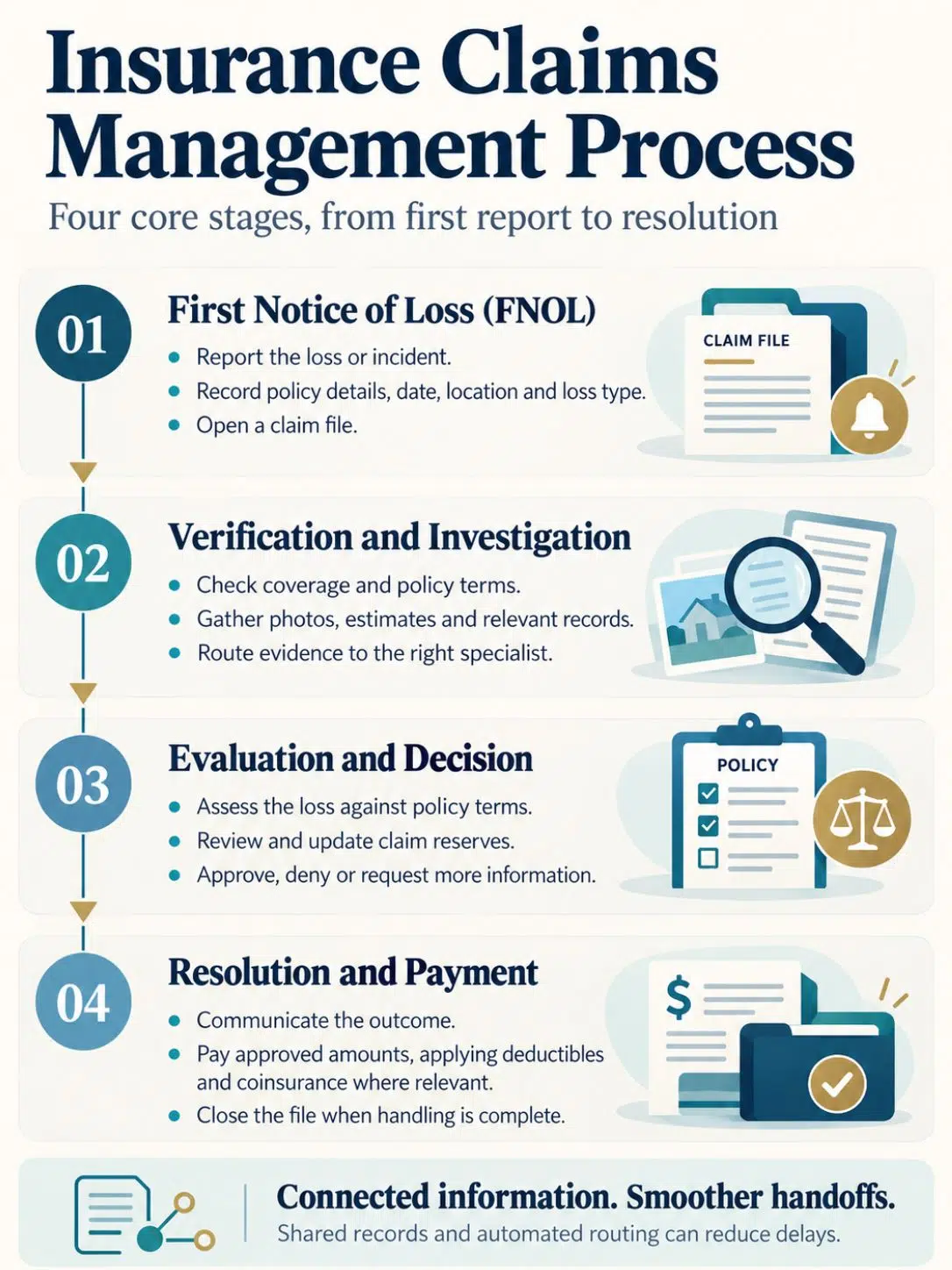
The claims management process typically moves through four core stages: first notice of loss (FNOL), investigation and verification, evaluation and decision, and resolution or payment. Each stage generates data that the next stage depends on, which is why a connected claims management system outperforms disconnected spreadsheets and email chains.
Here is what each stage involves in practice:
- First notice of loss (FNOL): The policyholder, agent, or third party reports the claim. The system captures basic facts, date, location, policy number, loss type, and opens a digital claims file.
- Verification and investigation: Adjusters confirm coverage, request documentation, and gather evidence such as photos, repair estimates, or medical records. Capture and route functions move information to the right specialist automatically.
- Evaluation and decision: The claim is evaluated against policy terms, reserves are set, and a decision is made to approve, deny, or request more information.
- Resolution and payment: Approved claims move to payment processing, including deductibles and coinsurance calculations, and the file is closed.
A well-built claims management system automates the handoffs between these stages, so a claim does not sit untouched in someone’s inbox for days.
How Insurance Claims Management Software Works: Automating the Claims Process Step by Step
Insurance claims management software works by replacing manual handoffs with rules-based automation and a shared digital record that every stakeholder can see. The moment a claim enters the system, data flows from system record into system action, triggering assignments, document requests, and status updates without a human having to manually re-key information at each step.
In a typical automated workflow:
- A policyholder files a claim through a web portal, mobile app, or call center, triggering instant FNOL capture.
- The system automatically checks policy status, coverage limits, and deductible information against the policy administration system.
- Business rules route the claim to the right adjuster or team based on loss type, severity, and jurisdiction.
- Once the adjuster opens file, claim history, prior notes, and third-party data (repair estimates, medical bills, telematics data) are already loaded.
- Automated reminders chase missing documents, and the system flags claims approaching compliance deadlines.
- Payment processing, including deductible and coinsurance calculations, executes once approval is logged.
This is how insurance claims management software works at a mechanical level: not by replacing human judgment, but by removing the repetitive data-entry and routing work that used to eat up most of an adjuster’s day.
What Features Should You Look for in Insurance Claims Software?
The most important features in insurance claims software are automated FNOL intake, configurable workflow rules, document management, integrated communication tools, reporting dashboards, and open APIs for integration. These features together power every step of the claims journey, from intake to resolution.
A strong claims management platform generally includes:
- FNOL capture tools across web, mobile, call center, and IoT-connected devices (for example, telematics sensors that trigger an auto claim automatically after a collision).
- Document and evidence management for photos, estimates, medical records, and recorded statements.
- Automated triage and segmentation, which routes claims, including complex workers’ compensation cases, to adjusters with the right expertise.
- Financial modules that calculate reserves, deductibles, coinsurance, and payments without manual spreadsheets.
- Compliance tracking tied to state and regional regulatory requirements.
- Analytics and reporting dashboards that give claims managers visibility into cycle time, loss ratios, and adjuster workload.
- Integration capability with policy administration, billing, and managed care networks.
How Is Technology Changing Claims Management?
Technology is changing claims management by moving insurers away from on-premise servers and manual data entry toward cloud infrastructure, real-time data analytics, and automated task handling. These three shifts, cloud, data, and automation, now define what a competitive claims management system looks like.
Cloud-Based Claims Systems
Cloud-based claims systems let insurers scale claims operations up or down without buying new hardware. Carriers moving legacy platforms, including long-standing systems like Guidewire ClaimCenter, onto cloud infrastructure gain faster release cycles, easier regional deployment (for example, London market or Germany-specific regulatory templates), and lower total cost of ownership over time. Cloud deployment is also what makes rapid disaster-response scaling possible during catastrophe season, when claim volume can spike overnight.
Data-Driven Decision-Making
Data-driven decision-making means claims managers use analytics dashboards, not gut instinct, to assign work, predict reserves, and spot fraud patterns. Modern systems pull in structured and unstructured data, adjuster notes, medical records, telematics, even social media evidence, and surface it through claims platform dashboards that flag outliers automatically.
Automation of Routine Tasks
Automation handles the repetitive parts of claims processing: data entry, status notifications, document routing, and payment calculations. Removing these manual steps is consistently the biggest lever for shrinking cycle time, because adjusters spend their time on judgment calls instead of paperwork.
How Is AI Transforming Claims Management?
Artificial intelligence is transforming claims management by automating claim summarization, powering virtual assistants that answer policyholder questions, and running sophisticated triage models that route claims faster and more accurately than manual sorting. Generative AI, specifically, now drafts claim summaries and adjuster notes in seconds rather than requiring 20 to 30 minutes of manual writing per file, based on vendor-reported productivity estimates.
Some of the most visible AI use cases in claims today include:
- Generative AI summarization, which condenses long claim files, medical records, and adjuster notes into a short, readable summary.
- Intelligent assistants, often described as multi-agent systems, that handle routine policyholder questions, request missing documents, and update claim status without human intervention.
- Predictive segmentation, which flags high-complexity claims (such as workers’ compensation cases with return-to-work risk) for senior adjuster review early, rather than after weeks of delay.
- Fraud detection models that compare new claims against historical fraud patterns in real time.
What Are the Biggest Challenges in Claims Management?
The biggest challenges in claims management are persistent fraud risk, regulatory compliance complexity, claims backlog during catastrophe events, and data fragmentation across disconnected systems. These challenges exist regardless of company size, though they hit smaller insurers harder because they have fewer resources to absorb a sudden claims spike.
Common persistent pain points include:
- Fraud detection, which requires constantly updated models as fraud tactics evolve.
- Compliance complexity, since claims rules differ by state, region, and line of business.
- Catastrophe surges, where claim volume can jump 300 to 500 percent in affected regions within days (a widely cited estimate from catastrophe-response industry reporting, varying by event severity).
- Data silos, where policy, billing, and claims data live in separate systems that do not talk to each other.
- Adjuster turnover, which creates knowledge gaps when experienced staff leave mid-claim.
Insurance Claims Management Software Pricing and Cost Comparison
Insurance claims management software pricing ranges from a few hundred dollars per user per month for small agency tools to custom enterprise contracts running into six or seven figures annually for large carriers. Cost depends on claim volume, number of users, integration complexity, and whether the deployment is cloud-based SaaS or an on-premise legacy system.
| Buyer type | Typical pricing model | Approximate cost range |
|---|---|---|
| Small agency or MGA | Per-user subscription | $100,$400 per user/month |
| Mid-size TPA or carrier | Tiered subscription or per-claim fee | $50,000,$500,000 per year |
| Large enterprise carrier | Custom enterprise license | $500,000, several million per year |
| Self-insured employer | Modular or per-claim pricing | Varies by claim volume |
These figures are general industry estimates, not vendor-quoted prices, since actual contracts are typically negotiated and non-public. Businesses should request a demo and a volume-based quote before budgeting.
Best Insurance Claims Management Software for Small vs. Large Companies
The best claims management software for small companies is usually a cloud-based, templated platform that deploys quickly with minimal IT staff, while large companies typically need a scalable, highly configurable claims management system that supports multiple lines of business and regional compliance templates.
Choose a lighter, templated system if:
- Claim volume is under a few thousand claims per year.
- You operate in a single line of business, such as auto or general liability.
- You lack a dedicated IT or claims technology team.
Choose an enterprise-grade claims platform if:
- You handle multiple lines of business across different regions or regulatory frameworks.
- You need deep integration with policy administration, billing, and managed care networks.
- You require scalable, ready-to-deploy capabilities that can absorb catastrophe-level claim spikes without manual workarounds.
How to Implement Claims Management Software Without Disrupting Operations
Insurers avoid disruption during implementation by running the new claims management system in parallel with the old process, migrating data in phases, and training staff before full cutover. Rushing a full switch-over on a single date is the most common reason implementations fail.
A practical rollout checklist:
- Audit existing claims data before migration to catch duplicates, missing fields, and outdated records.
- Pilot with one team or line of business first, rather than switching the entire claims operation at once.
- Run parallel systems for 30 to 90 days so adjusters can compare outputs and catch errors.
- Train staff in stages, starting with power users who can support colleagues during full rollout.
- Set a clear cutover date only after the pilot team confirms accuracy and stability.
This phased approach keeps claim volume moving even while the underlying claims management software changes underneath the team.
Common Mistakes When Setting Up Insurance Claims Software
The most common mistakes in claims software setup are poor data migration, inadequate staff training, and configuring workflow rules that do not match real-world claims handling. Each of these mistakes creates rework that costs more time than a careful setup would have.
Watch for these specific pitfalls:
- Migrating “dirty” data without cleaning duplicate or outdated claim records first.
- Under-training adjusters, which leads to workarounds outside the system that recreate the old manual process.
- Over-customizing workflow rules early, before the team understands how the default system actually behaves.
- Skipping integration testing with policy administration or billing systems before go-live.
- Ignoring compliance mapping for multi-state or multi-region operations, which creates audit problems later.
Is Insurance Claims Management Software Worth the Investment?
Yes, for most insurers, MGAs, TPAs, and self-insured employers handling more than a few hundred claims per year, claims management software is worth the investment because it reduces loss adjustment expense, shortens cycle times, and improves customer experience at renewal. The return on investment grows with claim volume.
Businesses should weigh the investment against the real cost of staying manual: higher labor cost per claim, slower payouts that hurt customer satisfaction, and greater fraud exposure from inconsistent review processes. Smaller businesses handling very low claim volume may find a lighter-weight, templated tool offers a better cost-to-benefit ratio than a full enterprise claims management system.
Final Thoughts
Claims management software works by turning a slow, paper-based process into a connected digital workflow, where data moves automatically from first notice of loss through resolution. The technology shift toward cloud infrastructure, data-driven decisions, and automation has made claims processing faster and more accurate, and AI tools are now extending that progress into summarization, triage, and routine correspondence.
For insurance companies, MGAs, TPAs, and self-insured employers evaluating claims management solutions, the practical next step is simple: map your current claims process stage by stage, identify where manual work is slowing things down, and request a demo focused specifically on those bottlenecks rather than a generic feature tour. Subscribe to industry updates on claims technology, review vendor case studies carefully, and prioritize platforms that integrate cleanly with the policy administration and billing systems you already run.
Frequently Asked Questions
1. What is insurance claims management software?
Insurance claims management software is a digital tool that helps insurers manage, track, process, and settle insurance claims efficiently.
2. How does insurance claims management software work?
It streamlines the claims process, including claim submission, document verification, policy validation, assessment, approval, and settlement.
3. What are the benefits of insurance claims management software?
It reduces paperwork, minimizes errors, speeds up claim processing, improves accuracy, and enhances customer satisfaction.
4. Can insurance claims management software detect fraud?
Yes, many solutions use automated rules, data analysis, and AI-powered tools to identify suspicious claims and potential fraud.
5. Can insurance claims management software automate claim processing?
Yes, it can automate repetitive tasks such as data entry, document handling, claim routing, status updates, and notifications.