SaaS sprawl rarely starts with careless spending. It starts with people trying to solve real problems. Marketing needs a survey tool, sales wants better prospecting software, and someone discovers an AI assistant that makes a repetitive task easier. Each decision looks reasonable on its own.
The trouble begins when those tools accumulate faster than the company can track them. Soon, nobody can clearly explain what everything costs, who owns each application, what data it contains, or whether anyone still needs it.
That is when a flexible software stack becomes an unmanaged one.
What Is SaaS Sprawl?
SaaS sprawl is the uncontrolled growth of software-as-a-service applications, subscriptions, user accounts, integrations, and stored data across an organization.
I do not define it by a specific number of applications. There is no point where 49 tools are manageable but 50 automatically become a problem. A large company might govern hundreds of applications responsibly, while a smaller business might struggle with 20 poorly documented subscriptions.
The more useful test is whether the organization can answer a few basic questions:
- Which SaaS applications are people using?
- What business purpose does each one serve?
- Who owns and administers it?
- How much does it really cost?
- Who has access?
- What information does it store?
- When does the contract renew?
- What systems depend on it?
- How would the company stop using it safely?
If answering those questions requires a company-wide investigation, SaaS sprawl is already developing.
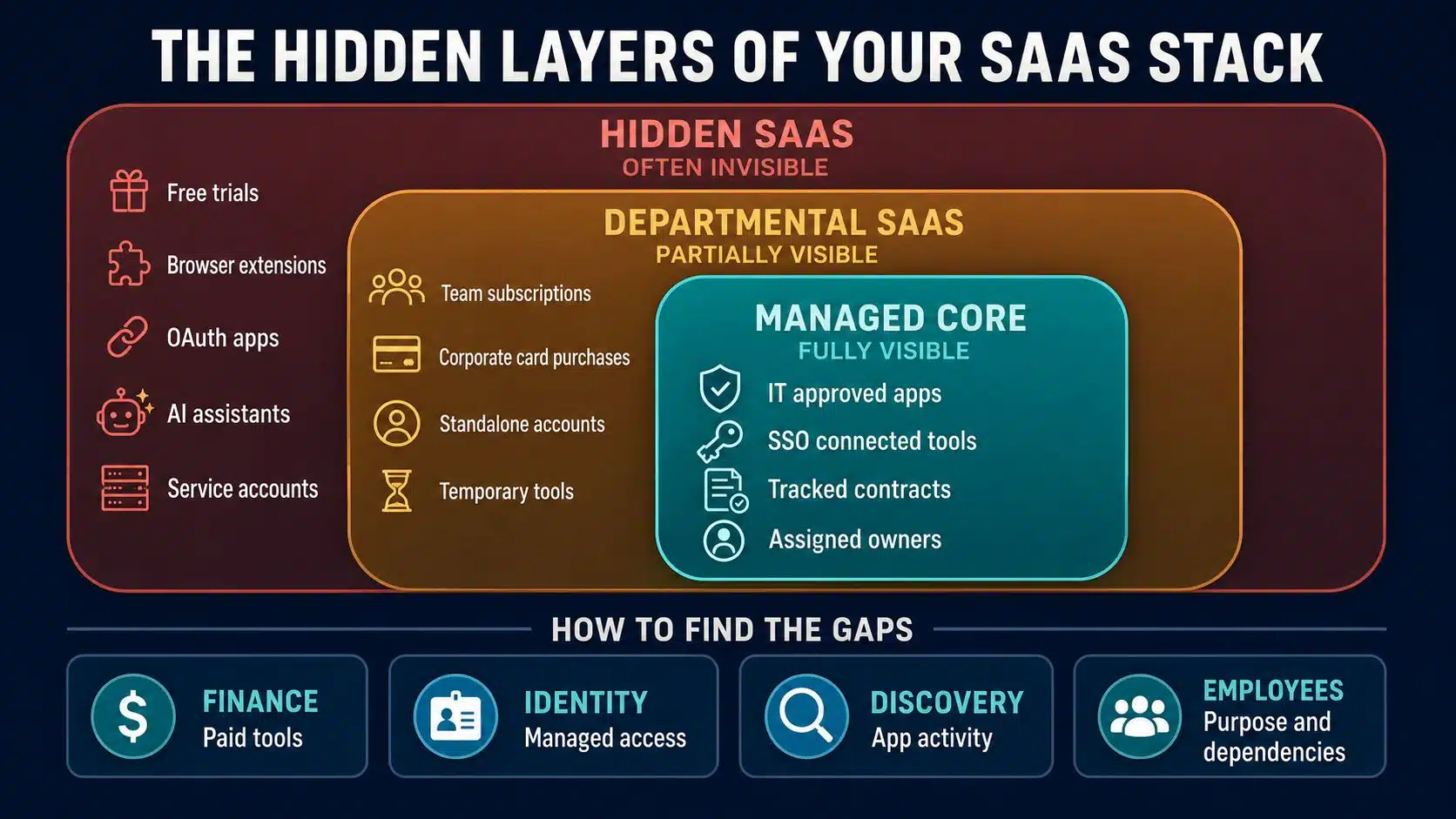
The problem also extends beyond visible subscriptions. Free tools, trial accounts, browser extensions, AI assistants, guest accounts, OAuth connections, API keys, and employee-created automations can all become part of the company’s software environment.
SaaS Sprawl Is Not the Same as Shadow IT
SaaS sprawl and shadow IT are closely related, but they are not interchangeable. Shadow IT refers to technology used without the knowledge, approval, or oversight of the company’s IT team. An employee uploading work files to an unapproved storage or AI service is a straightforward example.
SaaS sprawl is broader. It includes both approved and unapproved applications.
A project management platform may have passed procurement, finance, and security reviews. It can still contribute to sprawl if another department buys a competing product, nobody monitors the licenses, and the original owner leaves before renewal.
Shadow IT often feeds SaaS sprawl, but approval alone does not guarantee that an application will remain useful, secure, or properly managed.
Why SaaS Stacks Grow Out of Control
Most employees are not trying to create a technology-management problem. They are trying to finish their work, and SaaS products make it easy to act quickly.
Software Is Easy to Buy
Many applications can be tested or purchased with a work email and a company card. Small subscriptions may sit below formal approval limits, while free tools never appear in financial records.
One inexpensive purchase may not matter much. Multiply that behavior across departments, projects, and locations, and the company can accumulate a large collection of disconnected tools.
Teams Choose Tools Independently
Decentralized purchasing is not automatically a bad idea. The people closest to a problem often understand their needs better than a central technology team.
The issue appears when departments solve similar problems without checking what the company already owns. Marketing, sales, support, and product teams may each adopt separate tools for surveys, automation, scheduling, analytics, or document sharing.
Temporary Tools Become Permanent
A team may buy an application for a campaign, client project, migration, or short-term experiment. The work ends, but the subscription quietly renews.
The application may also retain company data, integrations, shared links, and user accounts long after its original purpose has disappeared.
Existing Products Add Overlapping Features
SaaS products rarely stay within their original category. A communication platform adds project management. A CRM introduces email marketing. A design tool adds documents, automation, and AI.
This creates overlap even when every original purchase was sensible. The company eventually pays for the same broad capabilities across several products without deliberately choosing to do so.
Applications Lose Their Owners
Subscriptions often become ownerless after resignations, reorganizations, mergers, or role changes. Finance continues paying the invoice, but nobody evaluates the application, manages access, or prepares for renewal.
That is how a useful product becomes an orphaned subscription.
Signs Your Company Has SaaS Sprawl
A long application list is not enough to prove that a company has a problem. I would look for patterns of uncertainty, duplication, and weak ownership.
Financial Warning Signs
- Several vendors are being paid for substantially similar capabilities.
- Licenses remain assigned to inactive users or former employees.
- Teams discover renewals after the cancellation deadline.
- Employees have premium licenses but use only basic features.
- Consumption-based charges increase without a clear business reason.
- Finance cannot match software spending with a reliable application inventory.
- Nobody knows who should approve a renewal.
Operational Warning Signs
- Employees are unsure which application is the official source of information.
- Customer, project, or employee data is duplicated across platforms.
- Teams manually move information between tools.
- Different departments produce conflicting reports.
- Important workflows depend on one person’s private account or automation.
- New employees receive an inconsistent mix of application access.
- Staff waste time searching for information spread across several systems.
Security and Data Warning Signs
- Employees use direct passwords instead of managed company sign-ins.
- Multifactor authentication is not consistently enforced.
- Former employees or contractors retain access.
- Guest, administrator, and service accounts are rarely reviewed.
- Unapproved applications can access company email, files, calendars, CRM records, or source code.
- Sensitive information is stored in applications with no documented owner.
- Nobody knows how to export or delete company data before canceling a product.
One warning sign may have a reasonable explanation. A cluster of them suggests that the stack is no longer being managed as a connected business system.
Why SaaS Sprawl Costs More Than Subscription Fees
Wasted subscriptions are the easiest cost to see, but they are only part of the damage.
Unused and Oversized Licenses
Some employees need a lower plan, occasional access, or no paid license at all. Others may have stopped using an application without telling the person responsible for billing.
However, I would not classify a license as waste based solely on its last login. A quarterly reporting or compliance tool may be used infrequently and still be essential. Usage data always needs business context.
Duplicate Capabilities
Overlapping tools create more than duplicate license costs. Each product may require administration, onboarding, training, integrations, security reviews, data maintenance, and employee support.
Not all overlap should be removed, though. Separate applications may be justified by specialist requirements, regional rules, client preferences, or resilience needs. I would rather keep two well-justified tools than force every team into one unsuitable platform just to make the inventory look tidy.
Fragmented Work
When the same process is divided across several applications, employees spend time finding information, switching tools, updating duplicate records, and correcting inconsistencies.
These costs are harder to find on a balance sheet, but they can affect daily productivity more than the subscription itself.
Security and Privacy Exposure
Every application introduces accounts, permissions, sharing settings, integrations, and stored data. An unmonitored tool may retain sensitive information or provide access to another company system.
OAuth connections, API tokens, bots, and AI agents make this harder to manage. These non-human identities can continue operating after the employee who created them has changed roles or left the company.
Unknown applications also make it harder to retrieve, retain, protect, or delete information properly. A company cannot govern data it does not know exists.
How to Rein In SaaS Sprawl
I would treat SaaS sprawl as an ongoing management problem, not a dramatic application-cutting exercise. The goal is to create visibility and accountability without making it painfully slow for employees to get useful tools.
1. Discover the Complete SaaS Stack
Start by identifying every application people use, including free and unapproved products. No single source will reveal everything. A proper inventory may require information from:
- Vendor invoices and accounts payable
- Expense reports and corporate cards
- Procurement records and contracts
- Single sign-on and identity-provider logs
- Application administration consoles
- Browser, endpoint, or network discovery
- OAuth and API connection records
- Employee and department interviews
Each source has limits. Financial records miss free tools. Single sign-on misses direct accounts. Technical discovery may show that an application was accessed without explaining why it matters.
The findings need to be combined, cleaned, and checked for duplicate vendor names or products.
A smaller company may be able to manage this in a well-maintained spreadsheet. A larger or faster-growing organization may need a software asset or SaaS management platform. The important part is having a reliable process, not buying another tool for the sake of buying one.
2. Give Every Application an Owner
Every application should have a named business owner and, when necessary, a technical administrator.
The business owner should be able to explain:
- Why the application is needed
- Which teams and processes depend on it
- Who should have access
- Whether the current plan is appropriate
- Whether the product should be renewed
- What would happen if the company stopped using it
An ownerless application should be investigated before it renews. It should not continue indefinitely because nobody feels responsible for making a decision.
3. Build a Useful SaaS Inventory
Recording product names and prices is not enough. For each application, capture:
- Business purpose
- Owner and administrator
- Paying department
- Approval status
- Contract and cancellation dates
- License quantity and plan
- Actual or projected annual cost
- Active users and meaningful feature usage
- Type and sensitivity of stored data
- SSO and MFA status
- Administrator, guest, and service accounts
- Integrations and OAuth permissions
- Data export and deletion process
This creates a shared source of truth for IT, finance, procurement, security, and department leaders.
4. Evaluate Real Use and Value
Application usage should be reviewed over a period that makes sense for the product. For many workplace tools, 30-, 60-, or 90-day activity can reveal dormant accounts. Seasonal and compliance tools may require a longer view.
Login frequency is only one signal. I would also ask:
- Are employees using the features included in the paid plan?
- Does the application support an important business process?
- Would removing it affect customers, revenue, or compliance?
- Is the same capability already available elsewhere?
- Are employees satisfied with the approved alternative?
- What data and integrations depend on it?
- How difficult and expensive would migration be?
- Does the application create significant security or privacy risk?
This prevents a cleanup team from canceling a low-frequency but high-value tool.
5. Decide What to Keep, Optimize, or Remove
Each application should lead to a clear decision.
| Decision | When It Makes Sense |
| Keep | The application provides clear value and is appropriately governed |
| Optimize | The product is useful, but licenses, tiers, storage, or consumption need adjusting |
| Consolidate | Another approved application can meet the need without unacceptable compromises |
| Replace | The current product is too costly, risky, unreliable, or poorly suited |
| Retire | The application no longer has a valid business purpose |
| Keep as an exception | Overlap is justified by specialist, regional, regulatory, or customer needs |
Start with high-cost contracts approaching renewal, obvious duplication, ownerless applications, inactive licenses, and unknown tools handling sensitive information. There is little value in debating a low-cost subscription while a major contract quietly renews for another year.
6. Strengthen Access Management
Where supported, applications should use centralized single sign-on and multifactor authentication.
The company should also:
- Automate account creation and removal where practical.
- Match access to job responsibilities.
- Limit administrator privileges.
- Review guest and external accounts.
- Track service accounts and API credentials.
- Remove access promptly when someone leaves or changes roles.
- Review connected applications and OAuth permissions.
- Disable dormant accounts according to a documented policy.
SSO improves access control and visibility, but it does not reveal every application. Free tools, direct accounts, browser extensions, and employee-purchased products may still exist outside the identity system.
7. Review Applications Before Their Renewal Deadlines
The date that matters most may not be the renewal date. Many contracts require cancellation notice weeks or months earlier.
For significant subscriptions, reviewing usage and business value 90 to 120 days before renewal creates time to:
- Reclaim unused licenses
- Reduce plan levels
- Compare alternatives
- Gather employee feedback
- Negotiate pricing
- Plan a migration
- Submit cancellation notice on time
After the decision, update the inventory with the new terms and next review date.
8. Retire Applications Safely
Canceling an application without checking its dependencies can cause more damage than savings.
Before retirement:
- Identify connected workflows, reports, forms, and automations.
- Export or migrate required information.
- Address retention and legal requirements.
- Transfer ownership of shared records and files.
- Revoke user, guest, administrator, and service accounts.
- Remove API keys and OAuth connections.
- Disconnect SSO and automated provisioning.
- Explain the replacement to affected employees.
- Confirm that billing has stopped.
- Document data deletion where necessary.
Cancellation should be the final step, not the first.
How to Stop SaaS Sprawl From Returning
A one-time cleanup may produce short-term savings, but it will not fix the conditions that allowed the problem to develop. The company needs a purchasing process that employees can realistically follow. That process should include:
- A searchable catalog of approved tools
- A short application request form
- Faster approval for low-risk products
- Deeper review for tools handling sensitive or critical data
- A required business owner and budget
- Defined trial periods and success criteria
- Security, privacy, integration, and exit checks
- Regular license and access reviews
- A shared calendar for renewals and cancellation deadlines
Governance should create useful guardrails, not make every software decision painfully slow. If approval takes weeks for a simple, low-risk tool, employees will continue finding ways around it.
It is also worth asking why an unapproved product became attractive. The official tool may lack an important capability, be difficult to use, or require an access process that does not work. Shadow usage can reveal a real gap in the approved stack.
SaaS Consolidation Mistakes to Avoid
The cleanup should not become a competition to reach the smallest possible application count.
Avoid:
- Blocking tools without understanding why employees use them
- Canceling applications based only on login frequency
- Forcing specialist teams into unsuitable general-purpose platforms
- Ignoring free tools because they do not create invoices
- Overlooking OAuth connections, service accounts, and API keys
- Canceling contracts before migrating data and dependencies
- Buying a management platform without assigning human ownership
- Reporting projected savings that never appear in the actual budget
- Treating SaaS management as an annual event
The healthiest software stack is not necessarily the smallest. It is the one the company can explain, secure, support, and justify.
Build a Stack You Can Explain
SaaS gives teams the freedom to solve problems quickly, and good governance should not remove that advantage. The goal is to stop useful experimentation from turning into permanent, invisible infrastructure.
Start with visibility. Find the applications, accounts, spending, data, and integrations that already exist. Assign owners, evaluate real value, strengthen access, plan ahead for renewals, and retire tools carefully.
That is how I would rein in SaaS sprawl without forcing every team into the same oversized platform or slowing useful work to a crawl.
Frequently Asked Questions on SaaS Sprawl
1. How many SaaS applications are too many?
There is no universal limit. The number becomes a problem when the company cannot track ownership, cost, access, data, usage, or renewals. Ten unmanaged applications can create more trouble than 100 well-governed ones.
2. Is SaaS sprawl the same as shadow IT?
No. Shadow IT refers to technology used without IT’s knowledge or approval. SaaS sprawl includes approved and unapproved applications that have grown without effective coordination or lifecycle management.
3. Who should be responsible for controlling SaaS sprawl?
Responsibility should be shared. IT manages technology and access, security evaluates risk, finance tracks spending, procurement manages contracts, and business owners justify value. Every application still needs one clearly accountable owner.
4. Can single sign-on eliminate SaaS sprawl?
No. SSO improves visibility and access control, but it cannot find every application. Free tools, direct accounts, expensed subscriptions, browser extensions, and unsanctioned integrations may remain outside the identity provider.
5. How often should a company audit its SaaS stack?
A complete inventory should be reviewed at least once or twice a year. Accounts, high-risk tools, and major renewals deserve more frequent attention. Larger or regulated organizations may need continuous discovery and quarterly access reviews.