If you need Canonical tags explained simply, they help search engines understand which version of a page should be treated as the main one when similar or duplicate URLs exist.
For publishers, this is not a small technical detail. A single article can appear through category paths, tracking parameters, print pages, AMP versions, syndicated copies, tag archives, or old URL structures. If search engines see too many versions of the same content, they may choose a version you did not want to rank.
That is where canonical tags help. It does not make weak content stronger. It does not replace redirects, noindex rules, or good internal linking. But it gives search engines a clear preference when duplicate or near-duplicate pages exist.
The goal is simple. You want ranking signals, links, crawl attention, and performance data to point toward the cleanest, most useful version of the page. This guide explains canonical URL SEO in a publisher-friendly way, without turning it into a developer-only topic.
What Is a Canonical Tag?
A canonical tag is a small HTML element that tells search engines which URL is the preferred version of a page.
It usually looks like this:
<link rel=”canonical” href=”https://www.example.com/sample-article/” />
This tag normally sits inside the <head> section of a page.
In plain English, it says:
“This page may have duplicate or similar versions, but this is the main URL I want search engines to treat as preferred.”
For example, these URLs may show the same article:
- https://www.example.com/seo-guide/
- https://www.example.com/seo-guide/?utm_source=newsletter
- https://example.com/seo-guide/
- http://www.example.com/seo-guide/
The canonical tag should point to the clean preferred version. For most publishers, that means the HTTPS, final, indexable, user-friendly article URL.
Why Canonical Tags Matter for Publishers
Publishers create duplicate content situations more often than they realize. A news site, magazine, or blog may have thousands of URLs created by categories, tags, authors, pagination, search filters, ad tracking, UTM parameters, AMP pages, or syndicated content.
Some duplication is normal. It is not automatically a penalty. The real issue is control.
If search engines find multiple versions of the same article, they must decide which one to show. Sometimes they choose correctly. Sometimes they choose a parameter URL, an old URL, a duplicate archive version, or a version with weaker signals.
Canonical tags help publishers:
- Point search engines to the preferred URL
- Consolidate duplicate content signals
- Clean up tracking and parameter issues
- Protect evergreen articles from duplicate versions
- Support cleaner crawl and indexing signals
- Reduce confusion across CMS templates
- Improve reporting by focusing performance on one URL
Canonical tags are especially useful for evergreen content. A long-term article may collect backlinks, social shares, internal links, newsletter clicks, and tracking parameters over time. Canonical tags help keep the preferred article URL clear.
Canonical Tags vs Canonical URLs
These two terms are related, but they are not exactly the same.
| Term | Meaning | Example |
| Canonical tag | The HTML element that signals the preferred URL | <link rel=”canonical” href=”…” /> |
| Canonical URL | The preferred URL you want search engines to treat as the main version | https://www.example.com/article/ |
The canonical tag is the signal. The canonical URL is the destination. A clean canonical setup means every indexable page clearly points to the correct preferred URL. For a normal article page, the page usually points to itself. This is called a self-referencing canonical.
What Is a Self-Referencing Canonical?
A self-referencing canonical is a canonical tag that points to the same URL the user is already visiting.
Example:
- Page URL: https://www.example.com/mobile-seo-guide/
- Canonical tag: <link rel=”canonical” href=”https://www.example.com/mobile-seo-guide/” />
This tells search engines that the current URL is the preferred version. For publishers, self-referencing canonicals are a good default for original articles, pillar pages, cluster content, category pages, and other indexable pages.
They help prevent confusion when small URL variations appear later, such as tracking parameters or session parameters.
When Publishers Should Use Canonical Tags
Canonical tags are useful when two or more URLs show the same or very similar content.
Common publisher use cases include:
- UTM tracking parameters
- Printable article versions
- AMP and non-AMP versions
- HTTP and HTTPS variants
- www and non-www variants
- Republished or syndicated articles
- Category path duplicates
- Tag archive duplicates
- Pagination or filtered archive variations
- Similar landing pages were created for campaigns
- Article copies in multiple sections
For example, a publisher may publish one article under a primary URL, but the article also appears in a category feed, tag archive, and newsletter tracking URL. The canonical should point to the clean article URL, not the tracking version.
Canonical Tags and Duplicate Content
Duplicate content canonical problems usually happen when the same content appears under different URLs.
For publishers, this can happen naturally. A single article may be reachable from multiple navigation paths. A CMS plugin may create attachment pages. A tracking campaign may generate URL variants. A site migration may leave old versions accessible.
Canonical tags help search engines understand which version should be treated as the main one. But canonical tags are not a cleanup excuse.
If a duplicate page has no reason to exist, remove it or redirect it. If a page should not appear in search, use noindex. If the page is a true alternate version of the same content, canonical may be the right tool. Use canonical tags for duplicate or near-duplicate pages that still need to exist for users or systems.
Canonical vs Redirect vs Noindex
Publishers often confuse canonical tags with redirects and noindex tags. They solve different problems.
| Method | Main Purpose | Best Use | Common Mistake |
| Canonical tag | Signals preferred version | Similar or duplicate pages that still need to exist | Using it on unrelated pages |
| Redirect | Sends users and crawlers to another URL | Old URLs, moved articles, deleted duplicates | Keeping old duplicate pages live when the redirect is cleaner |
| Noindex | Keeps a crawlable page out of search results | Thin archives, internal search, low-value pages | Blocking the page in robots.txt so crawlers cannot see the noindex |
| Robots.txt | Controls crawling | Low-value crawl paths and technical areas | Using it to solve duplicate content canonical issues |
A simple rule helps:
- Use a redirect when the old page should no longer be accessed.
- Use canonical when similar versions need to stay live.
- Use noindex when the page can be crawled but should not appear in search.
- Use robots.txt when the goal is crawl control, not canonicalization.
How to Add a Canonical Tag
For HTML pages, the canonical tag should be placed in the <head> section.
Example: <link rel=”canonical” href=”https://www.example.com/article-url/” />
Use the full absolute URL, not a relative path.
- Good: https://www.example.com/article-url/
- Risky: /article-url/
Absolute URLs are clearer and safer, especially during migrations, staging issues, protocol changes, or domain changes.
For WordPress publishers, SEO plugins often generate canonical tags automatically. Still, do not assume everything is correct. Check important templates manually.
Review canonicals on:
- Posts
- Pages
- Categories
- Tags
- Author pages
- Pagination
- AMP pages
- Custom post types
- Syndicated articles
- Landing pages
Your CMS may handle standard pages well, but fail on custom templates.
Canonical Tags in WordPress
Most WordPress publishers use an SEO plugin to manage canonical tags. That is usually fine. The problem is not WordPress itself. The problem is when plugins, themes, builders, and custom templates produce conflicting signals.
Common WordPress issues include:
- Multiple canonical tags on one page
- Canonicals pointing to the wrong domain
- HTTP canonicals on HTTPS pages
- Category pages are canonicalized incorrectly
- Paginated pages pointing only to page one
- Attachment pages indexed by mistake
- Parameter URLs are not handled cleanly
- Custom templates missing canonicals
- AMP pages with incorrect canonical setup
After installing or changing an SEO plugin, check your high-value article pages first. Then check categories, tags, author pages, and paginated archives. For publishers, one template mistake can affect thousands of URLs.
Canonical Tags for Syndicated Content
Syndication is common in publishing. Your article may appear on a partner site, network site, or republishing platform. When the same article appears on another site, the safest SEO setup depends on the agreement.
If another site republishes your full article, you may ask them to use a cross-domain canonical pointing back to your original article. This tells search engines that your version is the preferred source.
However, not every publisher or partner will agree to this. Some may use a source link instead. Some may add noindex. Some may publish an edited version.
Before syndicating valuable evergreen content, agree on the SEO handling in advance. For important original work, do not wait until after duplication happens. Make canonical expectations part of your publishing workflow.
Canonical Tags for Paginated Content
Be careful with pagination. A common mistake is canonicalizing every paginated page to page one.
For example:
/category/seo/page/2/ canonicalized to /category/seo/
This can be wrong if page two contains different article links and serves a real browsing purpose.
Paginated pages are not always duplicates. They often contain different content. If they are indexable and useful, they may need self-referencing canonicals.
For publishers, this matters on:
- Category archives
- Tag archives
- Author archives
- Search-style listing pages
- Long multi-page articles
- Review roundups
- Listicles split across pages
Do not treat every paginated page as a duplicate. Review the content and purpose first.

Canonical Tags and Internal Linking
Canonical tags work better when your internal links support the same preferred URL. If your canonical tag points to one URL, but your menus, breadcrumbs, related posts, and body links point to another version, you send mixed signals.
For example, avoid linking internally to:
- HTTP versions
- Non-canonical category paths
- URLs with tracking parameters
- Old article slugs
- Duplicate archive versions
- Printable URLs
- Staging URLs
For example, for my cluster content, I’ll link naturally to my pillar article on technical SEO for publishers using the clean canonical URL. That keeps a topical structure clear for readers and crawlers. A canonical tag is a signal. Internal linking is another signal. They should agree.
Canonical Tags and XML Sitemaps
Your XML sitemap should list canonical URLs only. If your sitemap lists one URL but the page canonical points to another, that creates confusion. Search engines may still figure it out, but your setup becomes harder to trust.
For publishers, this often appears after:
- Site migrations
- Slug changes
- HTTP to HTTPS moves
- www to non-www changes
- CMS rebuilds
- SEO plugin changes
- Content pruning
- Category restructuring
A strong sitemap and canonical setup should match.
If the canonical URL is: https://www.example.com/seo-guide/
Then the sitemap should list that same URL, not a parameter version, a redirecting version, or an old path.
Common Canonical Tag Mistakes
There are multiple canonical tag mistakes publishers make. Some of them are listed below to avoid further confusion.
Mistake 01: Pointing Canonicals to the Wrong URL
This is the most damaging mistake. If an important article points its canonical tag to the wrong page, search engines may treat the wrong URL as preferred.
Always check canonicals on high-traffic pages after plugin changes, migrations, or template edits.
Mistake 02: Adding Multiple Canonical Tags
A page should not have several conflicting canonical tags.
This can happen when an SEO plugin, theme, and custom code all add canonical tags at once. Keep one clear canonical signal.
Mistake 03: Canonicalizing Different Pages Together
Canonical tags are for duplicate or very similar pages.
Do not canonicalize a weak article to a stronger article just because you want the stronger article to rank. If the content is different, this can create confusion.
Mistake 04: Using Canonical Instead of Redirect
If an old URL has been replaced and no longer needs to exist, a redirect is often cleaner than keeping both URLs live with a canonical tag.
Canonical is useful when the duplicate version still needs to remain accessible.
Mistake 05: Using Robots.txt for Canonicalization
Do not block duplicate pages in robots.txt and expect canonicalization to work cleanly.
If crawlers cannot access the page, they may not see the canonical tag.
Mistake 06: Canonicalizing All Paginated Pages to Page One
Paginated pages often contain different content.
Do not automatically point every page two, page three, or page four to page one unless those pages are truly duplicate or not meant to stand on their own.
Mistake 07: Sending Mixed Signals
Mixed signals happen when your canonical tag, internal links, sitemap, redirects, hreflang, and structured data point to different URLs.
Search engines may choose a different canonical when your signals conflict.
Best Practices for Canonical URL SEO
Strong canonical URL SEO is mostly about consistency.
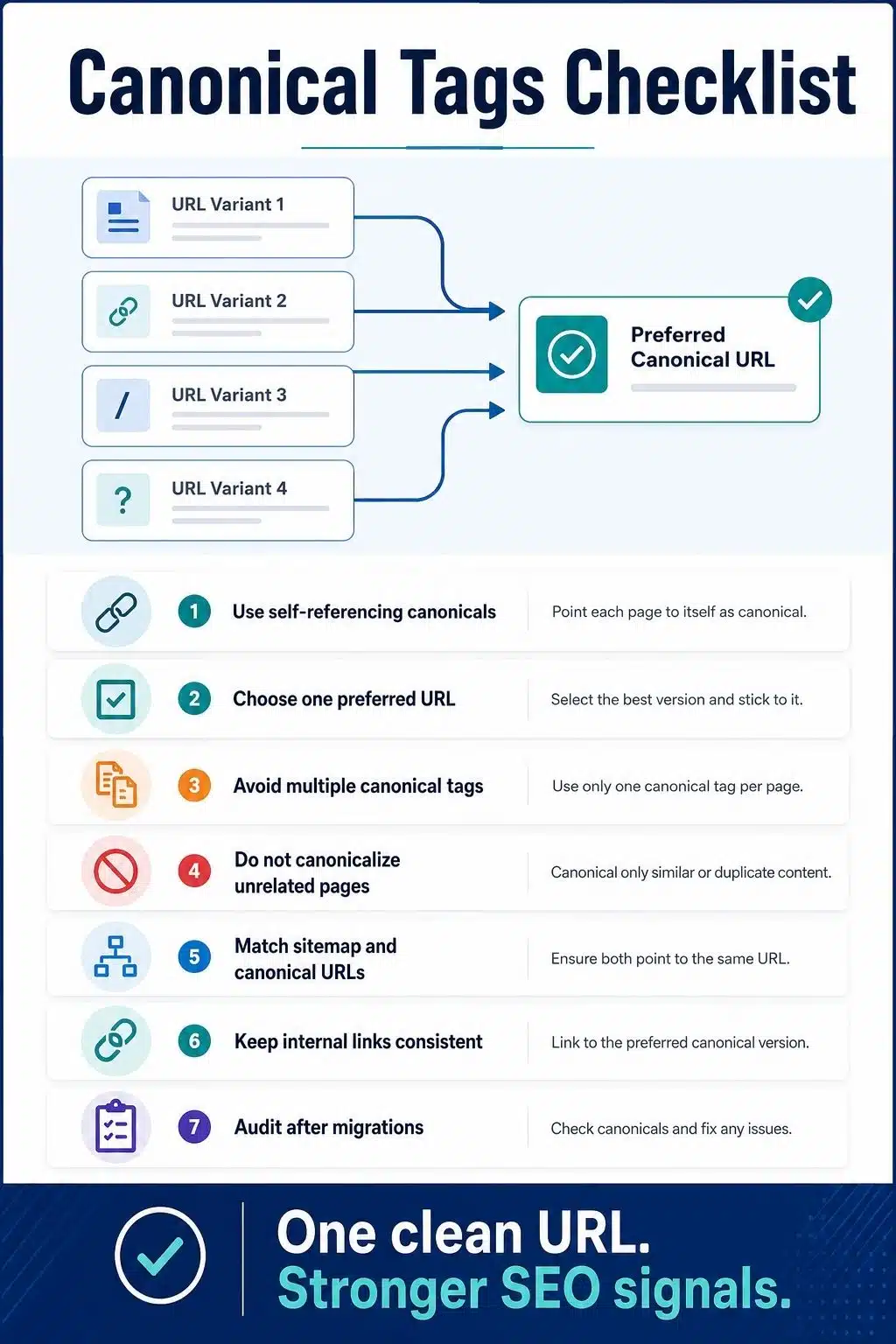
- Use self-referencing canonicals on original indexable pages.
- Use absolute canonical URLs.
- Keep canonicals in the HTML head.
- Avoid multiple canonical tags.
- Point duplicates to the best preferred version.
- Use redirects when the duplicate should not exist anymore.
- Keep sitemap URLs and canonical URLs aligned.
- Link internally to canonical URLs.
- Do not canonicalize unrelated pages.
- Review pagination before applying canonicals.
- Audit after migrations and plugin changes.
For publishers, the biggest habit is template checking. Do not test only one article. Test every major template that can create indexable URLs. That includes posts, pages, categories, tags, authors, pagination, AMP, custom post types, and landing pages.
Final Thoughts
Canonical tags explained well come down to one practical idea: tell search engines which URL should represent a piece of content when duplicate or similar versions exist.
For publishers, that clarity matters. Large sites create duplicate URLs easily. Tracking parameters, archives, syndication, CMS settings, AMP, pagination, and migrations can all create confusion.
Canonical tags help reduce that confusion, but only when they are consistent with your internal links, sitemap, redirects, and indexation rules.
Use canonicals carefully. Keep your preferred URLs clean. Audit important templates. Do not use canonical tags as a shortcut for unrelated content, old URLs that should redirect, or pages that should be noindexed.
A good canonical setup is quiet. Readers will never notice it. But search engines get a cleaner signal about which version of your content deserves attention. That is exactly what a strong publisher SEO needs.
Frequently Asked Questions About Canonical Tags
1. What is a canonical tag in SEO?
A canonical tag is an HTML element that tells search engines the preferred version of a page when duplicate or similar URLs exist. It helps search engines understand which URL should represent the content in search results.
Canonical tags help manage duplicate content by signaling the preferred URL. They do not remove duplicate pages or guarantee search engines will follow your preference, but they are a strong signal when used correctly.
3. Should every page have a canonical tag?
Most indexable publisher pages should have a canonical tag. Original articles, pages, and valuable archives usually use self-referencing canonicals. Duplicate or near-duplicate pages should point to the preferred version.
4. Is canonical the same as noindex?
No. Canonical suggests the preferred version of duplicate or similar content. Noindex tells search engines not to show a page in search results. Use canonical for duplication. Use noindex for pages that should not appear in search.
5. Can Google ignore a canonical tag?
Yes. Canonical tags are signals, not absolute commands. If Google sees conflicting signals or believes another page is a better representative version, it may choose a different canonical URL.
6. Should paginated pages canonicalize to page one?
Not automatically. Paginated pages often contain different content, so they may need self-referencing canonicals. Review the page’s purpose before canonicalizing every paginated URL to page one.
Publishers should audit canonical tags after migrations, redesigns, SEO plugin changes, CMS changes, permalink updates, syndication changes, or traffic drops. For large publisher sites, a quarterly template-level audit is a smart habit.