
Most people do not read a web page from top to bottom the first time they open it. They scan. They look at the title. They jump through headings. They check whether the page answers the right question. If the structure feels messy, they leave. If the page is clear, they stay longer, move through the sections, and trust the content faster. That is why the header tags hierarchy still matters in 2026.
Heading tags are not just big bold lines inside an article. They are part of the page structure. They help readers understand the flow. They help search engines interpret the main topic and supporting ideas. They also help screen readers and assistive technologies navigate content more easily.
Bad headings create confusion. Good headings create direction. A strong heading structure tells the reader: here is the main topic, here are the major sections, and here is how each idea connects.
For SEO, that matters because search is no longer only about ranking a page with a keyword. Search engines, AI Overviews, snippets, and answer-style results all need clear content that can be understood quickly. If your article has strong information but a poor heading structure, you are making both readers and search systems work harder than necessary.
This guide explains how H1, H2, H3, H4, H5, and H6 tags work, how to use them properly, where most content teams go wrong, and how to apply heading SEO best practices without making the article sound robotic.
What Are Header Tags?
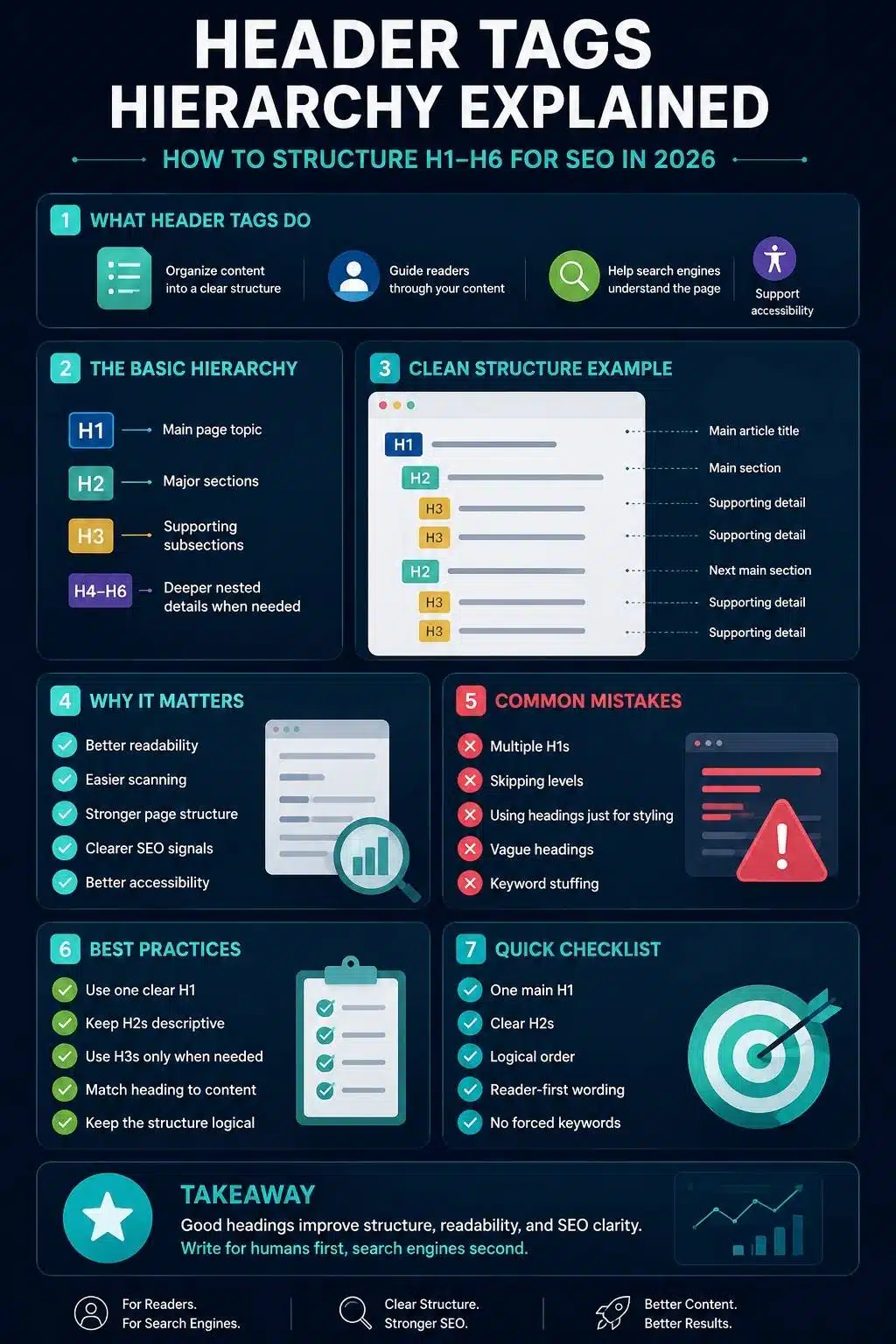
Header tags are HTML elements used to organize headings and subheadings on a web page.
They range from H1 to H6:
- H1 is the highest-level heading.
- H2 is used for major sections.
- H3 is used for subsections inside H2 sections.
- H4, H5, and H6 are used for deeper nested sections when needed.
In HTML, they look like this:
<h1>Main Page Topic</h1>
<h2>Major Section</h2>
<h3>Subsection Inside That Major Section</h3>
Most writers do not need to write HTML manually. In WordPress, Google Docs, CMS editors, and page builders, you usually select headings from a formatting dropdown. But the structure still matters.
A heading is not just a design choice. It should describe the content that follows. If you use an H3 only because it looks smaller, or use an H2 only because it looks nice, the page structure becomes weaker.
A simple rule helps: headings should work like an outline. If someone reads only your headings, they should understand the article’s journey.
Why Header Tags Hierarchy Matters for SEO
Header tags hierarchy matters because it gives your content order. A search engine can read the full text of a page, but headings help clarify what the page is about and how its sections relate. Readers also use headings to decide whether a page is worth their time.
This becomes even more important in long-form SEO content. A 2,500-word article without clear headings feels heavy. A 2,500-word article with smart headings feels manageable. The content may be the same length, but the experience is completely different.
Headings help with:
- Page structure
- Reader scanning
- Search intent alignment
- Topic clarity
- Accessibility
- Featured snippet potential
- Internal editing
- Content updates
- AI search readability
- On-page SEO organization
That does not mean headings are a ranking trick. Adding keywords to every H2 will not magically improve rankings. In fact, it often makes the article worse.
The real value is clarity. If the H1 names the page topic, the H2s cover the main questions, and the H3s explain supporting details, the page becomes easier to understand. That is useful for readers first. SEO benefits follow from that clarity.
H1, H2, and H3 SEO: The Basic Structure
Most SEO articles mainly rely on H1, H2, and H3 tags. H4 to H6 exist, but many blog posts and editorial articles do not need them. If your article uses H5 and H6 often, there is a good chance the structure is too complex or the page should be split into separate sections.
Here is the basic structure:
| Heading Level | Main Purpose | Common Use |
| H1 | Main page topic | Article title or page title |
| H2 | Major sections | Main ideas under the topic |
| H3 | Subsections | Supporting points inside an H2 |
| H4 | Deeper detail | Rarely needed in normal blogs |
| H5 | Extra nested detail | Usually unnecessary |
| H6 | Lowest heading level | Almost never needed in editorial content |
For H1, H2, and H3 SEO, the most practical advice is this:
Use one clear H1. Use H2s to organize the main sections. Use H3s only when a section needs smaller parts. Do not add headings just to add keywords. Do not turn every sentence into a heading. Do not use H4 because it looks pretty in your theme. A heading should earn its place.
The H1 Tag: Your Main Page Topic
The H1 is the main heading of the page. It should clearly tell readers what the page is about.
For this article, a strong H1 is:
Header Tags Hierarchy Explained: How to Structure H1-H6 for SEO in 2026
It includes the focus keyword naturally. It tells the reader what the article covers. It also adds the SEO angle and the year context.
A weak H1 would be: Headings, which is too broad.
Another weak H1:
The Ultimate Complete Powerful Guide to Header Tags Hierarchy, H1 H2 H3 SEO, Heading Structure, and Heading SEO Best Practices
That one tries too hard. It stuffs keywords instead of helping the reader. A good H1 should be specific without becoming a keyword suitcase.
Should Every Page Have Only One H1?
The safest editorial rule is to use one H1 per page. Modern HTML can technically handle more complex structures, and some templates may use multiple H1s. But for most SEO content, one H1 keeps things simple, clean, and easy to audit.
For publishers, blogs, and business websites, the H1 should usually be the visible article title or page title.
If your page has multiple H1s because the logo, sidebar, page title, and widget titles are all coded as H1, that is worth fixing. It may not destroy SEO overnight, but it creates a messy structure.
Simple wins here. One page. One main topic. One clear H1.
The H2 Tag: Your Main Sections
H2 tags divide the page into major sections. If the H1 is the article title, H2s are the main chapters.
For an article about header tags hierarchy, strong H2s might include:
- What Are Header Tags?
- Why Header Tags Hierarchy Matters for SEO
- H1, H2, and H3 SEO: The Basic Structure
- Common Heading Structure Mistakes
- Heading SEO Best Practices for 2026
- How to Audit Header Tags on Existing Pages
These H2s help the reader move through the topic logically.
Weak H2s look like this:
- Important Things
- More Details
- Helpful Tips
- Final Thoughts
- SEO Stuff
Those headings do not tell the reader enough. A good H2 should be clear even if someone reads it out of context. It should introduce a real section, not just decorate the page.
How Many H2s Should an Article Have?
There is no perfect number. A short 800-word article may only need three or four H2s. A 3,000-word guide may need ten or more. The number should depend on the topic, not a fixed SEO formula.
A better question is:
Does every major section help the reader understand the topic better?
If yes, keep it. If an H2 exists only because you wanted to include another keyword, remove or rewrite it. Heading structure should serve the article. The article should not serve the heading structure.
The H3 Tag: Supporting Details Inside a Section
H3 tags are used under H2s when a section needs smaller subtopics. For example, under the H2 “The H1 Tag: Your Main Page Topic,” this article uses an H3 about whether every page should have only one H1. That makes sense because the H3 expands one part of the H2 topic.
H3s are useful for:
- Breaking long H2 sections into smaller ideas
- Explaining examples
- Separating mistakes and fixes
- Adding checklists
- Organizing comparison points
- Improving scanability
But H3s can also make a page messy when overused. If every two paragraphs have another H3, the article starts to feel chopped up. The reader gets constant stops and starts. That rhythm can feel artificial. Use H3s when they clarify the section. Skip them when a normal paragraph works better.
When to Use H4, H5, and H6 Tags
Most normal blog posts do not need H4, H5, or H6 tags. That does not mean these tags are useless. They are helpful in complex documentation, legal content, technical manuals, research pages, learning platforms, product documentation, and long reference pages.
For example, a software documentation page may use:
- H1 for the feature name
- H2 for setup, configuration, errors, and examples
- H3 for each setup method
- H4 for platform-specific details inside each method
That structure makes sense because the content is deeply nested. But in a typical SEO article, H4-H6 often create more complexity than value. If you feel tempted to use H5 or H6, ask:
- Can this be simplified?
- Should this section be split?
- Is this really a heading or just bold text?
- Does the reader need this level of nesting?
Many times, the better answer is to rewrite the section, not add another heading level.
Heading Structure Should Follow a Logical Order
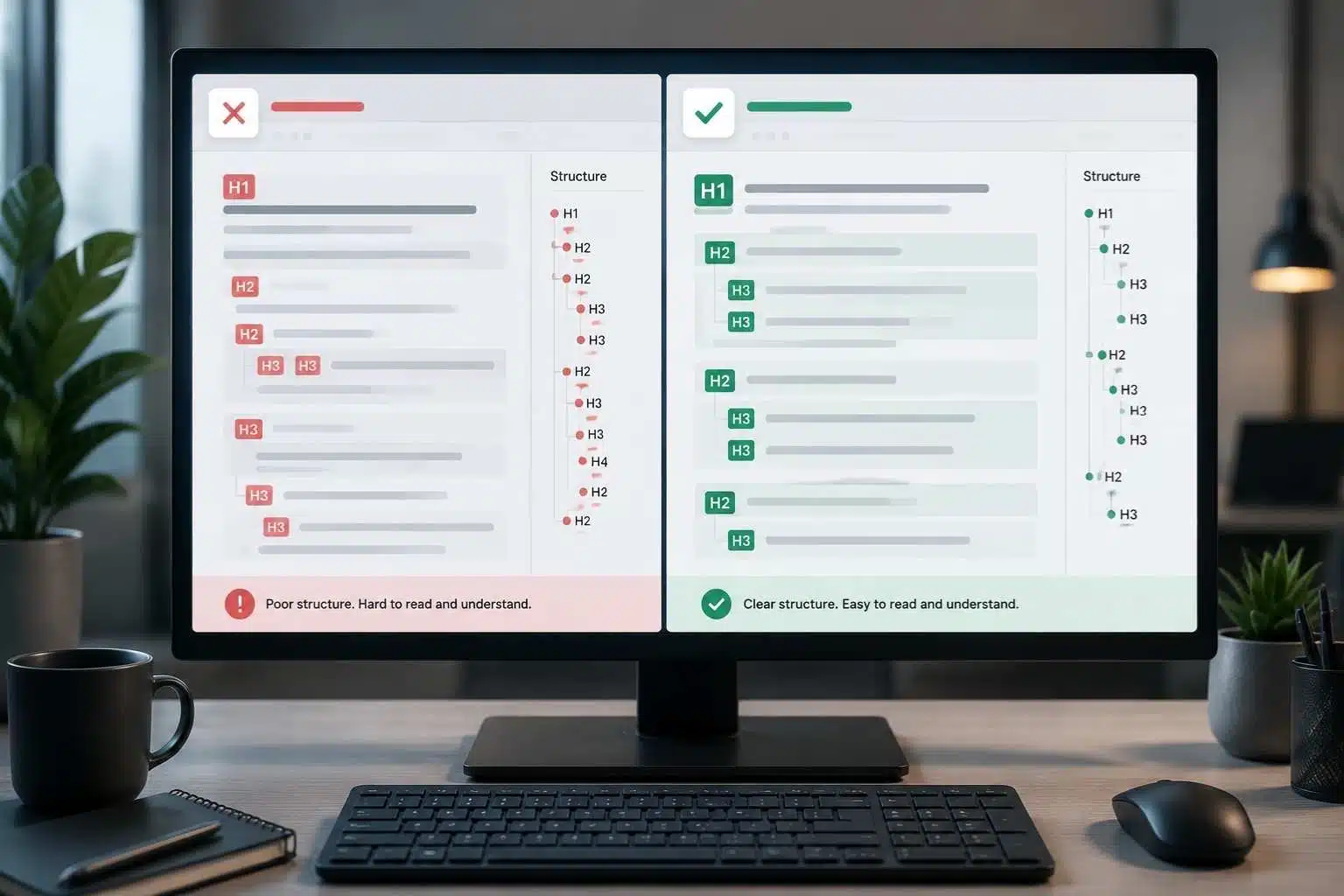
A clean heading structure should move in order.
That usually means:
H1
H2
H3
H3
H2
H3
H2
What you should avoid is jumping randomly:
H1
H3
H2
H5
H2
H4
Skipping levels can make the page harder to understand, especially for accessibility. A reader may not notice if the visual design looks normal, but assistive technologies can expose the structural problem.
Here is a clean example:
Article Title
Main Section
Supporting Point
Supporting Point
Main Section
Supporting Point
Here is a messy example:
Article Title
Supporting Point
Main Section
Tiny Detail
Main Section
The messy version may look fine in a visual editor, but the structure is not clean. One editorial habit can prevent this: outline the article before writing. If your outline is logical, your heading structure is usually logical too.
Header Tags vs Title Tags: Do Not Mix Them Up
Header tags and title tags are connected, but they are not the same. The title tag is the HTML title that may appear as the clickable title link in search results. It also appears in browser tabs and bookmarks. The H1 is the visible main heading on the page.
For example:
Title Tag:
Header Tags Hierarchy: H1-H6 SEO Best Practices
H1:
Header Tags Hierarchy Explained: How to Structure H1-H6 for SEO in 2026
They are similar, but not identical. The title tag is more concise because it has to work in search results. The H1 can be a little more descriptive because the reader is already on the page.
A common mistake is making the title tag, H1, and the first H2 almost the same. That creates repetition.
Better structure:
Title Tag: Header Tags Hierarchy: H1-H6 SEO Best Practices
H1: Header Tags Hierarchy Explained: How to Structure H1-H6 for SEO in 2026
First H2: What Are Header Tags?
That feels natural. The page title introduces the topic. The first section begins the explanation. The reader is not forced to read the same phrase three times in a row.
Heading SEO Best Practices for 2026
The best heading SEO best practices are not complicated. They are mostly about clarity, hierarchy, and intent. Here is what matters.
- Use the H1 to define the page topic.
- Use H2s for major sections.
- Use H3s for supporting details.
- Keep headings descriptive.
- Include keywords naturally when they fit.
- Avoid stuffing keywords into every heading.
- Do not use headings only for font size.
- Do not skip levels without a good reason.
- Make headings useful for scanning.
- Make sure the heading matches the content below it.
This sounds basic, but it is where many pages fail.
- A heading like “Helpful Tips” is weak because it does not tell the reader what kind of tips are coming.
- A heading like “Heading SEO Best Practices for 2026” is stronger because it names the exact topic.
- A heading like “Header Tags Hierarchy Header Tags SEO H1 H2 H3 SEO Heading Structure” is worse because it is written for a machine, not a person.
Search engines are better at understanding language now. Readers are still human. Write headings they can actually use.
How to Use Keywords in Headings Naturally
Keywords can belong in headings, but not every heading needs a keyword.
For this article, the focus keyword is the header tags hierarchy. It fits naturally in the H1, the introduction, and at least one H2. The secondary keywords are H1, H2, H3 SEO, heading structure, and heading SEO best practices. These also fit naturally because they are part of the topic.
A natural keyword heading:
H1, H2, and H3 SEO: The Basic Structure
A natural supporting heading:
Heading SEO Best Practices for 2026
A forced heading:
Header Tags Hierarchy H1 H2 H3 SEO Heading Structure Best Practices Guide
The forced version is ugly. It may technically include every keyword, but it does not help the reader. The best way to use keywords in headings is to write the heading normally first. Then check whether the keyword can be added without making it sound awkward.
If it can, add it. If it cannot, leave it out. SEO should improve clarity, not punish the sentence.
Heading Examples: Weak vs Better
Examples make this easier.
| Page Topic | Weak Heading | Better Heading |
| Header tags | More About Headings | How Header Tags Organize a Web Page |
| SEO title tags | Important SEO Tips | How SEO Title Tags Influence Click Decisions |
| Meta descriptions | Description Details | How Meta Descriptions Support Search Snippets |
| Keyword research | Finding Keywords | How to Find Keywords That Match Search Intent |
| Crawling and indexing | Search Engine Process | How Search Engines Crawl Before Indexing Begins |
| On-page SEO | Optimization Tips | On-Page SEO Elements That Still Matter in 2026 |
The better headings are not fancy. They are simply clearer. A heading should not make the reader guess.
How Headings Improve Reader Experience
Readers use headings to decide where to spend attention. Some readers want the full explanation. Others want one section. Some skim first and read later. Some jump straight to examples. Some only need the checklist.
A good heading structure respects that behavior.
It lets readers:
- Understand the page quickly
- Find the section they need
- Skip what they already know
- Return to useful sections later
- Follow the article without feeling lost
- Trust that the writer organized the topic properly
This is especially important for SEO guides, technical topics, finance content, health content, legal explainers, and long tutorials.
Dense content without headings feels like homework. Clear headings make the same content feel useful. That does not mean every article should be broken into tiny pieces. Too many headings can feel mechanical. The right balance is enough structure to guide the reader, but not so much that the article loses flow.
How Headings Support AI Search and Snippet Visibility
AI search has changed how people discover information, but it has not removed the need for structure. Clear headings help search systems understand the page’s main sections. They also make it easier for the page to contain direct answer blocks, comparison sections, step-by-step guidance, and examples.
For example, a section titled “What Is a Meta Description?” followed by a direct answer is easier to understand than a vague section called “Basics.”
A section titled “Why Google Rewrites Meta Descriptions” clearly signals a specific answer. A section titled “Common Heading Structure Mistakes” tells both readers and search systems what kind of information follows.
This does not mean you should write headings only for AI. That usually produces stiff content. The better approach is to write headings for human navigation. When the structure is clear to people, it is usually clearer for search systems too.
Do not create tiny “AI-friendly chunks” just because someone said AI likes chunking. Write organized sections that make sense.
That is enough.
Accessibility: Headings Are Not Just for SEO
Heading structure is also an accessibility issue. Many screen reader users navigate a page by headings. If the headings are logical, users can understand the page structure quickly. If headings are skipped, duplicated, vague, or used only for styling, navigation becomes harder.
This is one reason not to use heading tags just to make text bigger. If you want a large sentence for design, style it with CSS. If the text introduces a new section, use a proper heading tag.
For example, a pull quote should not be an H2 just because it looks nice. A callout label does not always need to be a heading. A button line should not be an H3.
Use headings for structure. Use design tools for design. That separation keeps the page cleaner for readers, search engines, and assistive technology.
8 Common Heading Structure Mistakes
Most heading mistakes happen because writers, editors, and developers treat headings as formatting instead of structure.
1. Using Multiple H1s Without a Clear Reason
Most editorial pages should have one H1. Multiple H1s can create confusion, especially if templates use H1 tags for logos, widgets, or unrelated page elements.
2. Skipping Heading Levels
Jumping from H2 to H4 can make the structure harder to follow. It is usually better to use H3 first unless there is a very specific reason.
3. Using Headings for Styling
If a line is not introducing a section, it probably should not be a heading. Use bold text, callout styling, or CSS instead.
4. Writing Vague Headings
“Important Tips” does not tell the reader much. “Heading SEO Best Practices for 2026” is clearer.
5. Stuffing Keywords Into Headings
Keyword stuffing makes headings harder to read. Search engines do not need every variation forced into every section title.
6. Making Every Heading the Same Pattern
If every H2 starts with “How to” or every H3 starts with “Why,” the article can feel repetitive. Vary the rhythm.
7. Creating Too Many Tiny Sections
A heading every three lines can make an article feel fragmented. Sometimes a paragraph is enough.
8. Ignoring Mobile Readability
Long headings can wrap badly on mobile. Keep headings clear and readable across devices.
How to Build a Heading Structure Before Writing
The best time to fix heading structure is before writing, not after publishing. Start with the search intent.
For “header tags hierarchy,” the reader likely wants to know what H1-H6 tags are, how they should be structured, why they matter for SEO, and what mistakes to avoid.
That gives the article a natural path:
- Define header tags.
- Explain why hierarchy matters.
- Break down H1, H2, and H3.
- Explain H4-H6.
- Show good and bad examples.
- Explain SEO, accessibility, and AI search relevance.
- Provide a checklist.
- Answer FAQs.
That structure is much better than opening a tool and randomly creating headings from related keywords. A good heading outline should answer the reader’s next question before they ask it.
Heading Structure Examples by Page Type
Different pages need different heading structures. A blog post does not need the same headings as a product page. A local service page does not need the same structure as a pillar guide.
Here are a few examples.
| Page Type | H1 | H2 Examples | H3 Examples |
| Blog guide | Keyword Research Fundamentals | Why Keyword Research Matters, How to Find Keywords | Search Intent, Keyword Clustering |
| Product page | Lightweight Running Shoes | Features, Size Guide, Customer Reviews | Cushioning, Road Running, Fit Notes |
| Service page | SEO Content Strategy Services | What We Offer, Who It Is For, Process | Keyword Research, Content Audits |
| Local page | Emergency Dentist in Austin | Same-Day Care, Treatment Options, Insurance | Tooth Pain, Broken Tooth, Swelling |
| Pillar page | Modern SEO Fundamentals | Crawling, Keywords, Metadata, On-Page SEO | Indexing Basics, Title Tags, Meta Descriptions |
| Cluster article | Header Tags Hierarchy Explained | H1-H6 Structure, Heading Mistakes, SEO Checklist | H1 Rules, H2 Sections, H3 Subsections |
The structure should match the page’s purpose. If every page on your site uses the same heading pattern, the content may start to feel templated. That is not always good. Let the topic shape the headings.
How Header Tags Fit Into Your Modern SEO Cluster
This article belongs naturally after the title tag and meta description clusters. Title tags influence search result titles. Meta descriptions support snippets. Header tags organize the page after the user clicks. That order matters.
A user sees your title first. Then they read your snippet. If they click, the H1 confirms they landed in the right place. The H2s and H3s then help them move through the article.
Your broader cluster now has a clean flow:
- Modern SEO fundamentals explain the full foundation.
- How search engines crawl explains discovery and indexing.
- Keyword research fundamentals explain how to choose search targets.
- Title tag optimization explains how to write better search titles.
- The meta description guide explains how to improve snippets.
- The header tags hierarchy explains how to organize the page itself.
That is a logical SEO learning path. It also creates natural internal linking opportunities. A section about title tags can link to the title tag optimization article. A section about snippets can link to the meta description guide. A section about content structure can link back to the modern SEO fundamentals pillar. Internal links should feel useful, not forced.
How to Audit Header Tags on Existing Pages
Old content often has messy headings. This happens when pages are updated by different writers, migrated between CMS platforms, redesigned, or edited quickly over the years. A simple heading audit can reveal problems fast. Start by checking the page outline.
Look for:
- Missing H1
- Multiple H1s
- Repeated H1 and H2 text
- Skipped heading levels
- Empty headings
- Vague headings
- Over-optimized headings
- Headings used for styling
- Sections that are too long without subheadings
- Too many tiny sections
- Headings that do not match the content below them
You can check headings manually in the editor, inspect the HTML, use browser extensions, or run a site audit tool. But do not rely only on tools.
A tool can tell you that an H2 exists. It cannot always tell you whether that H2 helps the reader. After the technical audit, read the headings like an outline. If the outline does not make sense, the page needs editing.
Header Tags Hierarchy Checklist Before Publishing
Use this checklist before publishing an important SEO article.
- Does the page have one clear H1?
- Does the H1 match the main topic?
- Is the focus keyword used naturally?
- Do the H2s cover the major sections?
- Do H3s support the H2 sections above them?
- Are heading levels used in logical order?
- Are there any skipped levels without a reason?
- Are headings written for readers, not just keywords?
- Does each heading describe the content below it?
- Are long sections broken up where needed?
- Are headings readable on mobile?
- Are there any duplicate or empty headings?
- Are headings used for structure, not styling?
- Does the page outline make sense without the paragraphs?
- Does the heading structure support internal links naturally?
That last point is useful for cluster content. If your headings are clear, internal links become easier to place. You can link from the exact section where the reader would naturally need the next resource.
Frequently Asked Questions About Header Tags Hierarchy
1. What Is Header Tags Hierarchy?
The header tags hierarchy is the ordered structure of H1 to H6 headings on a web page. It helps organize content from the main topic to supporting sections and deeper subsections.
2. Are H1, H2, and H3 Important for SEO?
Yes, H1, H2, and H3 tags are useful for SEO because they help organize page content and make the topic easier to understand. They are not magic ranking buttons, but they support readability, structure, and search clarity.
3. Should Every Page Have One H1?
For most SEO content, yes. One clear H1 is the safest and cleanest approach. It should describe the main topic of the page and usually match the article title closely.
4. Can I Skip From H2 to H4?
It is better to avoid skipping heading levels when possible. A cleaner structure moves from H2 to H3 before using H4. This helps readers, screen readers, and editors understand the content hierarchy.
5. What Is the Best Heading Structure for a Blog Post?
A common blog structure is one H1 for the article title, H2s for major sections, and H3s for supporting points. Most blog posts do not need H4-H6 unless the content is deeply detailed.
6. Do Header Tags Help With Featured Snippets?
Clear headings can help organize answer sections, examples, steps, and definitions. They do not guarantee featured snippets, but they make the page easier to understand and extract from.
7. Are Header Tags and Title Tags the Same?
No. A title tag appears in the browser tab and may appear as the search result title. Header tags appear on the page itself and organize visible content.
Build a Page Structure Readers Can Trust
A strong article is not only about what you say. It is also about how you arrange it. That is the real value of the header tags hierarchy. It turns a long page into something readable. It gives the H1 a clear job, lets H2s carry the main sections, and uses H3s to add depth without making the article chaotic.
In 2026, that structure matters even more because search experiences are more fragmented. Users may arrive from classic results, AI Overviews, social links, newsletters, or internal links. However they arrive, the page still has to make sense quickly.
Do not treat headings as decoration. Do not stuff them with keywords. Do not create a fake outline just to satisfy an SEO checklist. Use headings to guide the reader. Make the page easy to scan. Keep the structure logical. Support accessibility. Give search engines a clean view of the topic. Then connect the article naturally to the rest of your SEO cluster.
That is how heading structure becomes more than formatting. It becomes part of a trustworthy reading experience.