
A business email can look small. But it can do serious work. It can win a client. Calm an angry customer. Push a stuck project forward. Ask for payment. Open a partnership. Or fix a mistake before it grows into something bigger. That is why email still matters.
The problem is simple. Many people know exactly what they want to say, but the words don’t come out right in English. The message may sound too stiff, too soft, too long, or too direct. This happens a lot to founders, freelancers, marketers, support teams, and non-native English speakers working with global clients.
Gemini AI can help with that.
But only if you use it properly.
You don’t want to copy the first draft Gemini gives you. That is how emails start sounding flat and robotic. You also don’t want every message to sound like it came from the same polished template.
The goal is different.
You want Gemini to clean up your writing while keeping your voice, your point, and your business judgment intact.
This guide shows you how to write business emails in flawless English using Gemini AI in a natural, practical way. You’ll learn how to give better prompts, control tone, protect private information, edit drafts, and send emails that sound clear, confident, and human.
Why Gemini AI Can Help with Business Emails
Business emails need more than correct grammar.
They need timing. Tone. Context. Respect. A clear next step.
Gemini can help with the writing part. In Gmail, eligible users can use Gemini features such as “Help me write” to draft or improve emails. Google also lists options like Polish, Formalize, Elaborate, and Shorten for refining draft text.
That means you can use Gemini in two ways.
You can ask it to write an email from scratch. Or you can write your own rough draft and ask Gemini to make it clearer.
The second method often works better.
| Email Need | How Gemini Helps | What You Must Still Check |
|---|---|---|
| Grammar | Fixes awkward lines and sentence errors | Meaning and accuracy |
| Tone | Makes the email warmer, firmer, shorter, or more formal | Whether the tone fits the person |
| Structure | Organizes scattered points | What should come first |
| Clarity | Removes confusion and repetition | Whether the reader knows what to do |
| Speed | Gives you a usable first draft fast | Whether the final email sounds like you |
| Proofreading | Suggests grammar, tone, and style fixes | Names, dates, links, numbers, and promises |
Start with Context, Not Commands
Weak prompts create weak emails.
If you only write, “Write a professional email,” Gemini has to guess everything. It guesses the relationship. It guesses the tone. It guesses the purpose. That is why the result often sounds generic.
A better prompt gives the real situation.
For example:
“I sent a proposal to a US client five days ago after a discovery call. They haven’t replied yet. Write a short follow-up. Keep it polite and calm. Don’t make it sound desperate. Ask if they need clarification or want to schedule a quick call.”
That prompt gives Gemini something useful to work with.
Good Business English Is Simple English
You don’t need big words to sound professional.
In fact, simple English often sounds more confident.
Instead of this:
“Please do not hesitate to contact me should you require any further clarification.”
Write this:
“Please let me know if you need any more details.”
The second line is cleaner. It sounds natural. It gets the job done.
Let Gemini Fix the Writing, Not the Decision
Gemini can improve your words.
But it can’t always understand the full business risk.
It may make a promise you didn’t approve. It may soften a message that needs to be firm. It may sound too friendly in a sensitive situation.
So use Gemini for language.
Use your own judgment for meaning.
How to Write Business Emails in Flawless English Using Gemini AI
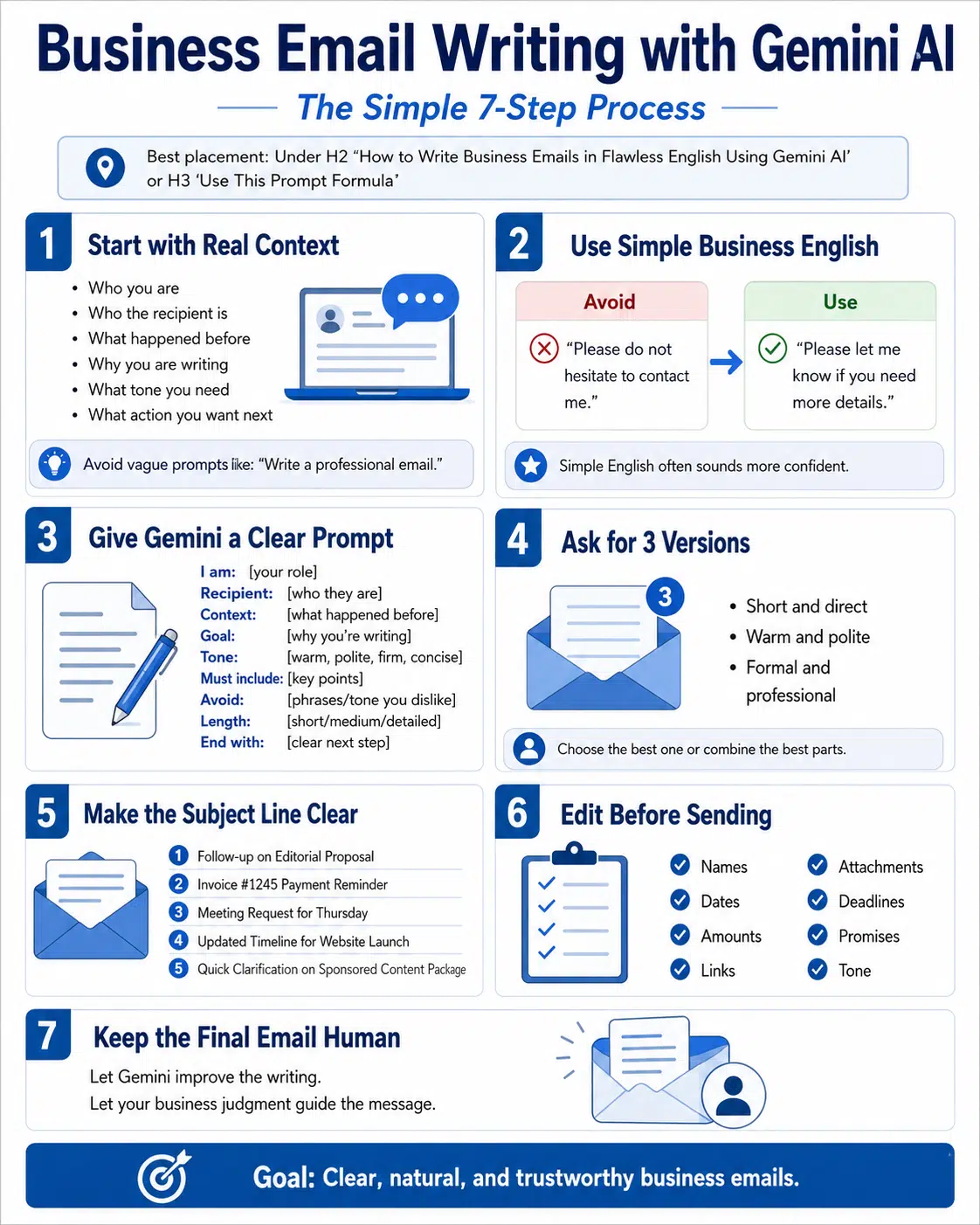
The best way to write business emails in flawless English using Gemini AI is to follow a simple process.
Don’t start by asking for a perfect email.
Start by writing the situation in plain words.
Who are you writing to? What happened before? What do you want now? What tone do you need? What should the reader do next?
Once you have those answers, Gemini can help you turn the message into clean English.
| Prompt Detail | What to Add | Example |
| Your role | Who you are | “I’m the founder of a digital media company.” |
| Recipient | Who will read the email | “A potential client in the US.” |
| Background | What happened before | “We had a call last week.” |
| Goal | Why you’re writing | “I want to follow up on the proposal.” |
| Tone | How it should sound | “Warm, clear, and professional.” |
| Length | How long it should be | “Keep it under 150 words.” |
| Next step | What you want from them | “Ask for a 20-minute call.” |
Use This Prompt Formula
Here is a practical prompt you can reuse:
“Write a business email in natural English.
I am: [your role]
Recipient: [who they are]
Context: [what happened before]
Goal: [why you’re writing]
Tone: [clear, warm, firm, polite, concise]
Must include: [key points]
Avoid: [phrases or tone you dislike]
Length: [short, medium, detailed]
End with: [clear next step]”
This structure works because it removes guesswork.
Gemini does not need a fancy command. It needs useful details.
Use Your Native Language First
If English is not your strongest language, don’t fight your thoughts.
Write the full context in Bangla, Hindi, Arabic, Spanish, or any language you think in naturally. Then ask Gemini to turn the meaning into business English.
Try this:
“Here is my context in Bangla. Understand the meaning and write a natural business email in English. Keep it professional, short, and human. Don’t add extra promises.”
This works well because your idea stays real. Gemini only improves the English.
Ask for More Than One Version
One draft is not enough.
Ask Gemini for three versions:
- Short and direct
- Warm and polite
- Formal and professional
Then choose the best parts.
This gives you control. It also helps you avoid the usual “AI email” sound.
Write for the Reader, Not for the Tool
A strong email starts with one question:
“What does the reader need from me?”
That question keeps your writing focused.
A busy executive does not need a long story. A new client may need a little background. A support customer needs reassurance and a clear next step. An investor wants facts, progress, and direction.
| Reader Type | Best Email Style |
| Busy executive | Short and decision-focused |
| New client | Clear, warm, and credible |
| Existing client | Direct but respectful |
| Support customer | Calm, helpful, and specific |
| Vendor | Clear requirements and deadlines |
| Investor | Factual, concise, and confident |
| Internal team | Action-focused and easy to scan |
Get to the Point Early
Don’t hide the reason for your email.
Weak opening:
“I hope you are doing well. I wanted to reach out regarding a matter that we have been discussing recently.”
Better opening:
“I’m following up on the proposal I shared last Thursday.”
That line is clear. It saves time. It sounds like a real person.
Keep One Main Purpose
One email should do one main job.
If you ask for payment, feedback, approval, and a meeting in the same email, the reader may miss the main point.
Keep the message focused.
When you need several things, use bullets.
Use Subject Lines That Actually Help
A good subject line tells the reader what the email is about before they open it.
Keep it plain.
Good examples:
- Follow-up on Editorial Proposal
- Invoice #1245 Payment Reminder
- Meeting Request for Thursday
- Updated Timeline for Website Launch
- Quick Clarification on Sponsored Content Package
You don’t need clever subject lines.
You need clear ones.
Make the Tone Natural, Not Robotic
Tone can make or break an email.
A message can have perfect grammar and still feel wrong. It may sound too cold. Too soft. Too pushy. Too fake.
Gemini can help adjust tone, but you need to be specific.
Don’t just say:
“Make it professional.”
Say:
“Make it polite and calm, but not too formal. Keep it short. Don’t make it sound desperate.”
That gives Gemini a better target.
| Situation | Better Tone Direction |
| Client follow-up | Polite and calm, not desperate |
| Payment reminder | Firm but respectful |
| Apology | Honest, accountable, and not dramatic |
| Sales outreach | Warm, specific, and not pushy |
| Investor update | Clear, factual, and confident |
| Internal instruction | Direct and supportive |
| Rejection email | Respectful, brief, and kind |
Remove Overused Email Lines
Gemini may add lines that sound polished but tired.
Watch for these:
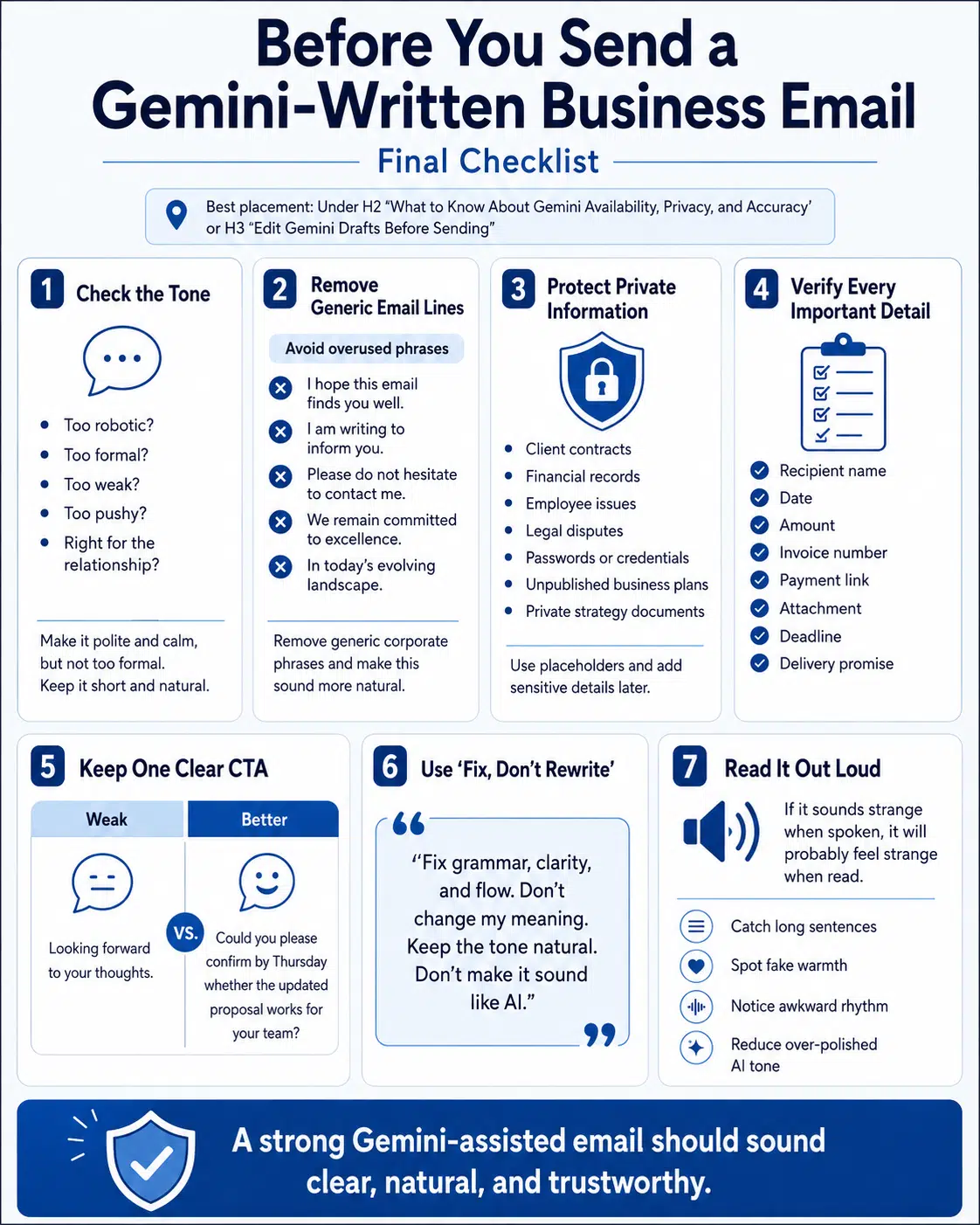
- I hope this email finds you well.
- I am writing to inform you.
- We are delighted to announce.
- Please do not hesitate to contact me.
- We remain committed to excellence.
- In today’s evolving landscape.
These lines are not always wrong. But they often make the email sound like a template.
Ask Gemini:
“Remove generic corporate phrases and make this sound more natural.”
Ask Gemini to Check the Tone
After you get a draft, don’t stop there.
Ask:
“Does this email sound too robotic, too formal, too weak, or too pushy? Rewrite it in a more natural tone.”
This second pass can make a big difference.
Keep a Human Touch
Human writing does not need drama.
It just needs to feel real.
Instead of:
“We sincerely appreciate your valuable time and kind attention.”
Write:
“Thanks for reviewing this.”
That is enough.
Business Emails You Can Write Faster with Gemini
Once you understand the process, Gemini can help with many email types.
The key is to match the prompt to the situation.
A cold outreach email should be short. A payment reminder should be firm. An apology should be honest. A proposal email should make the next step easy.
If you want to write business emails in flawless English using Gemini AI, build a small library of prompts for your daily work.
| Email Type | Best Prompt Direction |
| Follow-up email | Polite, short, and not desperate |
| Proposal email | Clear summary, attachment mention, next step |
| Payment reminder | Firm, respectful, and specific |
| Apology email | Accountable, simple, and clear |
| Cold outreach | Specific value and soft CTA |
| Meeting request | Purpose, time options, and agenda |
| Customer support | Acknowledge issue and explain next step |
| Internal update | Status, blockers, and action items |
Client Follow-Up Email
Prompt:
“Write a short follow-up email to a client who received our proposal five days ago but hasn’t replied. Keep it polite, calm, and professional. Don’t sound desperate. Ask if they need clarification or want to schedule a quick call.”
Sample draft:
Subject: Quick follow-up on the proposal
Hi [Name],
I wanted to follow up on the proposal I shared last week.
Please let me know if you have any questions or if you’d like us to adjust anything based on your current priorities.
I’d be happy to schedule a quick call if that helps.
Best,
[Your Name]
Payment Reminder Email
Prompt:
“Write a polite but firm payment reminder for an overdue invoice. Mention the invoice number, due date, amount, and payment link. Keep the tone respectful. Ask the client to confirm once paid.”
Sample draft:
Subject: Payment reminder for Invoice #[Number]
Hi [Name],
This is a quick reminder that Invoice #[Number] for [Amount] was due on [Date].
You can complete the payment here: [Payment Link]
Please let me know once the payment is processed, or reach out if there’s any issue from your side.
Best,
[Your Name]
Apology Email
Prompt:
“Write a sincere apology email to a client for a delayed delivery. Keep it accountable, not dramatic. Mention the reason briefly, explain the fix, and give the new delivery timeline.”
Sample draft:
Subject: Update on your project delivery
Hi [Name],
I apologize for the delay in delivering [Project/Task].
The delay happened because [brief reason]. We’ve already adjusted the workflow to avoid further delays.
The updated delivery date is [Date]. I’ll also share a progress update by [Day/Time].
Thank you for your patience.
Best,
[Your Name]
Meeting Request Email
Prompt:
“Write a short meeting request email to a potential client. Mention that we want to discuss their content marketing goals and share how our team can help. Offer three time slots. Keep the tone warm and professional.”
Sample draft:
Subject: Meeting request to discuss content goals
Hi [Name],
Thanks again for your interest in our content marketing services.
I’d be happy to schedule a short call to understand your goals and suggest the best next steps.
Would any of these times work for you?
- [Option 1]
- [Option 2]
- [Option 3]
Best,
[Your Name]
Edit Gemini Drafts Before Sending
The first draft is only a starting point.
Never send it without reading it.
Gemini can produce a clean email fast. But you still need to check whether it sounds right, says the correct thing, and gives the reader a clear next step.
| Editing Check | What to Ask Yourself |
| Clarity | Can the reader understand the point quickly? |
| Tone | Does it fit the relationship? |
| Accuracy | Are the names, dates, numbers, and links correct? |
| Length | Can I cut anything? |
| CTA | Is the next step clear? |
| Voice | Does this sound like a real person? |
| Risk | Does it promise anything I don’t want to promise? |
Use “Fix, Don’t Rewrite”
If your draft already says what you mean, don’t let Gemini rewrite the whole thing.
Use this prompt:
“Fix grammar, clarity, and flow. Don’t change my meaning. Keep the tone natural. Don’t make it sound like AI.”
This keeps your voice in the email.
Stop Over-Apologizing
Many people weaken their emails by saying sorry too much.
Instead of:
“Sorry to bother you again, but I just wanted to check if maybe you had a chance to review this.”
Write:
“I wanted to check whether you had a chance to review this.”
It is still polite. It sounds more confident.
Make the Next Step Obvious
A business email should not leave the reader guessing.
Weak:
“Looking forward to your thoughts.”
Better:
“Could you please confirm by Thursday whether the updated proposal works for your team?”
The second line tells the reader exactly what to do.
Read It Out Loud
This is one of the easiest editing tricks.
Read the email once before sending.
If it sounds strange when spoken, it will probably feel strange when read. You will catch long sentences, fake warmth, and awkward rhythm right away.
What to Know About Gemini Availability, Privacy, and Accuracy
Gemini features are helpful, but they are not the same for every user.
Google’s support pages show that Gemini features in Gmail can depend on your account type, plan, region, platform, and language. Some features need an eligible Google Workspace or Google AI plan. Some proofreading features also have language limits.
So don’t assume every Gmail user can access every Gemini email feature everywhere.
| Area | What to Know |
| Gmail drafting | Gemini can help eligible users draft and refine emails |
| Refinement options | Google lists options such as Polish, Formalize, Elaborate, and Shorten |
| Proofreading | Gemini can suggest grammar, tone, and style fixes |
| Language limits | Some features are English-only or limited by language |
| Plan limits | Some features require paid or eligible plans |
| Privacy | Workspace protections differ from personal account settings |
| Human review | Sensitive emails still need human judgment |
Workspace Privacy Has Specific Rules
For Google Workspace business users, Google says it does not use customer Workspace data to train or improve the underlying generative models without permission.
Google also says that for licensed Workspace users, prompts and generated responses stay within the organization, are not used for model training, and are not reviewed by humans.
That is useful for businesses.
Still, don’t treat every account the same.
A personal Google account, Workspace Labs access, consumer Gemini app, or company-managed Workspace account may follow different settings. Always check your plan, admin controls, and privacy settings before entering sensitive business details.
Don’t Paste Private Details Unless You Need To
Be careful with:
- Client contracts
- Financial records
- Employee issues
- Legal disputes
- Medical information
- Passwords or credentials
- Private strategy documents
- Unpublished business plans
When possible, remove sensitive details.
Instead of writing:
“Write an email about Client X’s unpaid invoice of $12,750 under Contract Y.”
Write:
“Write a polite payment reminder for an overdue invoice. I’ll add the client name, amount, and invoice number myself.”
That is safer.
Check Every Important Detail
Gemini can sound confident even when something is wrong.
Before sending, check:
- Names
- Dates
- Amounts
- Attachments
- Links
- Deadlines
- Legal terms
- Delivery promises
Gemini can improve the writing. You still own the message.
Build Your Own Business Email Style Guide
One of the best ways to get better results is to give Gemini your writing rules.
This does not mean sharing private data.
It means telling Gemini how you like your emails to sound.
A style guide helps you get consistent results, especially if you write many emails every day.
| Style Area | Example Rule |
| Tone | Clear, polite, direct, and human |
| Paragraphs | Keep paragraphs short |
| Vocabulary | Use simple business English |
| Greeting | Use “Hi [Name]” for most emails |
| Closing | Use “Best” or “Regards” |
| Avoid | Avoid stiff corporate phrases |
| CTA | End with one clear next step |
Example Style Guide
“My email style is simple, clear, and professional. I prefer short paragraphs and direct sentences. I don’t like heavy corporate words. Avoid phrases like ‘I hope this email finds you well’ and ‘please do not hesitate.’ Keep the tone warm but not fake.”
Save this.
Use it before your email prompts.
Create Different Styles for Different Needs
A founder’s email should not always sound like a support reply.
You can create separate style guides for:
- Sales emails
- Client follow-ups
- Customer support
- Investor updates
- Editorial outreach
- Internal team updates
- Payment reminders
- Partnership proposals
This helps your emails stay consistent without sounding copied.
Keep the Final Email Human
A good Gemini-assisted email should not make the reader think, “This was written by AI.”
It should make them think, “This is clear.”
That is the real goal.
Common Mistakes to Avoid
Gemini saves time when you use it well.
But it can also create weak emails if you trust it too quickly.
The biggest mistake is sending the first draft. The second mistake is giving almost no context. The third mistake is asking for “professional English” and accepting a stiff result.
| Mistake | Why It Hurts | Better Move |
| Sending the first draft | It may sound generic | Edit before sending |
| Giving no context | Gemini guesses too much | Add the situation and goal |
| Over-polishing | The email sounds fake | Keep natural wording |
| No clear CTA | The reader may not act | Add one direct next step |
| Ignoring privacy | Sensitive data may be exposed | Remove private details |
| Wrong tone | It may hurt trust | Match the relationship |
| Not checking facts | It creates business risk | Verify everything important |
Don’t Ask for “Flawless” Only
If you ask only for flawless English, Gemini may make the email stiff.
Ask for:
“Flawless but natural business English.”
That small change helps.
Don’t Let Gemini Promise Too Much
Gemini may write lines like:
“We guarantee outstanding results.”
Do not send that unless it is true.
A sentence can sound beautiful and still create a problem.
Don’t Hide Bad News
If the email is about a delay, mistake, or issue, say it clearly.
Don’t bury the message under long polite wording.
A short, honest email usually works better.
Final Thoughts
Gemini can make business email writing easier.
It can clean up grammar. Improve tone. Shorten long drafts. Turn rough ideas into polished English. That is useful, especially when you work with global clients.
But Gemini should not take over your voice.
Give it the real context. Tell it the tone you want. Remove stiff phrases. Check the facts. Protect private details. Then edit the draft until it sounds like something you would actually send.
If you want to write business emails in flawless English using Gemini AI, remember this:
Let Gemini improve the language.
Let your judgment guide the message.
That balance is what makes the final email clear, natural, and trustworthy.
FAQs
Can Gemini write a complete business email from one prompt?
Yes, it can. But the quality depends on your prompt. A one-line prompt often creates a generic email. A detailed prompt with context, tone, key points, and a clear next step gives you a much better draft.
Can I write my Gemini prompt in Bangla or another native language?
Yes. You can write the context in your native language and ask Gemini to turn it into natural business English. This works well because your original meaning stays clear.
How do I stop Gemini from sounding robotic?
Tell it what to avoid. For example: “Don’t use generic corporate phrases. Avoid ‘I hope this email finds you well,’ ‘delighted,’ ‘seamless,’ and ‘please do not hesitate.’ Keep the tone natural and direct.”
Is Gemini in Gmail available for everyone?
No. Gemini features in Gmail can depend on account type, plan, region, language, and platform. Some features require eligible Google Workspace or Google AI plans.
Can Gemini match my personal email style?
Yes, if you guide it. Give it a short style guide with your tone, paragraph length, preferred greeting, closing style, and phrases you dislike.
Should I use Gemini for legal or confidential business emails?
Use caution. For legal, financial, HR, or confidential emails, avoid sharing private details unless your company policy allows it. Remove sensitive information when possible and get human review before sending.
What is the best prompt to write business emails in flawless English using Gemini AI?
Use this:
“Rewrite this email in flawless but natural business English. Keep my meaning. Improve grammar, clarity, and tone. Use short paragraphs. Avoid robotic phrases. End with a clear next step.”
Can Gemini help with cold outreach emails?
Yes. But you should add real context about the recipient. Cold emails work better when they are short, specific, and relevant.
Why should I edit Gemini emails before sending?
Because Gemini may miss context, add extra wording, or make the email too polished. Editing helps you check tone, facts, privacy, and the final call-to-action.