You stare at your blank screen, itching to whip up eye-catching social media graphics or marketing materials for your small business. But hey, you’re no graphic design whiz, and the thought of wrestling with complex software like Adobe Photoshop or Adobe Illustrator leaves you scratching your head.
It’s like trying to paint a masterpiece with just a crayon; frustrating, right? We’ve all been there, fumbling through visual content creation without the right tools, ending up with designs that scream “amateur hour.”.
Did you know Canva stands out as the most popular design apps for non-designers, thanks to its drag-and-drop magic that turns anyone into a creator? This blog post breaks down the top graphic design apps, from Canva to Adobe Express and Desygner, highlighting their user-friendly interfaces, templates, and features for photo editing or infographics.
You’ll discover how these online design platforms make visual branding a breeze, even on a budget. Get ready to spark your creativity.
Why Non-Designers Need Design Apps
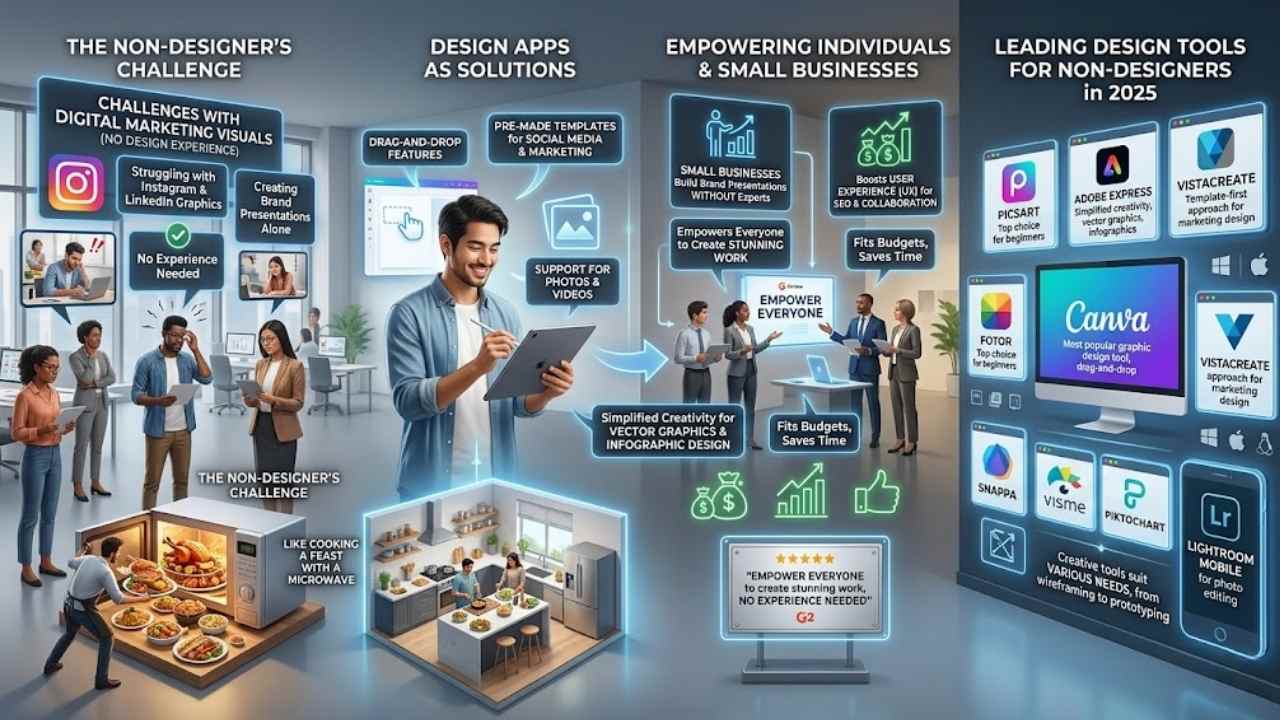
Non-designers often face challenges in creating visuals for digital marketing or social media. Tools like Canva, the most popular graphic design tool, help bridge that gap. They offer drag-and-drop features, pre-made templates, and support for photos and videos.
Small businesses rely on these design resources to build brand presentations without hiring experts. Imagine juggling Instagram posts or LinkedIn graphics on your own, it’s like trying to cook a feast with just a microwave, but these apps turn it into a full kitchen setup.
Picsart stands out as the top choice for beginners in graphic design software. Apps such as Fotor, Snappa, Visme, and Piktochart join Canva in making ui/ux design accessible.
Design apps empower everyone to create stunning work, no experience needed. – A satisfied user on G2 reviews.
Adobe Express ranks among the top eight tools for non-designers in 2025, with simplified creativity for vector graphics and infographic design. VistaCreate uses a template-first approach, perfect for marketing design.
PicMonkey shines as a top pick alongside Canva and Adobe Spark. Lightroom Mobile handles photo editing tasks well. These creative tools suit various needs, from wireframing to prototyping, even on Windows, macOS, or Linux systems.
They fit budgets and boost user experience for seo and collaboration features.
Canva: The Go-To Design Tool
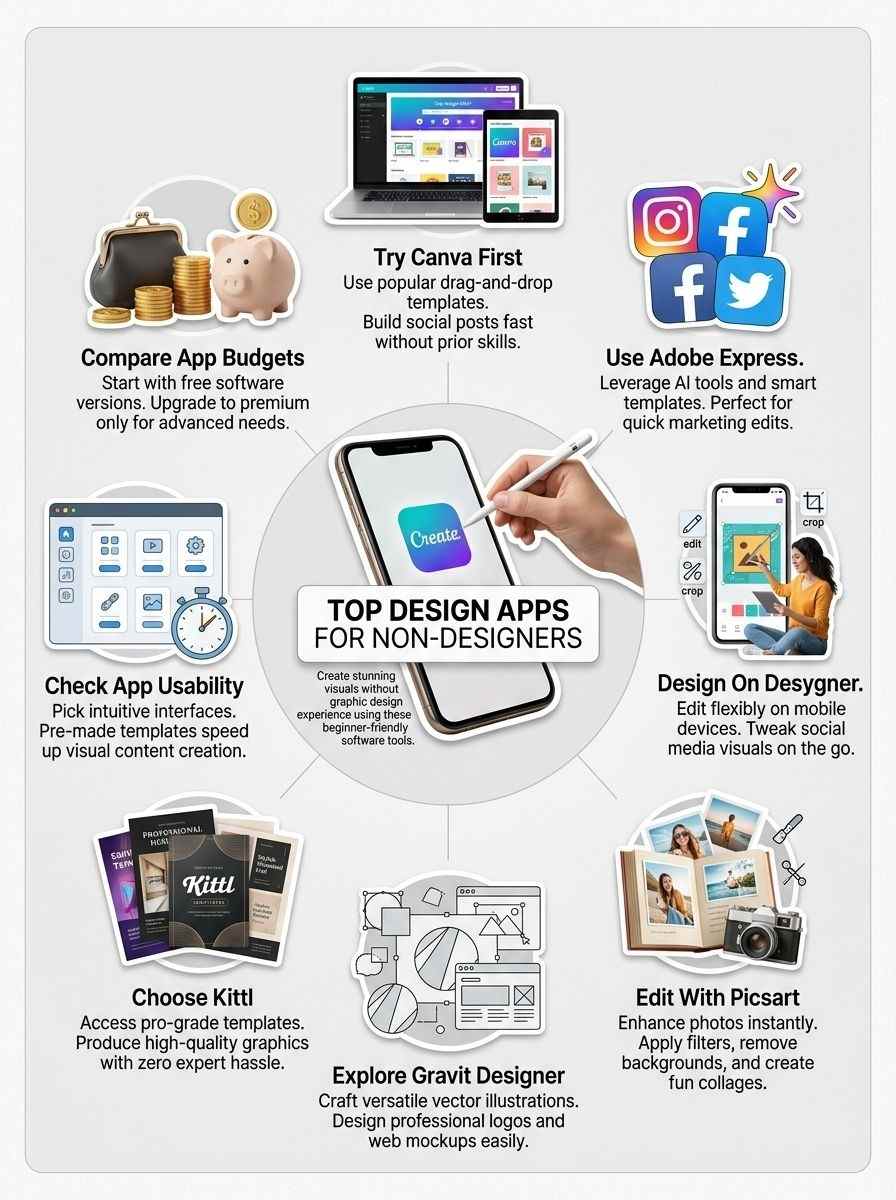
Canva jumps in as the friendly champ for folks dipping toes into graphic design, packed with drag-and-drop magic that turns wild ideas into sharp visuals, no sweat. Picture whipping up social media posts or flyers in minutes, thanks to its vast library of design templates and user-friendly interface that feels like chatting with an old pal.
Features & Benefits (Canva)
People love Canva as the most well-known and popular graphic design tool for non-designers out there. You get drag-and-drop functionality that lets anyone create stunning graphics without prior experience.
This user interface keeps things simple, like piecing together a puzzle. Non-designers tackle design templates for social media posts or flyers with ease. The app supports photos and videos in projects, turning basic ideas into eye-catching visuals.
Think of it as your trusty sidekick in design tools, always ready to help.
Users benefit from pre-made templates that make creation a breeze, much like following a recipe for a perfect cake. Top apps like Fotor, Snappa, Visme, and Piktochart join Canva in helping beginners shine.
Adobe Express ranks among the top eight graphic design tools for non-designers in 2025, offering simplified creativity alongside Canva’s strengths. PicMonkey stands out as one of the top three, with Canva and Adobe Spark, for easy edits.
You edit photos like a pro, similar to using Lightroom Mobile for enhancements. Picsart earns praise as the best all-around tool for non-designers, yet Canva’s flexibility fits various needs, from vector illustrations to mockup designs.
Best Use Cases for Beginners
Canva shines as a top pick for folks new to design. It packs drag-and-drop ease that turns ideas into visuals fast, no skills needed.
- Social media posts come alive with Canva’s project templates, perfect for beginners who want quick wins on platforms like Instagram or Facebook, and you can mix in photos or videos for that extra pop.
- Flyers and posters get a boost from Canva’s simple tools, much like using Affinity Designer but way easier, letting you drag elements around without the hassle of complex software like CorelDRAW.
- Presentations flow smoothly thanks to pre-made templates in Canva, ideal for non-designers tackling work pitches or school projects, and it beats out tools like Prezi with its user-friendly vibe.
- Invitations and cards feel personal when you use Canva’s drag-and-drop features, supporting multiple content types that make beginners look pro without touching advanced apps like Adobe InDesign.
- Infographics turn data into stories via Canva’s templates, great for starters who need to visualize info without getting into GIMP or Inkscape’s steep curves.
- Logos emerge effortlessly with Canva’s beginner-focused interface, outshining options like Vectr for quick branding tasks, and you can tweak colors or add AI design touches for fun.
- Brochures assemble in minutes using Canva’s flexible setup, suited for small business owners new to design, far simpler than wrestling with Sketch or Krita.
- Newsletters spark engagement through Canva’s photo and video support, helping beginners craft updates that rival those from HubSpot tools, all with zero design background.
- Book covers dazzle with Canva’s high-quality graphics, a nod to apps like Kittl but more accessible, letting you experiment like a pro on a budget.
- Menus for events or cafes design themselves in Canva, leveraging features akin to Gravit Designer for versatile projects, and beginners love how it skips the complexity of Figma or Pixlr.
Adobe Express: Simplified Creativity
You know that rush when creativity strikes, but pro tools feel like a maze? Adobe Express cuts through the clutter with quick edits, smart AI features for UI UX tweaks, and ready templates that spark ideas for laptops or smart home graphics.
Features & Benefits (Adobe Express)
Adobe Express shines as a top choice for non-designers, ranking among the top 8 graphic design tools in 2025. This app simplifies creativity with pre-made templates that fit right into ui ux projects.
Users drag and drop elements, much like chatting with a friend about ideas. Picture a busy marketer whipping up social media posts in minutes, thanks to its ai tools integration. Adobe Express stands out next to Canva and PicMonkey as one of the top three apps for easy designs.
It handles photos and videos, perfect for product development visuals or infogram-style charts. Beginners love how it turns complex tasks into simple steps, avoiding the hassle of pro software.
Adobe Express makes design feel like a walk in the park, even for total newbies, says a satisfied user on tech deals forums.
Folks often pick Adobe Express for its flexible features, like colorcinch effects and designwizard templates. The app boosts your work with smart home-inspired interfaces, intuitive as using laptops or monitors daily.
It supports various formats, from postermywall graphics to google chart integrations. Non-designers find joy in editing photos, similar to Lightroom Mobile but more straightforward.
Adobe Express fits budgets well, offering free tiers alongside premium options. Creators use it for networking visuals or chitchat marketing campaigns, keeping things fresh and engaging.
Ideal Users and Templates
Adobe Express fits right in for folks who want quick creativity without the hassle. People love it because it ranks among the top 8 graphic design tools for non-designers in 2025, sitting pretty next to Canva and PicMonkey in the top three spots.
- Small business owners grab Adobe Express for its pre-made templates that whip up social media posts in a snap, like flyers for pc hardware sales or visily-inspired layouts that pop on any screen.
- Content creators, you know, the ones juggling videos and photos, use templates made for operating systems guides or gpu comparisons, making complex ideas look simple and fun.
- Beginners in graphic design find ideal setups here with templates for storage device ads or cpu overviews, all drag-and-drop easy, no experience needed, just your ideas.
- Social media managers use it best for flexible designs, think templates that highlight keyboards & mice reviews or plasfy-style edits that engage followers fast.
- Educators and hobbyists pick Adobe Express for its template-first approach, similar to VistaCreate, perfect for single-board computers tutorials or gaming handheld infographics that teach without overwhelming.
- Marketers rely on these templates to create high-quality graphics for various projects, including elements like Fotor-level photo editing or Snappa-inspired visuals for Visme-like presentations.
- Freelancers appreciate the ideal user focus on simplified tools, with templates that echo Piktochart’s style for turning data on cpu and gpu into stunning, shareable charts.
- Everyday users, even non-designers, turn to Adobe Express templates for photo enhancements, much like Lightroom Mobile recommends, blending in details on storage or operating systems for personal blogs.
Desygner: Easy and Flexible Design
Imagine jumping into graphic creation without the usual headaches, that’s Desygner for you. This app lets you drag, drop, and tweak elements like a pro, turning quick ideas into eye-catching posters or flyers that grab attention right away.
Features & Benefits (Desygner)
Desygner packs easy tools that let you create graphics without any design skills. You drag and drop elements, just like playing with building blocks. Pre-made templates speed things up, much like grabbing a ready-made sandwich instead of cooking from scratch.
This app flexes for social media posts, flyers, or logos, keeping things simple and fun. Users love how it handles photos and text edits on the fly.
Flexibility shines in Desygner’s free version, with premium options for more bells and whistles. It mirrors that template-first approach seen in tools like VistaCreate, making visual design a breeze for beginners.
Think of it as your pocket artist, turning quick ideas into eye-catching results. Social media fans use it to whip up posts that pop, saving time and hassle.
Perfect for Social Media Designs
Desygner shines when you need quick visuals for your online presence. It packs tools that turn simple ideas into eye-catching posts, perfect for anyone dipping their toes into social media.
- Users love how Desygner offers pre-made templates, much like those in Canva and PicMonkey, which speed up the creation of Instagram stories or Facebook banners without any design skills.
- This app stands out for its flexibility, allowing you to tweak elements easily, and it fits right in with top tools like Fotor and Snappa for non-designers tackling social feeds.
- Think of Desygner as your trusty sidekick for visual content; it supports multiple formats, including photos, echoing the drag-and-drop ease found in VistaCreate’s template-first approach.
- Beginners often pick Desygner for its user-friendly interface, similar to Adobe Express, which ranks among the top eight graphic design tools for non-designers in 2025.
- Social media pros use it to craft high-engagement graphics, drawing from features that rival Visme and Piktochart, all while keeping things simple and fun.
- One key perk is its focus on mobile editing, akin to Lightroom Mobile’s photo enhancements, making it a breeze to polish images for Twitter or TikTok on the go.
Picsart: Turn Ideas Into Stunning Creations
Ever felt stuck with a plain photo that screams for some magic? Picsart jumps in like a creative sidekick, letting you edit images, add effects, and craft collages with just a few taps, turning your wildest visions into eye-popping art that grabs attention.
Features & Benefits (Picsart)
Picsart stands out as the top graphic design tool for non-designers. You get easy tools to edit photos and add enhancements that pop. Imagine turning a plain snapshot into a masterpiece, like adding filters or stickers with just a tap.
This app packs pre-made templates that simplify your workflow, perfect for quick social media posts or fun collages. Folks love how it feels intuitive, almost like chatting with a creative buddy who knows all the tricks.
Jump into features like AI-powered edits that fix lighting or remove backgrounds in seconds. Benefits shine through in its mobile-first design, letting you create on the go without needing pro skills.
Think of it as your pocket artist, handling everything from text overlays to custom graphics. Non-designers rave about the free version’s power, though premium unlocks even more magic for those deeper projects.
Best for Photo Editing and Enhancements
Picsart shines when you want to edit photos without hassle. Experts call it the best all-around graphic design tool for non-designers, and it pairs well with tools like Lightroom Mobile for extra photo tweaks.
- Picsart lets you crop, resize, and adjust colors in photos with simple taps, perfect if you’re new to editing and need quick results like fixing a family snapshot.
- You can add filters, stickers, and text overlays to make your images pop, turning a plain picture into something shareable on social media, much like how a splash of paint transforms a blank canvas.
- The app includes AI-powered tools that remove backgrounds or enhance details automatically, saving time for folks who aren’t pros but want pro-level shine.
- Picsart handles batch editing, so edit multiple photos at once, ideal for bloggers sorting through event pics without pulling their hair out.
- It supports collage creation with easy drag-and-drop, letting you mix photos into fun layouts, think of it as piecing together a puzzle that tells your story.
- Users love the retouching features for smoothing skin or fixing blemishes, making portraits look polished, as if a friend gave you insider tips on looking your best.
- Picsart integrates with other apps like Canva for broader projects, but it stands out for photo enhancements, especially since pre-made templates guide beginners through the process.
- You get access to a huge library of effects and brushes, encouraging creativity, similar to having an art supply store in your pocket for on-the-go edits.
- The community shares tips and designs within the app, helping you learn fast, like chatting with fellow hobbyists over coffee about your latest photo fix.
Gravit Designer: Versatile and Adaptable
Gravit Designer acts like a shape-shifting buddy for your creative projects, switching from vector illustrations to web mockups without missing a beat. Explore its free tools, and watch simple ideas turn into pro-level posters or app interfaces that wow your crowd.
Features & Benefits (Gravit Designer)
Gravit Designer stands out with its versatile tools that let you create vector graphics without a steep learning curve. You get powerful features like path editing, boolean operations, and multiple artboards, all in a clean interface.
Non-designers love the free version, which packs enough punch for most projects. Imagine whipping up a logo that looks pro, just like that time I sketched a quick banner for a friend’s event and it turned heads.
This app adapts to web, print, and screen designs, making it a solid pick among top tools like Fotor, Snappa, Visme, and Piktochart, as noted in lists of great options alongside Canva.
Pre-made templates speed things up, much like VistaCreate’s approach, so beginners jump right in. Features include symbols for reusable elements and export options in various formats.
Users gain big benefits from Gravit Designer’s cloud sync, which keeps your work safe across devices. Edit photos or enhance layouts with ease, similar to how Lightroom Mobile handles photo tweaks in the design world.
Teams collaborate in real time, turning solo efforts into group wins. Think of it as your design sidekick, always ready with grids and snapping for precise results. Budget plays a role too, with premium upgrades for advanced needs, but the basics cover a lot.
Social media graphics come alive here, flexible for any project size. Adobe Express joins the top eight for 2025, and Gravit fits right in with its adaptable style.
Suitable for Various Design Projects
Gravit Designer fits a wide range of design tasks. You tackle projects big and small with its flexible tools.
- Logos become simple to craft in Gravit Designer; you draw vectors and shapes without hassle, and just like Canva, the most well-known and popular design tool for non-designers on the market, it keeps things user-friendly for quick results.
- Posters pop with color and text; mix elements freely, as Gravit supports drag-and-drop functionality that makes it easy for users without design experience to create graphics, much like what Canva offers to beginners.
- Videos and photos blend into designs; you edit and layer them smoothly, since Gravit handles multiple content types including photos and videos for design projects, echoing Canva’s versatile approach.
- All-around graphics shine bright; Gravit turns basic ideas into pro looks, and Picsart stands out as the best all-around graphic design tool specifically designed for non-designers, yet Gravit matches that ease for everyday creations.
- Visual stories flow from templates; start with ready layouts in Gravit, where VistaCreate uses a template-first approach to visual design, making it accessible for beginners, and you get similar quick starts here.
- Future designs stay fresh; plan ahead with Gravit’s updates, as Adobe Express ranks among the top 8 graphic design tools for non-designers in 2025, giving you tools that evolve like those.
- Infographics tell tales with charts; build them fast in Gravit, while top design apps for non-designers include Fotor, Snappa, Visme, and Piktochart alongside Canva, all offering ways to visualize data just as effectively.
- Social posts grab attention; customize them in Gravit, and PicMonkey gets highlighted as one of the top three graphic design apps for non-designers alongside Canva and Adobe Spark, with comparable fun tweaks for your feeds.
- Templates speed up everything; pick pre-made ones in Gravit to jumpstart ideas, since pre-made templates form a key feature of graphic design apps that make them user-friendly for non-designers, saving you tons of time.
- Photo tweaks add polish; enhance images right in Gravit, plus Lightroom Mobile gets recommended as a tool for photo editing within the broader category of design tools for non-designers, pairing well for deeper fixes.
Kittl: Professional-Level Templates Made Simple
Ever felt like a kid in a candy store, overwhelmed by design choices? Kittl steps up with pro-grade patterns that turn your wild ideas into sharp visuals, no sweat involved.
Features & Benefits (Kittl)
Kittl brings professional templates to your fingertips, folks. You get access to high-quality graphics that rival what experts create. Drag them into place, tweak colors, and add text with ease.
This app shines for non-designers who crave polished results without the hassle. Think of it as your secret weapon, like finding a shortcut through a busy city street. Pre-made templates make starting a breeze, just as in tools like Canva or Adobe Express.
Users love how Kittl fits social media designs and more. It offers flexible tools for photo edits, much like Picsart or Lightroom Mobile. Budget-friendly options keep things simple for beginners.
Imagine whipping up stunning visuals for your blog or business card in minutes. Top picks in 2025 lists, including Adobe Express, highlight similar apps, and Kittl stands tall among them for its user-friendly vibe.
Best for High-Quality Graphics
Non-designers crave graphics that look sharp and professional. Kittl delivers those results with tools anyone can master.
- Professional templates in Kittl let you start strong for high-quality graphics, acting as ready-made starters that simplify everything, much like the pre-made templates that make graphic design apps user-friendly for non-designers.
- Drag elements around easily in this app, a feature Canva made famous as the most well-known design tool on the market, so you build stunning visuals without any hassle or skills.
- Add photos and videos to your projects here, just as Canva supports multiple content types, turning basic ideas into rich, polished creations that grab attention.
- Picsart gets praise as the best all-around graphic design tool for non-designers, but Kittl shines in quality, helping you craft eye-catching posters and banners that feel top-notch.
- VistaCreate pushes a template-first method for easy visual work, and Kittl follows suit, letting beginners whip up pro-grade designs in minutes, no sweat.
- Adobe Express ranks in the top eight graphic design tools for non-designers in 2025, with Kittl matching that vibe for crisp, adaptable outputs you can trust.
- Top picks for non-designers feature Fotor, Snappa, Visme, and Piktochart next to Canva, yet Kittl fits the bill too, giving you flexible options for logos that pop off the screen.
- PicMonkey joins Canva and Adobe Spark as a top three choice for non-designers, and Kittl echoes that ease, producing banners and flyers with that same pro polish, like a hidden gem in your toolkit.
- Lightroom Mobile excels at photo tweaks for design tasks, so pair it with Kittl’s features to enhance images, creating graphics that sparkle with clarity and detail.
How to Choose the Right Design App for Your Needs
Picking a design app that fits you, well, it’s like choosing the right pair of shoes for a long walk—comfort matters most. Ask yourself if you want simple buttons for fast social media posts, powerful effects for photo tweaks, or budget-friendly plans that won’t break the bank, and you’ll land on a winner.
Factors to Consider: Usability, Features, and Budget
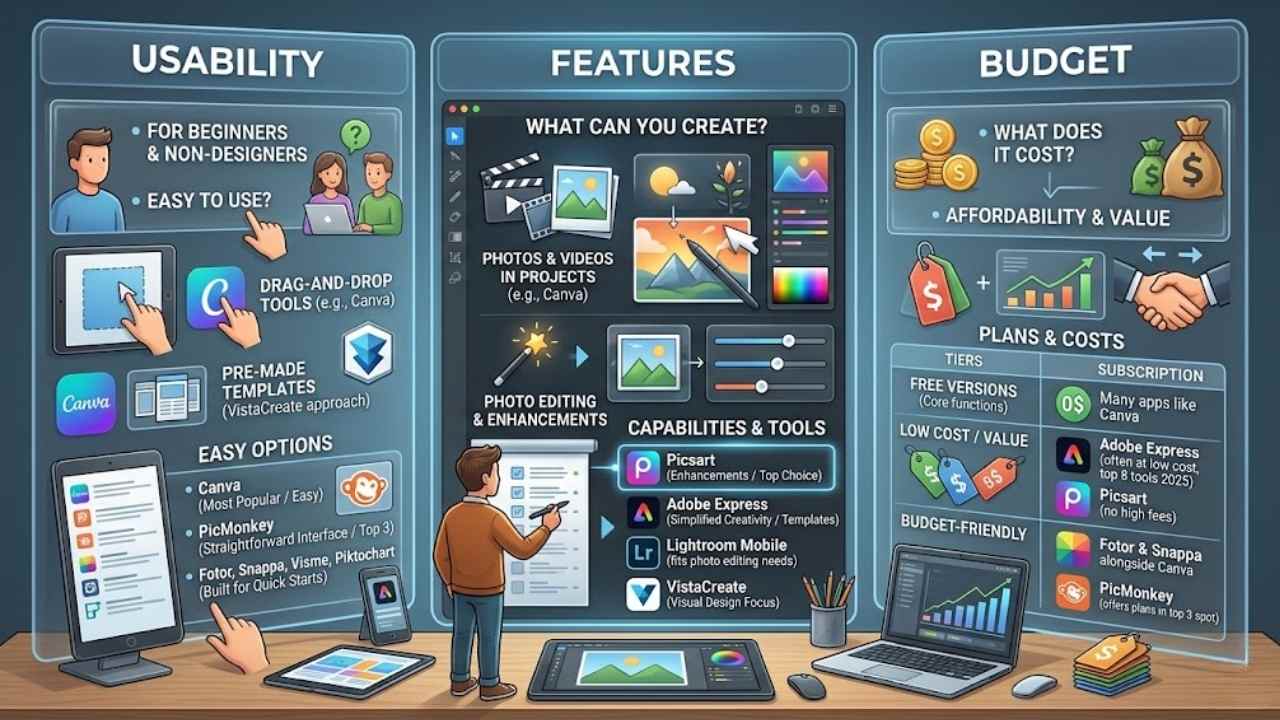
You face choices when picking a design app, so think about usability, features, and budget to match your needs.
| Factor | Key Points |
|---|---|
| Usability | Look for drag-and-drop tools like those in Canva, which make graphics simple for beginners. Apps with pre-made templates, such as VistaCreate’s template-first approach, help non-designers jump in fast. Canva stands out as the most popular option, easy for users without experience. PicMonkey ranks in the top three with Canva and Adobe Spark for straightforward interfaces. Fotor, Snappa, Visme, and Piktochart join Canva in the top list, all built for quick starts. |
| Features | Canva supports photos and videos in projects, plus drag-and-drop ease. Picsart excels in photo editing and enhancements, often called the top choice for non-designers. Adobe Express offers simplified creativity with templates for ideal users. Lightroom Mobile fits photo editing needs within design tools. VistaCreate focuses on visual design through templates, perfect for starters. |
| Budget | Many apps like Canva provide free versions with core functions, but check premium options for extras. Adobe Express lands in the top eight tools for 2025, often at low cost. Picsart gives value for photo work without high fees. Tools such as Fotor and Snappa keep things affordable alongside Canva. PicMonkey offers budget-friendly plans in its top-three spot. |
Final Thoughts
Explored top design apps like Canva, Adobe Express, and Picsart that empower non-designers to create stunning graphics. These tools offer drag-and-drop features, pre-made templates, and easy photo editing, making design simple and quick for everyone.
Jump into projects with confidence, as they solve common hurdles like lack of skills or time. Check out free trials on their websites, or join online communities for tips and inspiration.
Once whipped up a poster in minutes using Canva, and it changed how I tackle creative tasks. Grab your favorite app today, and watch your ideas come alive.
Frequently Asked Questions (FAQs) About Design Apps for Non-Designers
1. What are the top design apps for non-designers?
If you’re not a pro designer, apps like Canva and Adobe Express make it simple to whip up graphics. They come packed with templates that feel like a cheat sheet for creativity. Picture this, you drag and drop elements, and boom, you’ve got a poster that looks pro without the hassle.
2. How do these design apps help beginners create visuals?
These tools turn complex tasks into a walk in the park with drag-and-drop features. Non-designers love how they suggest colors and layouts, like a helpful buddy whispering tips in your ear.
3. Are top design apps for non-designers free to use?
Many start free, letting you test the waters with basic features before you dive into paid upgrades for extras like premium stock photos.
Absolutely, they’re perfect for crafting eye-catching posts; think Instagram stories or Twitter banners. Non-designers find the ready-made templates a lifesaver, saving time like finding money in an old coat pocket. Plus, they integrate with your phone, so you edit on the go without breaking a sweat.