Ever open MyKaty Cloud and feel like you should be seeing grades, class updates, or Canvas, but the screen seems to fight you instead? That happens to plenty of Katy ISD families, especially at the start of the year or after a password change.
You are not stuck.
This guide walks you through what MyKaty Cloud does, how to sign in, what to check when Home Access Center will not load, and where to get help fast. I will keep it simple, practical, and focused on the steps that matter most for parents and guardians.
What Is MyKaty Cloud?
MyKaty Cloud is the Katy ISD web portal that gives students, parents, guardians, and staff one place to access district applications and educational resources. As of the 2025-26 school year, Katy ISD says it serves more than 97,000 students across more than 100 campuses and facilities, so having one clear sign-in point saves families real time.
Think of it as your family’s front door to online school tools. Instead of keeping track of separate pages for grades, assignments, and research databases, you sign in once and open the tiles you need.
The same setup works across Katy Independent School District, whether your child attends an elementary school, a junior high, Katy High School, Seven Lakes High School, or programs like Miller Career & Technology Center and Legacy Virtual High School.
- Home Access Center: Check schedules, grades, assignments, test scores, absences, and basic parent contact details.
- Canvas: See class calendars, assignments, resources, and teacher-posted content in one place.
- Katy 1 Source and Knowledge Base: Find how-to articles for passwords, apps, and common technology problems.
- A+ Library Resources: Open databases, online encyclopedias, ebooks, streaming video, and the Destiny Catalog.
- SchooLinks: For grades 6 through 12, families can review career interests, scholarships, course plans, and graduation planning.
One helpful detail that many parents miss is this: parents can see plenty of school information through MyKaty Cloud, but the district FAQ says digital textbooks themselves are generally student access items. That saves you from wasting time hunting for a textbook tile that may only appear under your child’s login.
Features of MyKaty Cloud
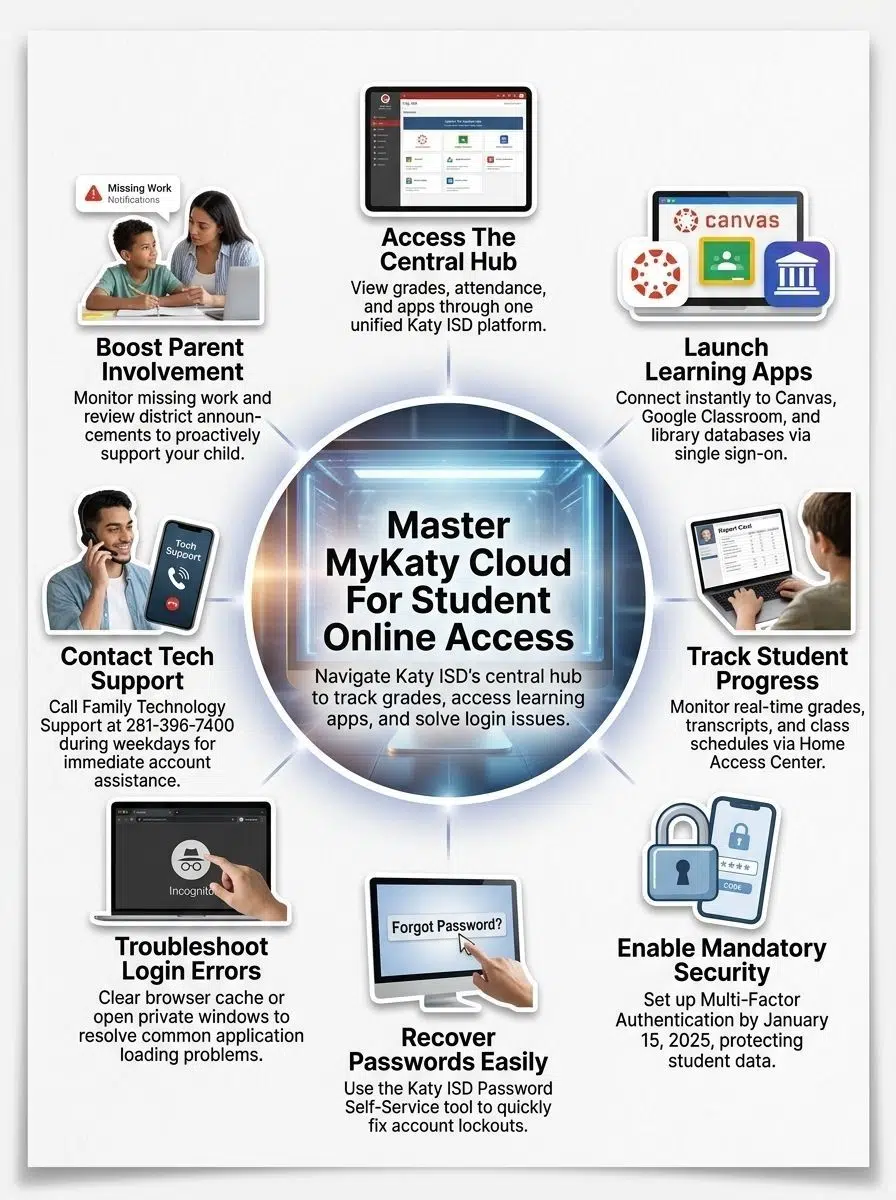
MyKaty Cloud is most useful when you know which tile solves which problem. Once you learn that map, the portal feels much easier to use.
Access to learning apps and resources
MyKaty Cloud gives your student one online access point for district applications, cloud computing tools, and classroom platforms. Katy ISD explains that students are often automatically signed in through ClassLink, which is why one login can open several apps without asking for the password again.
That matters on busy school nights. Your child can jump from Canvas to library tools to district applications without losing momentum.
A strong place to start is the A+ Library Resources folder. Katy ISD’s library services page says students can open databases, online encyclopedias, ebooks, streaming video, and the Destiny Catalog there, which makes it a better first stop for research than a random web search.
If your child needs a school device at home, Katy ISD’s CLASS 1:1 initiative has placed Chromebooks with students in grades 3 through 12 for school and home use. The district announced optional device insurance at $20 per student device per school year, covering up to two repairs or one replacement, which can be worth it if your child carries the device back and forth every day.
Parents can also use MyKaty Cloud to reach family-facing help and digital support without bouncing between sites. That is especially useful if you are dealing with a password issue, a broken app tile, or a question about safe device habits at home.
Grade tracking and attendance monitoring
For day-to-day parent use, Home Access Center is usually the most important tile inside MyKaty Cloud. It lets you see your child’s schedule, homeroom teacher, grades, assignments, test scores, absences, and basic parent or guardian contact information.
That contact section is more important than it looks. If your email address or phone number is outdated, password recovery and school alerts get harder right away.
Canvas and Home Access Center work side by side, but they do different jobs. Canvas shows class content and deadlines, while Home Access Center is the better place for official grade and attendance checks.
If a class average changes before you can see the matching assignment, do not panic. Katy ISD notes that a classwork average can include scores that are not visible yet because teachers still have to publish them to Home Access Center.
Library and database tools for research
MyKaty Cloud is also a solid research hub for students. The district’s library resources include vetted databases and ebooks, which can save your child from using weak sources for projects and reports.
This is where named tools matter. Sora helps with ebooks and audiobooks, Destiny Catalog helps with book searches and holds, and database collections give students access to school-approved articles and reference material.
For older students, SchooLinks adds another layer of support. Katy ISD makes it available to students and parents in grades 6 through 12, and families can use it to search scholarships, review college options, build a Personal Graduation Plan, and even look at virtual campus tours.
| Tool in MyKaty Cloud | Best for | Parent tip |
|---|---|---|
| Home Access Center | Grades, attendance, schedules, contact details | Check this first when you need official school information |
| Canvas | Assignments, calendars, class content, teacher posts | Use it nightly to spot due dates before they become late work |
| A+ Library Resources | Databases, ebooks, streaming video, Destiny Catalog | Start research here so your child uses district-vetted sources |
| SchooLinks | College, career, scholarships, graduation planning | Great for grades 6-12 when course planning starts to matter |
How to Access MyKaty Cloud
Getting into MyKaty Cloud is usually quick once you know which credentials to use. Most parent login problems happen because families try an old password, skip multi-factor authentication, or expect Home Access Center to work as a separate system.
Login process for parents and students
Use these steps if you want the shortest path from sign-in to the information you need.
- Open MyKaty Cloud and sign in with your Katy ISD credentials. Parents and guardians use the same username and password they use for Home Access Center.
- After you land on the dashboard, choose the tile you need, such as Parent Home Access Center, Canvas, or a library resource.
- If you have never logged into MyKaty Cloud before, complete your security questions and any multi-factor authentication prompts during setup.
- In the district’s January 2025 update, Katy ISD made clear that as of January 15, 2025, guardians who had never logged into MyKaty Cloud must go through MyKaty Cloud and set up MFA before using Home Access Center.
- If you are a new family and do not know your ID or password yet, use the Katy ISD Password Self-Service tool or contact your campus for account help.
- If a tile you expect is missing during the first week of school, wait a little before assuming something is broken. Katy ISD’s FAQ says app access can take up to 7 days after school starts because schedules and licenses need time to sync.
Students and parents do not always have the same view, and that is normal. Parents can use HAC credentials for Canvas access, while students open many tools directly through their own MyKaty Cloud view.
Troubleshooting common login issues
If MyKaty Cloud will not cooperate, work through the fixes below in order. That usually gets families back in faster than jumping between random reset links.
- Wrong username or password: Your guardian username is the same ID you use for Home Access Center. If it is forgotten, use the district’s guardian recovery options instead of creating a new account.
- MFA problems: If multi-factor authentication is blocking you, update your recovery choices or follow the guardian MFA reset steps. This issue shows up most often after a new phone number or email address.
- Old contact details: Update your email address and phone number inside Home Access Center so password recovery and alerts still reach you.
- Missing child account: If you need one ID and password to reach all of your children, the district FAQ says the campus Registrar can link Home Access user accounts for you.
- Elementary password confusion: Katy ISD says elementary students cannot change their passwords. If that password is missing, the fastest help usually comes from the teacher, librarian, campus, or parent tech support request.
- Secondary password reset: Middle and high school students can handle more through self-service inside MyKaty Cloud, and Katy ISD also sends important information to secondary student email accounts.
- App loads badly: Try a private browser window, clear cache and cookies, or switch devices. If another Katy ISD application keeps asking you to sign in again, make sure WebPass is enabled so the system can authenticate you across other programs.
Katy ISD lists Family Technology Support for parents and students at 281-396-7400. During the school year, the posted hours are 6:30 AM to 4:30 PM, Monday through Friday, excluding district holidays.
Benefits of Using MyKaty Cloud

When MyKaty Cloud is set up correctly, it removes a lot of small daily friction. You spend less time hunting for the right page and more time understanding what your child actually needs.
Streamlined access to academic tools
The biggest win is speed. One portal gives your family access to grades, attendance, Canvas, library resources, and college or career planning tools without repeated sign-ins.
That single sign-on setup is especially helpful on shared home devices. If your child uses a Windows laptop, an iPhone, or an Android phone, MyKaty Cloud is built to work across major operating systems, so you can check school information from the device you already have.
Students can move from teacher assignments to research databases for articles, videos, and ebooks in one session. For families, that means fewer forgotten passwords and fewer, “I can’t find it,” moments right before homework is due.
- Open Home Access Center for the official grade and attendance snapshot.
- Open Canvas for what is due next and what your child’s teacher posted today.
- Use A+ Library Resources when a project calls for stronger sources than a general search.
- Use SchooLinks for grades 6-12 when course planning, college exploration, or scholarships start coming up.
Enhanced parent involvement in student learning
MyKaty Cloud makes it easier to stay involved without hovering. A quick weekly check can show you absences, slipping grades, missing assignments, and upcoming deadlines before they grow into bigger problems.
Home Access Center also supports communication. Katy ISD says parents can email a teacher from the Interim Progress or Report Card screens, which turns the portal into a practical parent-teacher communication tool instead of just a grade book.
That kind of routine works best when it is simple.
- Once a week, check attendance and averages in Home Access Center.
- On the same visit, open Canvas and look for major due dates or teacher announcements.
- Once a grading cycle, review contact details and make sure your recovery email and phone number are still current.
- For secondary students, open SchooLinks together and talk through course choices, goals, and next steps.
Used this way, MyKaty Cloud helps you stay informed, helps your student stay organized, and gives both of you a calmer way to manage school online.
Final Words
MyKaty Cloud gives Katy ISD families one home for grades, attendance, Canvas, library tools, and student support resources. Once your login is working and MFA is set, checking in each week becomes much easier.
If something breaks, start with password recovery, contact details, and the right tile, then call Family Technology Support if you still need help. A short MyKaty Cloud check each week can keep you informed and help your child stay on track.