Are you tired of bouncing between apps, forgetting tasks, or feeling overwhelmed by endless data entry? This is a common challenge many people face every day. Time often slips away while managing reminders, organizing files, and trying to keep everything on track.
A simple yet effective approach is to combine GPT and Gemini. Together, these powerful AI tools can streamline daily workflows and reduce manual effort. With their advanced capabilities, tasks like scheduling meetings, syncing spreadsheets, and managing repetitive processes can be automated in seconds.
Explores how to automate workflows with GPT and Gemini for faster results and fewer headaches. Follow the step-by-step process outlined ahead to simplify tasks, improve efficiency, and free up more time for meaningful work.
What Are GPT and Google Gemini?
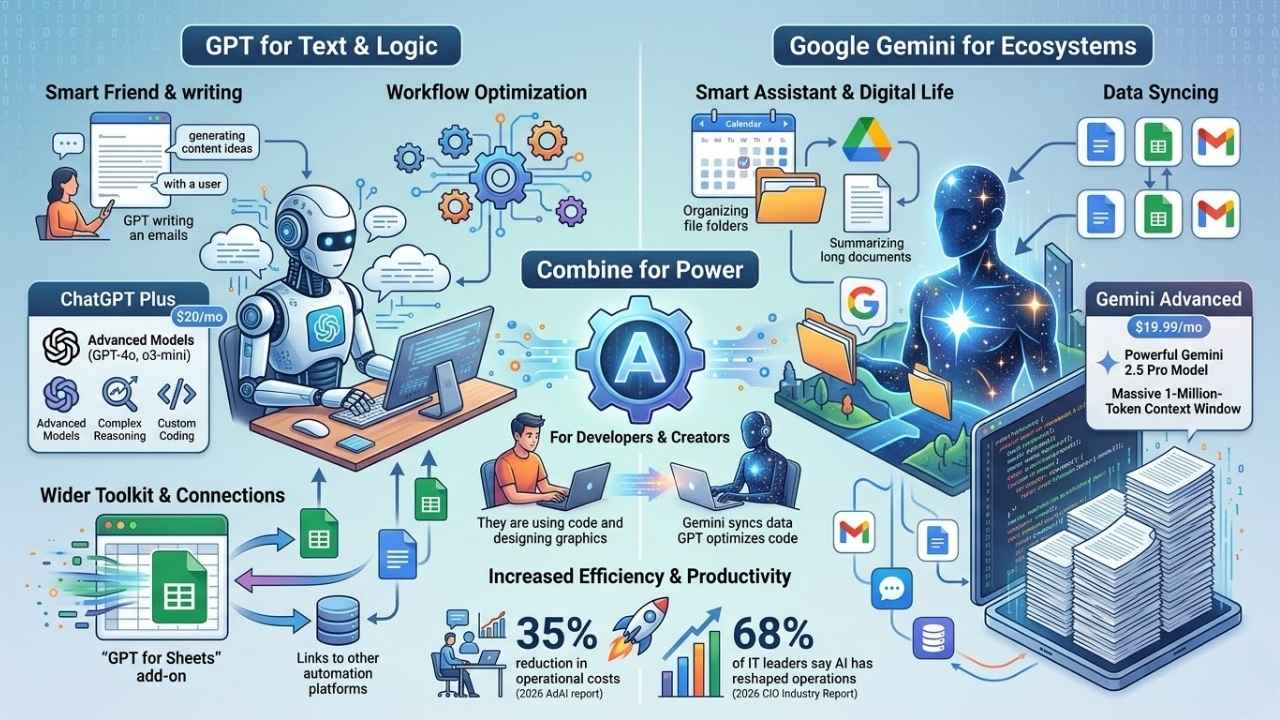
GPT chats like a smart friend and helps you write, answer questions, or brainstorm in plain language. Google Gemini gives brilliant help with tasks across your digital life. Think of them as two clever assistants teaming up for smoother workdays.
Overview of GPT technology
GPT, short for Generative Pre-trained Transformer, acts like a digital assistant with supercharged brains. OpenAI built GPT to understand and process natural language, making it perfect for workflow optimization and productivity tasks.
Many professionals use the premium ChatGPT Plus tier, which costs $20 per month in the US. This plan unlocks access to advanced models like GPT-4o and o3-mini, which are fantastic for handling complex reasoning and coding tasks.
- Wider Toolkits: Compared to other assistants, ChatGPT stands out by offering a wider toolkit loaded with features that work across multiple applications.
- Spreadsheet Power: Tools like the GPT for Sheets add-on handle huge data sets at blazing speeds.
- Easy Connections: It is common practice to link ChatGPT with automation platforms so teams achieve seamless data syncs at the click of a button.
Overview of Google Gemini AI
Google Gemini AI acts as a smart assistant that connects smoothly with tools like Google Workspace. It handles tasks like syncing data, managing schedules, and organizing workflows for teams of any size.
Scientists and developers flock to Gemini because it can automate tedious work, run analysis scripts, or build simulation models quickly.
If you upgrade to Gemini Advanced for $19.99 per month in the US, you gain access to the powerful Gemini 2.5 Pro model. This upgrade features a massive 1-million-token context window. That means you can feed it entire codebases or massive documents, and it will not forget the details.
| Feature | ChatGPT Plus ($20/mo) | Gemini Advanced ($19.99/mo) |
|---|---|---|
| Best For | Complex reasoning and custom coding | Deep Google Workspace integration |
| Context Window | Large, but varies by specific model | 1 million tokens for massive files |
Small business owners and creators often choose Gemini to get easy connections between their apps while boosting productivity.
Why Automate Your Workflow?
Everyone loves crossing things off their list, but there is only so much daylight. With a few smart tools and a pinch of AI magic, you will zip through daily tasks faster than ever.
Benefits for developers and creators
Developers save hours each week using proactive AI workflows with Gemini and GPT. Imagine syncing data between apps in seconds, not minutes.
- Massive Cost Savings: A 2026 report by AdAI notes that businesses using AI automation report a 35% average reduction in operational costs.
- Faster Processing: Tools like GPT for Sheets power through huge datasets, making old manual tasks seem ancient.
- Deep Integration: Google Gemini shines with deep integration into collaboration tools like Google Workspace, so creators juggle less and do more meaningful work.
Increased efficiency and productivity
Busy teams cut down manual work fast by combining these tools. Proactive AI workflows let you schedule meetings or organize files without breaking a sweat.
“68% of IT leaders say AI workflows have already reshaped operations in 2026, making automation a core necessity rather than a luxury.” – 2026 CIO Industry Report
Gemini and ChatGPT together turbocharge workflow optimization. Gemini is a star for ecosystem integration, while ChatGPT brings more features to the table for smart automation.
Scientists automate writing analysis scripts and simulations, freeing up time for real problem-solving instead of copy-paste chores. Many small businesses now combine these AI assistants to manage tasks faster and keep productivity high every day.
How to Automate Your Workflow Using GPT and Gemini Together
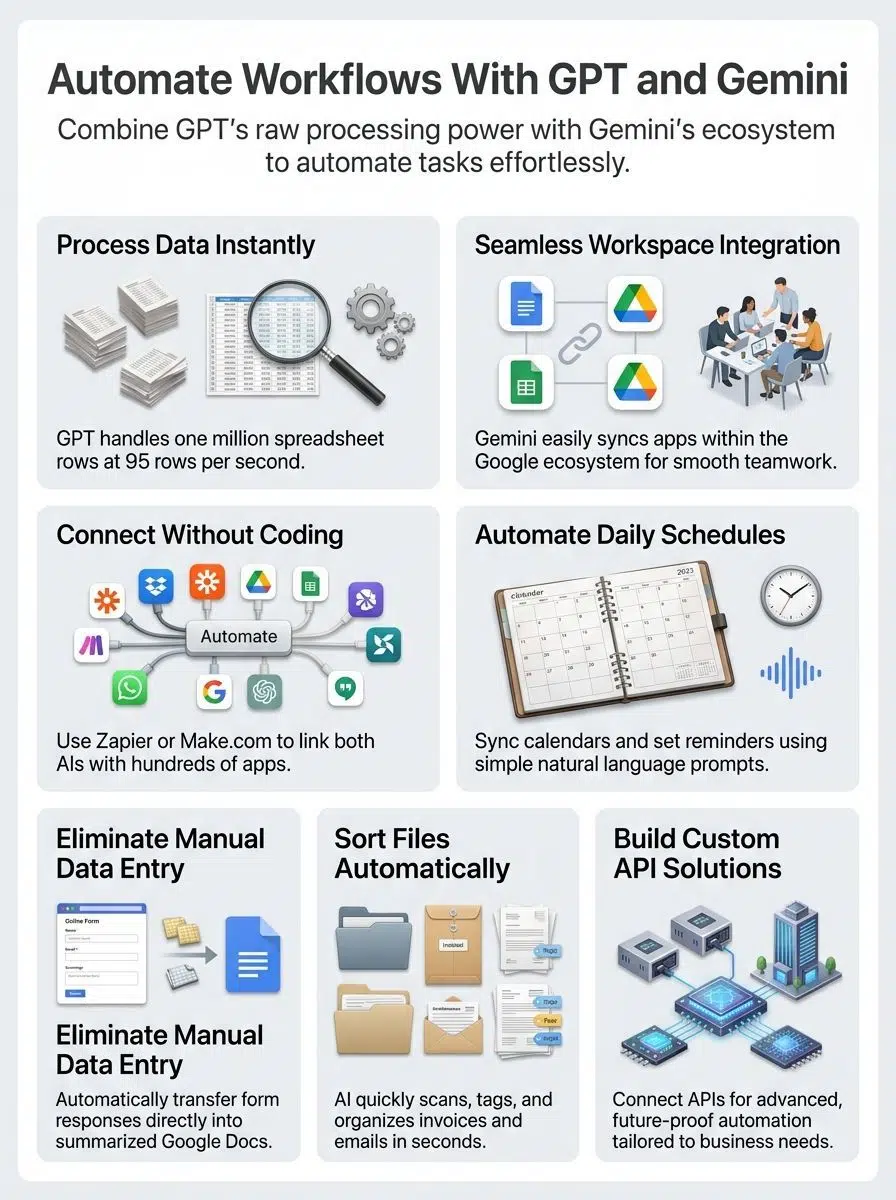
Pairing GPT and Gemini is easier than you might think, opening doors to smarter workflow tricks in a snap. With the right tools, even folks with little tech know-how can get their work running like clockwork.
Using automation platforms like Zapier or Make.com
You can use Zapier and Make.com to connect GPT and Gemini for smarter workflows. These platforms help link your favorite tools, so tasks run on autopilot and free up your time.
- Zapier now supports over 8,000 app integrations, meaning you can connect these AI tools to almost any software you use.
- Use the Model Context Protocol in Zapier to give your AI direct access to complex actions without writing a single line of code.
- Set triggers that watch for new emails, files, or calendar updates. Let GPT draft responses while Gemini manages schedule changes.
- Save time, worry less about errors, and see higher efficiency through process optimization across integrated services like Gmail and Slack.
Integration with Google Workspace tools
Gemini and GPT can work with Google Workspace tools to make jobs simpler and faster. These AI assistants help manage tasks, boost productivity, and save time for users at any skill level.
- Use the new
=AI()function inside Google Sheets, powered directly by Gemini, to instantly categorize customer feedback right in the cell. - Install the GPT for Sheets add-on by Talarian. It costs around $5 per 1 million tokens if you use an API key, making it incredibly cheap for bulk data formatting.
- Connect Gemini with Gmail for smart email sorting, auto-replies, or meeting scheduling using its deep integration abilities.
- Employ Gemini in Slides to suggest content ideas or update presentations automatically by pulling key points from reports.
Connecting with APIs for custom solutions
Connecting APIs can supercharge your workflow, giving you more control and options. AI tools like ChatGPT and Gemini become even smarter with custom API links.
Developers can use OpenAI’s API to access fast models like gpt-4o for specific tasks. On the Google side, the Gemini API offers a free tier of 15 requests per minute, which is perfect for small custom scripts.
With an API link, you can set up workflows that trigger on keywords from customer emails, auto-generate reports, or schedule tasks straight into your calendar. Scientists use API connections to automate boring bits in script writing and model simulation.
Custom solutions grow as your needs change. Adding new integrations to handle extra tasks keeps your process nimble and ready for the future.
Popular Use Cases for GPT and Gemini Automation
Working smarter gets easier with the help of AI tools like GPT and Gemini. Smart assistants can handle your daily tasks, so you have more room to focus on the work that matters most.
Scheduling tasks and reminders
GPT and Gemini make scheduling a breeze, syncing your tasks across Google Calendar, Gmail, and even Slack. You can tell ChatGPT or Gemini to set up meetings for next Tuesday at 2 PM, and they will do the rest.
- According to 2026 Zapier statistics, IT teams using AI automation cut out upwards of 30 minutes per support ticket or scheduled task.
- Integrate both tools to trigger daily reminders from Google Workspace with just one prompt.
- Gemini keeps reminders in sync, while ChatGPT offers wider options for task management in apps like Notion.
Automating data entry and reporting
Gemini and ChatGPT work as a team to tackle data entry, so you avoid the heavy lifting. Imagine Gemini syncing your Google Workspace with other apps while ChatGPT manages huge sheets.
This tag-team approach wipes out the need for endless copy-pasting.
| Tool | Best Use Case for Data | Key Benefit |
|---|---|---|
| Coefficient AI | Pulling live data from 50+ sources like Salesforce into Sheets | Keeps weekly reports updated with real-time numbers |
| GPT for Sheets | Mass text formatting and summarization | Generates hundreds of product descriptions instantly |
For long reports or tracking sales numbers, generating summaries and filling spreadsheets happens faster than most humans can blink. The right workflow feels smoother, keeps mistakes down, and gives teams more time for creativity.
AI-powered document management
ChatGPT and Gemini work together to sort, tag, and store files in seconds. Need to handle scripts or long research papers? These tools have you covered.
- Gemini natively integrates into Google Drive, allowing you to search and summarize massive PDFs using its 1-million-token context window.
- ChatGPT features tools like Canvas, which help you rewrite and format document text side-by-side in a dedicated workspace.
- Using tools like Zapier or Make.com, folks hook up these AI assistants with Google Workspace apps for smoother document workflows.
Step-by-Step Guide to Automating Workflows
Get ready to roll up your sleeves, follow a simple roadmap, and watch your tasks almost run themselves. Are you curious how? Keep reading!
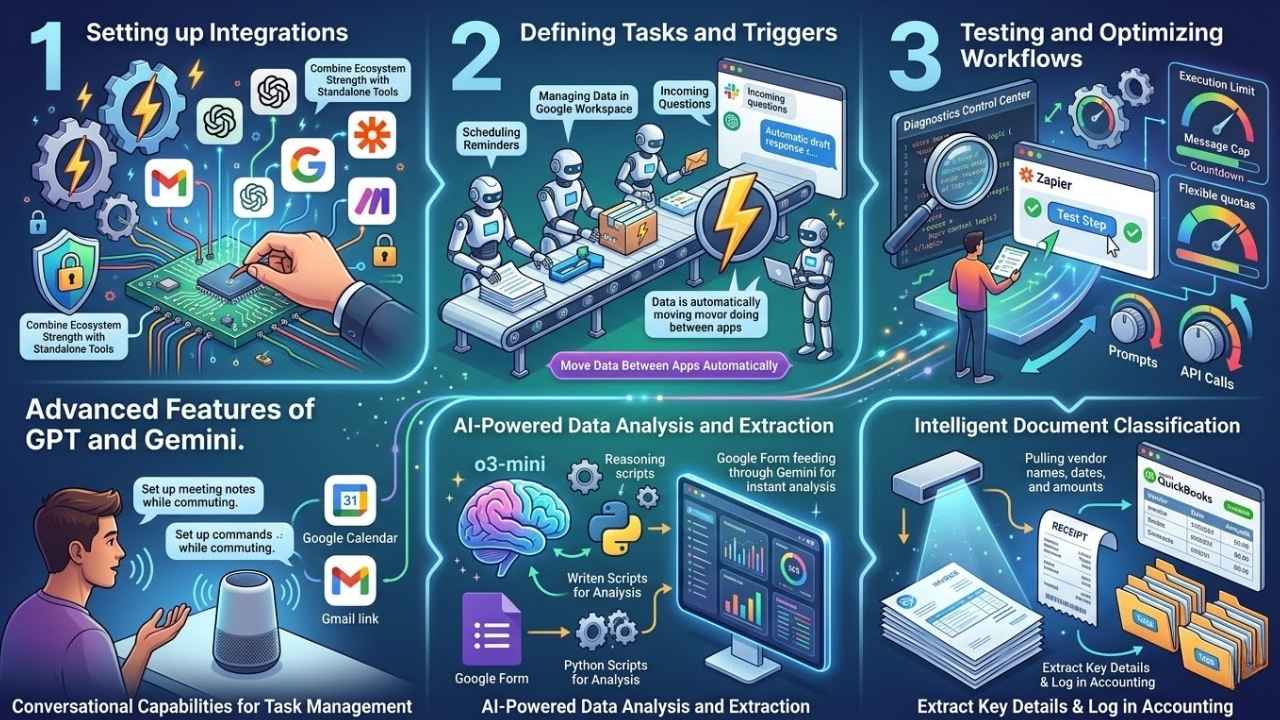
Setting up integrations
Setting up integrations helps you save time and boost productivity. You can link Gemini and GPT to create smarter, faster workflow automation.
- Sign in to your Google or OpenAI accounts before starting any workflow setup for security and smooth access.
- Start small. A 2026 industry report shows 42% of companies abandon AI initiatives due to poor execution. Begin with a single Zapier trigger, like “New Email in Gmail,” before building complex webs.
- Use automation platforms such as Zapier or Make.com. These let you connect Gemini and ChatGPT with hundreds of other smart tools using pre-made templates.
- Combine Gemini’s ecosystem integration strength with ChatGPT’s wide standalone toolkit for more flexible workflow optimization.
Defining tasks and triggers
Building workflow automation with GPT and Gemini is like planning a smart assembly line. Each job needs a clear task, and each action needs a trigger to set it off.
- Pick the task you want to automate, like scheduling reminders or managing data in Google Workspace, to save time.
- Target your most common requests. Zapier notes that 49% of ChatGPT queries are for practical guidance. Set a trigger for incoming questions in Slack to have the AI auto-draft a response.
- Use Zapier or Make.com to move data between apps automatically, even syncing files or updating calendars.
- Define outcomes early so your workflow delivers what you expect. If you want automated reports sent every day at 8 am, make that part of your trigger setup.
Testing and optimizing workflows
Testing and optimizing your workflow brings every automation up to speed. Find issues, fix them fast, and squeeze more value from your smart tools.
- Try out each step of your automated workflow with real data, making sure both GPT and Gemini process inputs like a pro.
- Use the “Test Step” feature in Zapier to verify data formatting before pushing the workflow live to your team.
- Watch out for execution limits. Gemini Advanced has flexible quotas but tracks computational load, while ChatGPT Plus caps usage at around 80 messages per 3 hours. If you hit these limits, your automated flow might stall.
- Adjust prompts and API calls if tasks do not complete correctly. Small tweaks can unlock huge productivity jumps.
Advanced Features of GPT and Gemini for Automation
These smart tools can handle more than simple tasks. With a few clicks, you will watch your workflow become incredibly sharp, quick, and smooth.
Conversational capabilities for task management
Gemini and ChatGPT can talk with users to help manage tasks faster. Need a quick meeting set up or want to track your project list?
“Using ChatGPT’s Advanced Voice Mode or Gemini’s Live conversational features, you can speak naturally to log tasks or meeting notes while commuting, completely hands-free.”
Developers love this because the toolkit handles instructions in natural language, while Gemini links smoothly with Google Calendar or Gmail. Both work together to sync data across platforms, creating automated workflows that keep things tidy.
The duo cuts down on busywork so creators and small teams boost productivity with smart conversations instead of endless back-and-forth emails.
AI-powered data analysis and extraction
GPT and Gemini work together like a smart assistant team. Both tools use artificial intelligence to pull data from texts or files, sort it out, and deliver quick answers.
- Leverage the new o3-mini model from OpenAI. It specializes in advanced reasoning and coding tasks, making it perfect for writing Python scripts to analyze your data.
- Google Gemini connects well with Google Workspace tools. You can set up automated workflows that grab new form responses and push them through Gemini for instant analysis.
- Productivity gets a sharp boost as AI sorts numbers and pulls key insights from documents quickly. No sweat required!
Intelligent document classification
GPT and Gemini sort files faster than a team of librarians. AI assistants scan documents, spot key details, and put each file in the right place using smart labels or tags.
Intelligent Process Automation uses optical character recognition combined with AI to read scanned files. For example, Gemini can extract the vendor name, date, and amount from an image of a receipt and automatically log it into accounting software like QuickBooks.
Combine both tools to let them handle invoice sorting, email attachments, contracts, or forms in seconds instead of hours. Sync data between apps like Gmail and Google Drive with automation platforms such as Zapier for even smarter document management. Tidy paperwork means you spend less time searching and more time finishing important tasks efficiently.
Final Thoughts
You now know how to automate your workflow using GPT and Gemini together to make tasks easier and boost productivity for anyone. Using tools like Zapier or Google Workspace makes setting up these smart systems incredibly simple.
These strategies save time, cut down on boring data entry jobs, and help you focus on the work that matters most. Stronger task management means fewer sticky notes cluttering your desk.
For more tips or guides, check out online forums or the official help centers for both AI assistants because learning never stops. With a few clicks today, you can watch your workflow run smoother tomorrow. Soon you might have so much free time that coffee breaks become brainstorming sessions!