How to Convert MOV to WAV with No Size Limit?

Convert MOV to WAV

MOV is usually the format used for videos recorded by iPhone iPad, DJI, Cannon and more, or the videos created by some Apple software like Final Cut Pro. WAV, shorted from Waveform Audio File Format, is an audio format standard which can store the audio bitstream. This is very important for audio editing. Whether you want to convert MOV video to WAV for audio observation, editing or just the soundtrack music, you can find the solution in this post.

Online MOV to WAV converter website is a choice for MOV video in small size. Almost all the online websites sets a limitation of the video file size for uploading and converting. Some sites make 400MB as the largest size and some allow MOV file less than 1GB. These make sense when you understand that the uploading process of large file is very time-consumption.

Besides, video in any format including MOV with large file size will impose a huge burden to the server of online converter. It’s a disaster if the website go crashing during the conversion of MOV to WAV. In a sudden, the long wait becomes a waste.

In the interest of converting MOV to WAV without file size limit, it’s suggested to use a MOV to WAV converter. Some software may also stop working when converting 4K UHD MOV videos. WinX Video Converter is a desktop software that allows you to convert HD/UHD videos with no file size limit. It can convert MOV to audio in WAV, FLAC, MP3, AAC, ALAC, etc. as well as convert MOV to video in MP4, WMV, AVI, and so forth.

All you need to do before converting MOV to WAV with this software is to download and install it on your PC or Mac computer. Then go after the steps below to start convert MOV video to WAV audio.

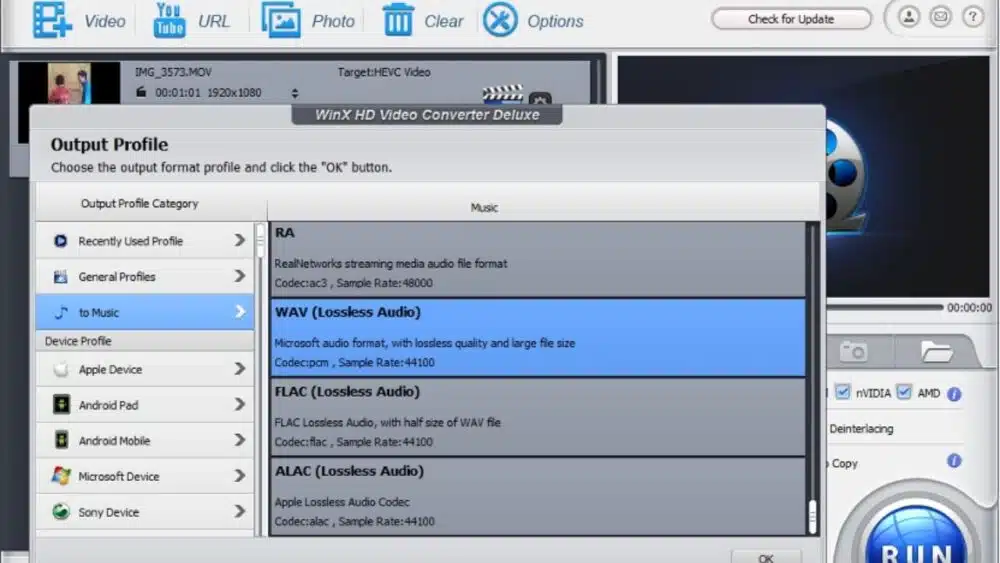
First, open WinX Video Converter, click “+Video” icon to add the video in MOV format that you want to convert. Or, you can directly drag the video file to this converter, it will automatically added to conversion queue.
Convert MOV to WAV

Then, click “to Music”, and scroll down to choose “WAV (Lossless Audio)” as output profile.          

In the end, if you don’t need any other changes, you can click the “Run” button to convert the MOV file.

Tips: you can use the edit function to cut off unwanted part before converting. Although this software offers the option to adjust audio parameters, if you need WAV audio for further editing, it’s not recommended to adjust the audio bitrate, sample rate or channel.  

It’s quite easy to convert any MOV to WAV, right? Only a few clicks and a moment of wait, you can get what you want in the local folder on computer. 

If you don’t need the soundtrack with lossless quality, it’s better to convert it to AAC. Unlike WAV, it is widely compatible with many devices and applications as MP3. Besides, it can compress the audio file in size a lot comparing with WAV format. WAV is an audio format without compressing, the file size will be very large. Thus AAC is more convenient for storing, uploading or sharing. But the audio quality is not good as WAV. Regarding to MP3, it’s the format with lowest audio quality among these three, while it is larger than AAC.   


Subscribe to Our Newsletter

Related Articles

Top Trending

Best CRM Tools for Small Marketing Teams
10 CRM Tools for Small Marketing Teams Worth Using
how many numbers should a toddler recognize
How Many Numbers Should a Toddler Recognize?
Painless Time Tracking
Why Time Tracking Feels Awful [and How to Make It Painless]
SaaS partnership tools
10 Best Tools for Managing SaaS Partnerships and Integrations
Best Educational YouTube Channel for Kids
Best Educational YouTube Channel for Kids: 10 Picks for Ages 2 to 8

Technology & AI

Best CRM Tools for Small Marketing Teams
10 CRM Tools for Small Marketing Teams Worth Using
SaaS partnership tools
10 Best Tools for Managing SaaS Partnerships and Integrations
White-Label SaaS Platform to Resell
8 Best White-Label SaaS Platforms to Resell
How to Add AI Features to an Existing SaaS
How to Add AI Features to an Existing SaaS: A 7-Step Guide From a Live AI Platform
How to Read the Page Indexing Report in GSC
How to Read the Page Indexing Report Properly

GAMING

Intentional Screen Time
How to Spend Your Screen Time More Intentionally
Complete Guide on Game Programgeeks
Game Programgeeks: A Complete Guide on PC, Game Dev, and Tech
Online Color Game Philippines
Online Color Game Philippines: What Every Beginner Should Know Before Playing
Ways to Reduce Game Development Costs
12 Ways Studios Cut Game Development Costs
NFT game development cost
How Much Does NFT Game Development Cost? A Realistic Budget Breakdown

Business & Marketing

Time to Value: How SaaS Teams Can Reach Results Faster
How to Onboard New Team Members With a Self-Serve Wiki
How to Document Team Processes for Better Teamwork
How to Manage Scope Creep Before It Manages You
How to Manage Scope Creep Without Blocking Good Ideas
Made in America work boots
Made in America Still Matters When You’re Buying Serious Work Boots

EdTech & E-Learning

how many numbers should a toddler recognize
How Many Numbers Should a Toddler Recognize?
Best Educational YouTube Channel for Kids
Best Educational YouTube Channel for Kids: 10 Picks for Ages 2 to 8
what makes an educational app educational
What Makes an Educational App Actually Educational?
How Alphabet Knowledge Predicts Reading Success
Mistakes Parents Made When Teaching Alphabet
8 Mistakes Parents Make When Teaching the Alphabet

Software & Apps

Best CRM Tools for Small Marketing Teams
10 CRM Tools for Small Marketing Teams Worth Using
SaaS partnership tools
10 Best Tools for Managing SaaS Partnerships and Integrations
White-Label SaaS Platform to Resell
8 Best White-Label SaaS Platforms to Resell
How to Add AI Features to an Existing SaaS
How to Add AI Features to an Existing SaaS: A 7-Step Guide From a Live AI Platform
free SaaS alternatives
9 Free Tools That Replace Expensive SaaS Subscriptions