
Are you tired of struggling to find the right tools for your web development projects? Here’s a cool fact: there are tons of hidden gems out there that can make your work with web apps and front-end web development much easier.
I’m here to share a list of 10 Underrated Web Development Tools that will boost your productivity and solve those pesky coding headaches. Stick around to uncover these awesome finds!
Key Takeaways
- ScreenToGif is a free tool on GitHub that records your screen to make GIFs for web projects.
- Responsively lets you test websites on over 40 devices at once to check responsiveness.
- DevDocs offers free documentation for tech like Ruby on Rails and React.js in one place.
- Undesign has 45 sections with free design resources like Colors and Templates for developers.
- Colorsinspo helps create color palettes and works with Adobe XD for web design tasks.
ScreenToGif: Simplify the Creation of GIFs
Hey there, folks, let’s chat about a cool tool called ScreenToGif. It’s a free and open-source gem you can grab right off GitHub, and it makes creating GIFs for your web projects super easy.
This handy app records your screen activity, turning it into neat little animations without any hassle. Perfect for showing off a quick demo or adding flair to web applications, it’s a must-try for web developers like you.
Now, get this, ScreenToGif comes with sweet features to boost your user experience. Pick a specific area of your screen to record, toss in webcam footage if you want, and even draw or annotate while capturing.
These options make your GIFs pop, whether you’re tweaking web design or sharing snippets of code from a text editor. Give it a spin, and watch how it jazzes up your workflow!
Responsively: Optimize Websites for Multiple Devices
Testing websites on different screens can be a real pain, right? Let’s talk about Responsively, a handy browser made just for web developers. It lets you view your site across over 40 devices at once to check responsiveness.
No more guessing if your design works on a tiny phone or a big tablet. This tool saves you time and headaches when building web-based projects or mobile apps.
Imagine flipping through all those device sizes with a single click, pretty neat, huh? Responsively is free and open-source, plus it has a lively community pitching in with updates.
Sure, it might glitch now and then, but it gets the job done for most web technologies. If you’re coding with tools like Visual Studio Code or crafting single-page applications, add this gem to your kit.
Your web development workflow will thank you!
DevDocs: Access Comprehensive Documentation in One Place
Hey there, folks, let’s chat about a gem for web development. DevDocs is your go-to spot for grabbing free documentation on tons of tech, all in one handy place. Think of it like a giant library, stuffed with guides for stuff like Ruby on Rails, React.js, and even Node.js.
No more hopping around different sites; it’s all right here.
Guess what’s even cooler? DevDocs works as a Progressive Web App, or PWA, so you can use it offline. Yep, no internet needed! Whether you’re digging into APIs, databases, or programming languages, this tool has your back.
It’s a real time-saver for developers who want quick answers without the hassle.
Undesign: Discover Free Design Resources for Developers
Moving from DevDocs and its wealth of coding info, let’s turn our attention to something more visual with Undesign. This gem is a free resource repository for developers and web designers alike.
It’s packed with goodies to elevate your projects. Think of it as a treasure chest, brimming with tools to make your web development stand out.
Inside Undesign, you’ll find 45 sections overflowing with options like Colors, Gradients, Illustrations, Templates, and Inspiration. It’s a real time-saver for creating stunning designs without starting from scratch.
Plus, it comes as a Progressive Web App, so you can access it anywhere, anytime, right from your device. Explore this hub and see your web application development glow with fresh, eye-catching elements.
Colorsinspo: Find Color Palettes and Inspiration
Shifting gears from free design goodies with Undesign, let’s chat about adding some flair to your projects with Colorsinspo. This nifty tool helps in creating color palettes for your web development tasks, making your designs pop.
Whether you’re coding a site on React.js or tweaking a Vue.js app, picking the right shades can set the mood. Colorsinspo offers premade palettes, gradients, solid colors, and even brand colors to match any vibe you’re aiming for.
Now, imagine your CSS framework looking sharp with just a few clicks. This platform also has a handy plugin for Adobe XD, so you can pull those hues straight into your mockups. It’s like having a paintbrush for your digital canvas, right at your fingertips.
If you’re building mobile applications or dynamic web apps, grab a palette from here to keep things fresh and user-friendly. Stick with me, pals, as we explore more tools to boost your creativity!
Burp Suite Community Edition: Enhance Web Security Testing
Hey there, let’s talk about a useful tool called Burp Suite Community Edition. Developed by PortSwigger, this standout is a top choice for application testing, especially if you’re focused on web security.
It’s highly regarded by bug hunters and security testers for identifying weaknesses in web apps. Plus, it surpasses other options like Postman for thoroughly examining vulnerabilities.
Here’s the thing—this tool excels at debugging APIs and verifying authentication setups. You can seamlessly integrate its security features into your web development process. Whether you’re creating dynamic web applications or simply testing for threats like cross-site scripting, Burp Suite ensures safety.
Give it a shot, and discover how it elevates your testing efforts effortlessly.
TabNine: AI-Powered Code Completion for Faster Development
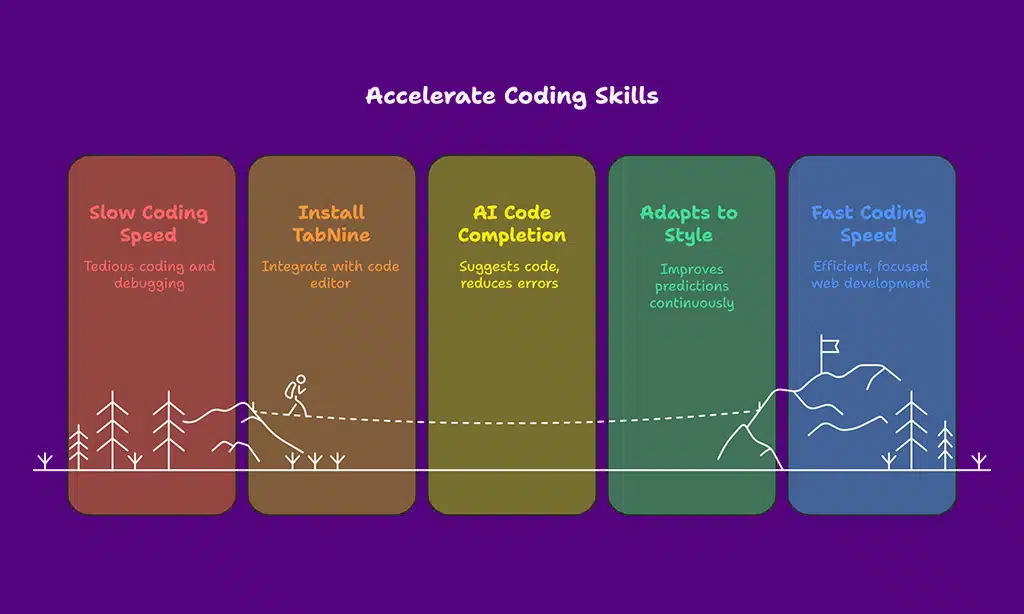
Moving from securing your web projects with Burp Suite, let’s turn our attention to accelerating your coding skills. TabNine is an incredible tool that leverages AI to assist with code completion, significantly speeding up your development process.
Imagine having a companion that anticipates your next line of code before you even start typing, almost like a psychic for your scripts. It integrates seamlessly with popular code editors like Sublime Text and supports frameworks such as React.js and Vue.js.
Now, envision this: you’re immersed in a web development project, and TabNine offers suggestions for your Node.js code. It saves you time, reduces errors, and helps maintain your concentration.
This tool adapts to your coding style, improving its predictions with each passing day. If you’re passionate about creating impressive web apps or refining client-side scripts, try this out, and see your efficiency skyrocket!
Figma Plugins: Extend Design Capabilities with Custom Tools
Shifting gears from coding with TabNine, let’s explore design brilliance with Figma Plugins. These useful add-ons can elevate your workflow, making web development more seamless when paired with design tasks.
If you’re creating interfaces for React.js or Vue.js, Figma Plugins allow you to refine and perfect designs effortlessly. Think of them as a reliable partner, always there to assist.
Ever tried managing design and code without the right tools? It’s like cooking without a guide. Figma Plugins offer unique features to your workspace, enabling you to align with CSS frameworks or prototype progressive web apps quickly.
They save time, inspire creativity, and keep your projects polished. Check out this collection of extras on their official website, and see your designs thrive for any web application framework.
Wappalyzer: Identify Technologies Behind Websites
Moving from the creative power of Figma Plugins, let’s switch gears to a handy tool for curious web developers. Wappalyzer is your go-to buddy for peeking behind the curtain of any website.
It shows you the tech stack, like which web frameworks or CMS they use, in just a click. Imagine being a detective, uncovering whether a site runs on React.js or Vue.js without breaking a sweat.
Ever wonder how competitors build their web presence? Wappalyzer, a neat extension for Chromium-based browsers, spills the beans on tools like NodeJS or specific CSS frameworks. It’s like having X-ray vision for the web, helping you learn and adapt fast.
Pop it into your browser, and see the magic unfold as you explore sites with ease.
Shorthand: Create Interactive Visual Stories with Ease
Hey there, let’s chat about Shorthand, a fantastic tool for crafting interactive visual stories without breaking a sweat. If you’re into web development tools and want to jazz up your projects, this gem lets you build stunning narratives with ease.
Think of it as painting a picture with code, but without the messy brushes, just clean, simple steps to captivate your audience.
Got a knack for storytelling? Shorthand pairs well with skills in vanilla JavaScript or even frameworks like React.js, helping you weave dynamic content that pops on any screen. It’s like having a secret weapon for single-page applications or progressive web apps, making your creations stand out in a crowded digital space.
Dive right in, and watch your ideas come to life with flair!
Takeaways
Well, folks, that’s the rundown on these amazing web development tools! Go ahead and give gems like ScreenToGif or Responsively a spin. I bet they’ll save you heaps of time, just like they’ve done for me.
Got a favorite from this list, or another cool find? Drop a comment, and let’s chat about boosting our coding game together!
FAQs on Underrated Web Development Tools
1. What are some lesser-known web development tools worth trying right now?
Hey, if you’re itching to boost your coding game, dive into tools like Sublime Text for slick editing or Ruby on Rails for a robust web development framework. These gems, often overlooked, can streamline your workflow on server-side projects or even mobile app development. Trust me, they’re like finding a shortcut through a maze, saving you heaps of time!
2. How can code editors and package managers help my projects?
Listen up, code editors like Sublime Text and package managers are your best pals for organizing source code. They make juggling CSS framework tweaks or React.js components a breeze, especially when you’re knee-deep in a single-page-application.
3. Why should I care about web application frameworks like Vue.js?
Well, my friend, web application frameworks such as Vue.js or ReactJS are like the backbone of modern sites, supporting slick designs with a Model-View-Controller (MVC) setup. They help you craft progressive web applications (PWAs) that users adore. Plus, they play nice with tools like Maven for seamless continuous integration.
4. Can underrated tools assist with database management or unit testing?
Absolutely, tools like an object-relational mapper can simplify database management, while JUnit is a hidden treasure for unit tests. Think of them as your trusty sidekicks, making sure your HTTP requests or XML data don’t trip you up on MacOS or Azure setups.
5. What’s the deal with cloud-based tools and productivity in web dev?
Yo, cloud-based options tied to Google Drive or Azure are game-changers for productivity tools in web development. They let you stash your Git repository safely, collaborate on Dart or Flutter mobile development projects, and keep your Document Object Model (DOM) tweaks in check without breaking a sweat. It’s like having a safety net when you’re walking a tightrope of deadlines!
6. Are there tools for testing and styling that I’m missing out on?
Hey there, don’t sleep on testing tools like DevTools or styling aids like Affinity Designer for your CSS framework needs. They’re perfect for polishing up XHTML or polyfills in your progressive web applications, and they pair well with Nginx Plus or K8s for proxy setups. It’s like adding the final brushstrokes to a masterpiece, making sure every detail pops!