Memes are the internet’s way of making us laugh, but creating them can feel tricky without a good tool. Viggle AI is here to change that with its easy-to-use meme generator packed with cool features.
This blog will show you how Viggle AI simplifies meme-making and turns static images into shareable fun. Ready to create memes like a pro? Keep reading!
Key Features of Viggle AI Meme Generator

Viggle AI is packed with tools that make memes a breeze. Its smart system helps you create fun, eye-catching content in no time.
Extensive library of 1000+ templates
Over 1,000 motion templates make creating memes a breeze. These templates cover every mood and moment, from witty one-liners to viral scenarios. You can find options for TikTok trends, reaction memes, or classic internet humor.
The collection is diverse and ready-made for quick edits.
Each template works with the Viggle AI Mix feature. This tool lets users blend character images with fun animation styles. Whether it’s lip-syncing to music or making a dance video, there’s something here for everyone.
Explore this variety as you move on to customization tools!
AI-powered customization for unique memes
With over 1,000 templates at your disposal, Viggle AI offers more. Its powerful AI customization elevates meme-making. Simply upload a static image or text prompt, and watch it transform into a meme full of personality.
The tool uses advanced classifiers to filter out inappropriate content, ensuring memes remain suitable for all users.
Viggle AI enables you to modify characters with ease. Want Joker lip-syncing “Gimme Head Top” or Lil Yachty animated? It’s achievable within minutes! Add custom animations using its motion video feature or select vibrant backgrounds like green screens for dynamic edits.
For even more variety, describe movement styles directly in the app—no additional software required!
How to Create Memes Using Viggle AI
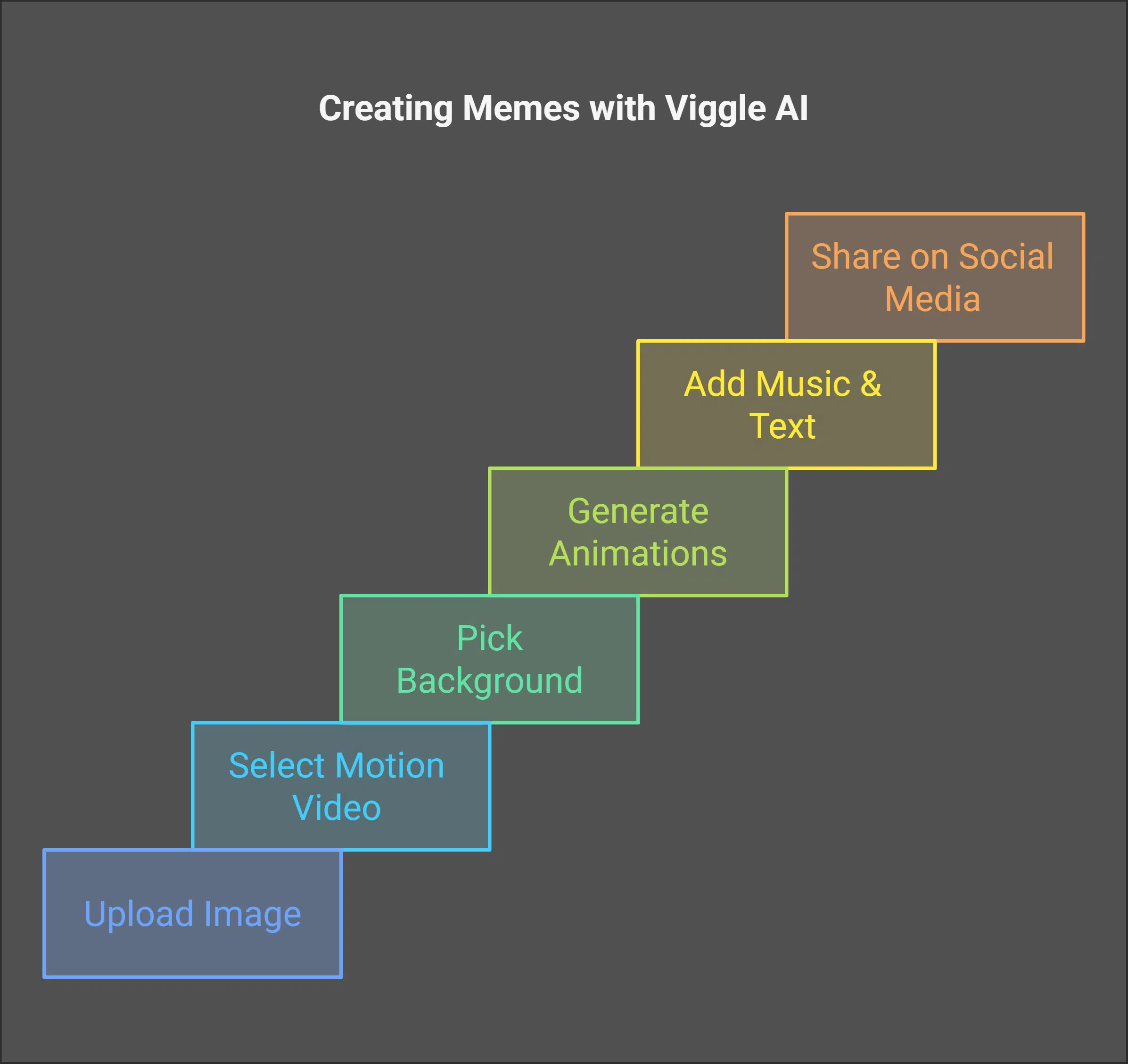
Creating memes with Viggle AI is simple and exciting. Just follow a few quick steps, and you’ll have a meme ready to share in minutes!
Step-by-step process for beginners
Upload an image of your character to the Viggle app. Pick a motion video that fits your idea. Choose a background—green or white works for Viggle AI Mix, while you can stick with the original for Viggle AI Move.
This helps set the stage.
Generate animations that bring characters to life using advanced tools like lip-syncing. Add music, text, or recorded voice to make it pop. Share these creations on social media platforms and watch them captivate audiences with ease!
Benefits of Using Viggle AI for Meme Creation
It makes meme-making quick, fun, and super simple—your creativity will thank you!
Fast and user-friendly meme generation
Creating memes with Viggle AI feels like magic. The tool simplifies the process with its user-friendly interface, letting users craft hilarious internet memes in no time. Upload an image, tweak it with AI-powered options, and your meme is ready to go viral across social media.
The platform supports over 1,000 templates designed for creativity and fun. Whether you’re a beginner or tech-savvy creator, the app helps you bring ideas to life effortlessly. Its speed ensures quick results without compromising quality.
Takeaways
Viggle AI turns meme-making into a fun, effortless experience. Its tools and features bring your ideas to life in seconds. Forget struggling with complex software—this app keeps things simple and creative.
Whether for laughs or attention online, it’s perfect for anyone. Create and let the memes flow!
FAQs
1. What is Viggle AI, and how does it work?
Viggle AI is an advanced tool powered by JST-1 that lets you create hilarious memes, dynamic dance videos, and animations. It uses artificial intelligence to bring static images to life or make characters move with ease and precision.
2. Can I use Viggle AI for free?
Yes, this app is free to use! You can download it from Google Play and start creating engaging content right away without spending a dime.
3. How does Viggle AI help in video creation?
Viggle AI empowers users by simplifying the animation process. You can animate your character, sync lip movements, or even produce high-quality videos using its first video-3D foundation model.
Absolutely! There’s a Discord community for Viggle AI users where you can share ideas, get feedback on your projects, and explore creative possibilities together.
5. What makes Viggle AI stand out as a meme generator?
This tool revolutionizes meme creation with its ability to combine actual physics understanding with fun features like motion control for characters. It brings humor alive in ways traditional tools can’t match!
6. Does using Viggle AI require technical expertise?
Not at all! The user-friendly interface makes it accessible for everyone—whether you’re new to animation or experienced in creative projects—you’ll find it easy to bring your imagination to life within the app’s world of possibilities!