

Website speed is one of the most critical factors for user experience, SEO rankings, and conversion rates. A slow website can drive visitors away, reduce engagement, and negatively impact search engine rankings.
If your WordPress site takes more than a few seconds to load, you’re likely losing potential customers.
Thankfully, WordPress offers several powerful plugins to enhance website speed and performance. From caching and minification to image compression and database optimization, the right plugins can significantly boost your site’s speed.
In this guide, we’ll explore the 10 Best WordPress Plugins to Improve Website Speed & Performance, helping you choose the right tools to create a fast and efficient website.
We also provide detailed insights, tables, and real-world examples to help you make the best choice.
Why Website Speed & Performance Matter
The Impact of Slow Websites
A slow-loading website affects multiple aspects of your online presence:
- User Experience: Visitors expect a site to load within 2-3 seconds; any delay increases the bounce rate.
- SEO Rankings: Google considers website speed a ranking factor, impacting search engine performance.
- Conversion Rates: Studies show that a 1-second delay in page load time can reduce conversions by up to 7%.
- Mobile Usability: With mobile-first indexing, speed is crucial for mobile users, as slow sites drive them away.
- Revenue Loss: According to research by Akamai, a 100-millisecond delay in website load time can hurt conversion rates by 7%.
How WordPress Plugins Improve Speed & Performance?
WordPress plugins can:
- Enable caching to reduce server load.
- Minify CSS, JavaScript, and HTML files.
- Optimize databases to remove unnecessary data.
- Compress and lazy-load images to reduce file sizes.
- Implement a CDN (Content Delivery Network) for faster content delivery.
With that in mind, let’s dive into the Best WordPress Plugins to Improve Website Speed & Performance.
10 Best WordPress Plugins to Improve Website Speed & Performance
A fast-loading website enhances user experience, improves search engine rankings, and boosts conversion rates. Here are the top 10 WordPress plugins that help optimize speed and performance.
1. WP Rocket – Best Overall Performance Plugin
WP Rocket is an all-in-one caching and performance optimization plugin that significantly improves website loading speed without requiring technical expertise. It provides a seamless setup process, making it ideal for beginners and advanced users alike.
WP Rocket improves website performance by implementing page caching, minification, and lazy loading features. Additionally, it enhances database efficiency by removing unnecessary files, ensuring better resource management.
The plugin is compatible with most hosting providers and integrates well with CDNs to boost speed further. While it offers extensive benefits, WP Rocket is a premium plugin with no free version.
Features:
- Page caching for faster load times.
- File optimization (minify and defer JavaScript/CSS).
- Lazy loading for images and videos.
- Database cleanup to remove unnecessary files.
- CDN integration for enhanced speed.
Pros & Cons:
| Pros | Cons |
| Easy setup with minimal configuration. | Premium-only plugin (no free version). |
| Improves Core Web Vitals scores. | Requires payment for additional features. |
| Compatible with most hosting providers. | May not be suitable for ultra-budget users. |
2. W3 Total Cache – Advanced Caching Plugin
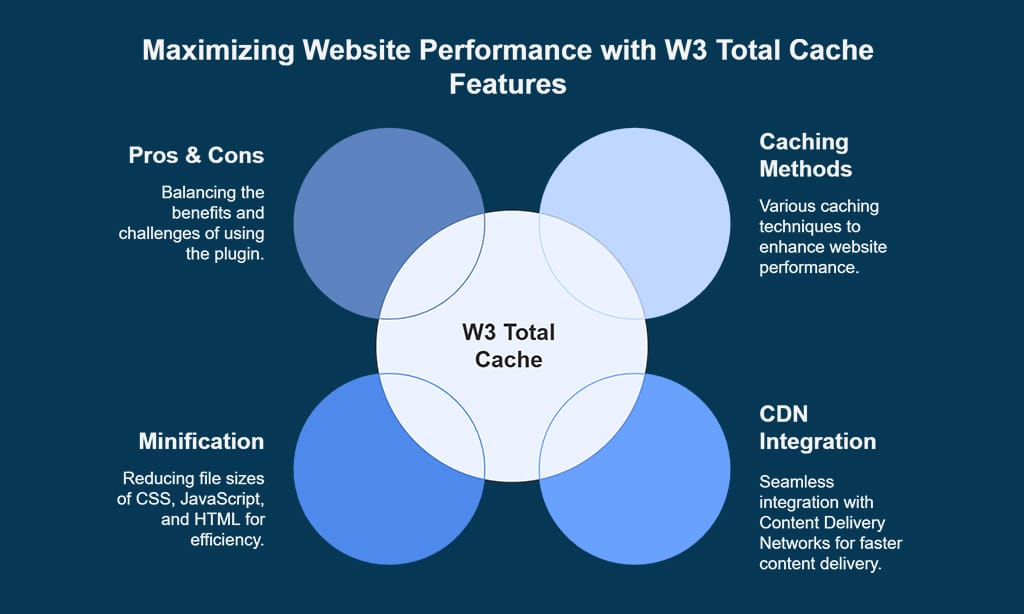
W3 Total Cache is a powerful caching plugin designed for users who require a high level of customization. It is widely used by developers and site administrators who need granular control over caching settings.
The plugin enhances website performance by offering page, object, and database caching, along with minification of CSS, JavaScript, and HTML files. It integrates well with CDNs, ensuring faster content delivery.
Although W3 Total Cache provides excellent optimization options, it can be overwhelming for beginners due to its extensive settings and manual configuration requirements.
Features:
- Page, object, and browser caching.
- CDN integration to serve static files faster.
- Database caching for optimized performance.
- Minification of CSS, JavaScript, and HTML.
Pros & Cons:
| Pros | Cons |
| Advanced caching and performance options. | Can be overwhelming for beginners. |
| Supports various caching methods. | Some features require manual setup. |
| Integrates well with CDNs. | Occasional compatibility issues with certain themes. |
3. WP Fastest Cache – User-Friendly Caching Plugin
WP Fastest Cache is one of the most beginner-friendly caching plugins, offering an intuitive setup and effective performance optimization.
It provides an easy-to-use interface with a one-click setup process, making it ideal for website owners with limited technical knowledge. WP Fastest Cache optimizes website speed by implementing browser caching, Gzip compression, and cache preloading.
The free version offers essential caching features, while the premium version includes advanced optimization options. Although it is a great choice for simplicity, it may lack some advanced settings found in competitors like WP Rocket.
Features:
- One-click setup for easy caching.
- Browser caching and Gzip compression.
- Cache preloading for improved speed.
Pros & Cons:
| Pros | Cons |
| Simple to configure with minimal effort. | Fewer advanced settings compared to competitors. |
| Free version available with essential features. | Premium version required for extra optimization. |
| Efficient caching and performance improvement. | Not as feature-rich as WP Rocket. |
4. LiteSpeed Cache – High-Performance Server-Level Caching
LiteSpeed Cache provides server-level caching for websites hosted on LiteSpeed servers, delivering superior performance enhancements.
This plugin offers an advanced caching mechanism that significantly improves page load speed, especially for high-traffic websites. It comes with built-in image optimization and database optimization tools, making it a powerful all-in-one solution.
Additionally, LiteSpeed Cache integrates with QUIC.cloud CDN for global content delivery. While it is free and feature-rich, its benefits are exclusive to LiteSpeed server users, making it less suitable for those on shared hosting platforms with other server technologies.
Features:
- Server-level page caching.
- Built-in image optimization.
- Integration with QUIC.cloud CDN.
Pros & Cons:
| Pros | Cons |
| Extremely fast caching with LiteSpeed servers. | Only works with LiteSpeed web servers. |
| Advanced optimization features. | Some settings may be complex for beginners. |
| Free and powerful performance tool. | Requires proper configuration for best results. |
5. Perfmatters – Lightweight Performance Optimization Plugin
Perfmatters helps reduce unnecessary HTTP requests and scripts to ensure faster loading times by disabling unused features in WordPress.
This plugin is designed to eliminate performance bottlenecks by removing unwanted scripts, optimizing database performance, and reducing clutter.
Perfmatters is lightweight and works well alongside caching plugins, making it a great complement for overall performance enhancement. It also includes DNS prefetching and script management options, further improving page speed.
However, as a premium-only plugin, users need to pay for its full functionality.
Features:
- Disable unused WordPress features (e.g., emojis, embeds).
- Remove unnecessary scripts to improve loading speed.
- Optimize database for better performance.
Pros & Cons:
| Pros | Cons |
| Lightweight and enhances performance. | Lacks built-in caching functionality. |
| Easy to use and configure. | Requires additional plugins for caching. |
| Helps reduce unnecessary scripts. | Premium plugin with no free version. |
6. WP-Optimize – Database Cleanup & Image Compression
WP-Optimize is a three-in-one plugin that helps with database optimization, image compression, and page caching to improve speed and performance. It regularly cleans up the database by removing unnecessary data such as post revisions, spam comments, and transient options.
The plugin also offers automatic image compression, ensuring that your website loads faster without compromising quality. WP-Optimize includes caching functionalities that further enhance site performance.
However, its caching features are not as advanced as dedicated caching plugins like WP Rocket or W3 Total Cache.
Features:
- Automatic database cleanup.
- Image compression and optimization.
- Caching for faster page loads.
Pros & Cons:
| Pros | Cons |
| Cleans up database automatically. | Some advanced features require a premium version. |
| Reduces unnecessary data storage. | Caching features are not as advanced as WP Rocket. |
| Helps in compressing images without quality loss. | Might not work well with some caching plugins. |
7. Autoptimize – Best for CSS, JavaScript, and HTML Optimization
Autoptimize optimizes your site by aggregating, minifying, and caching scripts and styles. It helps reduce page size by optimizing CSS, JavaScript, and HTML files, making websites load faster.
Autoptimize also defers JavaScript loading, reducing render-blocking resources and improving Google PageSpeed scores. The plugin works well with most caching plugins, enhancing overall performance.
However, it does not include built-in caching, requiring additional plugins for full performance optimization.
Features:
- Minifies and defers CSS and JavaScript files.
- Improves Google PageSpeed scores.
- Compatible with most caching plugins.
Pros & Cons:
| Pros | Cons |
| Improves loading speed significantly. | No built-in caching feature. |
| Works well with most themes and plugins. | Requires additional plugins for full performance optimization. |
| Helps reduce render-blocking resources. | Can break certain elements if not configured properly. |
8. Smush – Best Image Optimization Plugin
Smush helps to compress and optimize images to improve loading speed without quality loss. It automatically resizes and compresses images in bulk, making media files more efficient.
The plugin also supports lazy loading, ensuring images only load when they appear on the screen. Smush is easy to use and integrates well with various themes and caching plugins.
While the free version has a file size limit, the premium version offers additional features like super-smushing and unlimited compression.
Features:
- Lossless image compression.
- Bulk optimization of media library.
- Lazy loading for images.
Pros & Cons:
| Pros | Cons |
| No quality loss in image compression. | Free version has file size limitations. |
| Easy-to-use interface. | Some features require Smush Pro. |
| Improves website speed with lazy loading. | Can be resource-intensive on large sites. |
9. Asset CleanUp – Reduce Unused CSS & JavaScript
Asset CleanUp speeds up websites by reducing bloat and optimizing CSS & JavaScript usage. It scans each page and allows users to disable unnecessary scripts and styles, reducing the number of HTTP requests.
The plugin works well alongside caching plugins, ensuring a significant speed boost. Asset CleanUp is particularly useful for decluttering WordPress sites overloaded with unnecessary assets.
However, it requires technical knowledge to ensure proper script removal without breaking site functionality.
Features:
- Removes unused CSS and JavaScript.
- Reduces HTTP requests.
- Works well with caching plugins.
Pros & Cons:
| Pros | Cons |
| Helps declutter unused scripts. | Requires technical knowledge to use effectively. |
| Improves page load time. | Can conflict with other performance plugins if not configured properly. |
| Works alongside caching plugins for added speed boost. | Premium version needed for advanced features. |
10. Cloudflare – Free CDN & Security Plugin
Cloudflare improves speed and security with its global CDN, helping reduce latency and page load times.
It caches website content on multiple servers worldwide, delivering fast-loading pages to users in different regions.
Cloudflare also enhances security by offering DDoS protection and automatic content optimization. While the free plan offers basic CDN features, the premium plans provide advanced security measures and performance enhancements.
Features:
- Free CDN with caching.
- DDoS protection and security enhancements.
- Automatic content optimization.
Pros & Cons:
| Pros | Cons |
| Free CDN access for better global performance. | Requires configuration for optimal use. |
| Enhances security with DDoS protection. | Can cause compatibility issues with some plugins. |
| Reduces server load with cached content. | Advanced security features require a premium plan. |
Takeaways
By leveraging the Best WordPress Plugins to Improve Website Speed, you can create a blazing-fast, high-performing site that enhances user experience and boosts search rankings. Start optimizing today and watch your website speed soar!





















