Google’s New School Time Feature Enhances Focus on Android Smartphones

Googles School Time Feature Android Smartphones

Google is rolling out a new feature called “School Time” for Android smartphones, designed to help students and parents manage device usage during school hours. This feature aims to enhance focus and minimize distractions, making it easier for students to concentrate on their studies.

What is the School Time Feature?

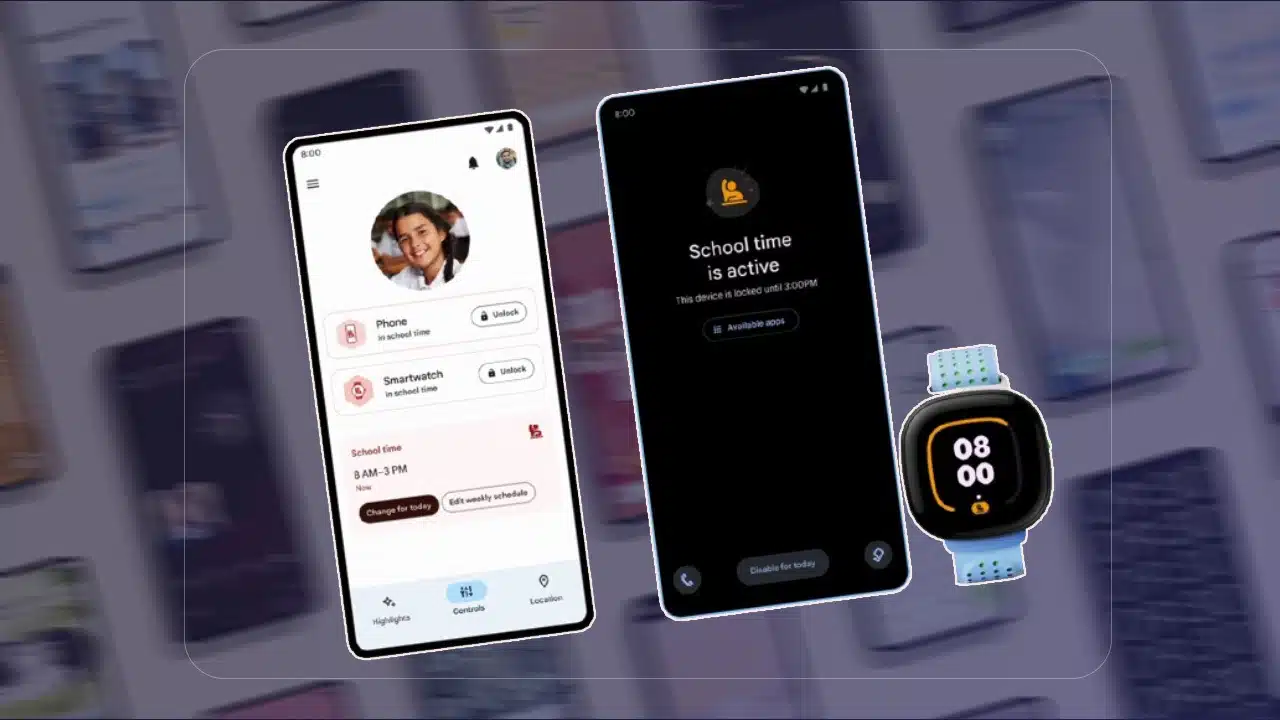
The School Time feature is a tool within Google’s Family Link app, that allows parents to set digital ground rules for their children. It enables parents to restrict access to certain apps and notifications during designated school hours. Parents can prevent their kids from becoming distracted by their phones while studying by customizing the schedule.

Key Features of School Time

  1. Customizable Schedules: Parents can set specific time blocks when the School Time feature is active. During these periods, access to distracting apps and notifications is limited.
  2. App Restrictions: Parents can choose which apps are accessible during school hours. Parents can restrict games and social media while maintaining access to essential apps like educational tools or emergency contacts.
  3. Notifications Silence: Notifications are paused during school time to prevent distractions. This allows students to concentrate on their tasks without being interrupted by alerts or messages.
  4. Usage Reports: Parents receive detailed reports on how their children use their devices. Parents can adjust restrictions based on screen time and the most used apps.

Why is School Time Important?

With the increasing reliance on digital devices for learning, it is crucial to balance educational use with potential distractions. The School Time feature addresses this by creating a structured environment that encourages productivity and minimizes the temptation to engage with non-educational content.

How to Use School Time

Parents must have the Family Link app installed on their and their children’s devices in order to use the School Time feature. The setup process involves the following steps:

  1. Install Family Link: Download and install the Family Link app from the Google Play Store.
  2. Create a Family Group: Set up a family group and add your child’s account to it.
  3. Configure School Time: Navigate to the School Time settings within the Family Link app. Set the desired schedule and select which apps to restrict during these periods.
  4. Monitor and Adjust: Regularly check usage reports and adjust the School Time settings as necessary to ensure it meet your child’s needs.

Benefits for Students and Parents

The School Time feature offers several benefits:

  • Enhanced Focus: By limiting access to distracting apps and notifications, students can maintain better focus during study hours.
  • Parental Control: Parents can feel more at ease knowing they control their children’s device usage.
  • Healthy Digital Habits:  Encouraging structured device use helps students develop healthy digital habits that balance education and recreation.

Google’s School Time feature is a valuable addition to the Family Link app, providing a practical solution for managing device usage during school hours. By allowing parents to customize restrictions and monitor usage, it helps create a focused and distraction-free learning environment for students. As digital learning becomes more prevalent, tools like School Time play a crucial role in ensuring students can maximize their educational opportunities while maintaining healthy digital habits.



Subscribe to Our Newsletter

Related Articles

Top Trending

why Netflix removes original movies featured image
Deleted Forever? Why Netflix Removes Original Movies And Where The “Tax Break” Theory Comes From
can fans save a Netflix show featured image
Can Fans Save A Netflix Show? The Real History Of Petitions, Pickups, And Comebacks
Netflix shows returning in 2026 featured image
Safe For Now: Netflix Shows Returning In 2026 That Are Officially Confirmed
why netflix cancels fantasy & sci-fi featured image
Why Netflix Keeps Cancelling Fantasy And Sci-Fi Shows: The Budget Curse Explained!
netflix 28-day rule featured image
The 28-Day Rule: Understanding Netflix’s Completion Rate Metric

LIFESTYLE

Travel Sustainably Without Spending Extra featured image
How Can You Travel Sustainably Without Spending Extra? Save On Your Next Trip!
Benefits of Living in an Eco-Friendly Community featured image
Go Green Together: 12 Benefits of Living in an Eco-Friendly Community!
Happy new year 2026 global celebration
Happy New Year 2026: Celebrate Around the World With Global Traditions
dubai beach day itinerary
From Sunrise Yoga to Sunset Cocktails: The Perfect Beach Day Itinerary – Your Step-by-Step Guide to a Day by the Water
Ford F-150 Vs Ram 1500 Vs Chevy Silverado
The "Big 3" Battle: 10 Key Differences Between the Ford F-150, Ram 1500, and Chevy Silverado

Entertainment

why Netflix removes original movies featured image
Deleted Forever? Why Netflix Removes Original Movies And Where The “Tax Break” Theory Comes From
can fans save a Netflix show featured image
Can Fans Save A Netflix Show? The Real History Of Petitions, Pickups, And Comebacks
Netflix shows returning in 2026 featured image
Safe For Now: Netflix Shows Returning In 2026 That Are Officially Confirmed
why netflix cancels fantasy & sci-fi featured image
Why Netflix Keeps Cancelling Fantasy And Sci-Fi Shows: The Budget Curse Explained!
netflix 28-day rule featured image
The 28-Day Rule: Understanding Netflix’s Completion Rate Metric

GAMING

Pocketpair Aetheria
“Palworld” Devs Announce New Open-World Survival RPG “Aetheria”
Styx Blades of Greed
The Goblin Goes Open World: How Styx: Blades of Greed is Reinventing the AA Stealth Genre.
Resident Evil Requiem Switch 2
Resident Evil Requiem: First Look at "Open City" Gameplay on Switch 2
High-performance gaming setup with clear monitor display and low-latency peripherals. n Improve Your Gaming Performance Instantly
Improve Your Gaming Performance Instantly: 10 Fast Fixes That Actually Work
Learning Games for Toddlers
Learning Games For Toddlers: Top 10 Ad-Free Educational Games For 2026

BUSINESS

Quiet Hiring Trend
The “Quiet Hiring” Trend: Why Companies Are Promoting Internally Instead of Hiring in Q1
Pharmaceutical Consulting Strategies for Streamlining Drug Development Pipelines
Pharmaceutical Consulting: Strategies for Streamlining Drug Development Pipelines
IMF 2026 Outlook Stable But Fragile
Global Economic Outlook: IMF Predicts 3.1% Growth but "Downside Risks" Remain
India Rice Exports
India’s Rice Dominance: How Strategic Export Shifts are Reshaping South Asian Trade in 2026
Mistakes to Avoid When Seeking Small Business Funding featured image
15 Mistakes to Avoid As New Entrepreneurs When Seeking Small Business Funding

TECHNOLOGY

Netflix shows returning in 2026 featured image
Safe For Now: Netflix Shows Returning In 2026 That Are Officially Confirmed
Grok AI Liability Shift
The Liability Shift: Why Global Probes into Grok AI Mark the End of 'Unfiltered' Generative Tech
GPT 5 Store leaks
OpenAI’s “GPT-5 Store” Leaks: Paid Agents for Legal and Medical Advice?
Pocketpair Aetheria
“Palworld” Devs Announce New Open-World Survival RPG “Aetheria”
The Shift from Co-Pilot to Autopilot The Rise of Agentic SaaS
The Shift from "Co-Pilot" to "Autopilot": The Rise of Agentic SaaS

HEALTH

Polylaminin Breakthrough
Polylaminin Breakthrough: Can This Brazilian Discovery Finally Reverse Spinal Cord Injury?
Bio Wearables For Stress
Post-Holiday Wellness: The Rise of "Bio-Wearables" for Stress
ChatGPT Health Medical Records
Beyond the Chatbot: Why OpenAI’s Entry into Medical Records is the Ultimate Test of Public Trust in the AI Era
A health worker registers an elderly patient using a laptop at a rural health clinic in Africa
Digital Health Sovereignty: The 2026 Push for National Digital Health Records in Rural Economies
Digital Detox for Kids
Digital Detox for Kids: Balancing Online Play With Outdoor Fun [2026 Guide]